
Xinrenxinshi as an Identity Source
# Overview
IDaaS supports enterprises to import user and organizational information into the IDaaS platform through various identity source channels. This article explains how to configure the Xinrenxinshi identity source in the IDaaS platform to achieve synchronization of organizational and user data.
# Prerequisites
- Have administrator permissions for the Xinrenxinshi Open Platform.
- Have administrator permissions for the IDaaS Enterprise Center platform.
# Configuration Process

# Steps
# Create an Application on the Xinrenxinshi Open Platform
- Create a self-built enterprise application on the Xinrenxinshi Open Platform (opens new window). For detailed operations, please refer to the platform's relevant documentation.
- Obtain parameters such as the ID and Secret of the self-built application.
- Grant users access permissions to the newly created application.
# Configure Xinrenxinshi Identity Source in IDaaS
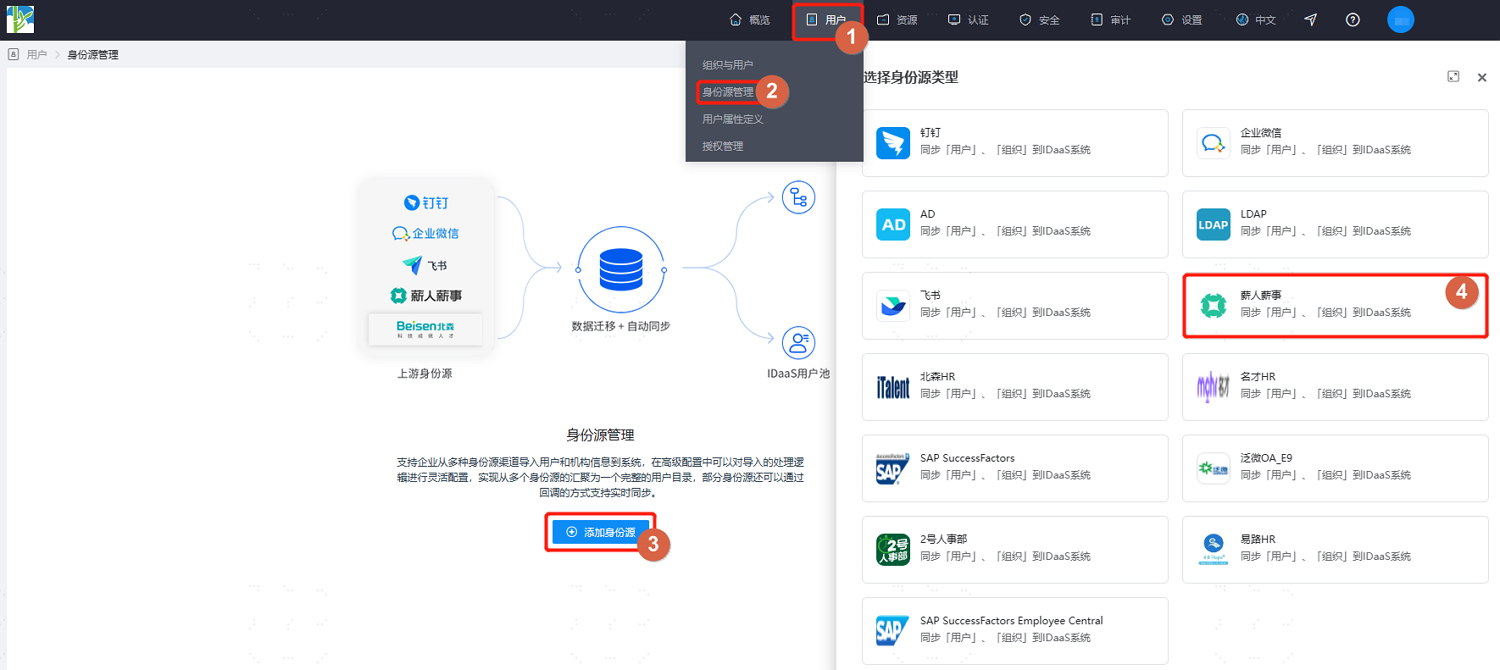
- Log in to the IDaaS Enterprise Center platform. In the top navigation bar, select "Users > Identity Source Management", click "Add Identity Source", and choose the "Xinrenxinshi" identity source.
Customize the identity source name. Fill in parameters such as appKey and appSecret as prompted on the interface. After setting, click "OK" to save.
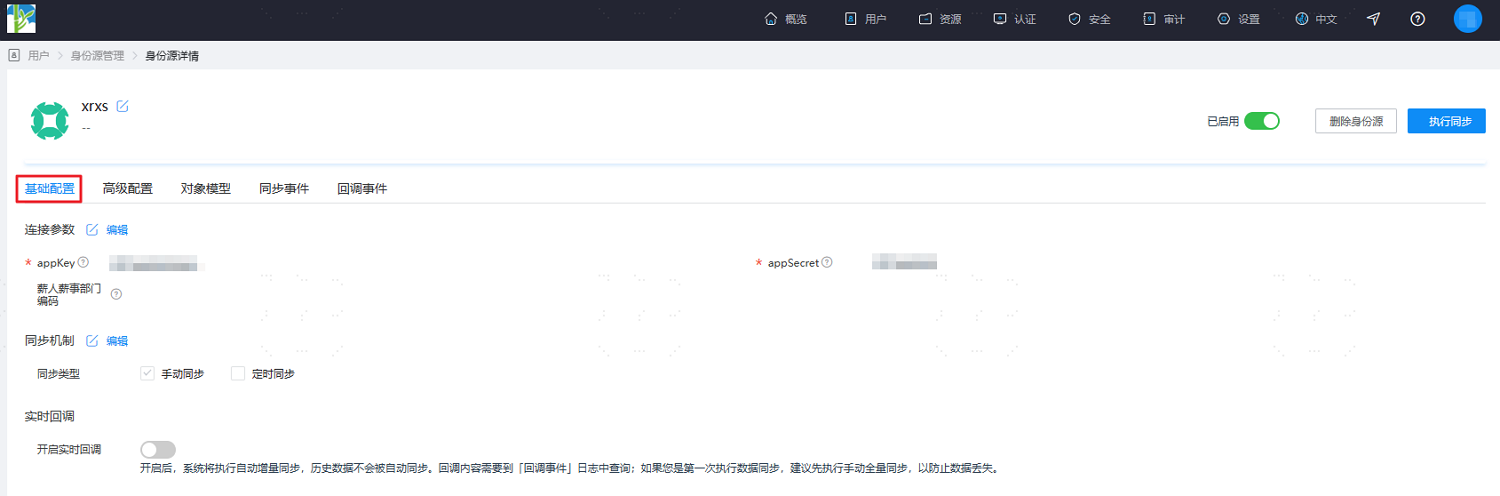
Enter the details page of the newly added identity source. You can view and update the "Basic Configuration" of the Xinrenxinshi identity source, including connection parameters, synchronization mechanisms, and real-time callbacks.
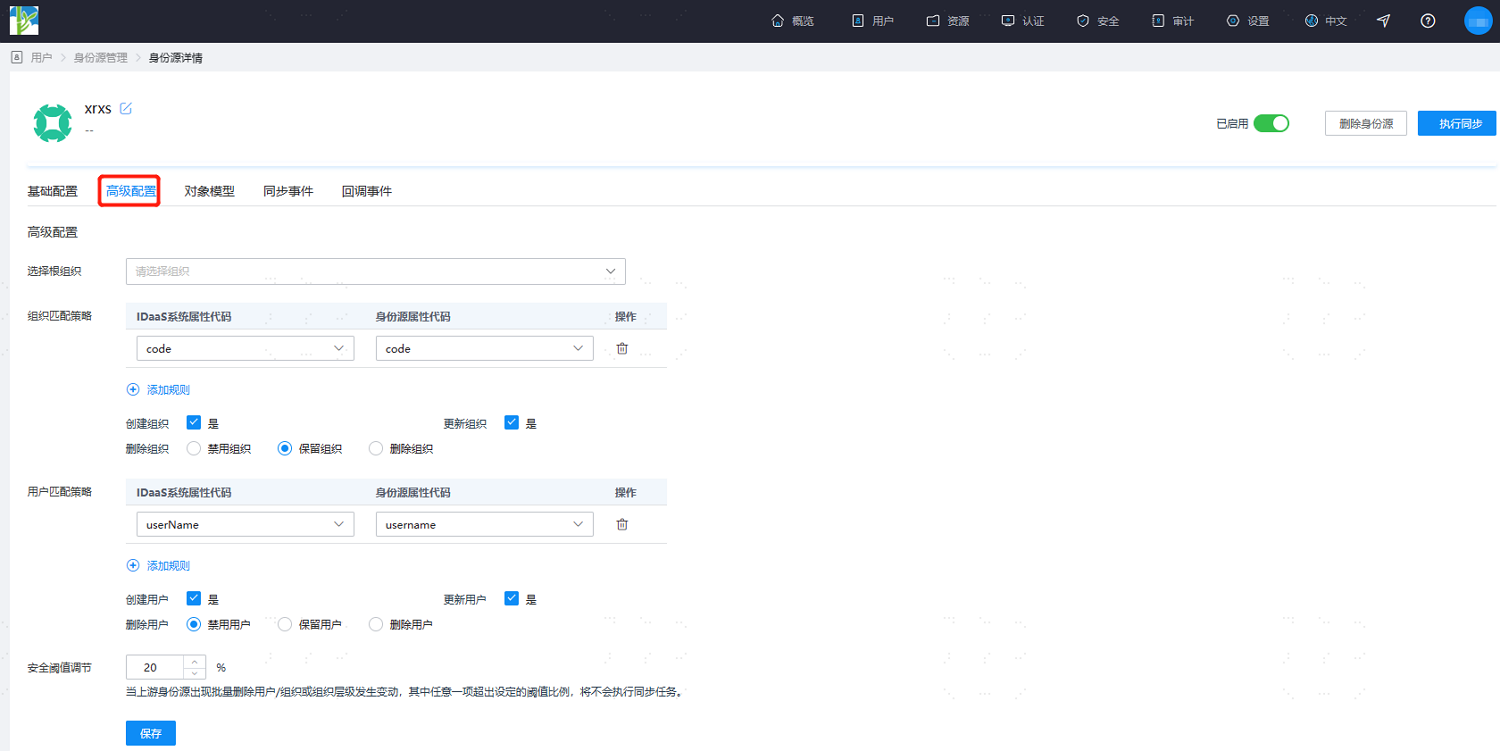
- Switch to the "Advanced Configuration" tab. It is recommended to keep the default settings or fill them in according to actual needs.
| Parameter | Description |
|---|---|
| Select Root Org | Select an organizational node in IDaaS to serve as the root node for the synchronized Xinrenxinshi organizations. |
| Org Matching Policy | By default, the organization code in IDaaS is associated with the institution code in Xinrenxinshi. |
| Create Organization | Default is Yes. |
| Update Organization | Default is Yes. |
| Delete Organization | Default is to retain the organization (i.e., when an organization is deleted in Xinrenxinshi, it is retained in IDaaS). Also supports disabling or deleting the organization. |
| User Matching Policy | By default, the user's mobile phone number and username in IDaaS are associated with the user's mobile phone number and username in Xinrenxinshi. |
| Create User | Default is Yes. |
| Update User | Default is Yes. |
| Delete User | Default is to disable the user (i.e., when a user is deleted in Xinrenxinshi, the user is disabled in IDaaS). Also supports retaining or deleting the user. |
| Security Threshold Adjustment | Set the maximum threshold percentage for changes such as user deletion/organization deletion/organization hierarchy changes when they occur in the upstream identity source. Threshold = (Difference between data already reclaimed by the platform and data reclaimed this time / Data already reclaimed) * 100%. When the upstream identity source application disables/deletes data exceeding the set threshold, the platform will not perform the disable/delete operation upon receiving the instruction. |
- After configuration, switch to the "Object Model" tab and select "Mapping Definition". Configure the mapping relationship between the attributes of organizations and users in Xinrenxinshi and the attributes of organizations and users in IDaaS according to the actual project requirements.
The object model supports mapping and matching attributes on users and organizations from the Xinrenxinshi identity source with attributes of users and organizations in IDaaS. After setting, it enables the reclamation of user and organization attributes from Xinrenxinshi to IDaaS user and organization attributes.

- Execution Method: Set under which circumstances the attribute needs to be mapped.
- Do Not Map: This attribute will not be synchronized to IDaaS.
- Create: Synchronize this attribute only during creation.
- Update: Synchronize this attribute only during updates.
- Create and Update: Synchronize this attribute during both creation and updates.
- Conversion Method: Set the method for attribute mapping.
- Automatic Conversion: Synchronize the value as is from the identity source.
- Script Conversion: Use this method to convert if the value from the identity source does not meet the required format. Please refer to Script Mapping Methods.
After the object model setup is completed, click "Execute Sync" to immediately perform the synchronization operation.
If the synchronization mechanism in the basic configuration is set to scheduled synchronization, manual execution of synchronization tasks is not required here.
After execution, switch to the "Synchronization Events" page to view all synchronization tasks for this identity source. Click "Details" under the "Operation" column of a synchronization task to view the import results, or go to the "Users > Users & Organizations" page to view the imported data.
(Optional) After the import synchronization is completed, switch to the "Callback Events" tab. After enabling callback registration in "Basic Configuration", you can view records of real-time updates pushed from XRXS data changes to IDaaS on this page.