
Developing Dynamic Scripts in Mapping Definitions
# Overview
IDaaS supports mapping definitions between platform attributes and application system attributes. This section guides you in using JavaScript dynamic scripts as a mapping type for configuration. When writing dynamic scripts, you can utilize script code to generate attribute values and also set display conditions for those attributes.
# Prerequisites
Administrator permissions for the IDaaS Enterprise Center platform.
# Script Code Rules
# Prohibition of Java Class Usage
If the following code is used:
var File = Java.type('java.io.File'); File;
The following exception will be thrown:
java.lang.ClassNotFoundException: java.io.File
# CPU Time Limit
The default execution time limit is 1 second. Exceeding this limit will throw an exception.
If the following code is used:
do{}while(true);
The following exception will be thrown:
ScriptCPUAbuseException
# Memory Usage Limit
The default size is 10M. Exceeding this limit will throw an exception.
If the following code is used:
var o={},i=0; while (true) {o[i++] = 'abc'}
The following exception will be thrown:
ScriptMemoryAbuseException
# Script Format Restriction
To facilitate script rewriting, if, while, and for statements in scripts must use braces; otherwise, a format error will occur.
If the following code is used:
var o={},i=0; while (true) o[i++] = 'abc';
The following exception will be thrown:
BracesException
# Restriction on Certain Functions
The following functions are not allowed in the code. If they appear, they will have no effect.
print
echo
quit
exit
readFully
readLine
load
loadWithNewGlobal
2
3
4
5
6
7
8
# Script Objects
Mapping scripts include the following objects: user, organization, enterprise, and account (application account).
# user Object
The user object contains the attributes of the current user, including built-in attributes from the attribute definitions and custom attributes.
| Attribute Name | Value Type | Description |
|---|---|---|
| id | string | User ID |
| organizationId | string | Organization ID |
| userName | string | Username |
| name | string | Name |
| firstName | string | First Name |
| middleName | string | Middle Name |
| lastName | string | Last Name |
| string | ||
| mobile | string | Mobile Number |
| disabled | boolean | Disabled |
| guid | string | User GUID |
| employeeid | string | Employee ID |
| attrGender | string | Gender |
| attrBirthday | Timestamp | Birthday |
| attrNickName | string | Nickname |
| attrIdentityType | string | Identity Type |
| attrIdentityNumber | string | ID Card Number |
| attrArea | string | Region |
| attrCity | string | City |
| attrManagerId | string | Manager ID |
| attrUserType | string | User Type |
| attrHireDate | Timestamp | Termination Date |
| attrWorkPlace | string | Work Address |
| externalId | string | External System ID |
| employeeRelation | string | Employment Relationship |
| deactivationDate | Timestamp | Deactivation Date |
| disabledMode | string | Disable Method |
| Other Custom Attributes | string |
# organization Object
The organization object stores information about an organization.
| Property Name | Value Type | Description |
|---|---|---|
| id | string | Organization ID |
| code | string | Code |
| name | string | Name |
| categoryId | string | Organization Category ID |
| parentId | string | Parent Organization ID |
| disabled | boolean | Disabled |
| displayPath | string | Organization Path |
| leaderId | string | Organization Leader ID |
# enterprise Object
The enterprise object stores basic information about an enterprise.
| Property Name | Value Type | Description |
|---|---|---|
| id | string | Enterprise ID |
| tenantId | string | Remote Enterprise ID |
| domain | string | Enterprise Domain |
| name | string | Enterprise Name |
| logo | string | Enterprise LOGO |
# account Object
The account object stores the properties of the current account. It includes built-in properties and custom properties defined in the application account model - property definition.
| Property Name | Value Type | Description |
|---|---|---|
| id | string | Account ID |
| username | string | Account Name |
| name | string | Account Surname |
| attrManagerId | string | Direct Supervisor |
| organizationId | string | Application Organization ID |
| disabled | boolean | Disabled |
| remoteId | string | Remote ID |
| roles | list | Role List |
| Other Custom Properties | string |
When using script objects, you can directly obtain them using the format 【object】.【property name】.
For example: user.name, organization.code, account.username, enterprise.domain. This method also applies to extended properties. For example, if a user has an extended property hobby, we can use user.hobby to get the hobby.
# Operational Steps
This section uses the authentication mapping configuration for OIDC protocol applications as an example. Other scenarios involving attribute mapping configuration can refer to the following configuration method.
Log in to the IDaaS Enterprise Center platform, select "Resources > Applications" in the top navigation bar, and choose the application.
Enter the application details, select "Authentication Integration > Mapping Configuration".

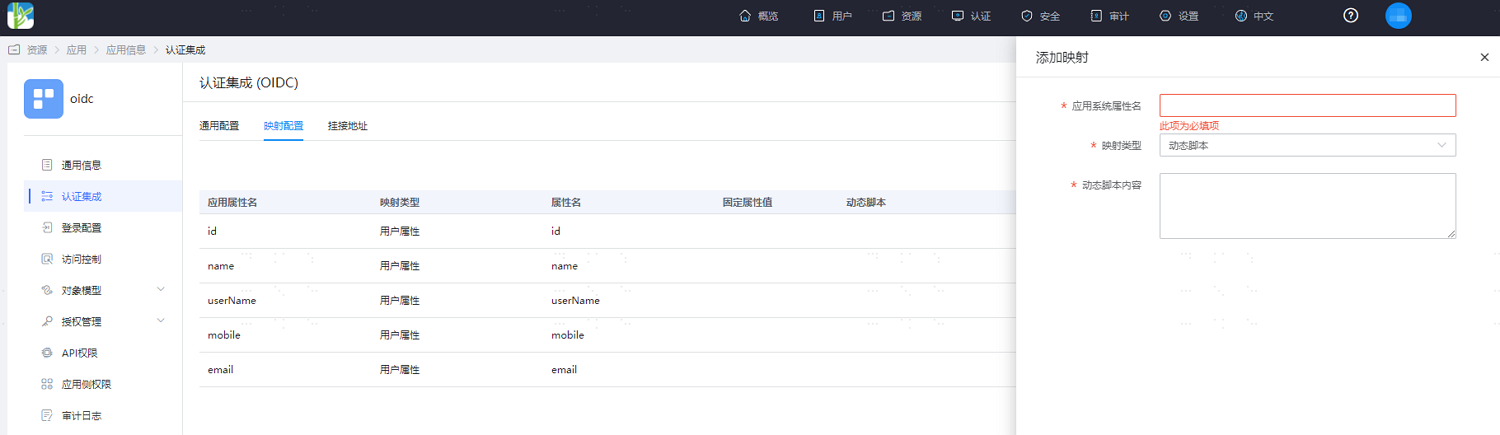
Click "Add Mapping" and configure the parameters as follows.
Application System Attribute Name: Custom application system attribute name.
Mapping Type: Select Dynamic Script.
Dynamic Script Content: JavaScript script.
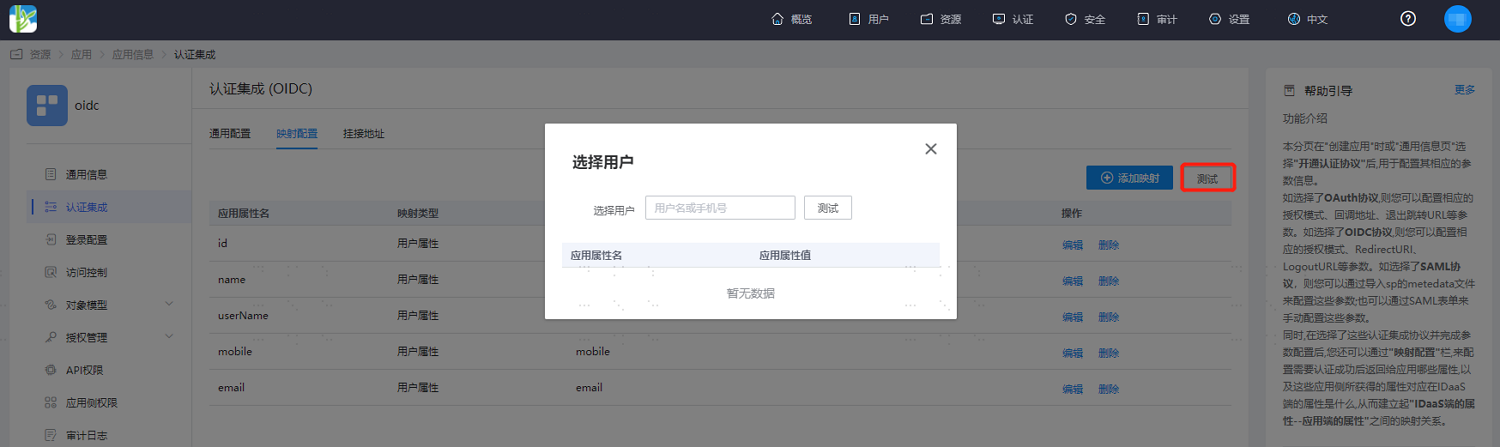
After configuration is complete, save it, click the "Test" button, and select a test user.
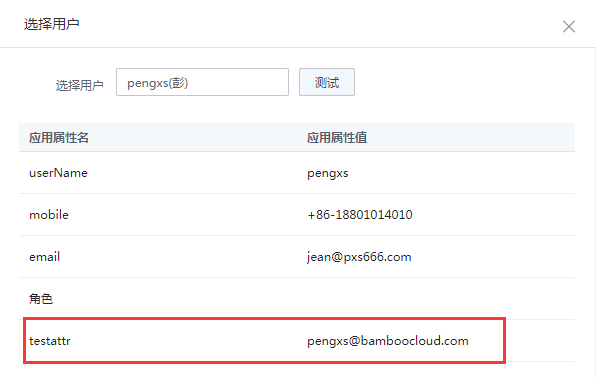
Click "Test" to display the value corresponding to this attribute. (Example script content: generate an email address by taking the username + email suffix)
# Script Examples
The following are some simple script examples. You can refer to the following writing methods during actual configuration.
# Example 1. Current Time Tomorrow
var date =new Date();
date.setDate(date.getDate()+1);
date.toISOString();
2
3
# Example 2. User Extended Attributes
First, add hobby as an extended attribute in the user's attribute definition.
user.hobby;
# Example 3. User's Mobile Number with the Middle 4 Digits Hidden
var mobile = user.mobile;
var result = "";
if(mobile.length==11){
    result = mobile.slice(0,3)+"****"+mobile.slice(-4);
}
result;
2
3
4
5
6
# Example 4. Generate User Email Based on Username
var username = user.userName;
username.toLowerCase()+"@bamboocloud.com";
2