
Exposing Employee Data Using LDAP Protocol
# Overview
IDaaS supports providing the platform's user and organizational structure data to third-party customers through the LDAP protocol. It is mapped into an LDAP directory via the LDAP protocol, allowing external systems to point their authentication to IDaaS's VLdap. Users can then log in to external systems using their IDaaS authentication credentials. For related concepts of the LDAP protocol, please search and refer to relevant documentation.
# Prerequisites
Have administrator permissions for the IDaaS Enterprise Center platform.
# Steps
Log in to the IDaaS Enterprise Center platform. In the top navigation bar, select "Settings > Service Configuration," then choose "LDAP Service." The platform comes pre-configured with the LDAP service and automatically fills in relevant parameters. Administrators only need to configure the following few parameters to use it.
Enable: Turn on the LDAP service switch.
Administrator Password: Enter the password for the LDAP administrator.
User Login: Configure the login authentication method for LDAP users, including password, OTP, and password + OTP authentication.
RDN Attribute: Configure the LDAP user's RDN attribute name as uid or cn.
RDN Attribute Value: Map user attributes to the LDAP user's RDN attribute value, options include id, userName.

After configuration, click Save. Connect to VLdap using tools like ldapadmin or Apache Directory Studio. Key parameters for connecting to VLdap are typically as follows:
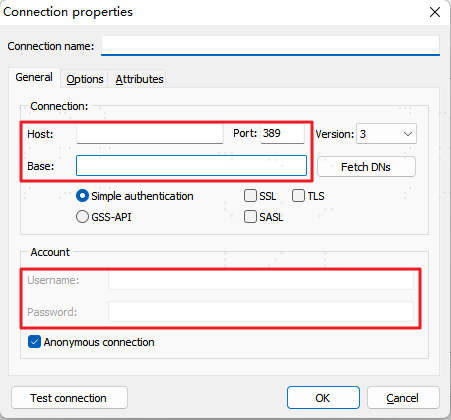
Host: Fill in the LDAP address found under "Settings > Service Configuration > LDAP Service" on the IDaaS Enterprise Center platform. For encrypted transmission, it is recommended to use the LDAPS address.
Port: Fill in the port number following the LDAP address found under "Settings > Service Configuration > LDAP Service" on the IDaaS Enterprise Center platform.
Base: Fill in the Base Context found under "Settings > Service Configuration > LDAP Service" on the IDaaS Enterprise Center platform.
Username: Fill in the Administrator DN found under "Settings > Service Configuration > LDAP Service" on the IDaaS Enterprise Center platform.
Password: Fill in the administrator password set under "Settings > Service Configuration > LDAP Service" on the IDaaS Enterprise Center platform.
Subsequently, users can log in to external applications connected to VLdap using the login method configured in the IDaaS platform's LDAP service parameters.