
Redirect Configuration
# Overview
In the Global Logout API, you can specify the address to redirect to after logging out of IDaaS using the redirect_url parameter. According to security specifications, the URL requiring redirection is validated.
This control is enabled through the Redirect Configuration feature located at 【Enterprise Center】-【Security Configuration】-【Redirect Configuration】. It allows whitelist control for the redirect parameters of the IDaaS logout interface.
# Prerequisites
Possess administrator privileges for the IDaaS Enterprise Center platform.
# Steps
Log in to the IDaaS Enterprise Center platform. In the top navigation bar, select "Settings > Enterprise Configuration", then choose the "Security Configuration" option on the left. Select "Redirect Configuration".
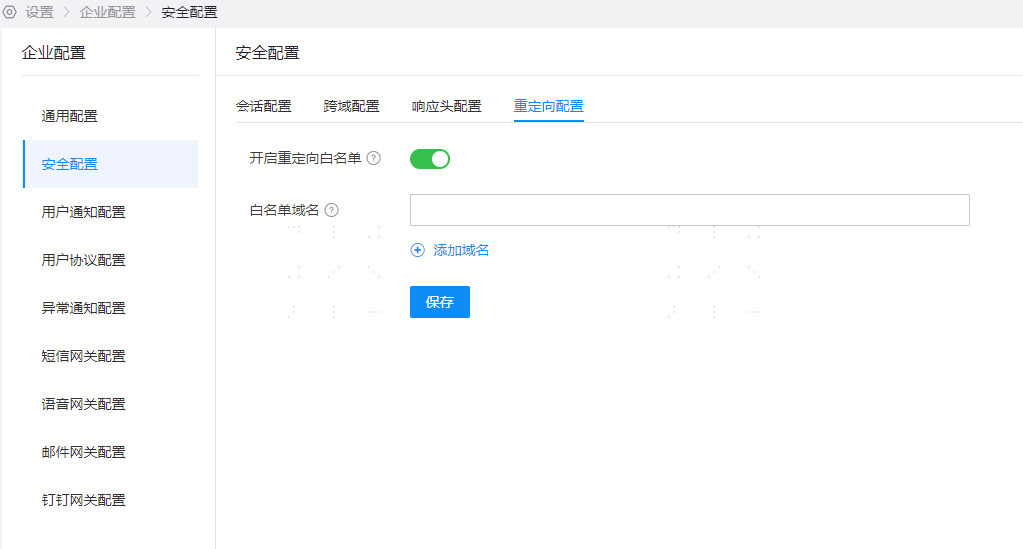
The Redirect Whitelist switch is off by default. After enabling it, it will take effect for the Global Logout API.
If you need to pass a redirect address, you can add trusted domains to the whitelist and click Save.
# Parameter Description
- The maximum number of whitelist domains that can be configured is 10, and wildcards are not supported.
# Function Verification
- After enabling the Redirect Whitelist switch, when calling the Global Logout API and including the
redirect_urlparameter, IDaaS will return an error page.