Response Header Configuration
# Overview
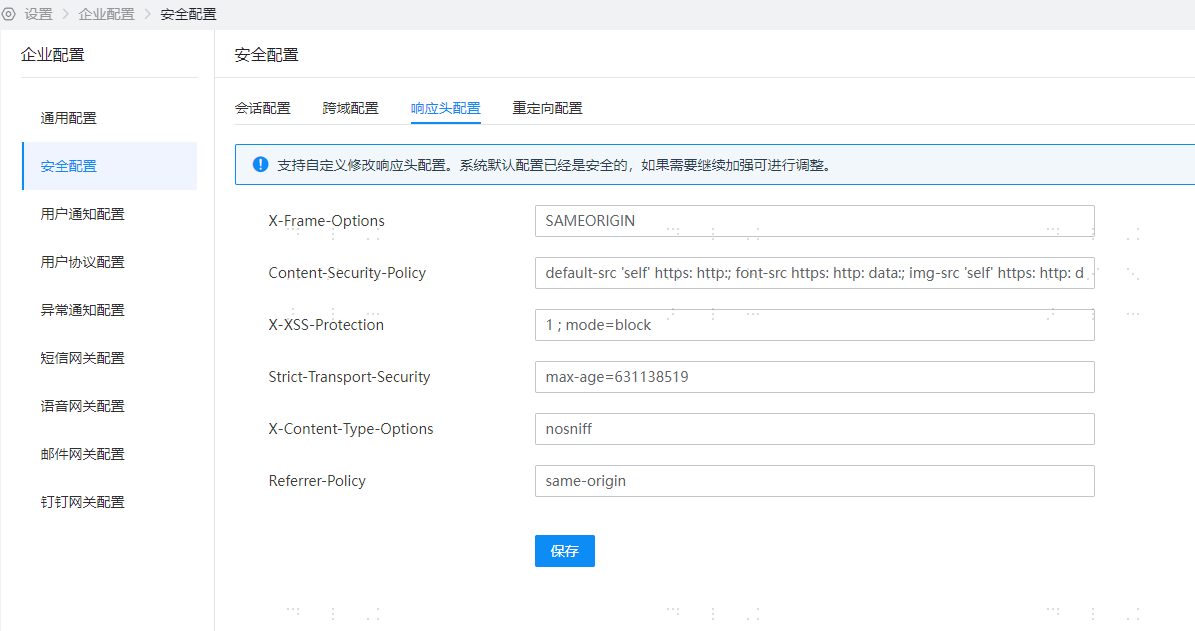
Through 【Enterprise Center】-【Security Configuration】-【Response Header Configuration】, you can personalize the values of certain security response headers in IDaaS interfaces.
Since HTTP response headers are processed at the gateway layer for interface responses, a caching mechanism has been added to prevent performance impact. Updates to response header configurations are not effective in real-time; the maximum time for changes to take effect does not exceed five minutes.
# Prerequisites
Have administrator privileges for the IDaaS Enterprise Center platform.
# Steps
- Log in to the IDaaS Enterprise Center platform, select "Settings > Enterprise Configuration" from the top navigation bar, choose the "Security Configuration" option on the left. Select "Response Header Configuration".
# Parameter Description
# X-Frame-Options
The X-Frame-Options HTTP response header is used to indicate to the browser whether a page can be displayed within a <frame>, <iframe>, <embed>, or <object>. Sites can avoid clickjacking attacks by ensuring that the website is not embedded in other sites.
IDaaS provides a text input box for X-Frame-Options. Customers can fill in custom values, which will be applied to the HTTP request response headers. For detailed information, please refer to: X-Frame-Options - HTTP (opens new window)
- X-Frame-Options: SAMEORIGIN
- DENY: Indicates that the page is not allowed to be displayed in a frame, even when nested within a page from the same domain.
- SAMEORIGIN: Indicates that the page can be displayed in a frame of a page from the same domain.
- ALLOW-FROM uri: Allows embedding from the specified URI. This is a deprecated directive and is no longer applicable in modern browsers. There are compatibility issues. The Content-Security-Policy HTTP header has a frame-ancestors directive, which can be used instead.
# Content-Security-Policy
The HTTP response header Content-Security-Policy (CSP for short) allows site administrators to control which resources the user agent can load for a given page. With few exceptions, the set policies mainly involve specifying server origins and script endpoints. This helps prevent Cross-Site Scripting (XSS) attacks.
IDaaS provides a text input box for Content-Security-Policy. Customers can fill in custom values, which will be applied to the HTTP request response headers. No content validation is performed. For detailed information, please refer to: Content-Security-Policy (opens new window)
Syntax format: Content-Security-Policy: <policy-directive>; <policy-directive>
Default value: default-src 'self' https: http:; font-src https: http: data:; img-src 'self' https: http: data:; object-src 'none'; script-src 'self' https: http: 'unsafe-inline' 'unsafe-eval'; style-src https: http: 'unsafe-inline'; frame-ancestors 'self' https: http:
# X-XSS-Protection
The X-XSS-Protection response header is a feature of Internet Explorer, Chrome, and Safari. When a cross-site scripting attack (XSS) is detected, the browser will stop loading the page. If a website sets a good Content-Security-Policy to disable inline JavaScript ('unsafe-inline'), modern browsers may not need these protections as much, but they can still provide protection for users of older browsers that do not support CSP.
IDaaS provides a text input box for Content-Security-Policy. Customers can fill in custom values, which will be applied to the HTTP request response headers. No content validation is performed. For detailed information, please refer to: Content-Security-Policy (opens new window)
- Content-Security-Policy: 1 ; mode=block
0 : Disables XSS filtering.
1 : Enables XSS filtering (usually browsers default). If a cross-site scripting attack is detected, the browser will sanitize the page (remove the unsafe parts).
1; mode=block : Enables XSS filtering. If an attack is detected, the browser will not sanitize the page but will prevent the page from loading.
# Strict-Transport-Security {/strict-transport-security/}
The HTTP Strict-Transport-Security (often abbreviated as HSTS) response header is used to inform browsers that the site should only be accessed via HTTPS, and any future attempts to access the site using HTTP should be automatically redirected to HTTPS.
IDaaS provides a text input box for Strict-Transport-Security. It can be customized by the customer and applied to the HTTP request/response headers, with no content validation. For details, please refer to: Strict-Transport-Security (opens new window)
- Strict-Transport-Security: max-age=<expire-time>
- Strict-Transport-Security: max-age=<expire-time>; includeSubDomains
- Strict-Transport-Security: max-age=<expire-time>; includeSubDomains; preload
max-age=<expire-time> : The maximum amount of time (in seconds) that the browser should remember that the site can only be accessed using HTTPS.
includeSubDomains : (Optional) If this optional parameter is specified, it means this rule also applies to all subdomains of the website.
preload : (Optional) Non-standard
# X-Content-Type-Options {/x-content-type-options/}
The X-Content-Type-Options HTTP header acts as a hint flag, used by the server to instruct the client to strictly adhere to the MIME type set in the Content-Type header and not modify it. This disables the client's MIME type sniffing behavior, meaning the website administrator is confident in their settings.
IDaaS provides a text input box for X-Content-Type-Options. It can be customized by the customer and applied to the HTTP request/response headers, with no content validation. For details, please refer to: X-Content-Type-Options (opens new window)
Syntax X-Content-Type-Options: nosniff
Parameter nosniff The following two types of requests will be blocked:
- The request type is "style" but the MIME type is not "text/css",
- The request type is "script" but the MIME type is not a JavaScript MIME type.
# Referrer-Policy {/referrer-policy/}
The Referrer-Policy header governs which referrer information—sent in the Referer header—should be included in the generated request.
IDaaS provides a text input box for Referrer-Policy. It can be customized by the customer and applied to the HTTP request/response headers, with no content validation. For details, please refer to: Referrer-Policy (opens new window)
- Referrer-Policy: no-referrer
- Referrer-Policy: no-referrer-when-downgrade
- Referrer-Policy: origin
- Referrer-Policy: origin-when-cross-origin
- Referrer-Policy: same-origin
- Referrer-Policy: strict-origin
- Referrer-Policy: strict-origin-when-cross-origin
- Referrer-Policy: unsafe-url
- no-referrer: The entire Referer header will be removed. Origin information is not sent along with the request.
- no-referrer-when-downgrade: The default behavior of the user agent when no policy is specified. The address of the referring page is sent when the security level is the same (HTTPS->HTTPS), but is not sent when downgrading (HTTPS->HTTP).
- origin: In all cases, only the origin of the document is sent as the referrer. For example, https://example.com/page.html will send https://example.com/ as the referrer.
- origin-when-cross-origin: For same-origin requests, the full URL is sent as the referrer, but for cross-origin requests, only the origin of the document is sent.
- same-origin: The referrer is sent for same-origin requests, but referrer information is not sent for cross-origin requests.
- strict-origin: When the security level is the same, the origin of the document is sent as the referrer (HTTPS->HTTPS), but it is not sent when downgrading (HTTPS->HTTP).
- strict-origin-when-cross-origin: For same-origin requests, the full URL is sent as the referrer; when the security level is the same, the origin of the document is sent as the referrer (HTTPS->HTTPS); this header is not sent when downgrading (HTTPS->HTTP).
- unsafe-url: For both same-origin and cross-origin requests, the full URL (after removing parameters) is sent as the referrer. :::
# Feature Verification
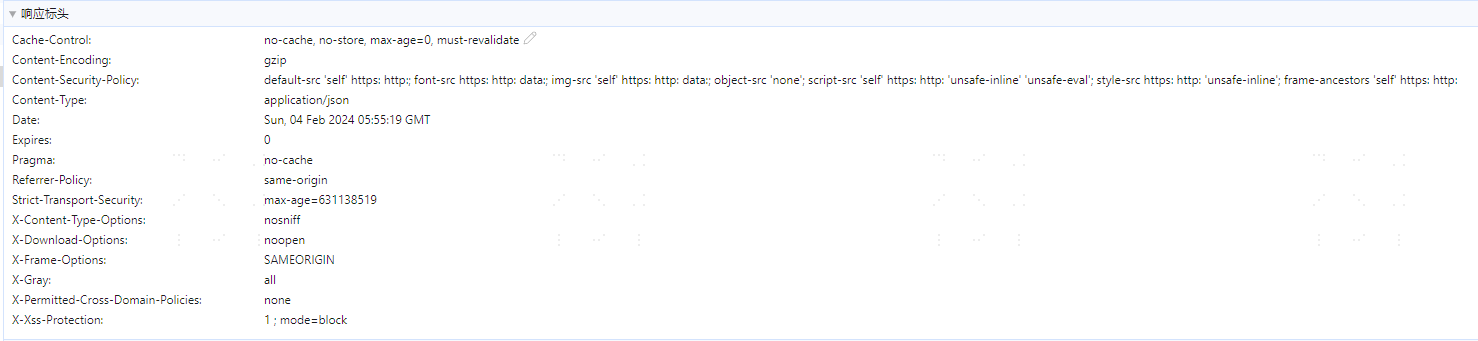
- After editing and saving the response header configuration, wait for the cache reset time. You can then view the changes in the response headers by accessing any IDaaS API.