
Configure One-Click Login with Local Mobile Number
# Overview
To facilitate authentication and login for enterprise users, IDaaS currently supports configuring one-click login with the local mobile number through Alibaba Cloud's Mobile Number Verification Service. Alibaba Cloud integrates the one-click login SDKs from the three major telecom operators, providing a unified mobile application interface. Mobile APP users only need to authorize with one click to register/log in using their local mobile number, enabling quick login to various applications. Currently, this feature is only supported in 2C scenarios.
# Prerequisites
- Have an Alibaba Cloud account and complete real-name verification.
- Have activated the Alibaba Cloud Mobile Number Verification Service.
- Have administrator permissions for the IDaaS Enterprise Center platform.
- The application has been integrated into the IDaaS platform.
# Configuration Process

# Steps
# Configure the Mobile Number Verification Service Platform
Refer to the One-Click Login and Local Mobile Number Verification Usage Process (opens new window) of the Mobile Number Verification Service to activate the service and add verification schemes. Different operating systems require different verification schemes.
After configuring the verification scheme, a secret key will be obtained. Please save it locally for use when initializing the SDK with the IDaaS SDK.
Refer to Creating AccessKey (opens new window) to create an AccessKey for a RAM user, which will be used to configure the parameters for the one-click login authentication source below.
# Configure the One-Click Login with Local Mobile Number Authentication Source on the IDaaS Platform
Log in to the IDaaS Enterprise Center platform, select "Authentication > Authentication Source Management" from the top navigation bar, go to the One-Click Login with Local Mobile Number authentication source page, and click "Add Authentication Source".

Configure the key parameters for the one-click login with local mobile number authentication source according to the following table.
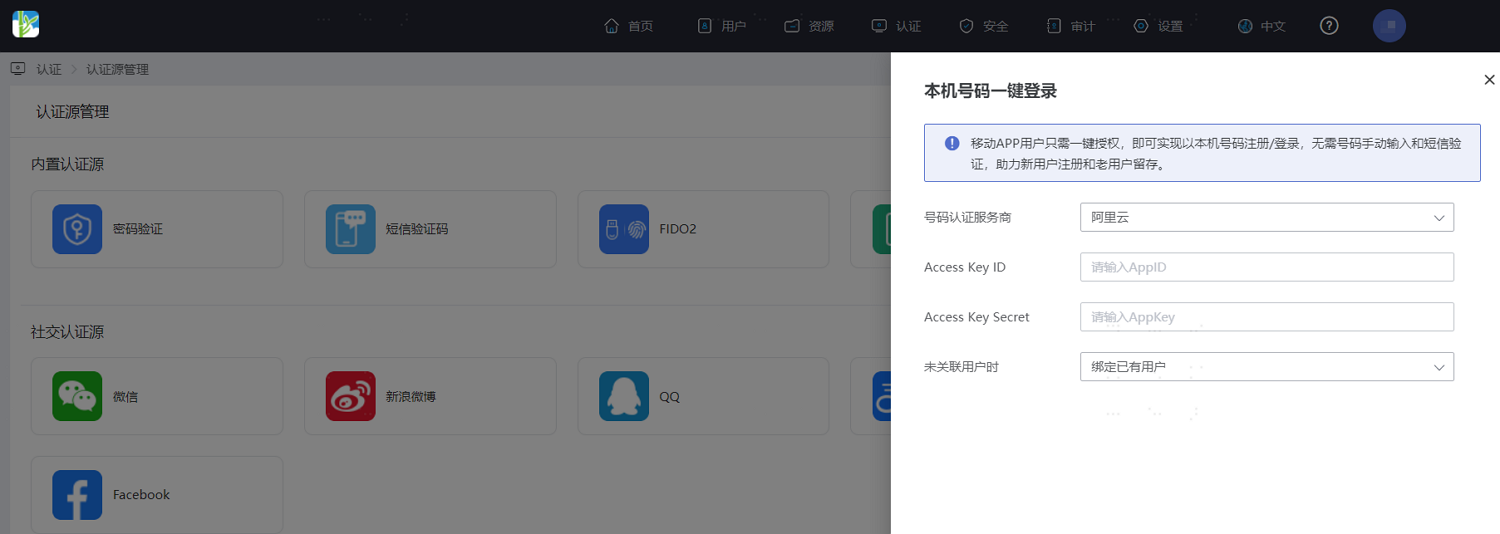
Parameter Description Mobile Number Verification Service Provider Select the connected mobile number verification service provider. Currently, only Alibaba Cloud is supported. Access Key ID Enter the AccessKey ID generated when creating the user in Alibaba Cloud as mentioned above. Access Key Secret Enter the AccessKey Secret generated when creating the user in Alibaba Cloud as mentioned above. When User is Not Associated Default is "Bind Existing User". When a user successfully logs in with one-click using their local mobile number and is not associated with a system user, it will automatically bind to an existing system user.
# Configure Authentication Integration for the Application
Log in to the IDaaS Enterprise Center platform, select "Resources > Applications" from the top navigation bar, choose the application to configure authentication for, and in the "Authentication Integration" configuration, be sure to select "SDK/API". After configuration, save and enable the application.
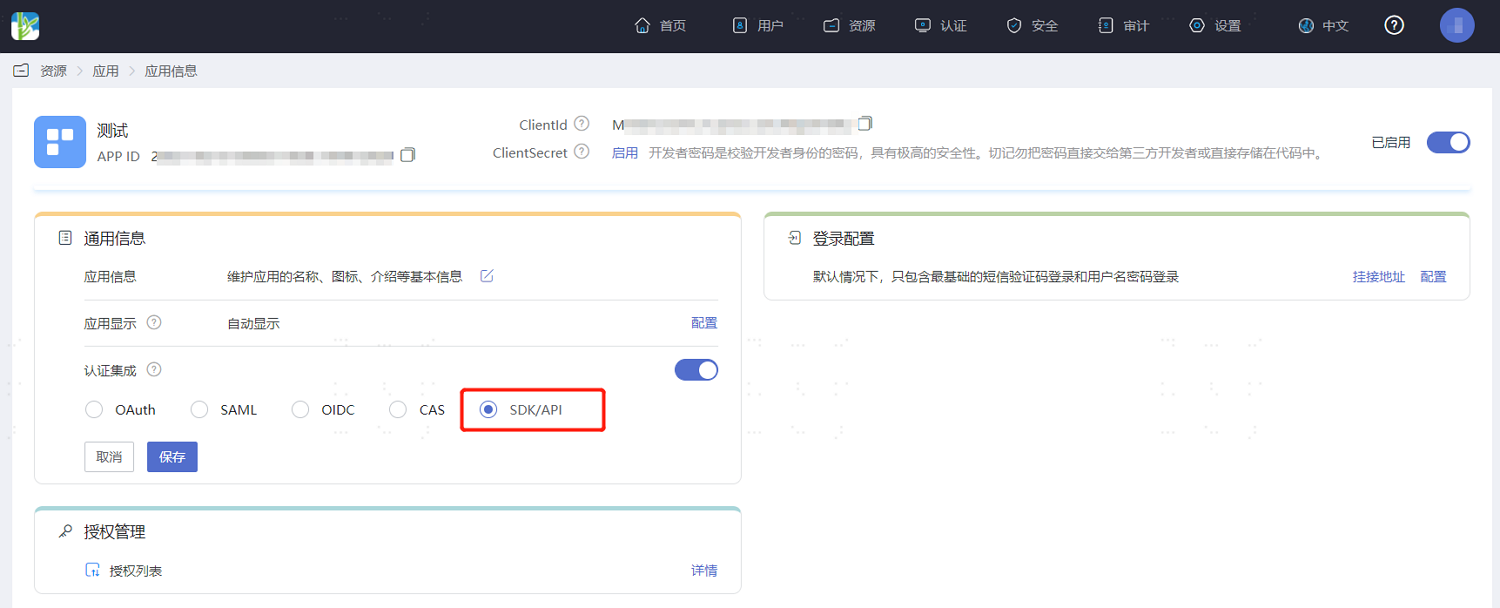
Authentication integration can only be configured once and cannot be changed later.
# Development Integration
After configuration on the IDaaS platform, development integration configuration for the client side is also required. Only after development is complete can users use the one-click mobile number login for the application.
- If your enterprise users' mobile APP uses the Android operating system, please refer to Zhuyun IDaaS Mobile Android SDK One-Click Login to complete the subsequent client-side development integration.
- If your enterprise users' mobile APP uses the iOS operating system, please refer to Zhuyun IDaaS Mobile iOS SDK One-Click Login to complete the subsequent client-side development integration.