
Script Definition
# Script Definition
function(context){ }
- Do not rename function(context){}
- Scripts provide a rich set of built-in functions. For detailed instructions, please refer to the following sections.
- Parameters can be passed between scripts. For detailed instructions, please refer to the following sections.
- When your script needs to throw an exception, it must return a Result object to IDaaS, for example: return new Error("this is error"); After an exception is thrown, the script terminates, and subsequent scripts will not execute; if no exception needs to be thrown, no return is necessary.
# Context Parameter
| Trigger Scenario | Description |
|---|---|
| context.user | The current requesting user. For detailed instructions, please refer to the following sections. |
| context.oldUser | The user before the current request, only exists before user update and after user update. |
# User Object
The user object contains the following fields defined in the user field definitions, including custom user fields. Common fields include:
| Field Code | Type | Field Name |
|---|---|---|
| id | String | ID |
| userName | String | Username |
| organizationId | String | Region |
| name | String | Full Name |
| mobile | String | Mobile Number |
| String | ||
| firstName | String | First Name |
| middleName | String | Middle Name |
| lastName | String | Last Name |
| externalId | String | External ID |
| mailingAddress | String | Mailing Address |
| zipCode | String | Postal Code |
| industry | String | Industry |
# Built-in Functions
HttpClient Functions:
| Method Name | Description | Example Code |
|---|---|---|
| get(url) | Please input a URL starting with http or https. | HttpClient.get(“url”) |
| get(url,params) | The params will be appended to the URL. Parameters need to be encoded beforehand if encoding is required. | HttpClient.get(“url”,params) |
| get(url,params,headers) | Supports passing headers. Use a semicolon (😉 to separate multiple values. | HttpClient.get(“url”,params,headers) |
| post(url) | Please input a URL starting with http or https. | HttpClient.post(“url”) |
| post(url,body) | Supports passing a body object. | HttpClient.post(“url”,body) |
| post(url,body,headers) | Supports passing headers. Use a semicolon (😉 to separate multiple values. | HttpClient.post(“url”,body,headers) |
Log Functions:
| Method Name | Description | Example Code |
|---|---|---|
| debug(msg) | msg is recommended to be a string. | new Log(context).debug(“this is log”) |
| debug(msg,...arguments) | Supports placeholder format for msg. | new Log(context).debug(“send {0}”, “success”) |
# Configuring Environment Variables
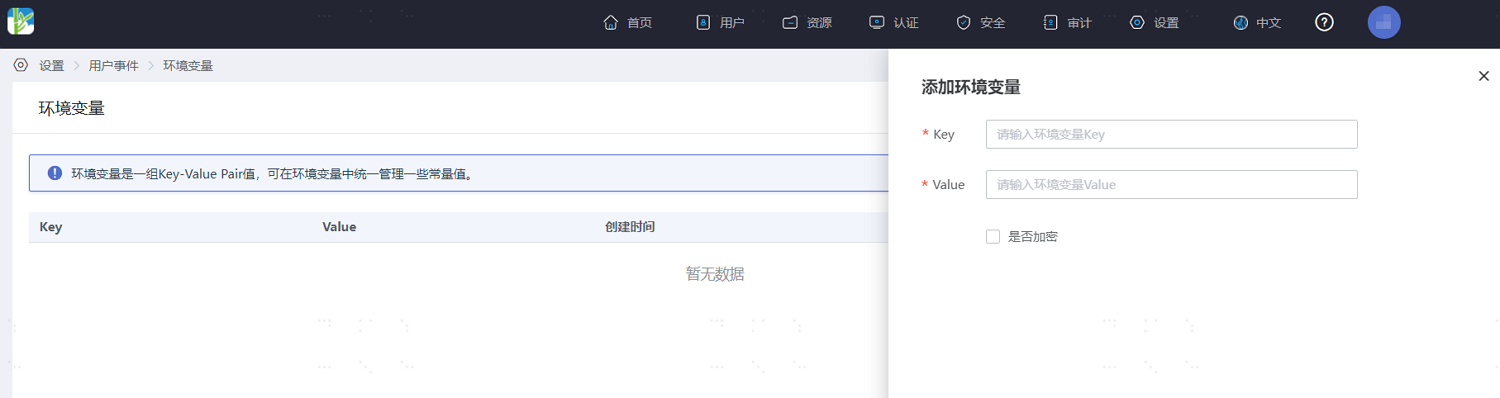
Developers can access them via the global variable env. Environment variables are visible to all scripts and consist of a set of Key-Value Pairs. The Value can be encrypted. They are commonly used to store data such as WebHook links and secret keys.
- On the IDaaS Enterprise Center platform, navigate to "Settings > User Events" page, select "Environment Variables", and click "Add Environment Variable". Configure the parameters according to the on-screen prompts.
# Parameter Passing
Data from scripts within an event definition can be passed throughout the entire process, achieving an industrial pipeline effect. This makes custom scripts more modular and easier to manage for developers.
Here is a demo containing two script definitions. One script obtains a token, and the other retrieves user information based on that token. The token is stored in the context object and passed to the next script for use.
Asynchronously executed scripts do not support parameter passing.
Obtaining Token:
function(context){
var header =  {"Authorization":"Basic " + env.basicToken};
var body =  {"grant_type":"client_credentials"};
var result =  HttpClient.post(env.tokenUrl, body,  header);
context.access_token= JSON.parse(result).token;
}
Store the token from the interface on context.access_token
2
3
4
5
6
7
Getting User Information Based on Token:
function(context){
var header =  {"Authorization":"Bearer " + context.access_token};
var result = HttpClient.get((env.userInfoUrl, null,  header);
new Log(context).debug(result);
[context.user.name](http://context.user.name/)=JSON.parse(result).user_name;
}
Retrieve the token stored in the previous step from context.access_token
2
3
4
5
6
7