
Configure WeChat Work Authentication Source
# Overview
WeChat Work authentication login allows users to securely log in to third-party applications or websites using WeChat Work as the authentication source. To facilitate authentication login for enterprise users, the IDaaS platform supports configuring WeChat Work as an authentication source. Users can log in to various application systems via WeChat Work authentication, providing enterprise users with a simpler, more convenient login method and a better user experience.
This section describes the related operations for configuring the WeChat Work authentication source.
# Prerequisites
- Have administrator permissions for the WeChat Work Open Platform.
- Have administrator permissions for the IDaaS Enterprise Center platform.
# Procedure
# Create an Application on the WeChat Work Open Platform
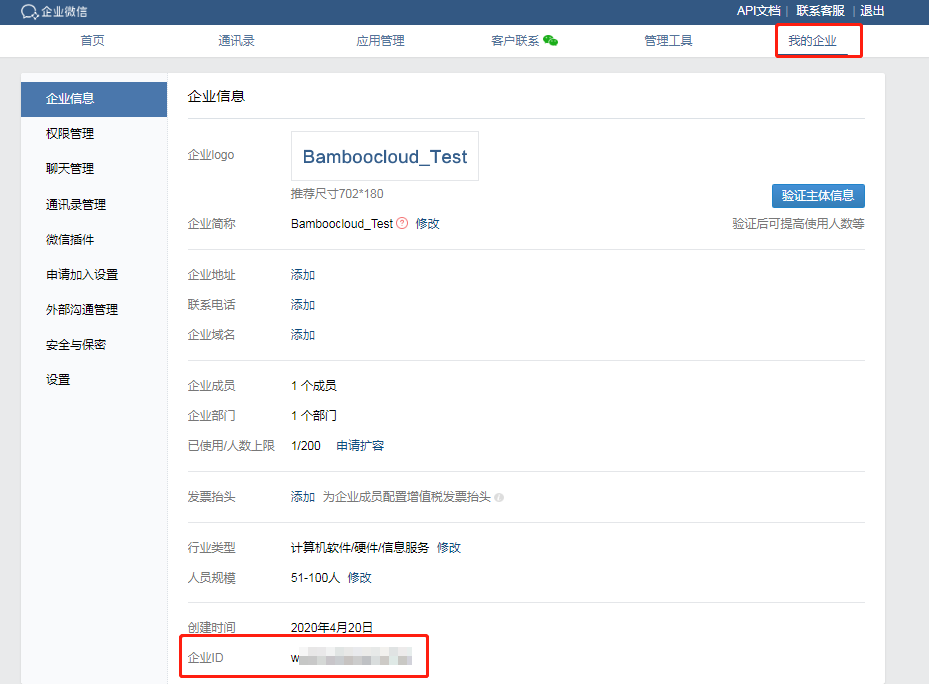
Log in to the WeChat Work Open Platform (opens new window), and obtain the corpID parameter under "My Company".
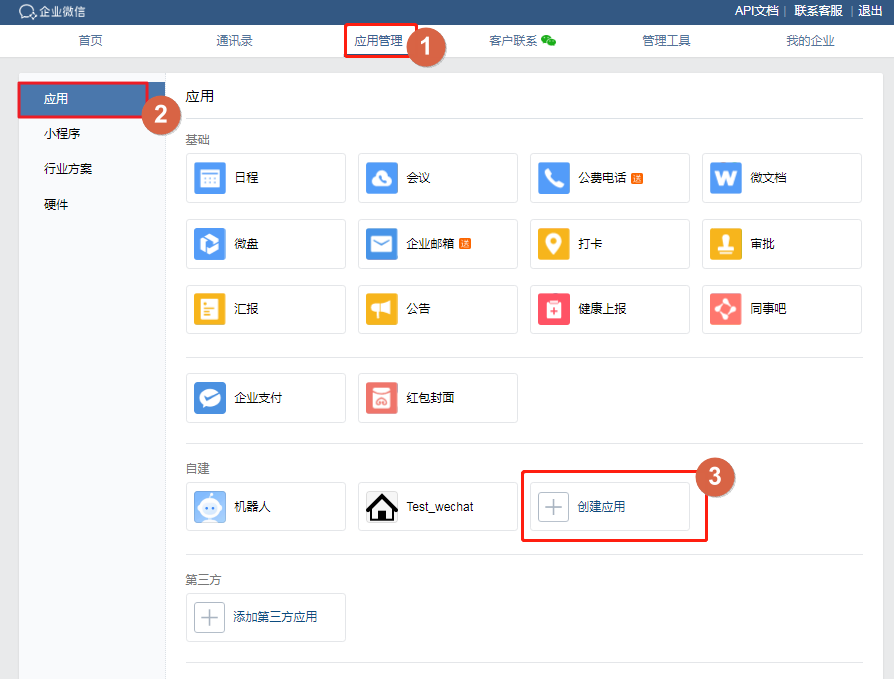
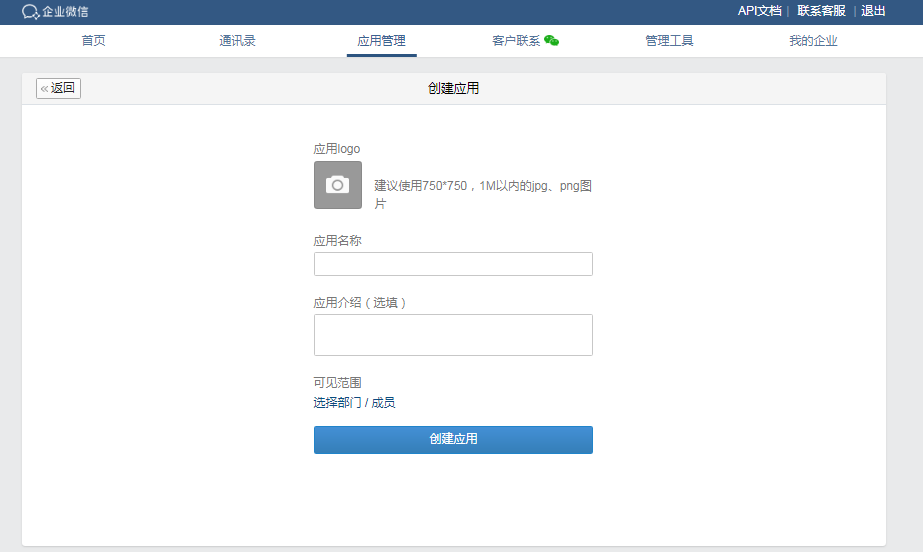
Select "Application Management" from the top navigation bar, choose "Application" on the left, and click "Create Application" to fill in the form information.
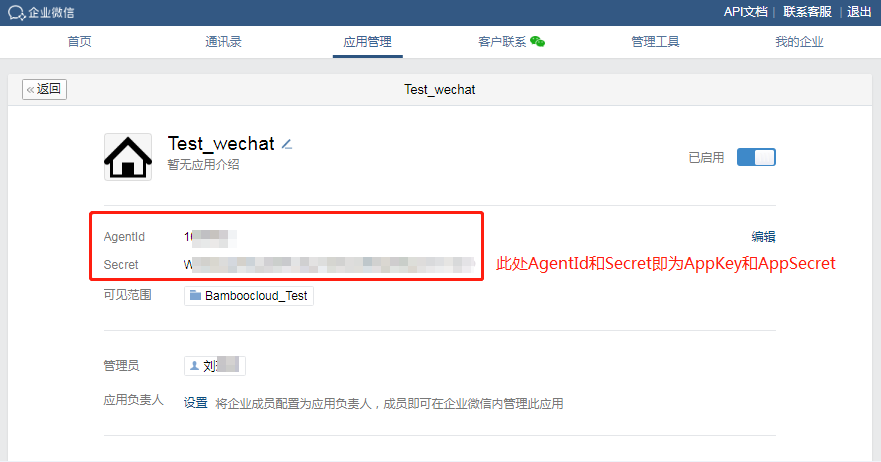
After successful creation, click the application icon to obtain the AppKey and AppSecret parameters.
In the "Developer Interfaces" section below, set up "WeChat Work Authorization Login", select the web application type, and configure the authorization callback domain.
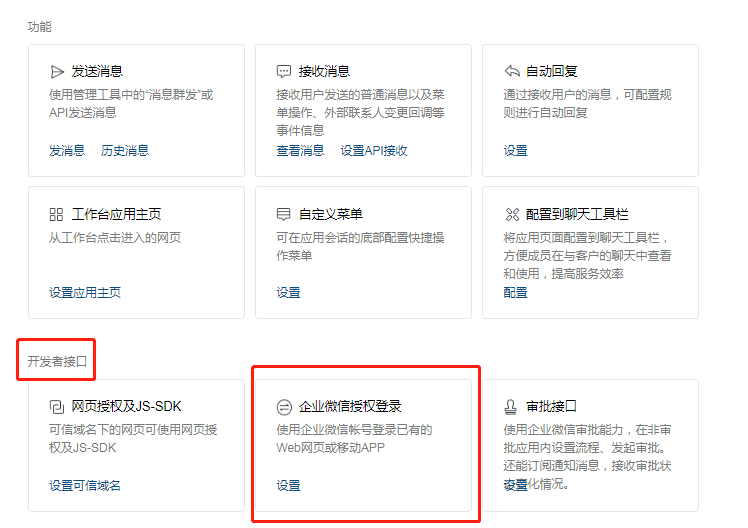

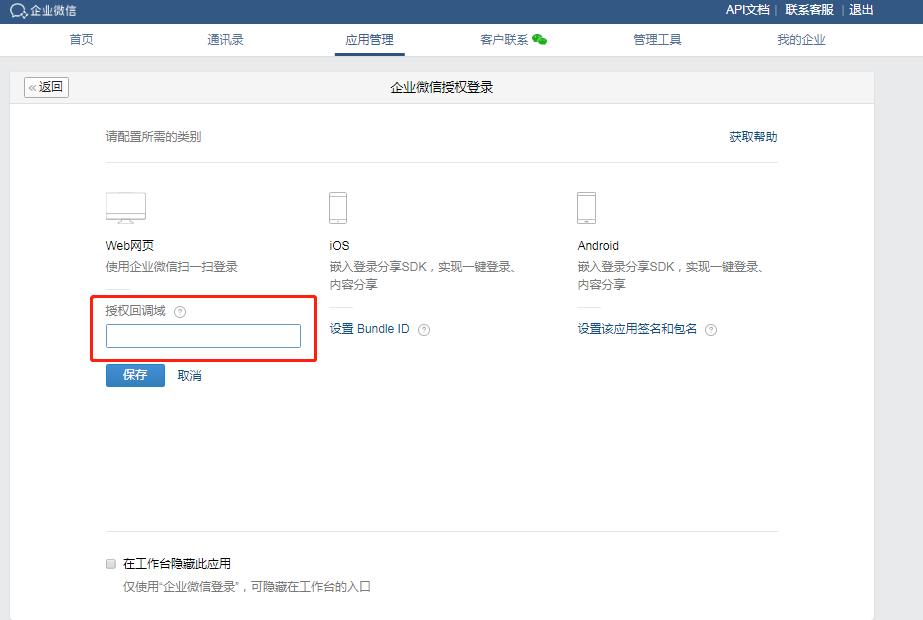
The authorization callback domain must match the IDaaS tenant domain, which can be obtained from "Settings > Company Information" in the IDaaS Enterprise Center.
After configuration, select "Webpage Authorization & JS-SDK" in the "Developer Interfaces" section below, set the trusted domain, and after filling it in, click "Apply for Domain Verification" to download the domain verification file. Then refer to Upload Domain Verification File to complete the domain verification.
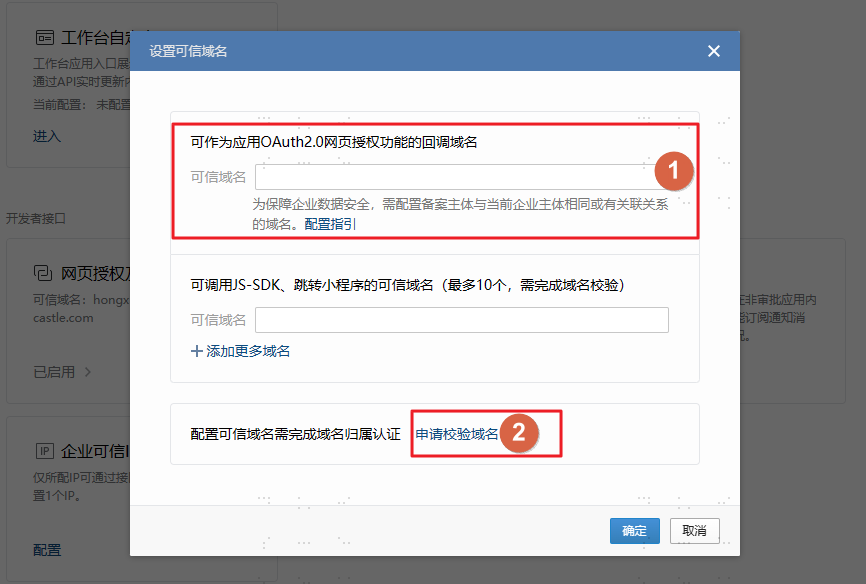
- The trusted domain is the IDaaS tenant domain, which can be obtained from "Settings > Company Information" in the IDaaS Enterprise Center.
- When configuring passwordless login for WeChat Work external browsers, the "Trusted domains for calling JS-SDK and redirecting to Mini Programs (up to 10, domain verification required)" also needs to be filled in as the IDaaS tenant domain.
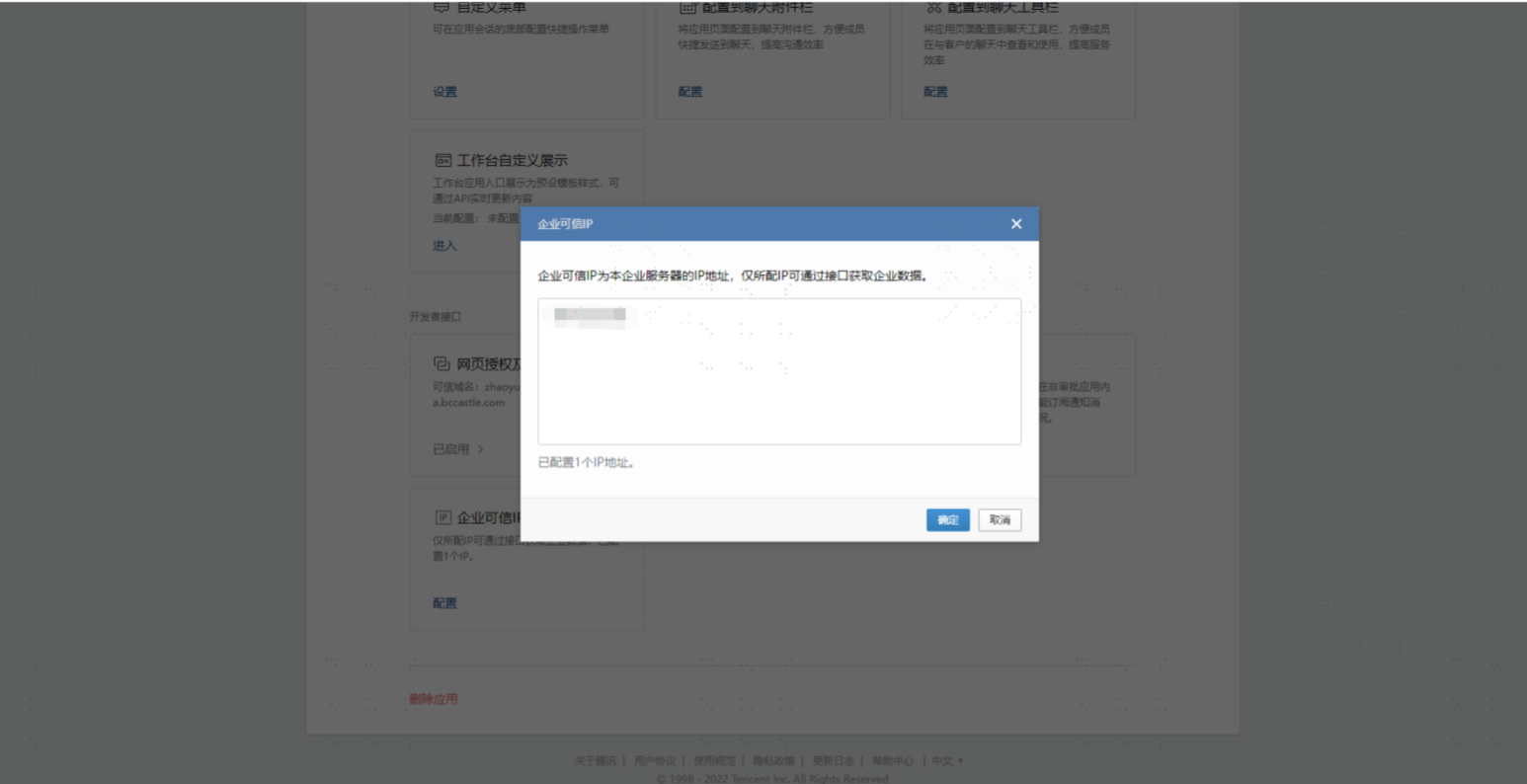
After configuration, select "Enterprise Trusted IPs" in the "Developer Interfaces" section below, and set the enterprise IP provided by the customer.
# Configure the WeChat Work Authentication Source on the IDaaS Platform
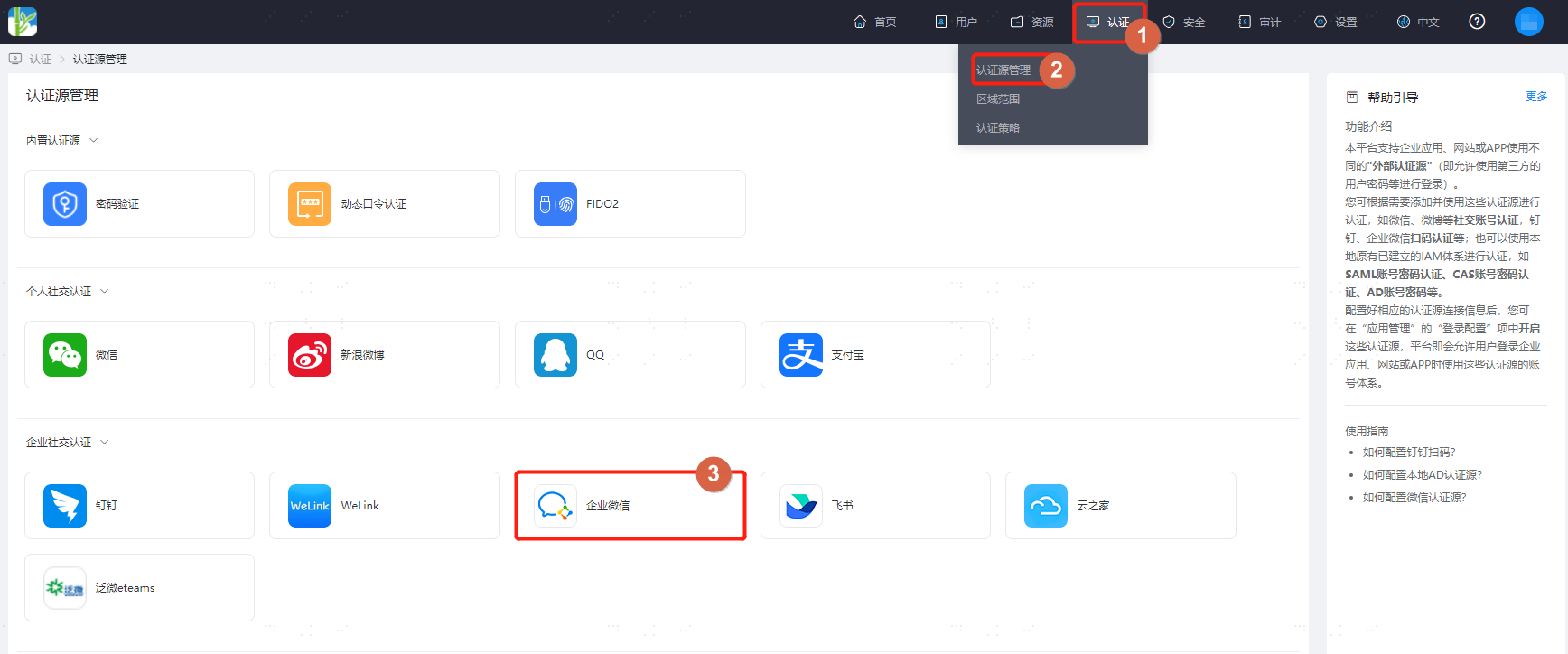
Log in to the IDaaS Enterprise Center platform, select "Authentication > Authentication Source Management" from the top navigation bar, go to the WeChat Work authentication source page, and click "Add Authentication Source".
Configure the WeChat Work authentication source parameters according to the interface prompts. Key parameter descriptions are as follows.
Before saving the WeChat Work authentication source, be sure to confirm that the trusted domain has been saved in the application settings in the WeChat Work backend.
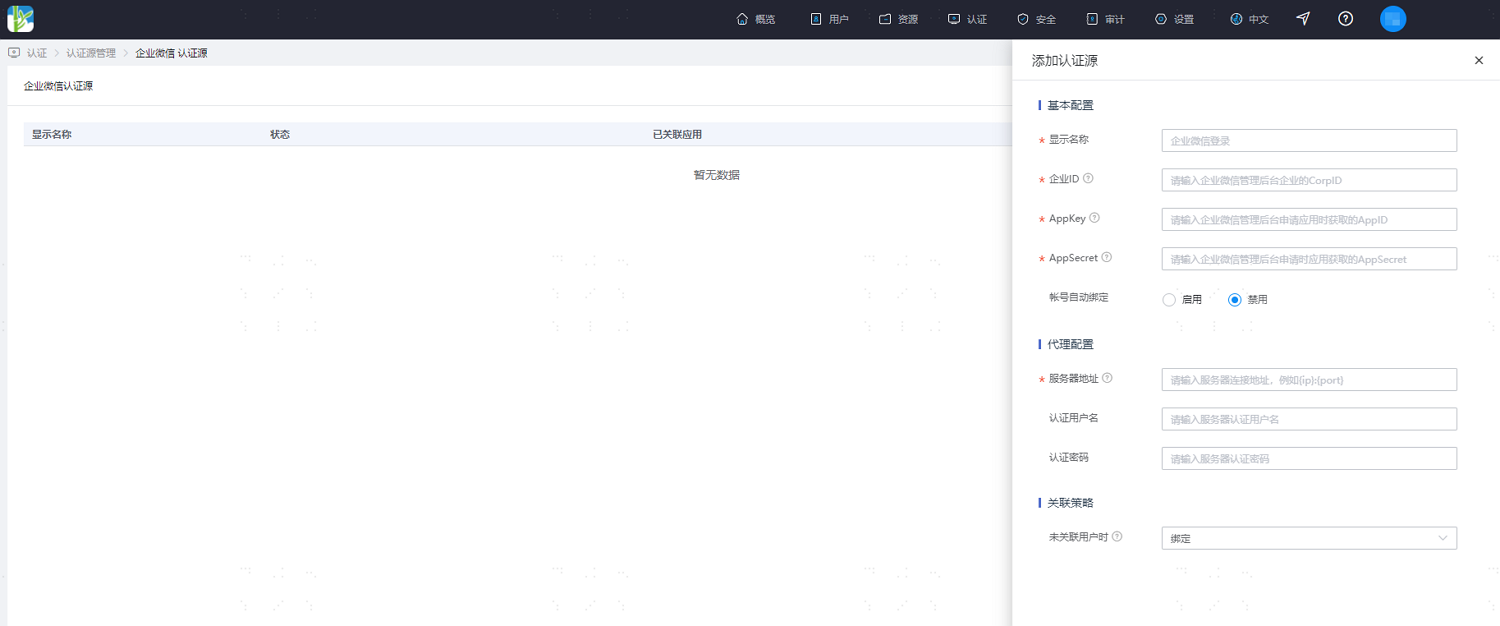
Parameter Description Account Auto-binding Sets whether to enable the account auto-binding function. Whether binding can succeed depends on the configuration item when no user is associated. It is recommended to disable this.
When enabled, the first login via WeChat Work can automatically obtain the WeChat Work "Account" attribute and bind it with the IDaaS user. This attribute is automatically generated by the WeChat Work system and can only be modified once.
When disabled, the first login via WeChat Work requires the user to manually enter a phone number or email for binding.Account Association User Attribute This configuration appears when the account auto-binding function is enabled. Sets the IDaaS user attribute associated with the WeChat Work "Account" attribute. Server Address The customer's proxy server address. HTTP proxy is supported. Up to 3 addresses are allowed. Separate multiple addresses with commas. Authentication Username Sets the authentication username for the server. Authentication Password Sets the authentication password for the server. When No User is Associated When the authentication source attribute of the user information returned by the WeChat Work platform does not match the associated user attribute in IDaaS, and no system user is associated, the available configuration options are as follows.
Set to "Bind": When no user is associated, it will redirect to a phone number or email verification page. If an existing phone number or email in IDaaS is entered and verification succeeds, the user passes authentication; if a non-existent phone number or email in IDaaS is entered and verified, it will prompt that no associated user was found.
Set to "Bind or Register": When no user is associated, it will redirect to a phone number or email verification page. If an existing phone number or email in IDaaS is entered and verification succeeds, the user passes authentication; if a non-existent phone number or email in IDaaS is entered and verification succeeds, an IDaaS user is created based on the phone number or email and passes authentication.
Set to "Fail": When no user is associated, it will prompt binding failure. This option is only available when automatic account binding is enabled.
I'm ready. Please provide the Markdown content you want me to translate.