
Configuring WeChat Official Account Authorization Login
# Overview
This section describes the configuration process for the WeChat Official Account authorization login feature. After configuring and integrating the WeChat authentication source on the IDaaS platform, refer to this module to configure WeChat Official Account authorization authentication login for each application system.
# Prerequisites
- Possess administrator permissions for the IDaaS Enterprise Center platform.
- Have already registered an official account on the WeChat Official Platform.
- Applications have been integrated on the IDaaS platform.
- Have already configured a WeChat authentication source on the IDaaS platform with the login scenario set to Official Account Authorization Login.
# Configuration Process

# WeChat Official Account Platform Configuration
# Obtain the Official Account's Developer ID and Password
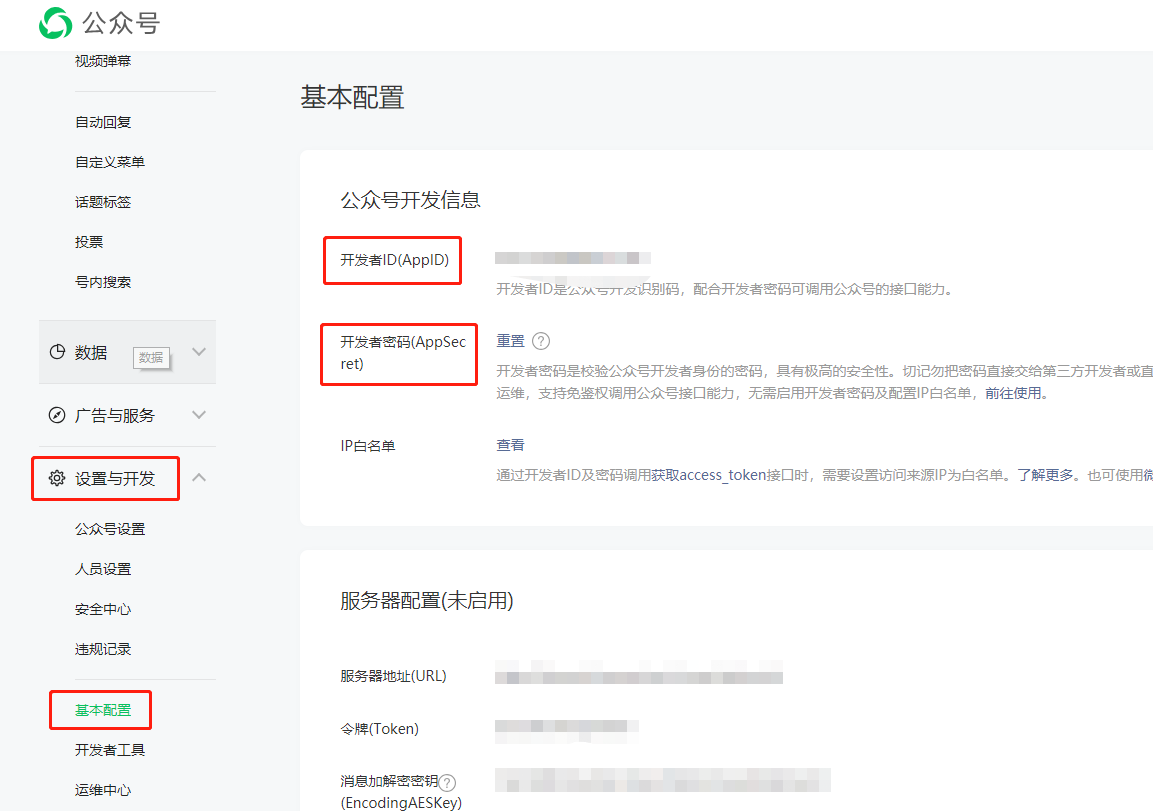
Developers log in to the WeChat Official Platform (opens new window), enter the created official account, select "Settings & Development – Basic Configuration", and view and save the Developer ID (AppID) and Developer Password (AppSecret).
# Configure the Official Account's Webpage Authorization Callback Domain
- After logging into the official platform website, developers enter the created official account, select "Settings & Development - Interface Permissions - Web Services - Web Account - Webpage Authorization to Obtain Basic User Information" option.
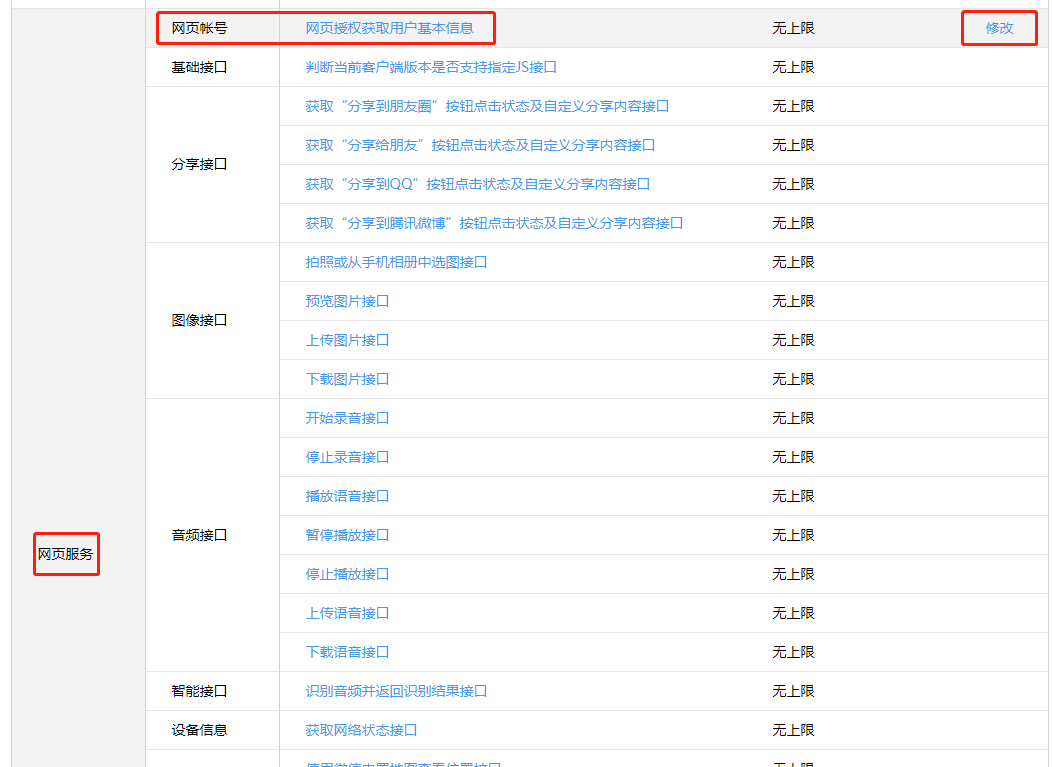
- Click "Modify", and change the authorization callback domain to the enterprise tenant domain in IDaaS, for example, xxx.bccastle.com (do not add protocol headers like http://). If the enterprise uses the custom domain feature of the IDaaS platform, the custom enterprise domain name needs to be filled in here.
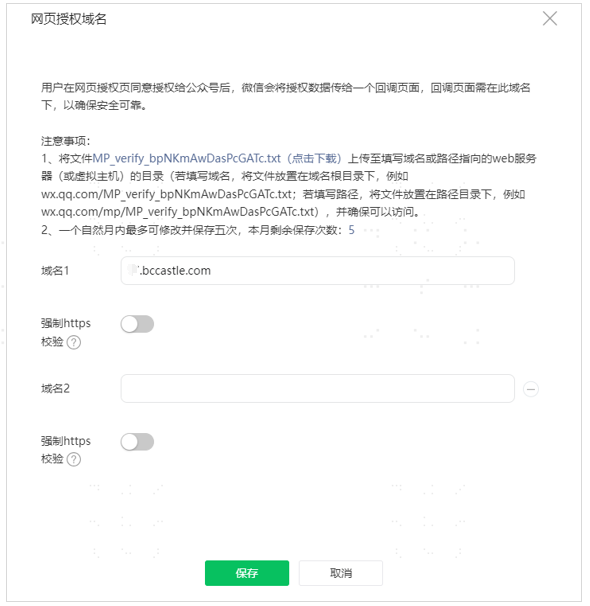
⚠️ Note: A formal official account requires verification of the callback domain. The verification file needs to be uploaded on the IDaaS platform first. For details, please refer to Upload Domain Verification File
# IDaaS Platform Configuration
# Add WeChat Official Account Authentication Source
For operational steps, please refer to Configure WeChat Authentication Source, select Official Account Authorization Login as the login scenario.
# Register Application
You can choose to create an OAuth protocol application or an OIDC protocol application for integration. Enterprises should choose based on their own business system situation.
# Configure Application for WeChat Official Account Authorization Login
Enter the configuration page of the registered application mentioned above, click on the "Login Configuration" menu, and turn on the switch for the WeChat Official Account authentication source under "Social Login – WeChat".
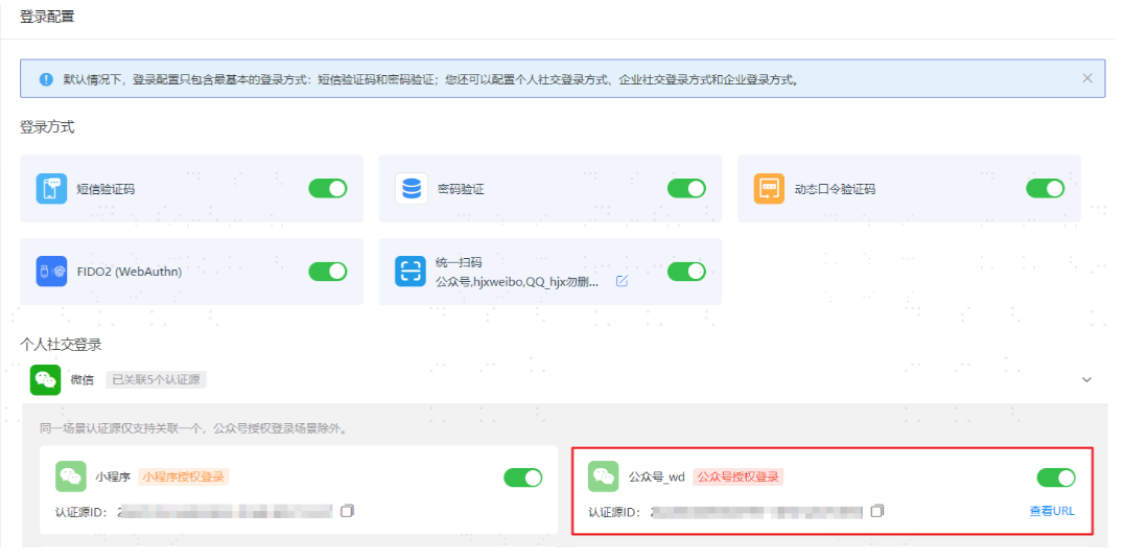
Click the "View URL" link for the official account authentication source, copy and save it.
# Display Effects
Currently, there are two scenarios for using WeChat Official Account authorization login, each corresponding to a different display effect. You can choose based on your actual business situation.
# Attach SSO Authorization Login URL to Official Account Menu
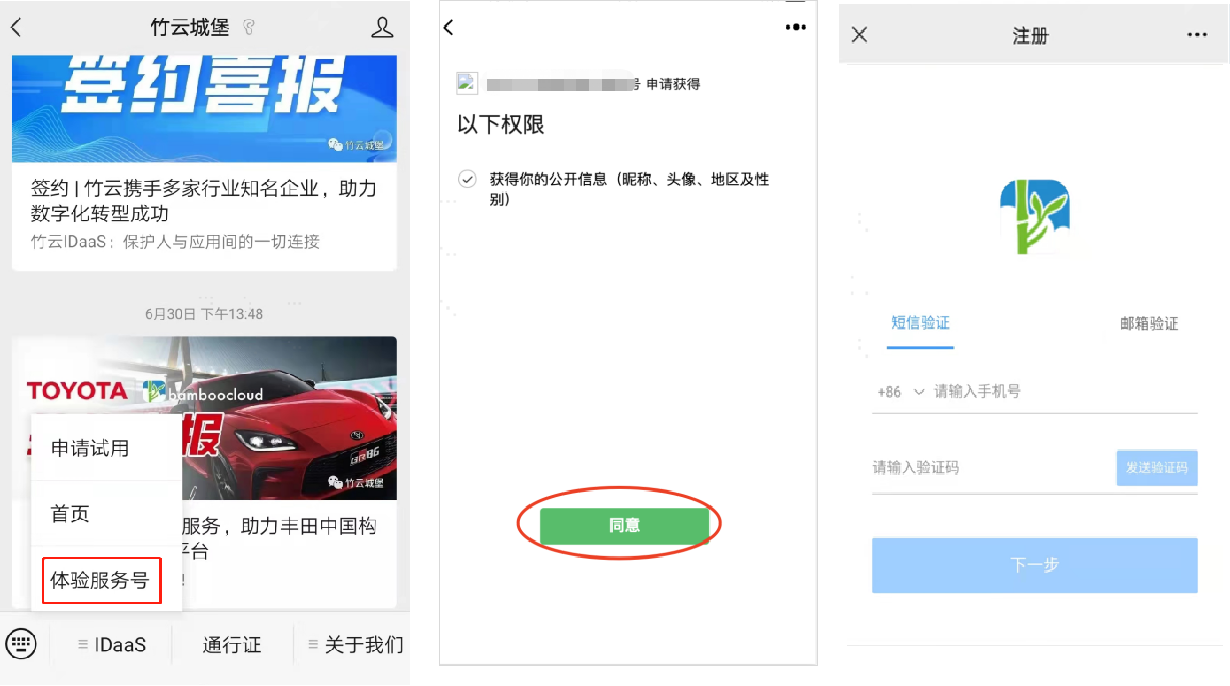
This scenario is suitable for: After users follow the official account, they first need to complete WeChat authentication and bind their phone/email before they can enter the H5 business system. When users access the H5 business system again later, they automatically enter the system password-free via WeChat Official Account authorization.
- In the formal official account management console, go to Content & Interaction -> Custom Menu page, enter the submenu name, input the address obtained from the "View URL" link of the official account authentication source into the "Webpage Link" field, save and publish.
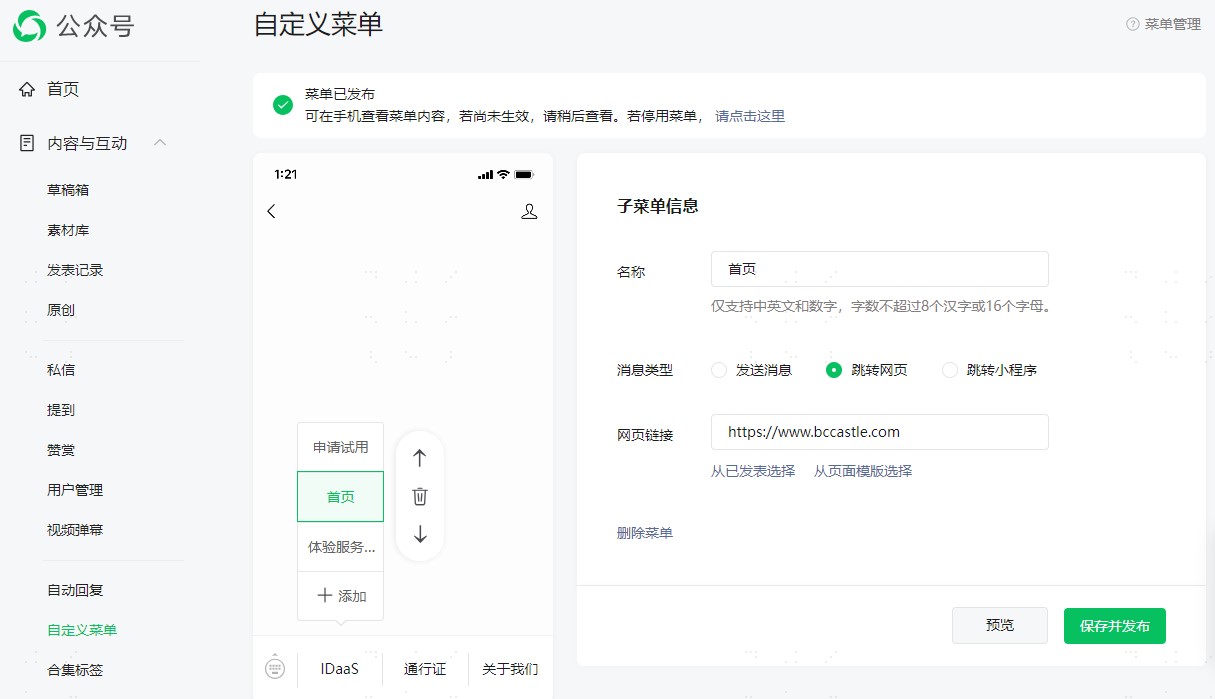
- After the official account is published, the effect for users accessing the official account is as follows:
# Automatically Display WeChat Official Account Logo Only on Unified Login Page within WeChat
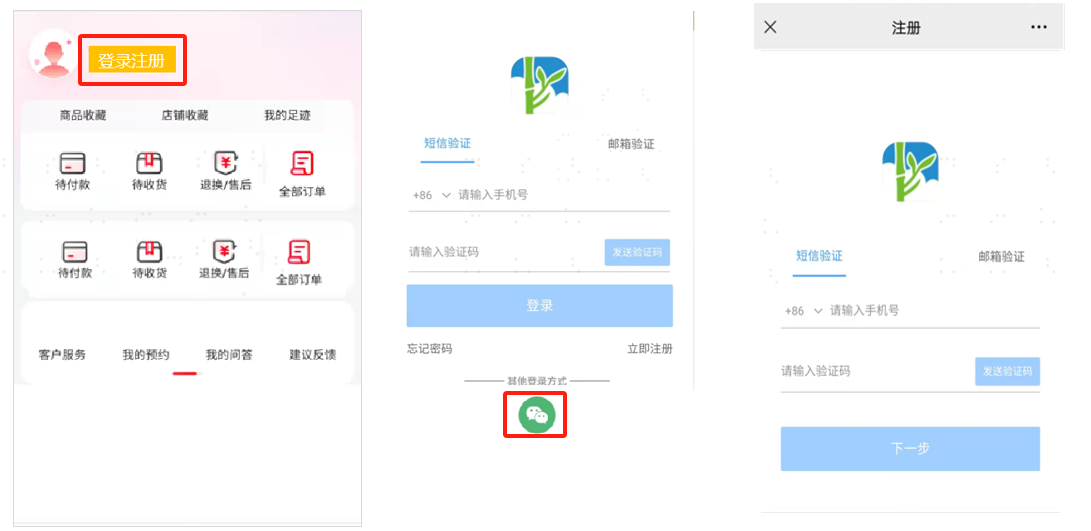
This scenario is suitable for: Enterprises have multiple H5 business systems. When users access a business system, the system's homepage is displayed first. When users are interested in the website and click login/register, the IDaaS unified login page is displayed. In addition to supporting phone/email login/registration, when the login page is opened in a WeChat browser, the WeChat Official Account authorization login logo is automatically displayed. Users clicking the WeChat logo automatically use WeChat Official Account authorization login. The WeChat Official Account authorization login logo is automatically hidden in other non-WeChat browsers.
- The usage effect is as follows
# Other Notes
During the joint debugging and testing phase, you may first use a personal public account for testing. After the joint debugging verification is completed, switch to the official public account for release. It should be noted that when using a personal public account -> custom menus, WeChat currently does not support adding configuration menus via the interface; it only supports creating custom menus through API calls. Please refer to the WeChat Open Platform for detailed operations.
Refer to the official documentation and interface prompts to obtain the public account's access_token using tools. Fill in the APPID and APPsecret with the public account information obtained earlier.
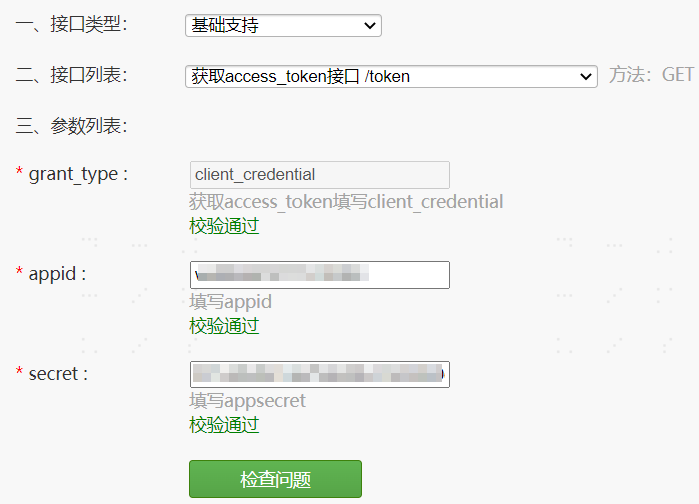
Then, customize a menu button for the public account for authenticated login to the user center. Refer to the official documentation to supplement the body code, where
nameis the display name of the menu in the public account; replace theurlwith the URL obtained when enabling the public account authorization login authentication source for the application.
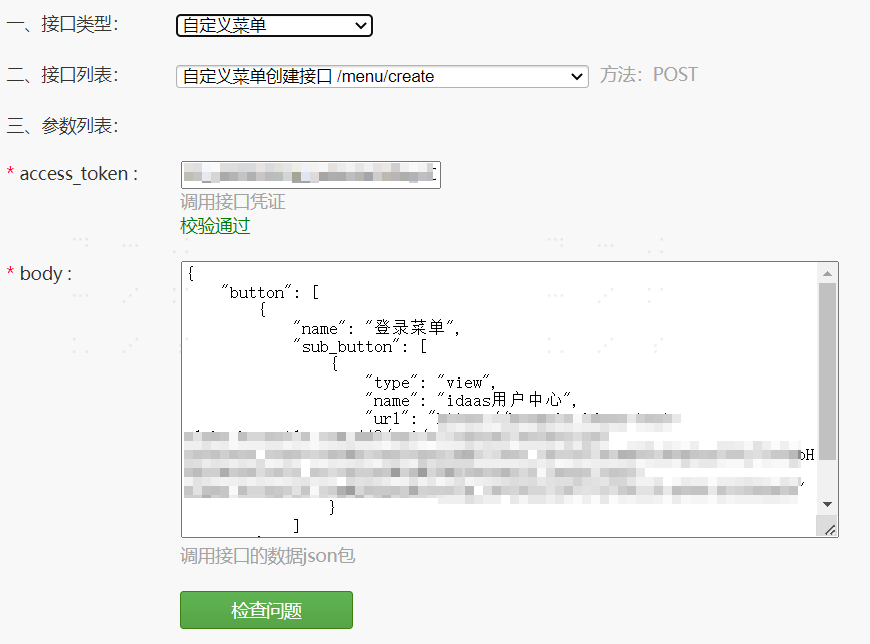
- After configuration, click "Check Issues". If no errors are prompted, the configuration is successful. Visit the personal public account to see the menu just added.