Configuring Custom SMS Gateway and Templates
# Overview
In scenarios such as "Login Authentication", "Registration", "Forgot Password", and "VPN Two-Factor Authentication", SMS verification codes may be used to confirm user identity to prevent impersonation or identity theft.
The IDaaS platform provides SMS notification functionality. It pre-configures and registers templates for potential notification scenarios, and enables the IDaaS "Built-in SMS Gateway" by default. Additionally, the IDaaS platform supports custom SMS gateways and SMS notification templates for various scenarios. These configurations will be invoked at the appropriate times and scenarios to send SMS messages and verification code information to users.
Currently, supported custom gateway providers include Huawei Cloud, Alibaba Cloud, Xiaoshui Intelligence, Zhutong Technology, and Mengwang Cloud Communication. Enterprises need to register and purchase messaging & SMS services with these providers in advance.
# Prerequisites
- Have administrator permissions for the IDaaS Enterprise Center platform.
- Have registered an account with the gateway provider and applied for various scenario notification templates, and have obtained the template ID or Code. Please refer to the respective provider's documentation for details.
- The Mengwang Cloud Communication gateway supports sending SMS with user-defined templates, and does not require configuring a template ID or Code.
# Configuration Process

# Steps
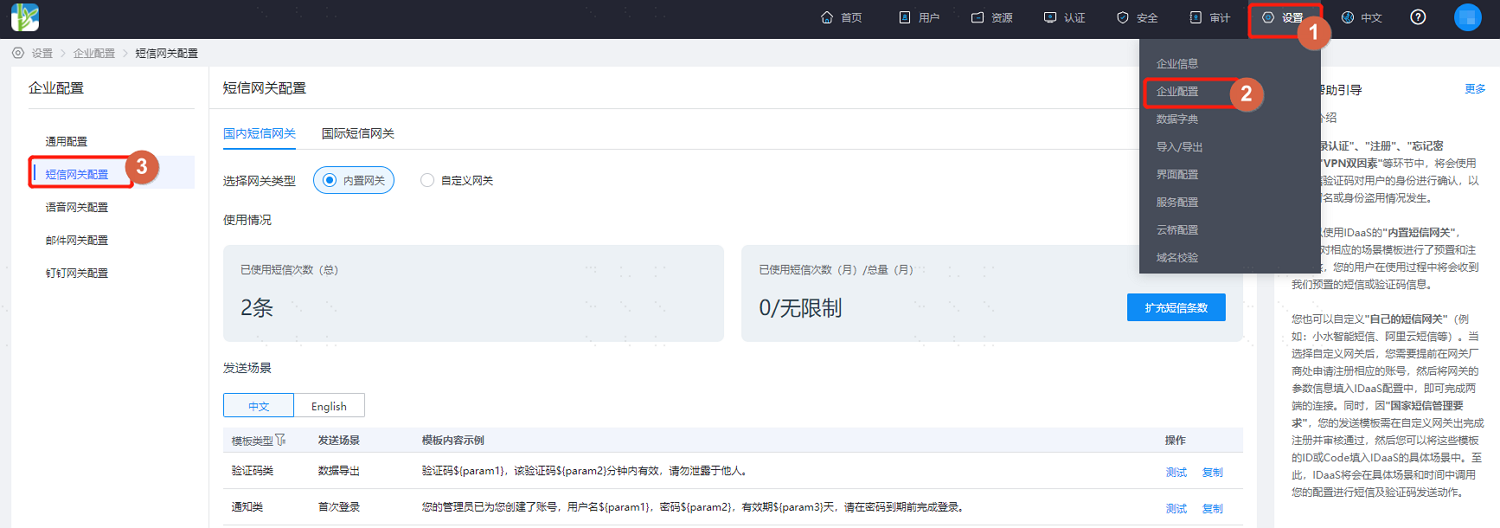
Log in to the IDaaS Enterprise Center platform. In the top navigation bar, select "Settings > Enterprise Configuration", then choose "SMS Gateway Configuration".
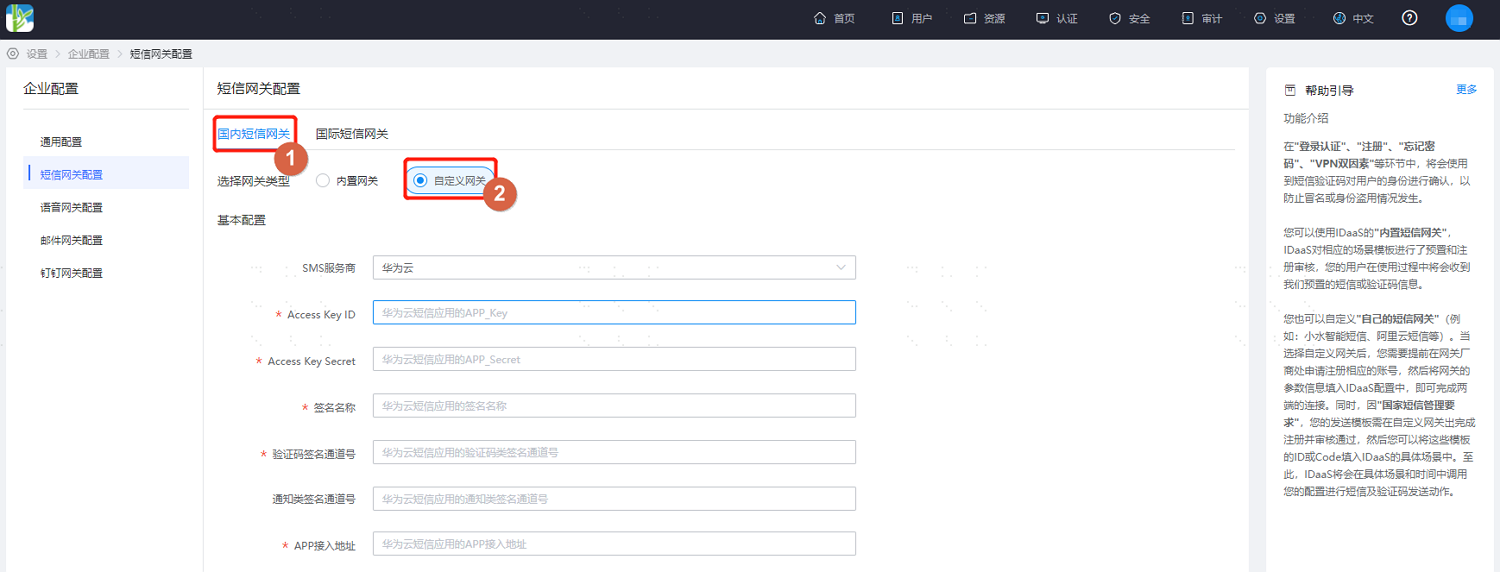
Select "Domestic SMS Gateway", choose "Custom Gateway" as the gateway type, and fill in the basic gateway configuration. The required gateway information varies depending on the selected service provider.
If you need to send SMS to mobile numbers in Hong Kong, Macau, Taiwan, or internationally, you can configure an international SMS gateway. Currently, the supported custom gateway providers for international SMS are only Huawei Cloud and Alibaba Cloud. You need to apply for and activate international/Hong Kong, Macau, Taiwan SMS services on the corresponding SMS provider's platform.
The international SMS configuration process is consistent with the domestic SMS gateway configuration process.
# SMS Provider: Huawei Cloud
For configuration details, please refer to the relevant content in the Huawei Cloud Messaging & SMS MSGSMS Help Documentation (opens new window). Key parameter descriptions are as follows.
Parameter Description SMS Provider Huawei Cloud AccessKey ID Huawei Cloud SMS Application APP_Key AccessKey Secret Huawei Cloud SMS Application APP_Secret SMS Signature Signature information created based on user identity and compliant with their own attributes, which can be used only after approval by Huawei Cloud Verification Code Signature Channel Number Signature channel number assigned after Huawei Cloud SMS signature approval Notification Class Signature Channel Number Signature channel number assigned after Huawei Cloud SMS signature approval APP Access Address APP access address assigned by the system after the Huawei Cloud SMS application is created
- It is necessary to apply for two SMS signatures with identical names on Huawei Cloud, with signature types being verification code and notification respectively.
- When applying for SMS templates, for templates sending verification codes, the associated signature should select the verification code type signature, while notification-type templates such as password reset should select the notification type signature.
- In sending scenarios, the template ID for the password reset sending scenario is the notification-type SMS signature template, while other scenarios use the verification code-type SMS signature template.
# SMS Provider is Alibaba Cloud
For configuration details, please refer to the relevant content in the Alibaba Cloud SMS Service Help Documentation (opens new window). Key parameter descriptions are as follows.
| Parameter | Description |
|---|---|
| AccessKey ID | AccessKey Description (opens new window) AccessKeyId is used to identify the user |
| AccessKey Secret | AccessKeySecret is the key used to verify the user |
| SMS Signature | SMS signature name, which can only be used after being approved in the Alibaba Cloud SMS console |
# SMS Provider is Xiaoshui Intelligent
| Parameter | Description |
|---|---|
| Username | Account name obtained by the customer when opening an account on the Xiaoshui Intelligent platform |
| Key | Password obtained by the customer when opening an account on the Xiaoshui Intelligent platform |
# SMS Provider is Zhutong Technology
| Parameter | Description |
|---|---|
| Username | Account name obtained by the customer when opening an account on the Zhutong Technology platform |
| Password | Password obtained by the customer when opening an account on the Zhutong Technology platform |
| SMS Signature | Registered SMS signature |
| User Extension Information | User-defined information, returned when the user retrieves status reports |
# SMS Service Provider: Mengwang Cloud Communication
| Parameter | Description |
|---|---|
| Account | The account obtained by the customer when opening an account on the Mengwang Cloud Communication platform. |
| Password | The password obtained by the customer when opening an account on the Mengwang Cloud Communication platform. |
| IP Address | The IP address configured by the customer when opening an account on the Mengwang Cloud Communication platform. |
After completing the basic configuration, refer to the interface configuration to set up SMS notification templates for the actual project requirements, supporting both Chinese and English SMS template configurations.
The administrator creates corresponding SMS templates on the SMS service provider's platform based on the scenarios used, and then fills in the generated SMS template ID/CODE.
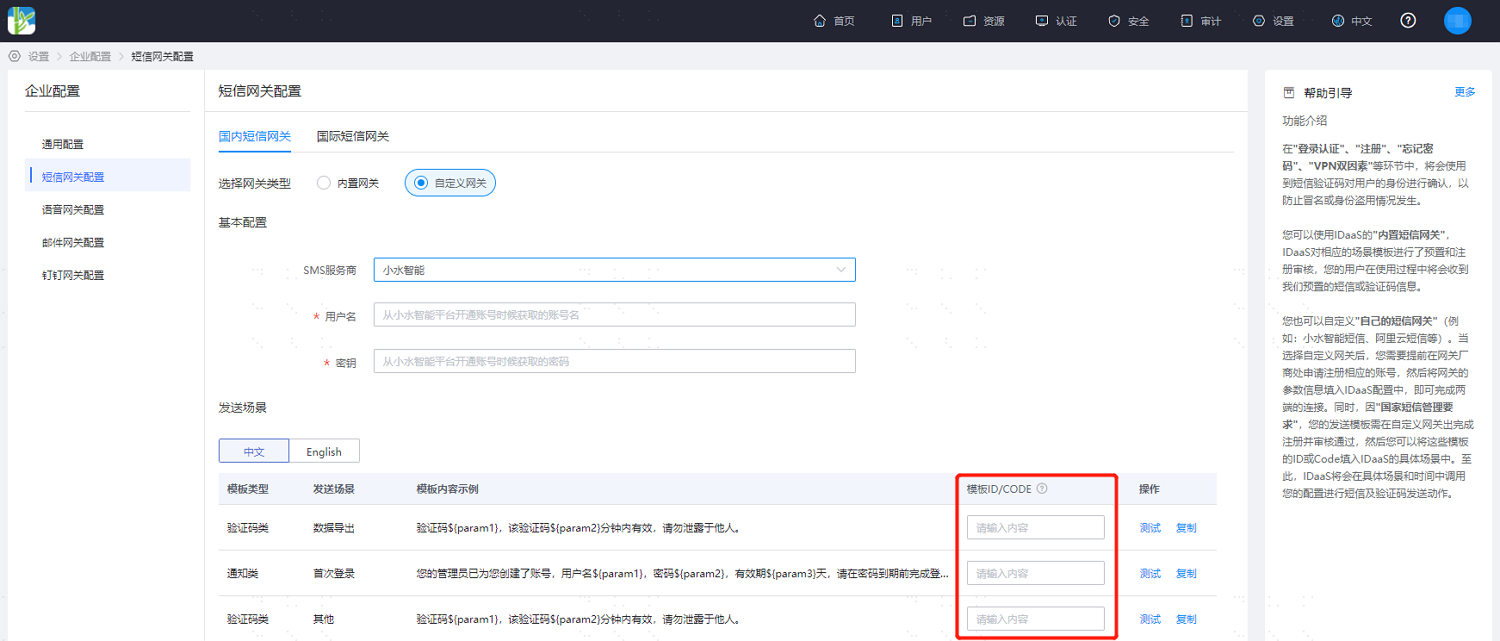
The Mengwang Cloud Communication gateway uses the system's built-in SMS templates by default and supports user customization.
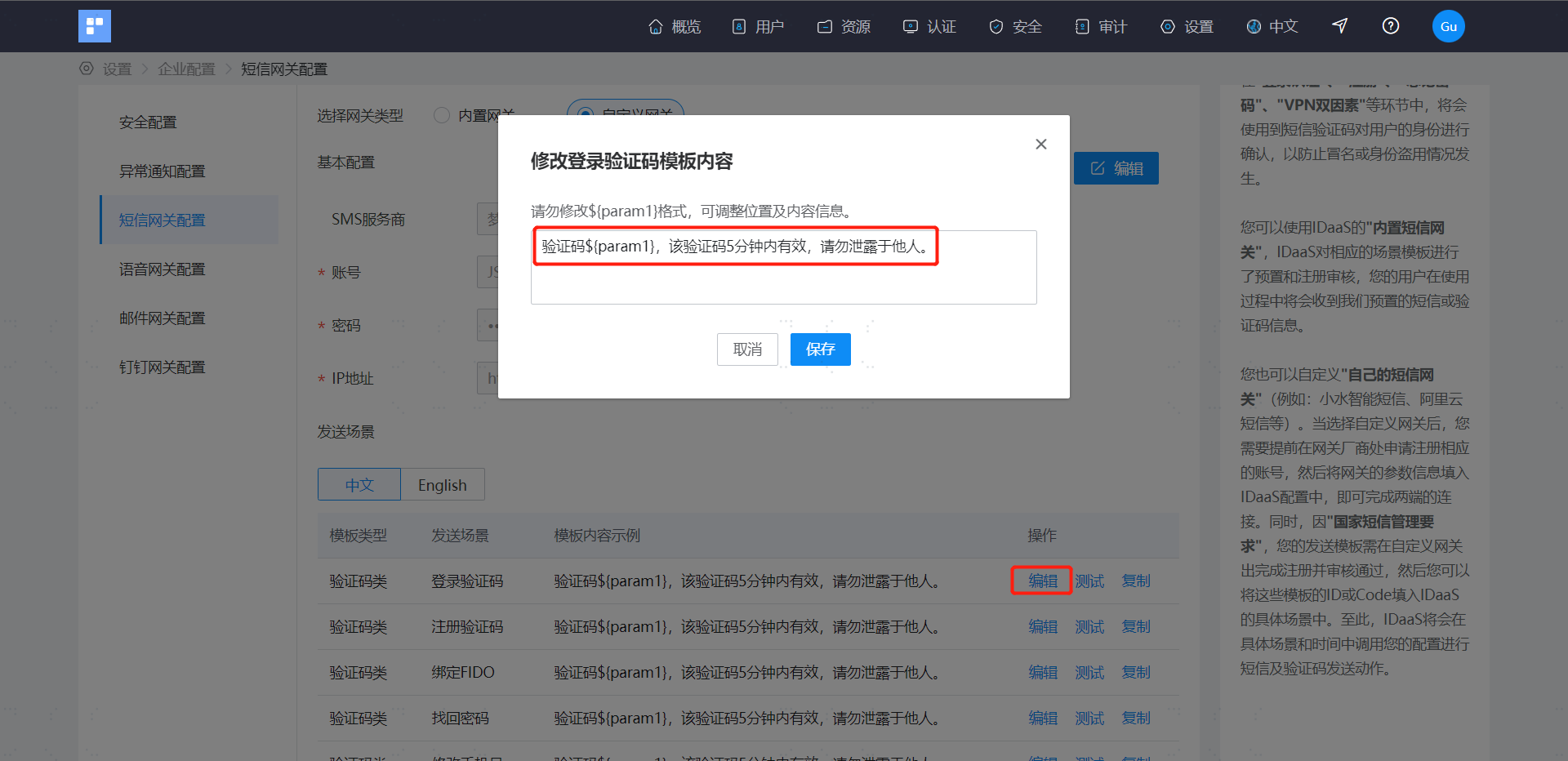
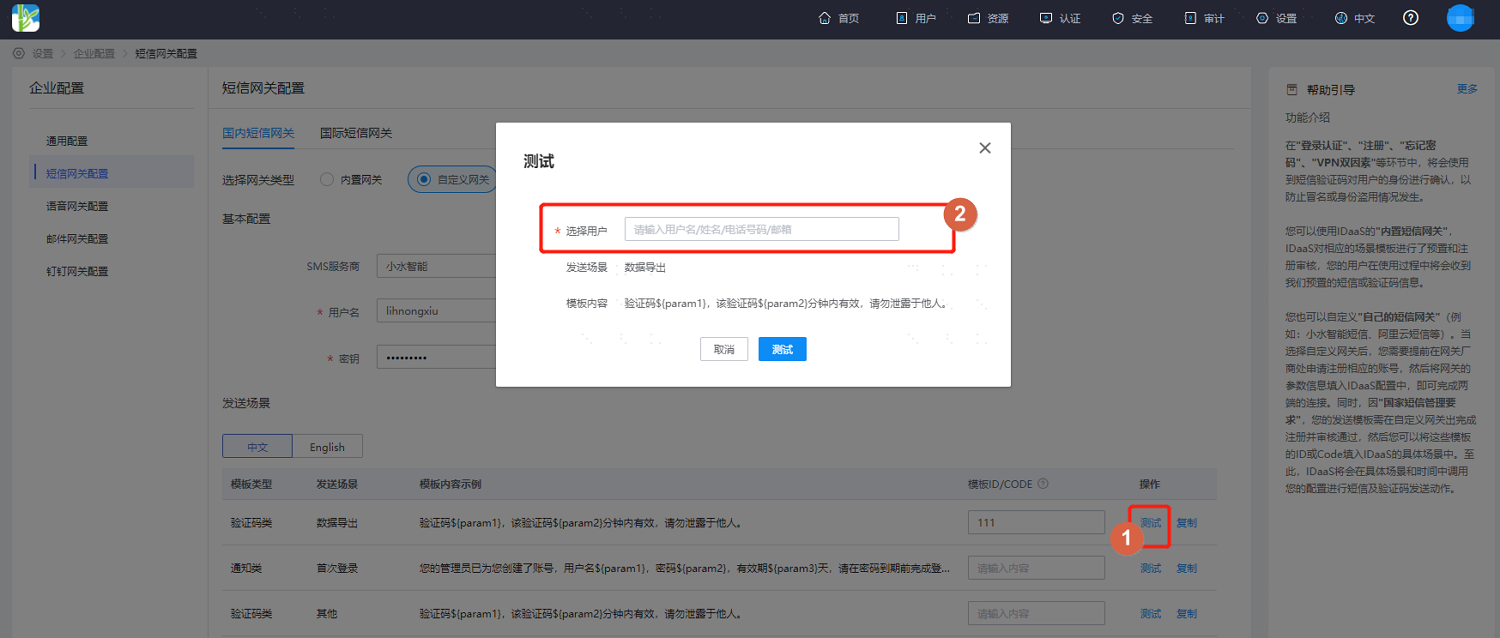
After configuration is complete, click "Test", select a test user, and then send an SMS test.