Cross-Browser Password-Free Login Plugin Installation or Update
Single Sign-On SSO
# Plugin Download
Please click the link below to download the plugin package first.
Download bamboocloud.exe plugin (opens new window)
# Install Plugin
After downloading, double-click the exe file. If a command window pops up and closes automatically, the installation is successful.
# Verify Installation Success
- Verify if the installation is successful via File Explorer. Search for the directory
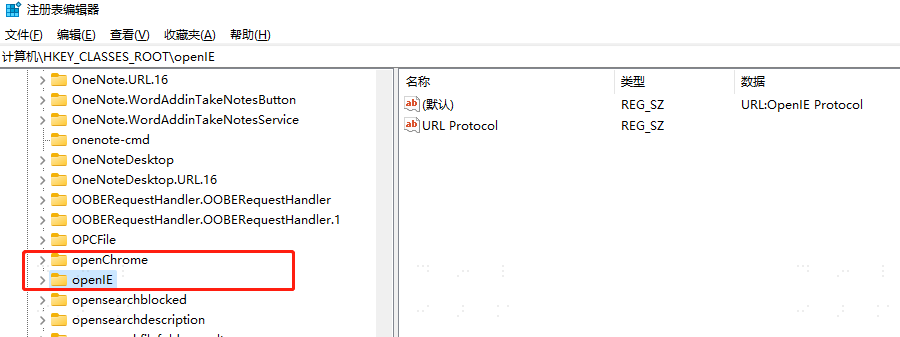
C:\Program Files\bamboocloud\idaas_open. If it exists, the installation is successful. - Verify if the installation is successful via the Registry. Open 【Win + R】, type 【regedit】 to view the registry. Search for 【Computer\HKEY_CLASSES_ROOT\openIE】 to check if the custom protocol registration is successful.
Note: Since this plugin adds registry entries, if your local computer has antivirus software installed, a relevant prompt may appear to block this operation. Please choose to allow this operation.
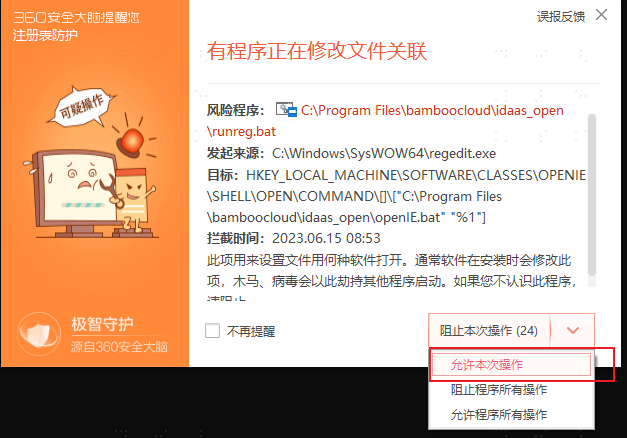
Malware scans might also delete the installation file. Please keep the file and choose not to remove it.