Application Permission Review
# Overview
Application Permission Review aims to inspect the permission management and authorization of application systems, helping you identify non-compliant situations and achieve permission compliance management. For example, through Application Permission Review, you can detect accounts with excessive permissions, accounts with sensitive permissions, similar roles, dormant function permissions, and so on. Furthermore, when the system enables position management, it can perform position-right analysis to identify situations where different positions have different rights.
# Review Capability List
The following are all the review capabilities currently supported by the IDaaS platform:
| No. | Category | Review Item | Review Item Description | Value Analysis |
|---|---|---|---|---|
| 1 | Application Account | Accounts with No Permissions | Accounts not granted any application-side permissions (including role/function permissions) | 1. Identify invalid accounts: The current system requires permissions for access, but accounts have had no permissions for a long time after creation. It is recommended to clean up such accounts. 2. Identify accounts pending authorization: Accounts that have just been created and have not yet been assigned permissions |
| 2 | Application Account | Accounts with Sensitive Permissions | Accounts granted sensitive permissions (including sensitive roles, sensitive function permissions), including accounts assigned sensitive function permissions based on roles | Verify whether the assignment of sensitive permissions is reasonable. If unreasonable situations exist, it is recommended to immediately correct the authorization for the corresponding accounts |
| 3 | Application Account | Accounts with Excessive Roles | Accounts granted too many roles: The number of granted roles exceeds a specified proportion of the total number of roles (configurable proportion) | Verify whether permission assignments follow the principle of least privilege. If an account is granted many roles, it is recommended to inspect each granted role for that account and retain only the necessary ones |
| 4 | Application Account | Accounts with Excessive Function Permissions | Accounts granted too many function permissions (including function permissions assigned by role): The number of granted function permissions exceeds a specified proportion of the total number of function permissions (configurable proportion) | Verify whether permission assignments follow the principle of least privilege. If an account is granted many function permissions, it is recommended to inspect each granted function permission for that account and retain only the necessary ones |
| 5 | Application Role | Roles with No Permissions | Roles not assigned any function permissions | 1. Identify invalid roles: Roles have had no permissions for a long time after creation. It is recommended to clean up such roles. 2. Identify roles pending permission assignment: Roles that have just been created and have not yet been assigned permissions |
| 6 | Application Role | Roles with No Authorized Accounts | Roles not authorized to any accounts | Identify invalid roles: Roles have not been authorized to any accounts for a long time after creation. It is recommended to clean up such roles |
| 7 | Application Role | Commonly Used Roles | Roles authorized to many accounts | Identify which roles are authorized more frequently |
| 8 | Application Role | Similar Roles | Roles with mostly identical assigned function permissions: The similarity of function permissions exceeds a specified proportion (configurable proportion) | 1. Identify if redundant roles exist. If two roles have almost identical assigned function permissions, consider canceling one of them. 2. Identify if the function permission assignment for roles is unreasonable. If two roles have roughly the same assigned function permissions but the roles themselves are reasonably defined, it is recommended to separately review the function permissions assigned to both roles to check for any excess ones |
| 9 | Application Role | Roles with Sensitive Permissions | Roles assigned sensitive function permissions | Verify whether the assignment of sensitive permissions is reasonable. If unreasonable situations exist, it is recommended to immediately correct the function permissions for the corresponding roles |
| 10 | Application Role | Roles with Excessive Function Permissions | Roles granted too many function permissions: The number of granted function permissions exceeds a specified proportion of the total number of function permissions (configurable proportion) | Verify whether permission assignments follow the principle of least privilege. If a role is granted many function permissions, it is recommended to inspect each granted function permission for that role and retain only the necessary ones |
| 11 | Function Permission | Dormant Function Permissions | Function permissions that are not used, i.e., function permissions not granted to accounts nor assigned to roles | Identify invalid function permissions: Function permissions have not been used for a long time after creation. It is recommended to clean up such function permissions |
| 12 | Function Permission | Commonly Used Function Permissions | Function permissions granted to many accounts, including function permissions granted to accounts via roles | Identify which function permissions are granted more frequently |
| 13 | Position-Right Analysis | Same Position, Different Rights | Analyze the permissions of user accounts under the same position. If the permissions granted to accounts differ, then users in that position have the situation of "same position, different rights" (temporarily does not analyze users holding multiple positions) | 1. If the permission assignments for users are all correct, then the position division might not be granular enough. It is recommended to add more positions. 2. If the position division is reasonable, then some users' permission assignments might be unreasonable. It is recommended to inspect and adjust them |
| 14 | Position-Right Analysis | Same Position, Same Rights | Analyze the permissions of user accounts under the same position. If the permissions granted to accounts are all the same, then it is "same position, same rights" (temporarily does not analyze users holding multiple positions; also, if a position has only one user account, it is not considered "same position, same rights") | Can serve as a reference for position-right relationships |
# Prerequisites
Before using the permission review feature, you need to synchronize the application's permission data and account authorizations to the application within the IDaaS platform. You need to complete the following tasks:
- Navigate to the application that requires review from the Resources - Applications menu, open the application model interface, and configure the application model (including the authorization management model) according to the application's situation. For guidance, please contact us. Contact Information (opens new window).
- Import or manually manage application permission data (including application roles, functional permissions, and role-functional permission relationships).
- Import account-permission relationships or manually manage user permissions (based on user authorization, based on role authorization).
# Usage Steps
# Configure Application Sensitive Permissions
To perform sensitive permission-related detection for an application, you need to configure the application's sensitive permissions. When configuring application sensitive permissions, configure them per application, specifying which roles or functional permissions within the application are sensitive permissions.
# Configure Application Permission Review Policy
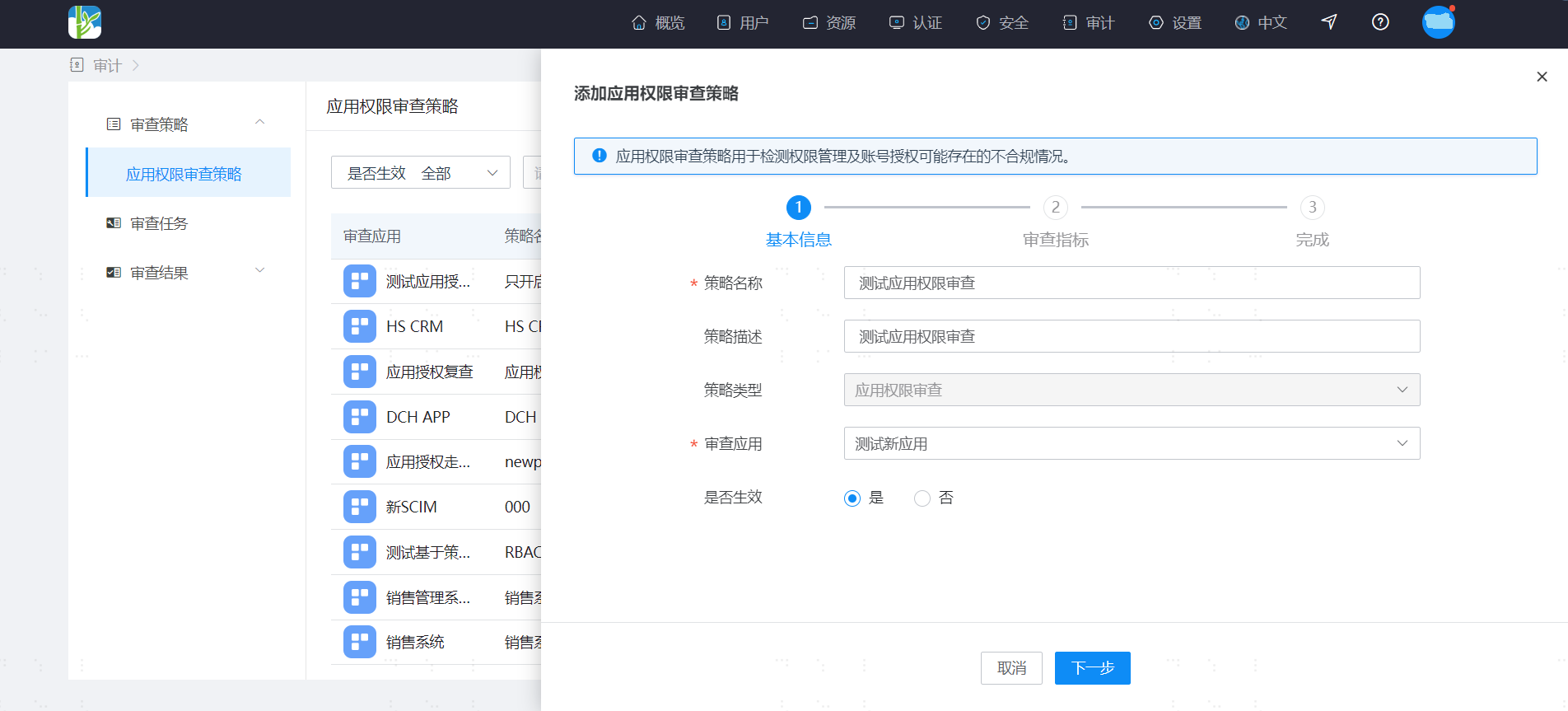
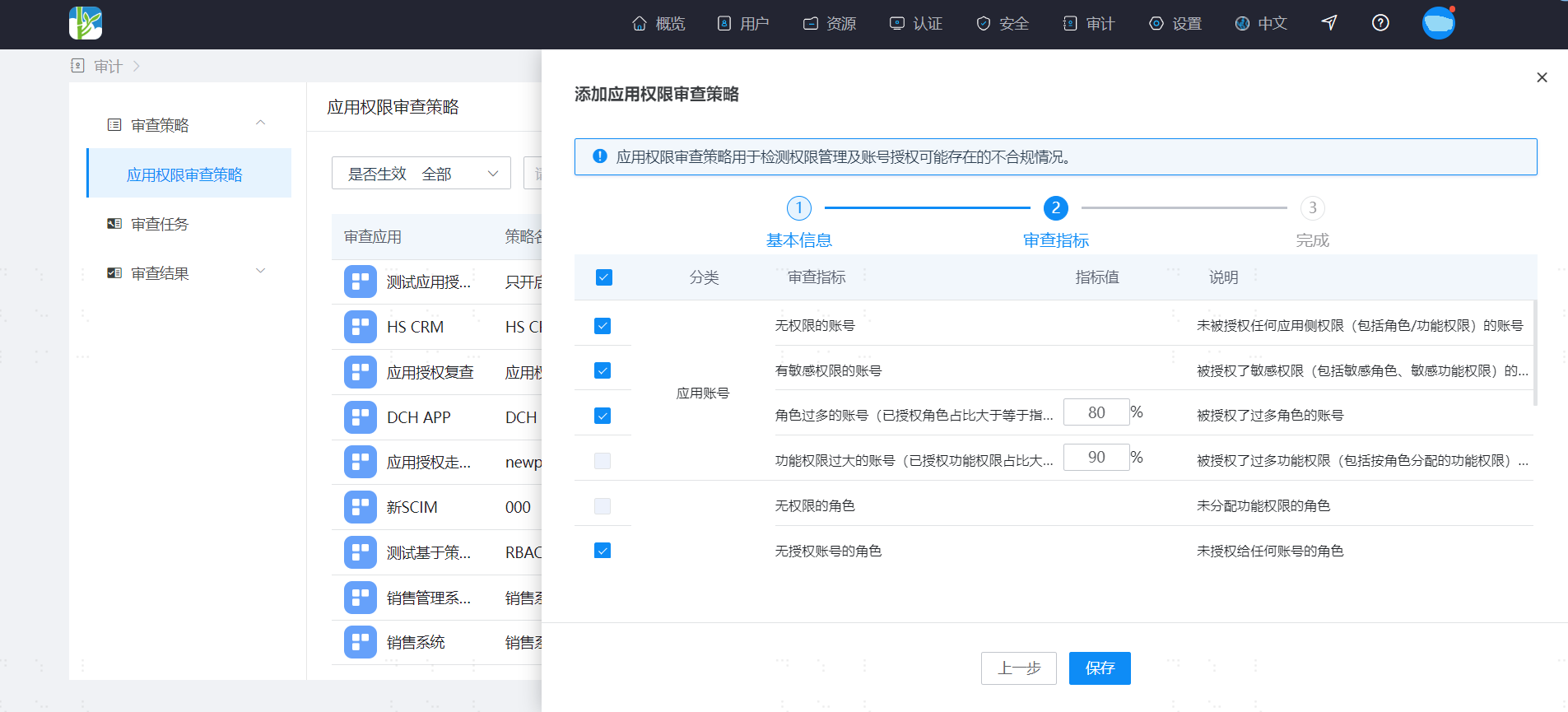
Configuring an application permission review policy mainly involves 2 steps:
Define the basic policy information
Configure application permission review metrics
# Create Application Permission Review Task
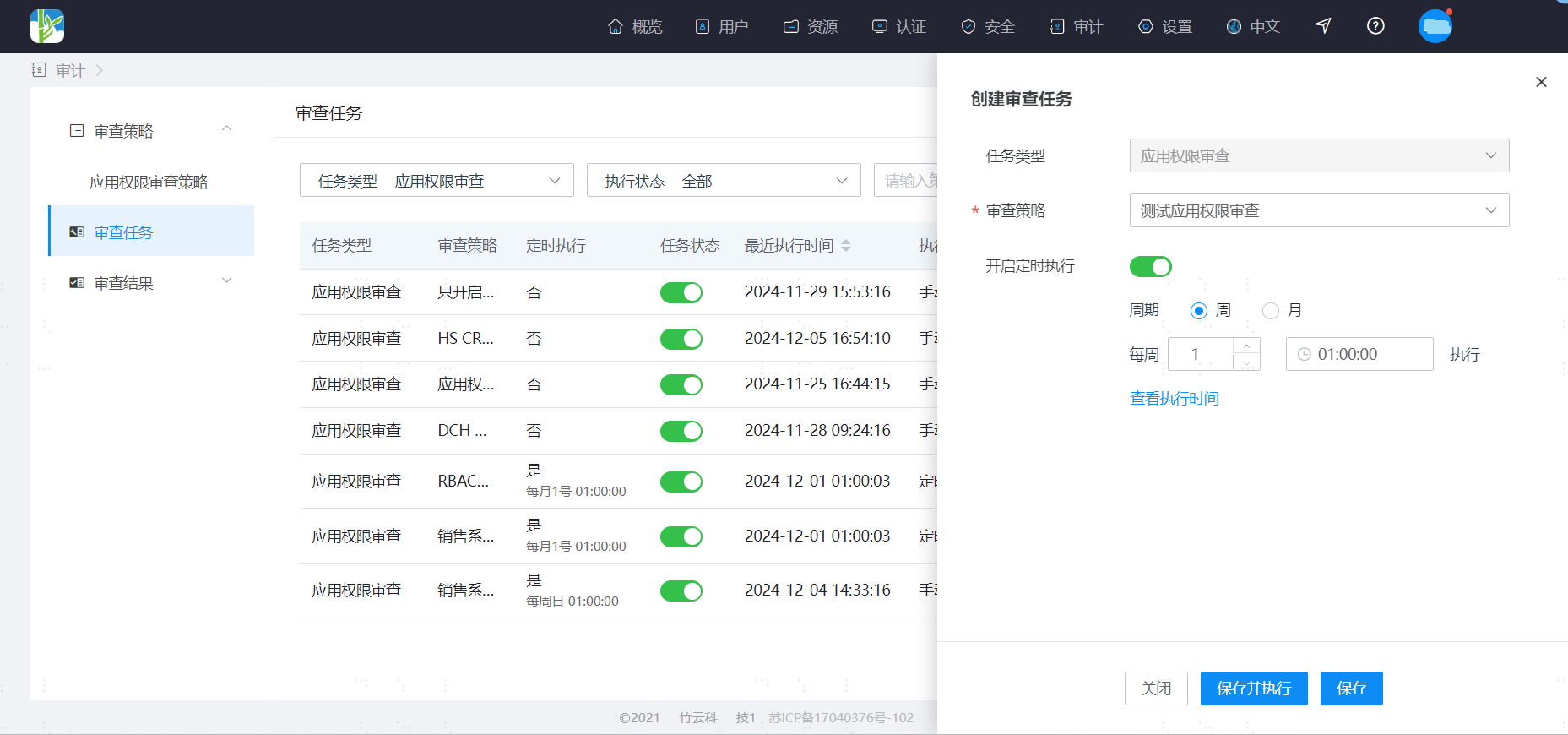
Create an application permission review task to execute the defined application permission review policy. It can be executed on a scheduled periodic basis or manually.
During manual execution, you can confirm the review metrics, supporting the selection of a subset of metrics from the defined policy for quick execution.
# View Application Permission Review Results
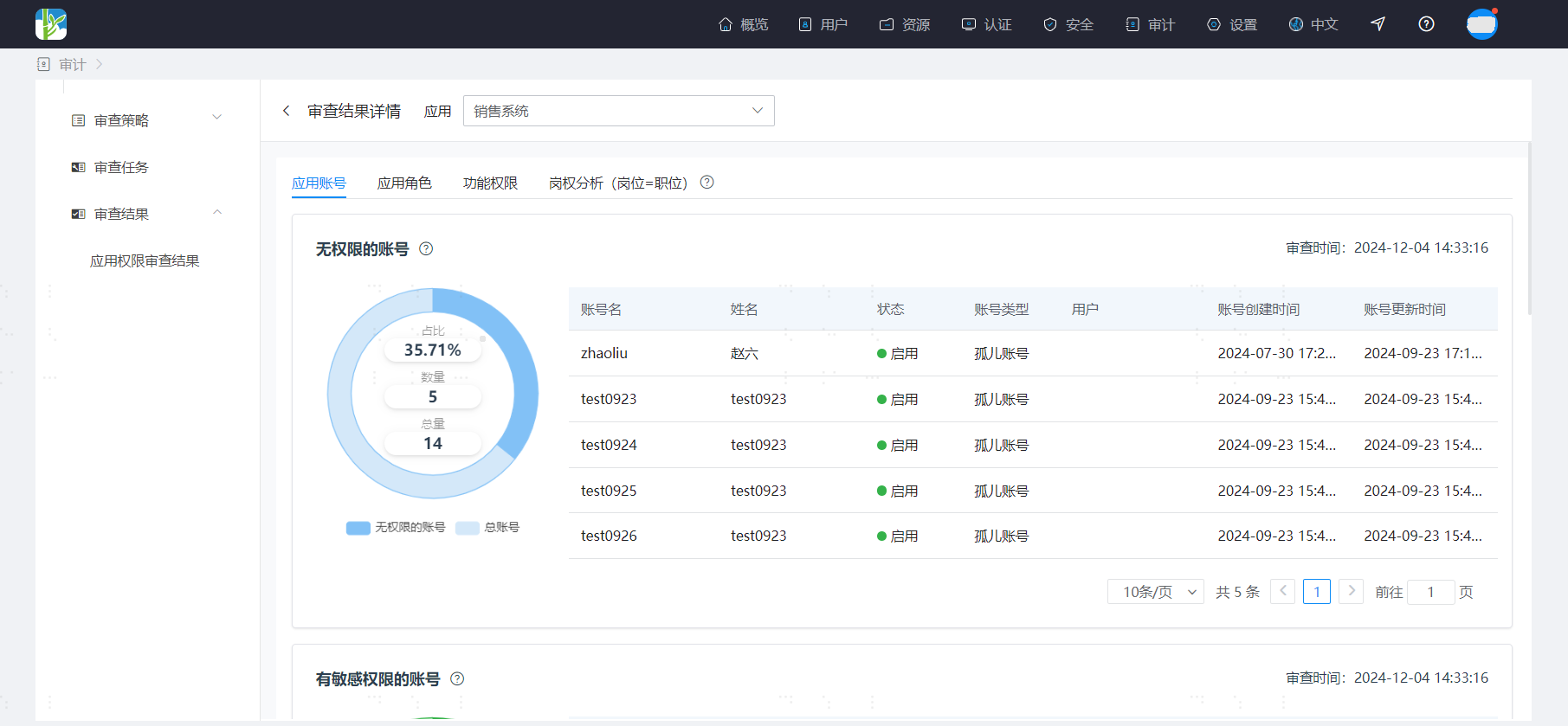
After the application permission review task is executed, you can view the review results. View the results per application, examining the outcomes of the review metrics from the policies configured for the selected application. The results are divided into 4 parts: Application Accounts, Application Roles, Functional Permissions, and Position-Power Analysis.
When viewing the review results, first look at the overall results for each review item to get an overview of the general situation.
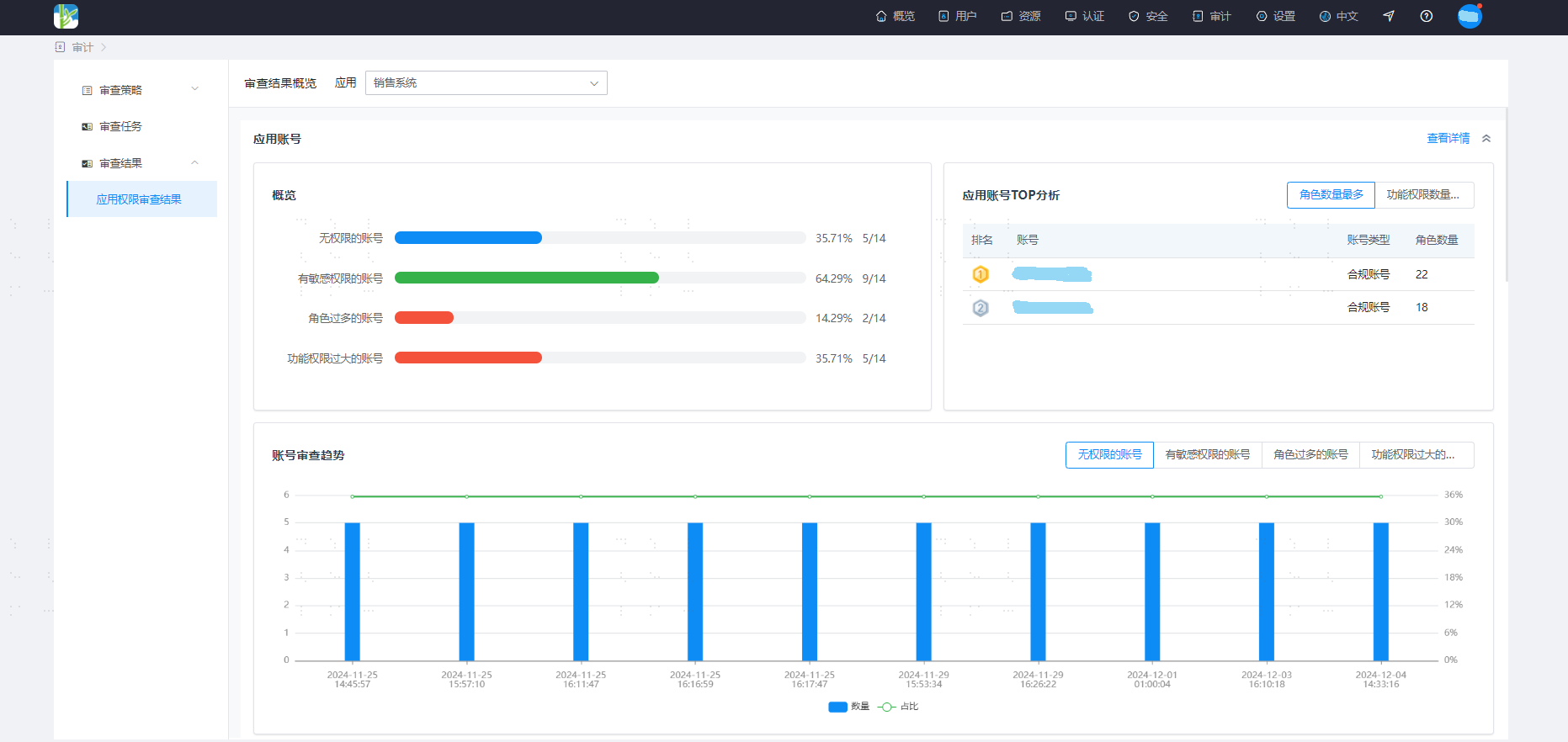
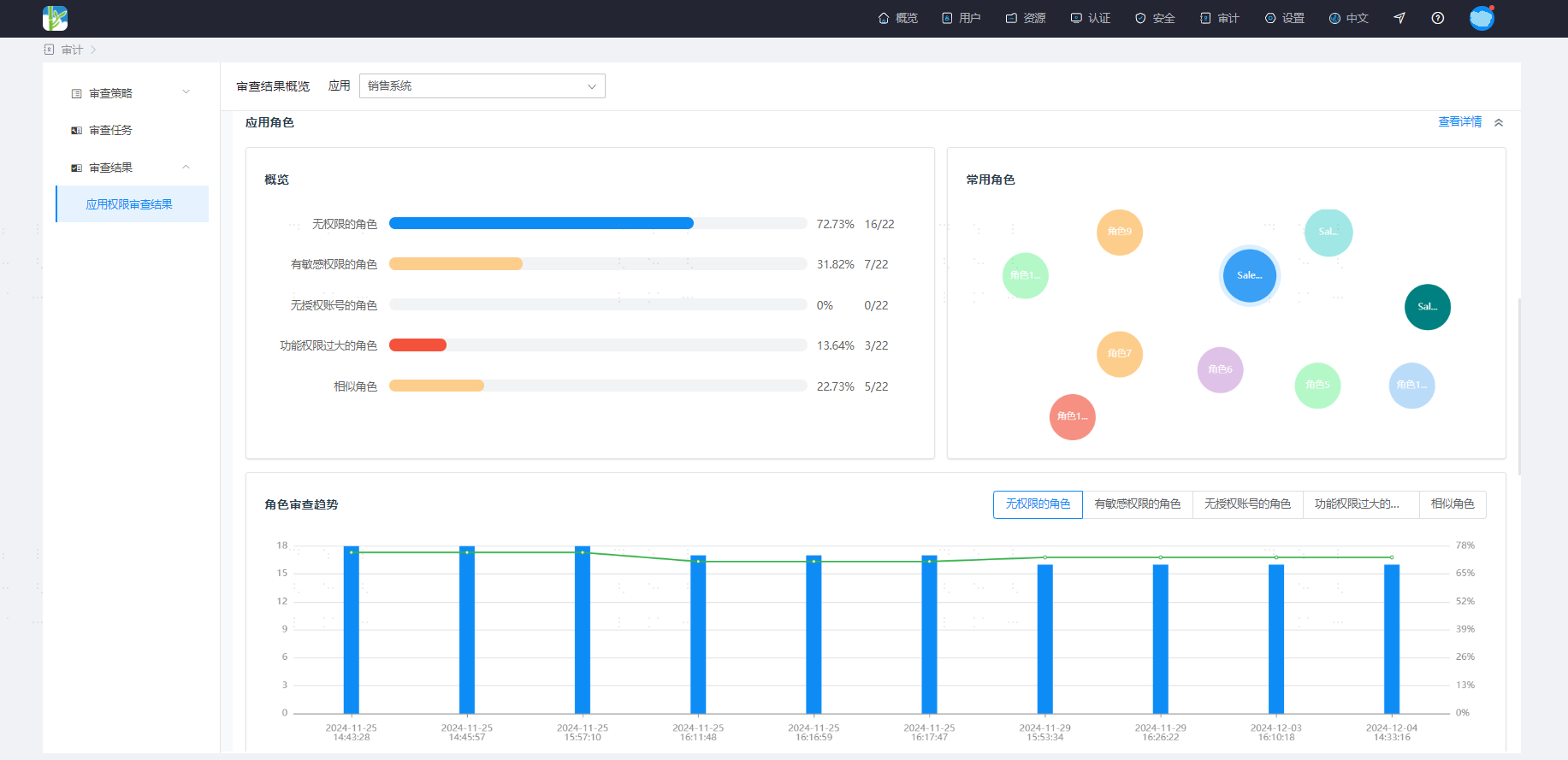
You can enter the details page to further view detailed data.