Gateway Introduction
Gateway
# Introduction
The Application Security Gateway, Gateway, as an efficient application proxy server solution, greatly simplifies the configuration process of reverse proxy and injects powerful access control and security protection capabilities into applications.
It can be easily installed and started with just a few commands, enabling intelligent management and security enhancement of application traffic.
# Server Requirements
# Operating System Version
Gateway is deployed on Linux servers. We recommend using stable and widely supported Linux versions, such as CentOS 7.x and Ubuntu 22.04 LTS.
For other Linux distributions, please contact our support team promptly if any issues arise.
# Environment Requirements
- Support for the iptables tool
# Network Requirements
Outbound
- Must be able to access the IDaaS service. Allow IP: 39.100.248.219, Port: 443. Failure to configure this IP may result in inability to access the IDaaS service normally.
- Must be able to access the proxied applications
Inbound
- Requires a public IP address to expose the port configured for the gateway server, enabling access from the external network, e.g., port 443.
- For gateway server configuration details, refer to: Gateway Management - Adding a Gateway Server
# Certificate Requirements
- Apply for the TLS certificate for the application, along with the certificate private key. The certificate and private key need to be uploaded in the IDaaS Application Security Gateway.
- For certificate upload details, refer to: Gateway Management - Configuring Gateway Certificate
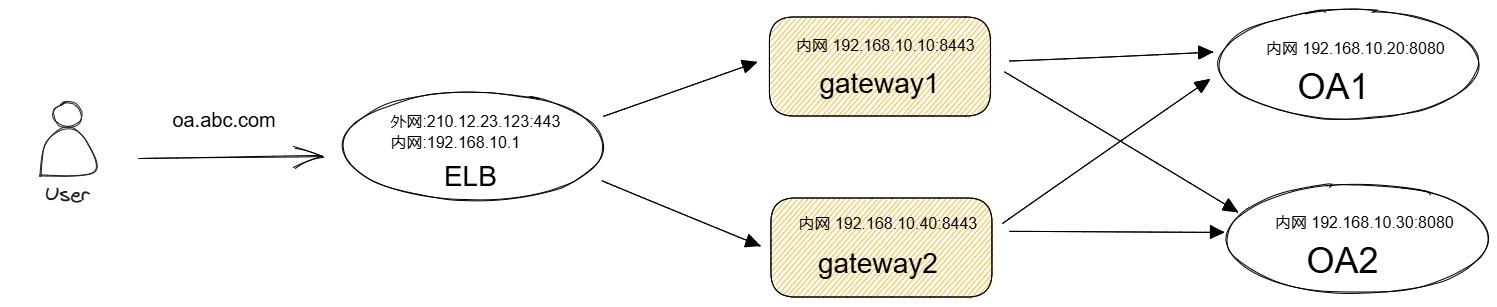
# Deployment Architecture
# Standalone Deployment
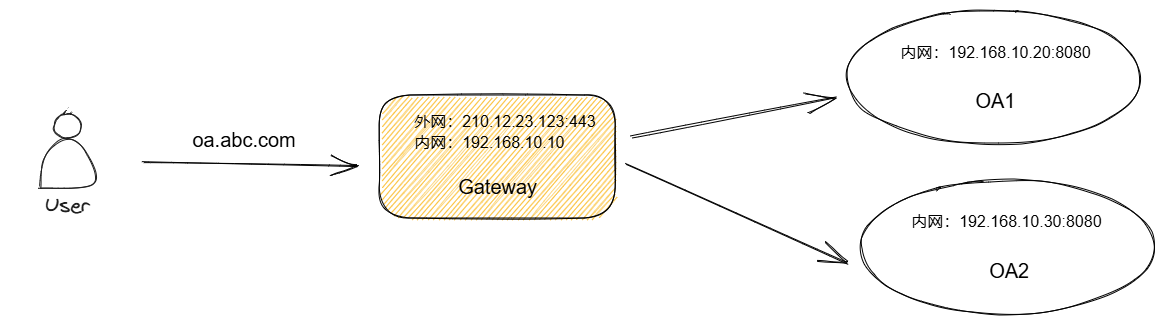
# Cluster Deployment