
Safari Blocks Third-Party Cookies, Preventing User Login Status Retrieval
# Problem Description
In cross-site scenarios, Apple's Safari browser cannot retrieve the user login status API (https://{domain_name}/api/v1/config/isLogin) from Bamboo Cloud IDaaS, whereas browsers on Windows and Android systems can successfully obtain the user's login status.
# Problem Analysis
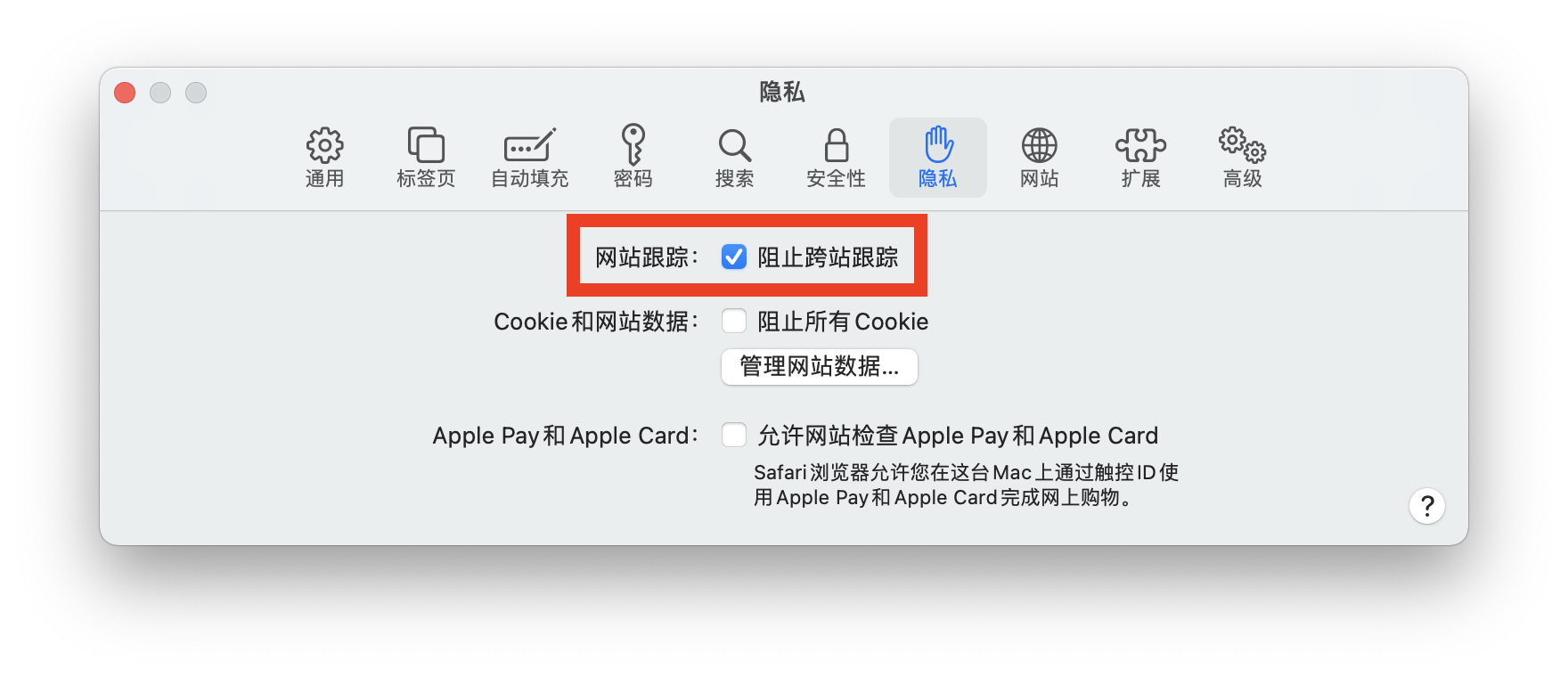
Currently, major browser vendors are continuously strengthening browser security restrictions to protect user privacy. Apple Safari adopts a more conservative cookie security policy and enables "Prevent Cross-Site Tracking" by default, which blocks cross-site access to third-party cookies. Other browser vendors will gradually follow suit with similar restrictions; it is currently just a matter of time. This configuration in Safari does not affect business application systems that directly use the integrated unified login page, but it does impact business systems that directly call IDaaS APIs to retrieve user status. This is because Safari blocks the cross-site submission of IDaaS SSO cookies, causing the API call to fetch user status to always return a "not logged in" state (false).

# Solution
From Safari's perspective, cookies from any third-party site are blocked. A temporary workaround is to instruct users to manually disable "Prevent Cross-Site Tracking," but this results in a poor user experience. The fundamental solution lies in transforming third-party cookies into first-party cookies, making the API calls from the application system to Bamboo Cloud IDaaS same-site requests, thereby avoiding the browser's rule of blocking third-party cookies.
For example, the default domain assigned by IDaaS to an enterprise customer is companyname.bccastle.com, and the application system's domain is app.companyname.com. By utilizing the custom enterprise domain feature provided by IDaaS, the default IDaaS domain can be changed to a domain owned by the enterprise itself, such as login.companyname.com.
login.companyname.com    # IDaaS service after custom enterprise domain configuration
app.companyname.com      # Application system domain
2
⚠️ Browser security policies are constantly evolving. The content described in this article may become outdated after some time.
# Related Concepts
When dealing with front-end technologies, Same-Origin and Same-Site are frequently encountered terms.
# Same Origin
Same Origin = Scheme + Hostname + Port
A request URL is considered cross-origin or cross-domain if any one of its scheme, domain, or port differs from the current page's URL. In other words, violating the same-origin policy means it is cross-origin or cross-domain.
# Same Site
Cookie validation is more lenient. Cookies only focus on the domain, ignoring the scheme and port. Two URLs are considered same-site if their eTLD+1 is the same. eTLD stands for effective Top-Level Domain, registered in the Public Suffix List maintained by Mozilla, such as .com, .co, .uk, .github.io, etc. eTLD+1 refers to the effective top-level domain plus the second-level domain, for example, taobao.com. Examples:
www.taobao.com and www.baidu.com are cross-site. www.a.taobao.com and www.b.taobao.com are same-site. a.github.io and b.github.io are cross-site.
Summary of cross-site:
- Two URLs are cross-site (also called Third-party) if their top-level domain and second-level domain are different. Cross-site always implies cross-origin, but the reverse is not true.
- If they are the same, they are same-site First-party.
# Summary of Various Scenarios
- Same Origin: Cookies are automatically read, stored, and sent.
- Cross-Origin but Not Cross-Site (Same Site): The backend adds CORS response headers to ensure cross-origin requests work properly. Combined with
XHR.withCredentials=trueon the frontend, cookies can be sent normally. - Cross-Origin and Cross-Site (Cross-site always implies cross-origin): Add
SameSite=None; Secure(Note: Even after settingSameSite=None, Safari still does not send the cookie, while other browsers currently support sending cookies); Or use an nginx reverse proxy to transform cross-site requests into same-site requests, thereby resolving the cookie cross-site issue.
Furthermore, there may be other workaround solutions available online. However, as browser vendors continuously strengthen security restrictions, these could lead to unknown compatibility issues. Application developers need to weigh the pros and cons and think twice before proceeding.