
Failed to Generate Keytab File When Configuring Kerberos Authentication Source
Frequently Asked Questions
# Issue Description
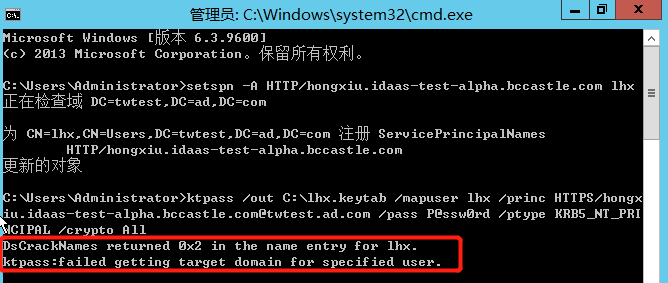
During the configuration phase of the Kerberos authentication source, an error ktpass cannot find the user identity occurs when executing the command to generate the keytab file on the AD domain server, as shown in the figure below.
# Possible Cause
In the Active Directory forest, the user identity query used by ktpass.exe does not have a default domain name to use.
# Solution
Re-execute the following command to generate the keytab file.
ktpass /out {File generation path} /mapuser {AD username created in step 1@AD domain name} /princ HTTPS/{IDaaS tenant domain name@AD domain name} /pass {Password for the AD user created in step 1} /ptype KRB5_NT_PRINCIPAL /crypto All
1