
SMS Login
# Documentation
This document explains how to integrate the SMS login functionality into an Android client. SMS login involves sending an SMS verification code to the user's mobile phone number, and the user authenticates with the IDaaS server using their phone number and the SMS verification code.
# Process Overview
SMS login scenario: The user enters their phone number, clicks the "Get SMS Verification Code" button, which triggers a slider verification. After successful verification, the IDaaS backend sends an SMS verification code to that phone number. The user enters the verification code and clicks login, then the IDaaS backend authenticates and returns a token. The final authentication result is returned to the App.
# SMS Login Process
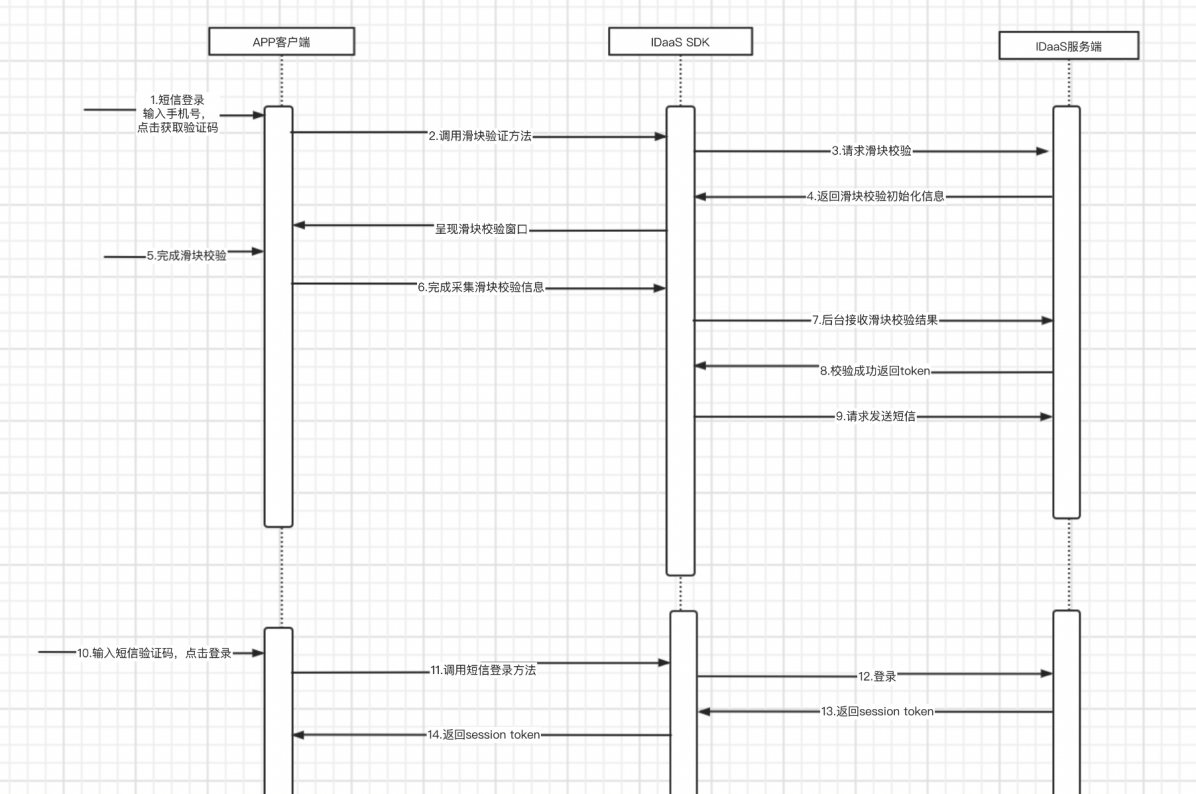
Integration Process Description
The user enters their phone number. The App client checks if the phone number format is valid. The user clicks "Get Verification Code".
The App client calls the slider verification method. The IDaaS SDK requests slider verification initialization information from the IDaaS backend and displays the slider verification window on the page.
The user drags the slider to complete the verification. The IDaaS SDK collects the slider verification information and requests verification from the IDaaS server.
The IDaaS server successfully completes the slider verification and returns a token to the IDaaS SDK.
The IDaaS SDK obtains the token and uses it to request the IDaaS server to send the SMS.
The user receives the SMS, enters the verification code, and clicks login.
The App client uses the phone number and verification code to call the IDaaS SDK's SMS login method.
The IDaaS SDK requests SMS login. The IDaaS server initiates the authentication process. If authentication is successful, it returns a Session token to the IDaaS SDK; if unsuccessful, it returns an error code and message to the IDaaS SDK.
The IDaaS SDK obtains the login result and returns it to the App client. The App client proceeds with its own process based on the result.
The client can use the
id_tokento verify the login validity period and obtain basic user information.The client can use the
session_tokento refresh theid_token.
# Preparation
# Import Dependencies
AuthnCenter_Common-1.5.3.aar //Common package
AuthnCenter_SMSLogin-1.5.3.aar //SMS login sdk
2
# Configure build.gradle
Place the aar packages in the libs directory under the App project, and write the following code in build.gradle.
/*begin*/
/*  rxjava2 +  okhttp + retrofit2  */
api 'io.reactivex.rxjava2:rxjava:2.2.10'
api 'io.reactivex.rxjava2:rxandroid:2.1.1'
api 'com.squareup.retrofit2:retrofit:2.6.0'
api 'com.squareup.retrofit2:adapter-rxjava2:2.6.0'
api 'com.squareup.retrofit2:converter-gson:2.6.0'
api 'com.squareup.okhttp3:okhttp:4.3.1'
api 'com.squareup.okhttp3:logging-interceptor:3.6.0'
api 'com.jakewharton.retrofit:retrofit2-rxjava2-adapter:1.0.0'
api 'com.trello.rxlifecycle2:rxlifecycle-components:2.1.0'
/*end*/

/*begin*/
/*  fastjson  */
api 'com.alibaba:fastjson:1.2.61'
/*end*/

/*begin*/
/*  AuthnCenter_Common+ AuthnCenter_SMSLogin */
implementation(name: 'AuthnCenter_Common-1.5.3', ext: 'aar')
implementation(name: 'AuthnCenter_SMSLogin-1.5.3.aar', ext: 'aar')
/*end*/
2
3
4
5
6
7
8
9
10
11
12
13
14
15
16
17
18
19
20
21
22
23
# Configure AndroidManifest
This module SDK does not require special declarations or registrations.
# Development Integration
# SDK Initialization
AuthnCenterSDK.Builder()
                .init(this)
                .setBaseUrl("https://xxx.xxx.com")      //Tenant domain
                .setClientId("xxxx") //Application client-id from tenant backend
                .isCheckSSL(false) //Whether to check SSL certificate
                .logEnable(false).build(); //Whether to enable HTTP request logs. It is recommended to turn off after release.
2
3
4
5
6
# Call Sequence Description {/examples/}
(1) If international number support is enabled, you must first call the international dialing code retrieval interface, bind and display it on the interface, and manually assemble the international dialing code (e.g., +86-13800000000) when passing the phone number to methods that require it. If support is not enabled, ignore this interface.
(2) Call the slider verification (BlockPuzzleDialog ) Pass in the phone number
(3) Call the send SMS verification code method (smsSend) Pass in the phone number and slider verification result
(4) Call the SMS login method (smsLogin) Pass in the phone number and SMS verification code
# Interface Call Description {/examples/}
Send SMS Verification
The App client needs to have its own UI interface, which includes several necessary components: a phone number input field, a verification code input field, a button (or event) to trigger obtaining the verification code, and a login button (or event).
- After the user enters the phone number and before clicking (triggering) the send verification code event, the App client performs phone number format validation.
- When the send verification code event is clicked (triggered), the App client calls the IDaaS SDK's send verification code method, as shown in the following example:
//Send verification code
SendSmsReq sendSmsReq = new SendSmsReq();
sendSmsReq.setMobile(getPhoneNum());
sendSmsReq.setType(SendSmsType.login);
sendSmsReq.setCaptcha_token("The result returned after successful slider verification");
AuthnCenterAPI.Builder().smsSend(mContext, sendSmsReq
        , new RequestListener<BaseResponse>() {
            @Override
            public void success(BaseResponse rsp) {
            }
            @Override
            public void error(String code, String errorMessage) {
            }
        });
2
3
4
5
6
7
8
9
10
11
12
13
14
Phone Number and SMS Verification Code Login
After completing the previous verification code sending, the user receives the SMS verification code, enters it into the verification code field, and triggers the login event. At this point, the App client initiates the SMS login process. Example code is as follows:
AuthnCenterSMSLogin.Builder().smsLogin(mContext, moblie, verifyCode, new LoginListener() {
    @Override
    public void success(String code, String data) {
        ToastUtils.ShowToast(mContext, "SMS login successful, returned data is: " + data);
    }

    @Override
    public void error(String code, String msg) {
        ToastUtils.ShowToast(mContext, msg);
    }
});
2
3
4
5
6
7
8
9
10
11
# Return Codes {/examples/}
| Status Code | Error Code (error_code) | Error Description (error_msg) | Action |
|---|---|---|---|
| 400 | IDAAS.SDK.COMMON.1001 | Parameter {0} cannot be left blank | |
| Parameter {0} cannot be left blank | |||
| 400 | IDAAS.SDK.COMMON.1002 | The {0} parameter format is incorrect | |
| Parameter {0} format is incorrect | |||
| 400 | IDAAS.SDK.COMMON.1003 | Device information is incomplete | |
| Device information is incomplete | |||
| 400 | IDAAS.SDK.COMMON.1004 | Signature decryption error | |
| Signature decryption error | |||
| 400 | IDAAS.SDK.COMMON.1005 | The {0} has failed | |
| {0} has expired | |||
| 400 | IDAAS.SDK.COMMON.1006 | The {0} parameter error | |
| {0} parameter error | |||
| 400 | IDAAS.SDK.COMMON.1007 | The {0} parameter type error | |
| {0} parameter type error | |||
| 500 | IDAAS.SDK.COMMON.1008 | The system is busy. Try again later | |
| The system is busy. Try again later | |||
| 400 | IDAAS.SDK.COMMON.1009 | Unknown authentication configuration | |
| Unknown authentication configuration | |||
| 400 | IDAAS.SDK.COMMON.1010 | Failed to obtain the enterprise center global configuration | |
| Failed to obtain enterprise center global configuration | |||
| 400 | IDAAS.SDK.COMMON.1011 | Failed to obtain the international area code configuration | |
| Failed to obtain international dialing code configuration | |||
| 400 | IDAAS.SDK.COMMON.1012 | The x-client-ID is incorrect and the corresponding application cannot be found | |
| X-client-id is incorrect, cannot find corresponding application | |||
| 400 | IDAAS.SDK.COMMON.1013 | The corresponding user is not found | |
| Corresponding user not found | |||
| 400 | IDAAS.SDK.COMMON.1014 | Application private key not found | |
| Application private key not found | |||
| 400 | IDAAS.SDK.LOGIN.1001 | Error calling interface {0} | |
| Error calling interface {0} | |||
| 400 | IDAAS.SDK.LOGIN.1002 | User not bound | |
| User not bound | |||
| 400 | IDAAS.SDK.LOGIN.1003 | The user has been locked due to too many unsuccessful login attempts. It will be unlocked in {0} minutes and {1} seconds | |
| The user has been locked due to too many unsuccessful login attempts. It will be unlocked in {0} minutes and {1} seconds | |||
| 400 | IDAAS.SDK.LOGIN.1004 | Failed to obtain the password policy | |
| Failed to obtain password policy | |||
| 400 | IDAAS.SDK.LOGIN.1005 | Invalid username or password. Remaining login attempts: {0} | |
| Invalid username or password. Remaining login attempts: {0} | |||
| 400 | IDAAS.SDK.LOGIN.1006 | Configuration error, unable to find wechat authentication source | |
| Configuration error, unable to find WeChat authentication source | |||
| 400 | IDAAS.SDK.LOGIN.1007 | Configuration error, unable to find alipay authentication source | |
| Configuration error, unable to find Alipay authentication source | |||
| 400 | IDAAS.SDK.LOGIN.1008 | The configuration is incorrect. The one-click login authentication source cannot be found | |
| Configuration error, unable to find one-click login authentication source | |||
| 400 | IDAAS.SDK.SMS.1001 | {0} slide base map is not initialized successfully, please check the path | |
| {0} slider base image not initialized successfully, please check the path | |||
| 400 | IDAAS.SDK.SMS.1002 | {0} verification code coordinate resolution failed | |
| {0} verification code coordinate resolution failed | |||
| 400 | IDAAS.SDK.SMS.1003 | {0} verification code coordinate verification fails | |
| {0} verification code coordinate verification failed | |||
| 400 | IDAAS.SDK.SMS.1004 | The graphic verification code is incorrect | |
| Graphic verification code verification error | |||
| 400 | IDAAS.SDK.SMS.1005 | SMS verification code verification is incorrect | |
| SMS verification code verification error | |||
| 400 | IDAAS.SDK.SMS.1006 | The email verification code is incorrect | |
| Email verification code verification error | |||
| 400 | IDAAS.SDK.SMS.1007 | Sending scenario does not exist | |
| Sending scenario does not exist | |||
| 400 | IDAAS.SDK.SMS.1008 | Failed to send the verification code | |
| Failed to send verification code | |||
| 400 | IDAAS.SDK.SOCIAL.1001 | The social account is unbound incorrectly | |
| Social account unbinding error | |||
| 400 | IDAAS.SDK.SOCIAL.1002 | The social account has been bound, please unbind it first | |
| Social account is already bound, please unbind first | |||
| 400 | IDAAS.SDK.PWD.1001 | The password length is incorrect | |
| Password length error | |||
| 400 | IDAAS.SDK.PWD.1002 | The password cannot be the username | |
| Password cannot be the username | |||
| 400 | IDAAS.SDK.PWD.1003 | Your password complexity is low | |
| Your password complexity is low | |||
| 400 | IDAAS.SDK.PWD.1004 | The password is weak | |
| The password is weak | |||
| 400 | IDAAS.SDK.PWD.1005 | The password is used before, cannot be used again | |
| This password has been used before and cannot be used again | |||
| 400 | IDAAS.SDK.PWD.1006 | Password cannot username in reverse order | |
| Password cannot be the reverse order of the username | |||
| 400 | IDAAS.SDK.PWD.1007 | The number of repeated password characters exceeded the upper limit | |
| Number of repeated password characters exceeds limit | |||
| 400 | IDAAS.SDK.PWD.1008 | Password cannot contain :username, phone number, email prefix, name in PinYing | |
| Password cannot contain: username, phone number, email prefix, name in Pinyin | |||
| 400 | IDAAS.SDK.MFA.1001 | The mobile doesn't match the user | |
| Phone number does not match the user | |||
| 400 | IDAAS.SDK.MFA.1002 | The access control policy is incorrect | |
| Access control policy configuration error | |||
| 400 | IDAAS.SDK.MFA.1003 | Access control authentication source type conversion error | |
| Access control authentication source type conversion error |
I am ready. Please provide the Markdown content you would like me to translate.