
Password Login
# Documentation Description
This document describes how to integrate the password login function in the Android client.
# Process Description
# Login Process
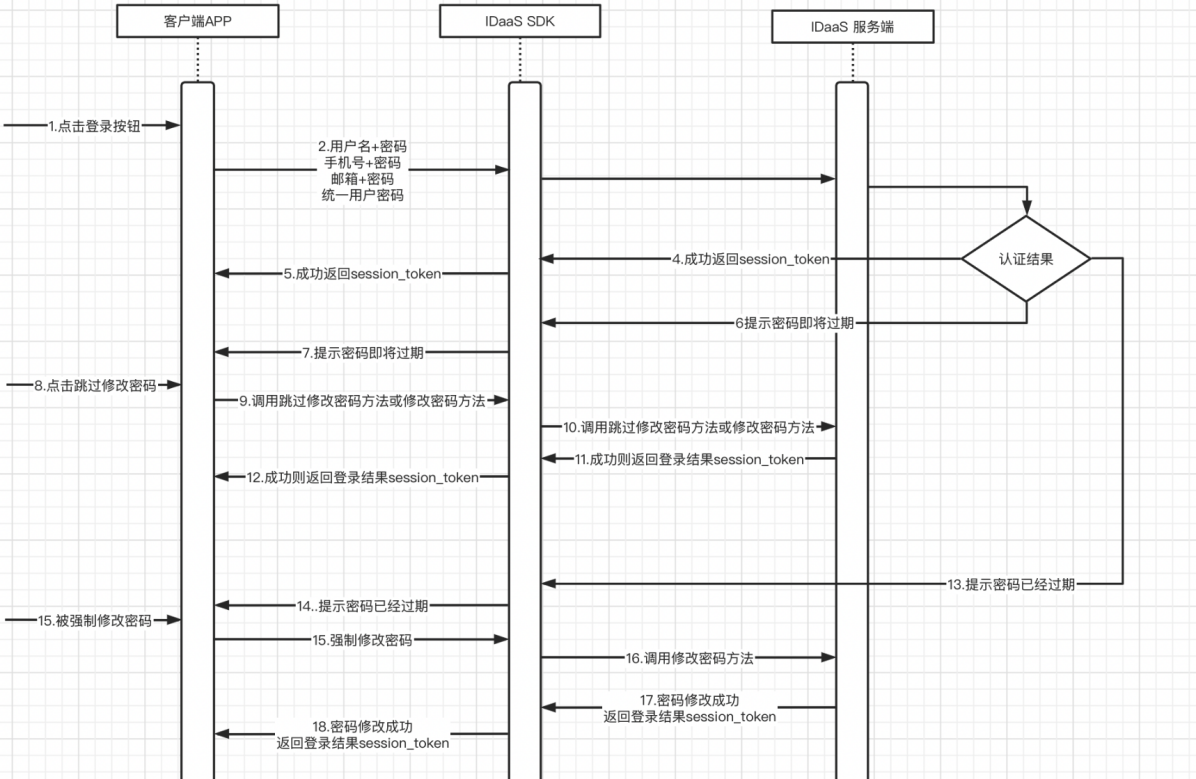
Integration Process Description
The user enters username + password / phone number + password / email + password and clicks the login button.
The APP client calls the login method (4 types).
The IDaaS SDK calls the IDaaS server for authentication. The authentication results are divided into four types (success, password about to expire, password expired, failure).
In case of success, the IDaaS server returns a session_token.
The IDaaS SDK returns the session_token to the APP client.
If the password is about to expire, the IDaaS server returns the parameter indicating the password is about to expire.
The IDaaS SDK returns the "password about to expire" status to the APP client.
The user can choose to skip changing the password or directly change the password.
Based on the button clicked by the user, the APP client calls the method to skip password change or calls the password change method.
The IDaaS SDK calls the IDaaS server's skip password change interface or calls the password change interface.
The IDaaS server validates successfully and returns a session_token; if it fails, it returns an error code.
The IDaaS SDK returns the success/failure parameters to the APP client.
If the password has already expired, the IDaaS server returns the parameter forcing password change to the IDaaS SDK.
The IDaaS SDK returns the parameter forcing password change to the client APP.
The user is forced to change the password, and the APP client calls the password change method.
The IDaaS SDK calls the IDaaS server's password change interface.
The IDaaS server returns a session_token to the IDaaS SDK upon successful password change / returns an error code upon password change failure.
The IDaaS SDK returns the session_token to the APP client upon successful password change / returns an error code upon password change failure.
The client can use the id_token to verify login validity and obtain basic user information.
The client can use the session_token to refresh the id_token.
# Password Recovery Process
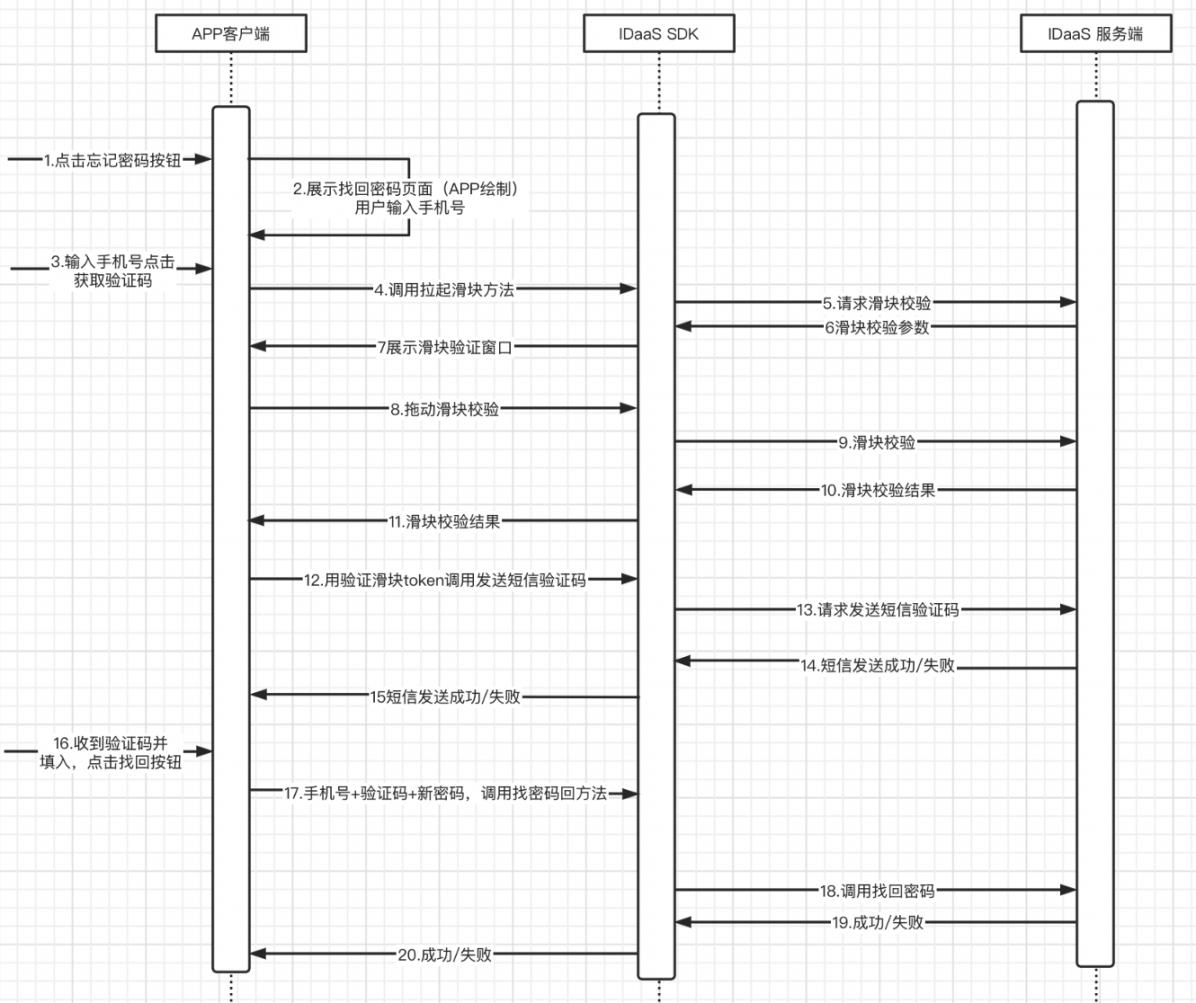
Integration Process Description
The user clicks the "Forgot Password" button.
The APP client displays the password recovery page, which needs to be provided by the APP itself.
The user enters a phone number and clicks the "Get Verification Code" button.
The APP calls the slider verification method.
The IDaaS SDK requests the IDaaS server's slider verification interface.
The IDaaS server returns slider verification parameters.
The IDaaS SDK launches and displays the slider verification window.
The user drags the slider to verify.
The IDaaS SDK sends the slider verification to the IDaaS server.
The IDaaS server returns the slider verification result.
The IDaaS SDK returns the slider verification result to the APP client.
The APP client uses the slider token to call the IDaaS SDK's method for sending SMS verification codes.
The IDaaS SDK calls the IDaaS server's interface for sending verification codes.
The IDaaS server returns the result of sending the verification code to the IDaaS SDK.
The IDaaS SDK returns the result of sending the verification code to the APP client.
The user receives the SMS verification code, enters it, and clicks the "Recover Password" button.
The APP client calls the IDaaS SDK's password recovery method using the phone number + verification code + new password.
The IDaaS SDK calls the IDaaS server's password recovery interface.
The IDaaS server returns the password recovery result to the IDaaS SDK.
The IDaaS SDK returns the password recovery result to the APP client.
# Preparations
# Obtain clientID
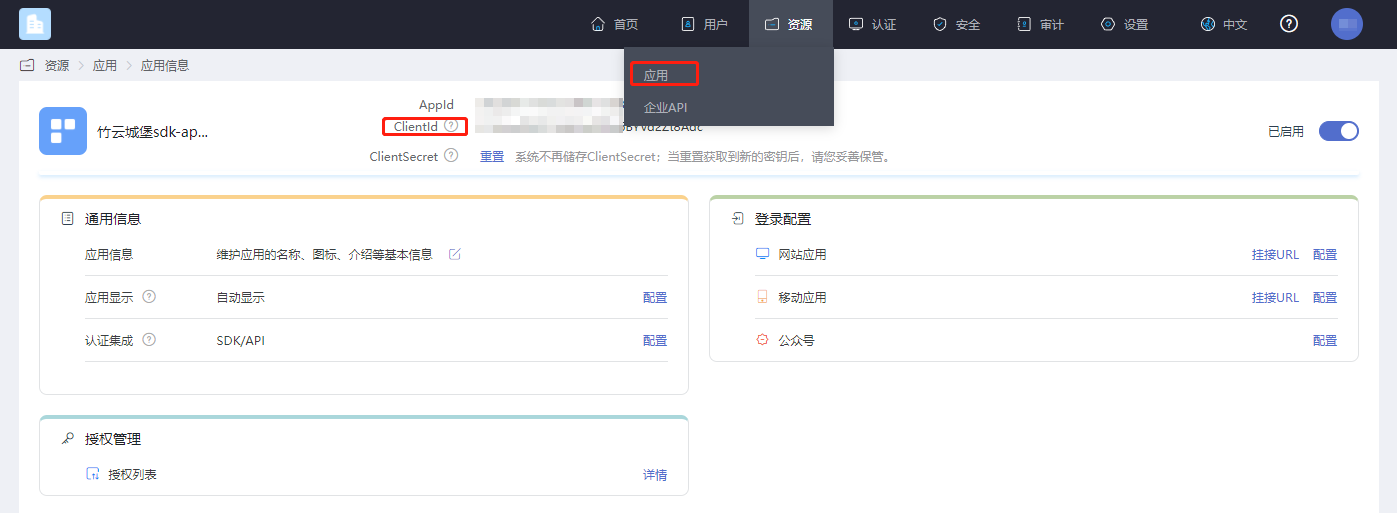
Log in to the IDaaS Enterprise Center platform, click "Resources -> Applications", select the application relevant to you and click to view it.
# Password Policy Settings
This setting is to configure the password expiration time and reminder duration.
First, follow the path in the diagram below to navigate to the password policy module.

Password expiration can be enabled below:
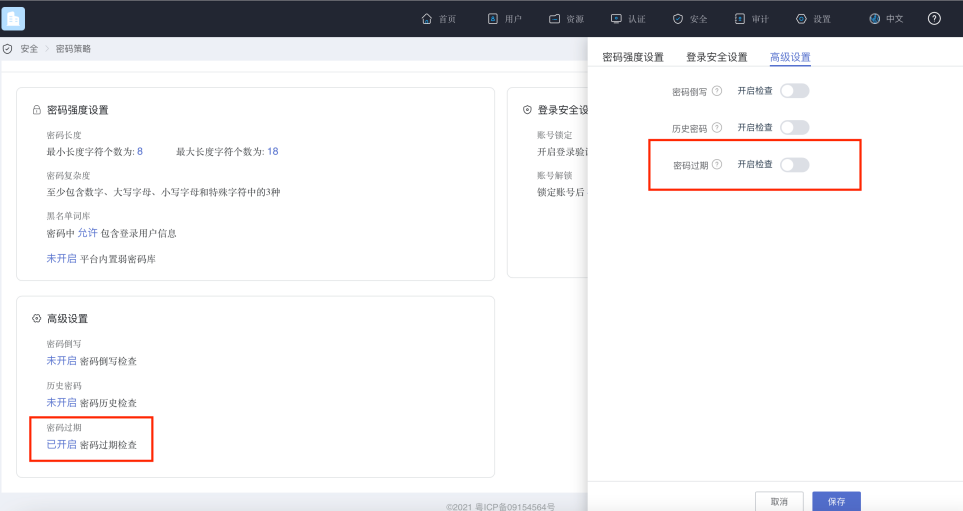
Once enabled, you can set how long the password will expire and the number of days for advance notification as shown in the figure below.
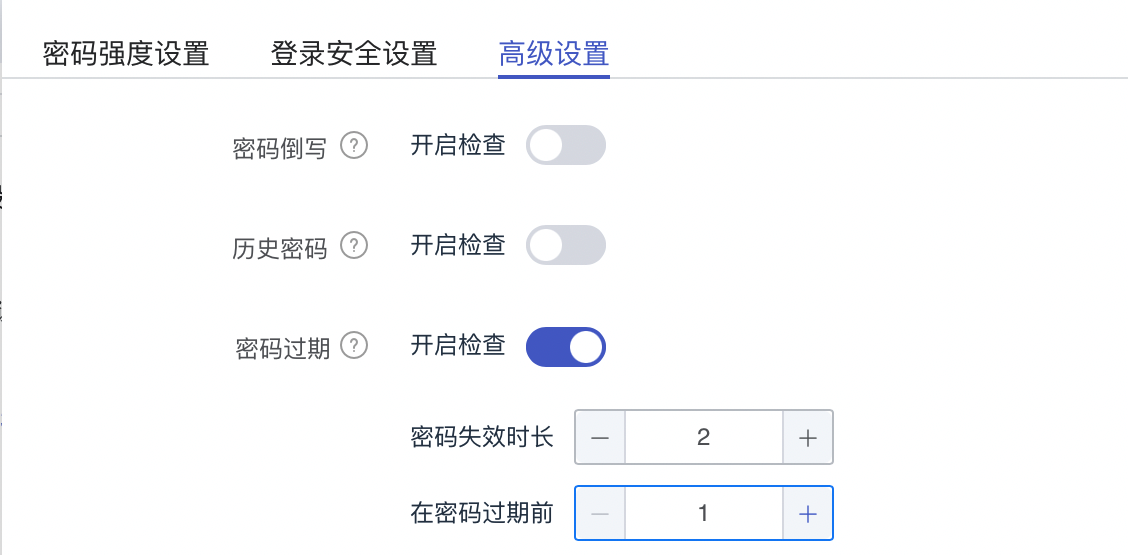
This setting is for the IDaaS server to detect, after login, how long the currently used password needs to be changed, and to prompt the user to modify it several days in advance. Once password expiration check is enabled, it will be performed according to the configured parameters every time you log in.
# Import Dependency Packages
AuthnCenter_Common-1.5.3.aar
AuthnCenter_PWLogin-1.5.3.aar
2
# Configure build.gradle
/*begin*/
    /*  rxjava2 +  okhttp + retrofit2  */
    api 'io.reactivex.rxjava2:rxjava:2.2.10'
    api 'io.reactivex.rxjava2:rxandroid:2.1.1'
    api 'com.squareup.retrofit2:retrofit:2.6.0'
    api 'com.squareup.retrofit2:adapter-rxjava2:2.6.0'
    api 'com.squareup.retrofit2:converter-gson:2.6.0'
    api 'com.squareup.okhttp3:okhttp:4.3.1'
    api 'com.squareup.okhttp3:logging-interceptor:3.6.0'
    api 'com.jakewharton.retrofit:retrofit2-rxjava2-adapter:1.0.0'
    api 'com.trello.rxlifecycle2:rxlifecycle-components:2.1.0'
    api 'com.alibaba:fastjson:1.2.61'
     /*end*/

    //Common library, required
    implementation(name: 'AuthnCenter_Common-1.5.3', ext: 'aar')
    //Password login SDK, required
    implementation(name: ''AuthnCenter_PWDLogin-1.5.3', ext: 'aar')
2
3
4
5
6
7
8
9
10
11
12
13
14
15
16
17
18
# Configure AndroidManifest
 <!--Permissions-->
    <uses-permission android:name="android.permission.INTERNET" />
    <uses-permission android:name="android.permission.WRITE_EXTERNAL_STORAGE" />
    <uses-permission android:name="android.permission.READ_EXTERNAL_STORAGE" />
    <uses-permission android:name="android.permission.CAMERA" />
    <uses-permission android:name="android.permission.RECORD_AUDIO" />
    <uses-permission android:name="android.permission.READ_PHONE_STATE" />
    <uses-permission android:name="android.permission.MOUNT_UNMOUNT_FILESYSTEM"/>
2
3
4
5
6
7
8
# Development Integration
# SDK Initialization
AuthnCenterSDK.Builder()
                .init(this)
                .setBaseUrl("https://xxx.xxx.com")      //Tenant domain
                .setClientId("xxxx") //Application client-id from the tenant backend
                .isCheckSSL(false) //Whether to check SSL certificate
                .logEnable(false).build(); //Whether to enable HTTP request logs. It is recommended to turn this off after going live.
2
3
4
5
6
# Interface Call Instructions
Obtaining Mobile International Dialing Codes
If international number support is enabled, please first call the international dialing code acquisition interface. This interface returns a configured list of international dialing codes, along with regular expressions for phone numbers. The figure below shows how to configure the international dialing code list and the preferred code.
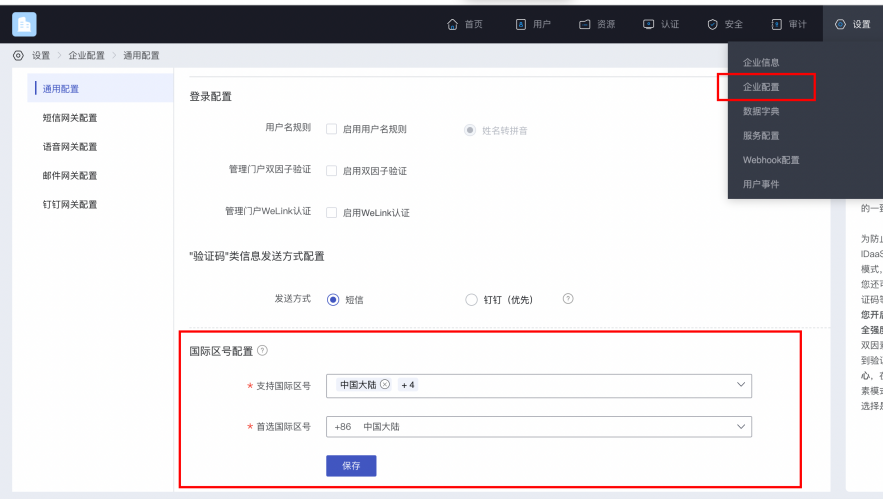
Example code for retrieving the list of international dialing codes:
AuthnCenterAPI.Builder().getCountryCode(this, new RequestListener<CountryCodeInfoRsp>() {
    @Override
    public void success(CountryCodeInfoRsp codeInfoRsp) {

    }

    @Override
    public void error(String code, String errorMessage) {
    }
});
2
3
4
5
6
7
8
9
10
Successful example with code=0, data value:
{
	"phoneAreaCodeDefinitions": [
		{
			"areaCode": "86",
			"displayMapping": {
				"zh-TW": "中國大陸",
				"en": "China",
				"zh-CN": "中国大陆"
			},
			"countryCode": "CN",
			"mobileRegex": "^(\\+86){0,1}\\-?1\\d{10}$",
			"areaCodeSuffixes": []
		},
		{
			"areaCode": "852",
			"displayMapping": {
				"zh-TW": "中國香港",
				"en": "Hong Kong",
				"zh-CN": "中国香港"
			},
			"countryCode": "HK",
			"mobileRegex": "^(\\+852){1}\\-?0{0,1}[1,4,5,6,7,8,9](?:\\d{7}|\\d{8}|\\d{12})$",
			"areaCodeSuffixes": []
		},
		{
			"areaCode": "886",
			"displayMapping": {
				"zh-TW": "中國臺灣",
				"en": "Taiwan",
				"zh-CN": "中国台湾"
			},
			"countryCode": "TW",
			"mobileRegex": "^(\\+886){1}\\-?[6,7,9](?:\\d{7}|\\d{8})$",
			"areaCodeSuffixes": []
		},
		{
			"areaCode": "853",
			"displayMapping": {
				"zh-TW": "中國澳門",
				"en": "Macau",
				"zh-CN": "中国澳门"
			},
			"countryCode": "MO",
			"mobileRegex": "^(\\+853){1}\\-?0{0,1}[1,4,5,6,7,8,9](?:\\d{7}|\\d{8}|\\d{12})$",
			"areaCodeSuffixes": []
		},
		{
			"areaCode": "93",
			"displayMapping": {
				"zh-TW": "阿富汗",
				"en": "Afghanistan",
				"zh-CN": "阿富汗"
			},
			"countryCode": "AF",
			"mobileRegex": "^(\\+93){1}\\-\\d{6,11}",
			"areaCodeSuffixes": []
		}
	],
	"preferredAreaCode": "CN"
}
2
3
4
5
6
7
8
9
10
11
12
13
14
15
16
17
18
19
20
21
22
23
24
25
26
27
28
29
30
31
32
33
34
35
36
37
38
39
40
41
42
43
44
45
46
47
48
49
50
51
52
53
54
55
56
57
58
59
60
Return parameters:
| Parameter Name | Chinese Name | Type | Description |
|---|---|---|---|
| preferredAreaCode | Preferred International Dialing Code | String | The preferred international dialing code configured for the current enterprise center |
| countryCode | Country/Region Code | String | Country/Region Code |
| areaCode | International Telephone Area Code | String | International Telephone Area Code |
| areaCodeSuffixes | International Telephone Area Code Suffix | String | International Telephone Area Code Suffix |
| mobileRegex | Mobile Number Format Regular Expression | String | Mobile Number Format Regular Expression |
| displayMapping | Multilingual Display Name Mapping | String | Multilingual Display Name Mapping |
Built-in Sliding Verification
Human-machine interaction verification is required when sending verification codes:
BlockPuzzleDialog mBlockPuzzleDialog = new BlockPuzzleDialog(mContext);
mBlockPuzzleDialog.setOnResultsListener(new OnResultsListener() {
        @Override
        public void onResultsClick(String result) {
            LogUtil.getInstance().d("Secondary verification callback result mCaptchaToken:" + result);
            //This callback result is the captchaToken parameter for SMS verification
        }
        @Override
        public void onError(String code, String msg) {
            ToastUtils.ShowToast(mContext, String.format("Error code : %s  Error message : %s", code, msg));
        }
    });
2
3
4
5
6
7
8
9
10
11
12
Username and Password Login
AuthnCenterPW.Builder().userLoginRequest(this, name, pwd, new PWLoginListener<LoginRsp>() {
    @Override
    public void success(String code, LoginRsp rsp) {
        loginRsp = rsp;
        if (code.equals(SDKCodeType.SDK_SUCCESS.getCode())) {
            ToastUtils.ShowToast(MainActivity.this, "Login successful, returned data: " + rsp.getSession_token());
            return;
        }
        onNext(code); //Determine if the password is expired based on the return value. Refer to the return CODE for judgment. 10006: password expired, 10007: password about to expire. Integrators can refer to the DEMO's onNext method.
    }
    @Override
    public void error(String code, String t) {
        ToastUtils.ShowToast(MainActivity.this, "Login failed, returned data: " + t);
    }
});
2
3
4
5
6
7
8
9
10
11
12
13
14
15
Mobile Number and Password Login
AuthnCenterPW.Builder().userLoginMobilePwd(this, name, pwd, new  PWLoginListener<LoginRsp>() {
    @Override
    public void success(String code, LoginRsp rsp) {
        loginRsp = rsp;
        if (code.equals(SDKCodeType.SDK_SUCCESS.getCode())) {
            ToastUtils.ShowToast(MainActivity.this, "Login successful, returned data: " + rsp.getSession_token());
            return;
        }
        onNext(code);
    }
    @Override
    public void error(String code, String t) {
        ToastUtils.ShowToast(MainActivity.this, "Login failed, returned data: " + t);
    }
});
2
3
4
5
6
7
8
9
10
11
12
13
14
15
Email and Password Login
AuthnCenterPW.Builder().userLoginEmailPwd(this, name, pwd, new PWLoginListener<LoginRsp>() {

    @Override
    public void success(String code, LoginRsp rsp) {
        loginRsp = rsp;
        if (code.equals(SDKCodeType.SDK_SUCCESS.getCode())) {
            ToastUtils.ShowToast(MainActivity.this, "Login successful, returned data: " + rsp.getSession_token());
            return;
        }
        onNext(code);
    }
    @Override
    public void error(String code, String t) {
        ToastUtils.ShowToast(MainActivity.this, "Login failed, returned data: " + t);
    }
});
2
3
4
5
6
7
8
9
10
11
12
13
14
15
16
Unified Username/Password Login
AuthnCenterPW.Builder().userLoginAuthRequest(this, name, pwd, new  PWLoginListener<LoginRsp>() {
    @Override
    public void success(String code, LoginRsp rsp) {
        loginRsp = rsp;
        if (code.equals(SDKCodeType.SDK_SUCCESS.getCode())) {
            ToastUtils.ShowToast(MainActivity.this, "Login successful. Returned data: " + rsp.getSession_token());
            return;
        }
        onNext(code); //Determine if the password has expired based on the return value. Refer to the return CODE for judgment. 10006: Password expired, 10007: Password about to expire.

    }
    @Override
    public void error(String code, String t) {
        ToastUtils.ShowToast(MainActivity.this, "Login failed. Returned data: " + t);
    }
});
2
3
4
5
6
7
8
9
10
11
12
13
14
15
16
Skip Password Change
AuthnCenterPW.Builder().skipPwd(MainActivity.this, loginRsp.getState_token(), new PWLoginListener<LoginRsp>() {
    @Override
    public void success(String code, LoginRsp rsp) {
        loginRsp = rsp;
        ToastUtils.ShowToast(MainActivity.this, "Skip change successful. Returned data: " + rsp.getSession_token());
    }
    @Override
    public void error(String code, String t) {
        ToastUtils.ShowToast(MainActivity.this, "Skip change failed. Returned data: " + t);
    }
});
2
3
4
5
6
7
8
9
10
11
Force Password Change
UpdatePwdReq up = new UpdatePwdReq();
up.setOld_password(oldPwd);
up.setNew_password(newPwd);
AuthnCenterPW.Builder().updatePwd(MainActivity.this, up, loginRsp.getState_token(), new PWLoginListener<LoginRsp>() {
    @Override
    public void success(String code, LoginRsp rsp) {
        loginRsp = rsp;
        ToastUtils.ShowToast(MainActivity.this, "Force change successful. Returned data: " + rsp.getSession_token());
    }
    @Override
    public void error(String code, String t) {
        ToastUtils.ShowToast(MainActivity.this, "Force change failed. Returned data: " + t);
    }
});
2
3
4
5
6
7
8
9
10
11
12
13
14
SMS Registration
UserInfoReq ur = new UserInfoReq();
ur.setUser_name(et_name.getText().toString().replace(" ", ""));
ur.setPwd(et_new_pwd.getText().toString().replace(" ", ""));
ur.setMobile(moblie);
ur.setVerify_code(verifyCode);
ur.setAttr_birthday(et_new_birthday.getText().toString().replace(" ", ""));
ur.setName("Test One");
ur.setAttr_nick_name("Test Alias");
ur.setMailing_address("Test Address");
ur.setZip_code("430000");
ur.setAttr_gender(SexType.MALE.getSex()); //Gender enumeration
ur.setEmail("111@111.com");
ur.setFirst_name("Test First_name");
ur.setLast_name("Test Last_name");
ur.setIndustry("Test Industry");
ur.setHead_img("https://www.baidu.com/img/PCtm_d9c8750bed0b3c7d089fa7d55720d6cf.png");
TestExtensionBean tb = new TestExtensionBean();
tb.setAge(12);
ur.setExtension(tb);
AuthnCenterPW.Builder().userRegister(RegisterActivity.this, ur, new PWLoginListener<LoginRsp>() {
    @Override
    public void success(String code, LoginRsp rsp) {
        if (code.equals(SDKCodeType.SDK_SUCCESS.getCode()))
            ToastUtils.ShowToast(RegisterActivity.this, "Registration successful: " + rsp.getSession_token());
    }
    @Override
    public void error(String code, String t) {
        ToastUtils.ShowToast(RegisterActivity.this, "Registration failed: " + t);
    }
});
2
3
4
5
6
7
8
9
10
11
12
13
14
15
16
17
18
19
20
21
22
23
24
25
26
27
28
29
30
Explanation of related fields for the UserInfoReq SMS registration entity.
| Parameter Name | Chinese Name | Required | Type | Description |
|---|---|---|---|---|
| user_name | Username | No | String | |
| name | Full Name | No | String | |
| mobile | Mobile Number | Yes | String | |
| verify_code | SMS Verification Code | Yes | String | |
| No | String | |||
| pwd | Password | No | String | |
| head_img | Profile Picture (URL) | No | String | |
| attr_gender | Gender | No | String | Allowed values: female: Female; male: Male; unknow: Secret |
| attr_birthday | Birthday | No | String | Format: yyyy-MM-dd |
| attr_nick_name | Nickname | No | String | |
| mailing_address | Mailing Address | No | String | |
| zip_code | Postal Code | No | String | |
| first_name | First Name | No | String | |
| middle_name | Middle Name | No | String | |
| last_name | Last Name | No | String | |
| industry | Industry | No | String | |
| extension | Extended Attributes | No | JSONObject | Extended attributes need to be defined within the enterprise |
# Return Codes
| Status Code | Error Code (error_code) | Error Description (error_msg) | Handling Measures |
|---|---|---|---|
| 400 | IDAAS.SDK.COMMON.1001 | Parameter {0} cannot be left blank | |
| Parameter {0} cannot be empty | |||
| 400 | IDAAS.SDK.COMMON.1002 | The {0} parameter format is incorrect | |
| Parameter {0} format error | |||
| 400 | IDAAS.SDK.COMMON.1003 | Device information is incomplete | |
| Device information is incomplete | |||
| 400 | IDAAS.SDK.COMMON.1004 | Signature decryption error | |
| Signature decryption error | |||
| 400 | IDAAS.SDK.COMMON.1005 | The {0} has failed | |
| {0} has expired | |||
| 400 | IDAAS.SDK.COMMON.1006 | The {0} parameter error | |
| {0} parameter error | |||
| 400 | IDAAS.SDK.COMMON.1007 | The {0} parameter type error | |
| {0} parameter type error | |||
| 500 | IDAAS.SDK.COMMON.1008 | The system is busy. Try again later | |
| System busy. Please try again later | |||
| 400 | IDAAS.SDK.COMMON.1009 | Unknown authentication configuration | |
| Unknown authentication configuration | |||
| 400 | IDAAS.SDK.COMMON.1010 | Failed to obtain the enterprise center global configuration | |
| Failed to obtain enterprise center global configuration | |||
| 400 | IDAAS.SDK.COMMON.1011 | Failed to obtain the international area code configuration | |
| Failed to obtain international area code configuration | |||
| 400 | IDAAS.SDK.COMMON.1012 | The x-client-ID is incorrect and the corresponding application cannot be found | |
| X-client-id error, corresponding application not found | |||
| 400 | IDAAS.SDK.COMMON.1013 | The corresponding user is not found | |
| Corresponding user not found | |||
| 400 | IDAAS.SDK.COMMON.1014 | Application private key not found | |
| Application private key not found | |||
| 400 | IDAAS.SDK.LOGIN.1001 | Error calling interface {0} | |
| Error calling interface {0} | |||
| 400 | IDAAS.SDK.LOGIN.1002 | User not bound | |
| User not bound | |||
| 400 | IDAAS.SDK.LOGIN.1003 | The user has been locked due to too many unsuccessful login attempts. It will be unlocked in {0} minutes and {1} seconds | |
| User has been locked due to multiple failed login attempts. It will be unlocked in {0} minutes and {1} seconds | |||
| 400 | IDAAS.SDK.LOGIN.1004 | Failed to obtain the password policy | |
| Error obtaining password policy | |||
| 400 | IDAAS.SDK.LOGIN.1005 | Invalid username or password. Remaining login attempts: {0} | |
| Invalid username or password. Remaining login attempts: {0} | |||
| 400 | IDAAS.SDK.LOGIN.1006 | Configuration error, unable to find wechat authentication source | |
| Configuration error, WeChat authentication source not found | |||
| 400 | IDAAS.SDK.LOGIN.1007 | Configuration error, unable to find alipay authentication source | |
| Configuration error, Alipay authentication source not found | |||
| 400 | IDAAS.SDK.LOGIN.1008 | The configuration is incorrect. The one-click login authentication source cannot be found | |
| Configuration error, one-click login authentication source not found | |||
| 400 | IDAAS.SDK.SMS.1001 | {0} slide base map is not initialized successfully, please check the path | |
| {0} slide base map not initialized successfully, please check the path | |||
| 400 | IDAAS.SDK.SMS.1002 | {0} verification code coordinate resolution failed | |
| {0} verification code coordinate resolution failed | |||
| 400 | IDAAS.SDK.SMS.1003 | {0} verification code coordinate verification fails | |
| {0} verification code coordinate verification failed | |||
| 400 | IDAAS.SDK.SMS.1004 | The graphic verification code is incorrect | |
| Graphic verification code verification error | |||
| 400 | IDAAS.SDK.SMS.1005 | SMS verification code verification is incorrect | |
| SMS verification code verification error | |||
| 400 | IDAAS.SDK.SMS.1006 | The email verification code is incorrect | |
| Email verification code verification error | |||
| 400 | IDAAS.SDK.SMS.1007 | Sending scenario does not exist | |
| Sending scenario does not exist | |||
| 400 | IDAAS.SDK.SMS.1008 | Failed to send the verification code | |
| Failed to send verification code | |||
| 400 | IDAAS.SDK.SOCIAL.1001 | The social account is unbound incorrectly | |
| Social account unbinding error | |||
| 400 | IDAAS.SDK.SOCIAL.1002 | The social account has been bound, please unbind it first | |
| Social account is already bound, please unbind first | |||
| 400 | IDAAS.SDK.PWD.1001 | The password length is incorrect | |
| Password length error | |||
| 400 | IDAAS.SDK.PWD.1002 | The password cannot be the username | |
| Password cannot be the username | |||
| 400 | IDAAS.SDK.PWD.1003 | Your password complexity is low | |
| Your password complexity is too low | |||
| 400 | IDAAS.SDK.PWD.1004 | The password is weak | |
| Password is weak | |||
| 400 | IDAAS.SDK.PWD.1005 | The password is used before, cannot be used again | |
| This password has been used before and cannot be used again | |||
| 400 | IDAAS.SDK.PWD.1006 | Password cannot username in reverse order | |
| Password cannot be the reverse order of the username | |||
| 400 | IDAAS.SDK.PWD.1007 | The number of repeated password characters exceeded the upper limit | |
| Number of repeated password characters exceeds limit | |||
| 400 | IDAAS.SDK.PWD.1008 | Password cannot contain :username, phone number, email prefix, name in PinYing | |
| Password cannot contain: username, phone number, email prefix, name in Pinyin | |||
| 400 | IDAAS.SDK.MFA.1001 | The mobile doesn't match the user | |
| Phone number does not match the user | |||
| 400 | IDAAS.SDK.MFA.1002 | The access control policy is incorrect | |
| Access control policy configuration error | |||
| 400 | IDAAS.SDK.MFA.1003 | Access control authentication source type conversion error | |
| Access control authentication source type conversion error |
I am ready. Please provide the Markdown content you need translated.