
Secondary Biometric Authentication
# Documentation Description
This document describes how to integrate biometric authentication functionality into the Android client. Biometric authentication refers to using the mobile phone's fingerprint/facial recognition function as a multi-factor authentication when logging in on the PC side.
When a user selects "Use authenticator as secondary authentication" during PC login, and simultaneously opens the APP (ensuring the login status and that the device is bound), the App queries the backend for secondary authentication requests. If one exists, the APP triggers the phone's biometric recognition to confirm it is the device owner, and simultaneously notifies the IDaaS server to proceed with the subsequent authentication and authorization process.
# Process Description

Device Binding Integration Process Description
- The App client calls the method to query the device binding status. The IDaaS SDK requests the IDaaS server to check if the device is already bound.
- If the query result indicates the device is not bound, the App client calls the device binding method. The IDaaS SDK initiates the binding process, triggers the phone's fingerprint/facial recognition to confirm it is the device owner. The IDaaS server records the device as bound and returns a binding success/failure result to the App client.
Secondary Authentication Process Description
- The user opens a PC browser to log into the IDaaS system, selects "Use authenticator as secondary authentication", and clicks verify. The App client calls the method to query if there is a secondary authentication request. The IDaaS server returns a random string.
- The App client obtains the random string and uses it to call the secondary authentication method. The IDaaS SDK initiates the secondary authentication process, triggers the phone's fingerprint/facial recognition to confirm it is the device owner, and sends the secondary authentication request to the IDaaS server. After the server verifies successfully, the PC web page automatically refreshes its status.
Unbinding Process Description
- The App client calls the method to query the device binding status. The IDaaS SDK requests the IDaaS server to check if the device is already bound.
- If the query result indicates the device is bound, the App client calls the unbinding method. The IDaaS SDK initiates the unbinding process, triggers the phone's fingerprint/facial recognition to confirm it is the device owner. The IDaaS server records the device as unbound and returns an unbinding success/failure result to the App client.
# Preparation
# Obtain clientID
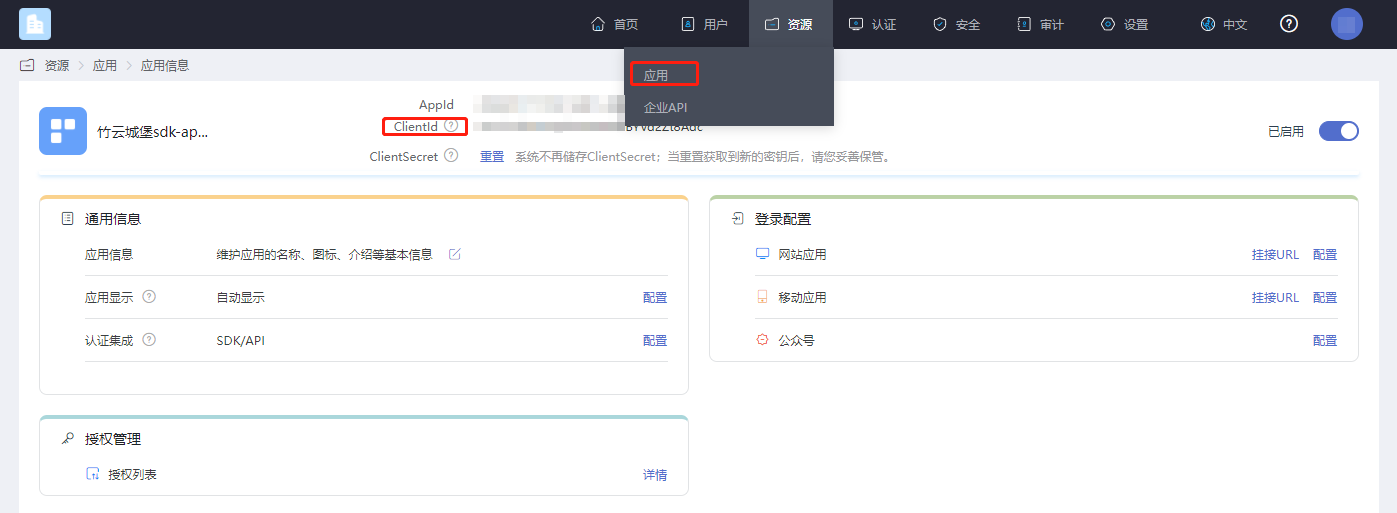
Log in to the IDaaS Enterprise Center platform, click "Resources --> Applications", select the application related to you, and click to view it.
# Enable Secondary Authentication
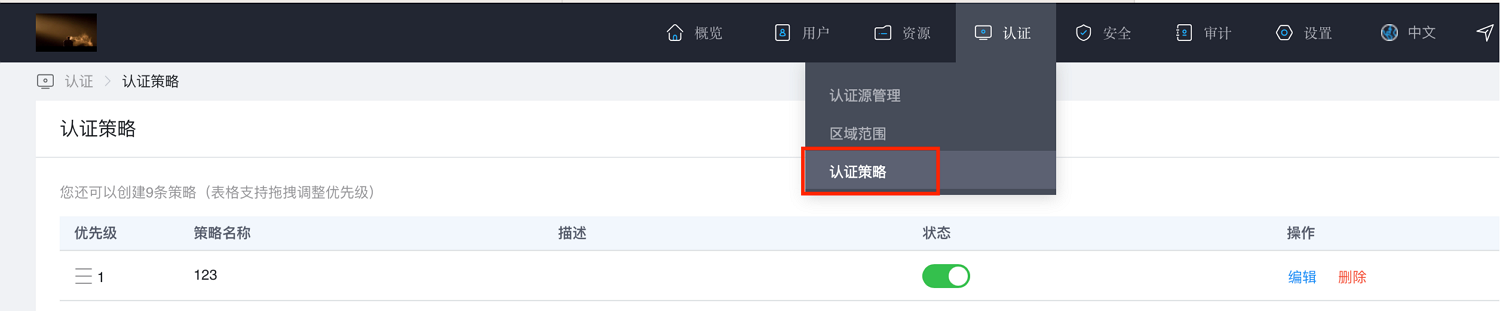
Log in to the IDaaS Enterprise Center platform, click "Authentication --> Authentication Policies".
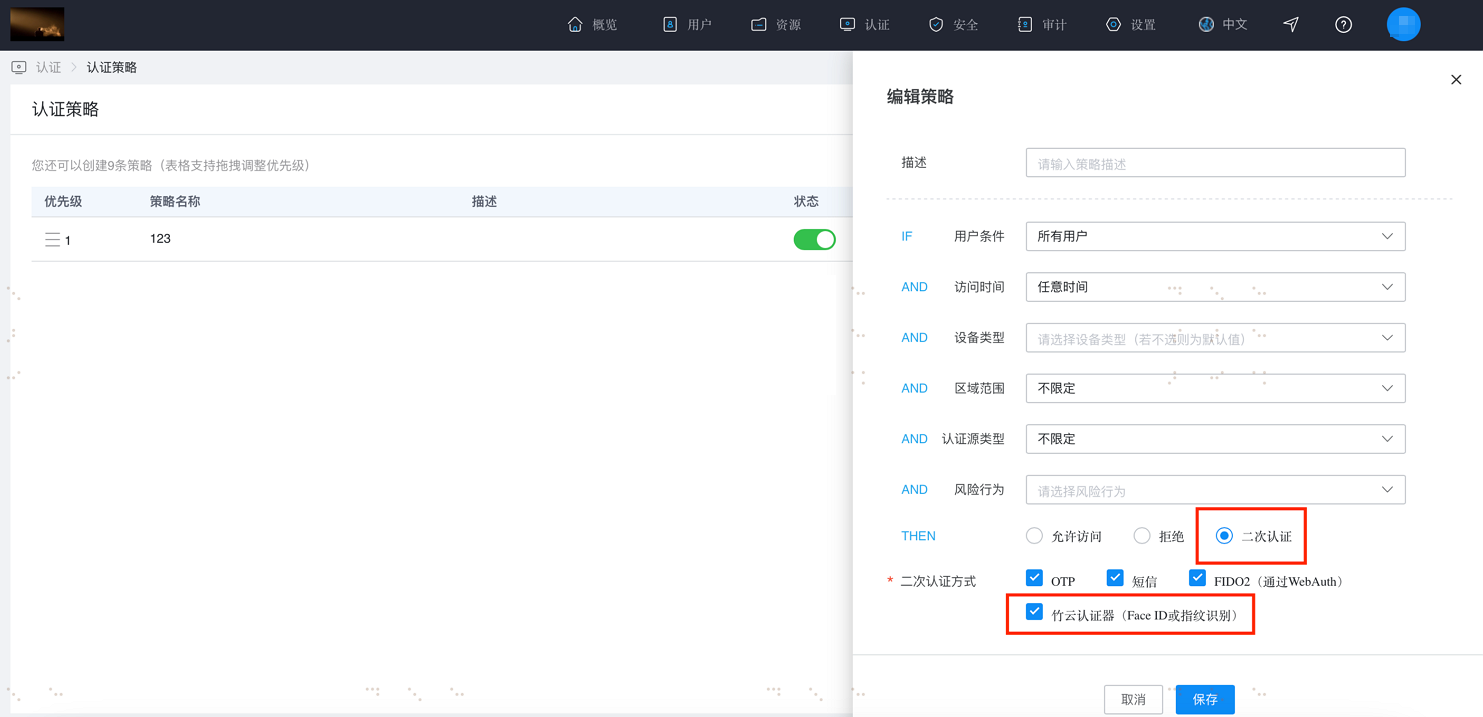
Click "Add Policy". A policy panel will pop up on the right side. Enter a description, check "Secondary Authentication" and "Zhuyun Authenticator (FaceID or Fingerprint Recognition)", then click OK.
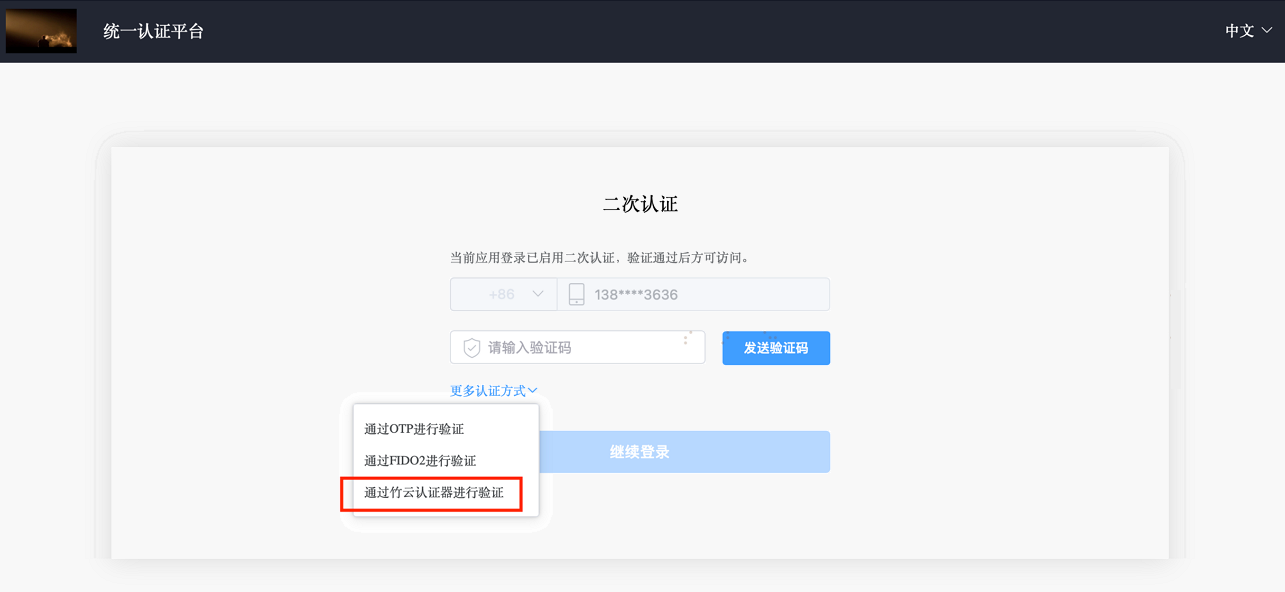
After configuring as per the above steps, on the login user center page, after the primary login step where secondary authentication is required, the option "Verify via Zhuyun Authenticator" will appear.
# Import Dependency Packages
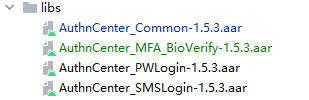
AuthnCenter_Common-1.5.3.aar
AuthnCenter_MFA_BioVerify-1.5.3.aar
2
Drag the IDaaS SDK into the project and import it as shown below:
# Configure build.gradle
  /*begin*/
    /*  rxjava2 +  okhttp + retrofit2  */
    api 'io.reactivex.rxjava2:rxjava:2.2.10'
    api 'io.reactivex.rxjava2:rxandroid:2.1.1'
    api 'com.squareup.retrofit2:retrofit:2.6.0'
    api 'com.squareup.retrofit2:adapter-rxjava2:2.6.0'
    api 'com.squareup.retrofit2:converter-gson:2.6.0'
    api 'com.squareup.okhttp3:okhttp:4.3.1'
    api 'com.squareup.okhttp3:logging-interceptor:3.6.0'
    api 'com.jakewharton.retrofit:retrofit2-rxjava2-adapter:1.0.0'
    api 'com.trello.rxlifecycle2:rxlifecycle-components:2.1.0'
    api 'com.alibaba:fastjson:1.2.61'

    api 'org.greenrobot:greendao:3.3.0' // add library

    implementation 'com.github.bumptech.glide:glide:4.14.2'
    annotationProcessor 'com.github.bumptech.glide:compiler:4.14.2'
    /*end  */

    api 'io.jsonwebtoken:jjwt-api:0.11.5'
    runtimeOnly 'io.jsonwebtoken:jjwt-impl:0.11.5'
    runtimeOnly('io.jsonwebtoken:jjwt-orgjson:0.11.5') {
        exclude group: 'org.json', module: 'json' //provided by Android natively
    }

    implementation "androidx.biometric:biometric:1.1.0"
2
3
4
5
6
7
8
9
10
11
12
13
14
15
16
17
18
19
20
21
22
23
24
25
26
# Development Integration
# SDK Initialization
AuthnCenterSDK.Builder()
                .init(this)
                .setBaseUrl("https://xxx.xxx.com")      //Tenant domain name
                .setClientId("xxxx") //Application client-id from the tenant backend
                .isCheckSSL(false) //Whether to check SSL certificate
                .logEnable(false).build(); //Whether to enable HTTP request logs. It is recommended to turn off after going live.
2
3
4
5
6
# Call Sequence Description
The SDK includes pre-packaged biometric interfaces and individual business APIs. The caller can flexibly combine them according to their actual business needs.
Description of the business API call sequence.
Check binding status ----> Check if authentication exists ----> Start authentication.
# Business API Call Examples
Check Device Binding Status
  AuthnCenterMFA.Builder().getStatus(this, accountInfo.getIdToken(), new MFAListener<Boolean>() {
            @Override
            public void success(Boolean data) {

            }

            @Override
            public void error(String s, String s1) {
                ToastUtils.ShowToast(InfoActivity.this, String.format("%s %s", s, s1));
            }
        });
2
3
4
5
6
7
8
9
10
11
Bind Device
        try {
           byte[] publicKey = keyStoreUtils.getPublicKey(accountInfo.getUserId()).getEncoded();
           String pk = Base64.encodeToString(publicKey, Base64.DEFAULT).replaceAll("\n", "");
            Map map = new HashMap();
           map.put("publicKey", keyStoreUtils.PublicKeyToPem(pk));

            AuthnCenterMFA.Builder().bind(this, accountInfo.getIdToken(), map, new MFAListener<Boolean>() {
                @Override
               public void success(Boolean o) {
                    ToastUtils.ShowToast(InfoActivity.this, o == true ? "Binding successful" : "Binding failed");
                }

                @Override
                public void error(String s, String s1) {
                    ToastUtils.ShowToast(InfoActivity.this, String.format("%s %s", s, s1));
                }
            });
        } catch (Exception e) {
            ToastUtils.ShowToast(InfoActivity.this, String.format("%s", e.toString()));
            e.printStackTrace();
        }
2
3
4
5
6
7
8
9
10
11
12
13
14
15
16
17
18
19
20
21
Unbind Device
   AuthnCenterMFA.Builder().unbind(this, accountInfo.getIdToken(), new MFAListener<Boolean>() {
            @Override
            public void success(Boolean data) {
                tv_switch.setChecked(data == true ? false : true);
                ToastUtils.ShowToast(InfoActivity.this, data == true ? "Unbind successful" : "Unbind failed");
            }

            @Override
            public void error(String s, String s1) {
                ToastUtils.ShowToast(InfoActivity.this, String.format("%s %s", s, s1));
            }
        });
2
3
4
5
6
7
8
9
10
11
12
Check for Authentication Information
        AuthnCenterMFA.Builder().getAuthentication(this, accountInfo.getIdToken(), new MFAListener<AuthenticationInfo>() {
            @Override
            public void success(AuthenticationInfo data) {

                if (data != null && !TextUtils.isEmpty(data.getRandom())) {

                } else {
                    return;
                }
            }

            @Override
            public void error(String code, String msg) {

            }
        });
2
3
4
5
6
7
8
9
10
11
12
13
14
15
16
Start Authentication
try {
String singMsgTmp = String.format("%s", authenticationInfo.getRandom());
Signature signature = KeyStoreUtils.getInstance(getUserId(accountInfo.getIdToken())).initSignature();
signature.update(singMsgTmp.getBytes());
byte[] valueSign = signature.sign();
String sing = Base64.encodeToString(valueSign, Base64.DEFAULT).replaceAll("\n", "");
Map map = new HashMap();
map.put("signature", sing);
AuthnCenterMFA.Builder().startAuthentication(InfoActivity.this, accountInfo.getIdToken(), map, new MFAListener<Boolean>() {
@Override
public void success(Boolean data) {
if (data)
ToastUtils.ShowToast(mContext, "Authentication successful");
else
ToastUtils.ShowToast(mContext, "Authentication failed");
}
```Java
@Override
public void error(String code, String msg) {
ToastUtils.ShowToast(mContext, String.format("%s %s", code, msg));
}
});
} catch (Exception e) {
ToastUtils.ShowToast(mContext, String.format("%s", e.toString()));
}
```
**Binding Call Method with Biometric Interface**
```Java
AuthnCenterMFA.Builder().startBiometric(this, accountInfo.getIdToken(), BiometricType.BIND, new OnBiometricIdentifyCallback() {
@Override
public void onSucceeded() {
ToastUtils.ShowToast(InfoActivity.this, "Binding successful");
}
@Override
public void onFailed() {
}
@Override
public void onError(String s, String s1) {
ToastUtils.ShowToast(InfoActivity.this, "Binding failed" + s1);
}
@Override
public void onCancel() {
}
});
```
**Unbinding Call Method with Biometric Interface**
```java
AuthnCenterMFA.Builder().startBiometric(this, accountInfo.getIdToken(), BiometricType.UNBIND, new OnBiometricIdentifyCallback() {
@Override
public void onSucceeded() {
ToastUtils.ShowToast(InfoActivity.this, "Unbinding successful");
}
@Override
public void onFailed() {
}
@Override
public void onError(String s, String s1) {
ToastUtils.ShowToast(InfoActivity.this, "Unbinding failed" + s1);
}
@Override
public void onCancel() {
}
});
```
### Return Codes
| <span style="display:inline-block;width:80px">Status Code</span> | <span style="display:inline-block;width:160px">Error Code (error_code)</span> | <span style="display:inline-block;width:160px">Error Description (error_msg)</span> | <span style="display:inline-block;width:100px">Handling Measures</span> |
| :---------------------------------------------------------- | :----------------------------------------------------------- | :----------------------------------------------------------- | :----------------------------------------------------------- |
| 400 | IDAAS.SDK.COMMON.1001 | Parameter {0} cannot be left blank | |
| | | Parameter {0} cannot be empty | |
| 400 | IDAAS.SDK.COMMON.1002 | The {0} parameter format is incorrect | |
| | | Parameter {0} format error | |
| 400 | IDAAS.SDK.COMMON.1003 | Device information is incomplete | |
| | | Device information incomplete | |
| 400 | IDAAS.SDK.COMMON.1004 | Signature decryption error | |
| | | Signature decryption error | |
| 400 | IDAAS.SDK.COMMON.1005 | The {0} has failed | |
| | | {0} has expired | |
| 400 | IDAAS.SDK.COMMON.1006 | The {0} parameter error | |
| | | {0} parameter error | |
| 400 | IDAAS.SDK.COMMON.1007 | The {0} parameter type error | |
| | | {0} parameter type error | |
| 500 | IDAAS.SDK.COMMON.1008 | The system is busy. Try again later | |
| | | System busy. Please try again later | |
| 400 | IDAAS.SDK.COMMON.1009 | Unknown authentication configuration | |
| | | Unknown authentication configuration | |
| 400 | IDAAS.SDK.COMMON.1010 | Failed to obtain the enterprise center global configuration | |
| | | Failed to obtain enterprise center global configuration | |
| 400 | IDAAS.SDK.COMMON.1011 | Failed to obtain the international area code configuration | |
| | | Failed to obtain international area code configuration | |
| 400 | IDAAS.SDK.COMMON.1012 | The x-client-ID is incorrect and the corresponding application cannot be found | |
| | | X-client-id error, cannot find the corresponding application | |
| 400 | IDAAS.SDK.COMMON.1013 | The corresponding user is not found | |
| | | Corresponding user not found | |
| 400 | IDAAS.SDK.COMMON.1014 | Application private key not found | |
| | | Application private key not found | |
| 400 | IDAAS.SDK.LOGIN.1001 | Error calling interface {0} | |
| | | Error calling interface {0} | |
| 400 | IDAAS.SDK.LOGIN.1002 | User not bound | |
| | | User not bound | |
| 400 | IDAAS.SDK.LOGIN.1003 | The user has been locked due to too many unsuccessful login attempts. It will be unlocked in {0} minutes and {1} seconds | |
| | | The user has been locked due to multiple failed login attempts. It will be unlocked in {0} minutes and {1} seconds | |
| 400 | IDAAS.SDK.LOGIN.1004 | Failed to obtain the password policy | |
| | | Failed to obtain password policy | |
| 400 | IDAAS.SDK.LOGIN.1005 | Invalid username or password. Remaining login attempts: {0} | |
| | | Invalid username or password. Remaining login attempts: {0} | |
| 400 | IDAAS.SDK.LOGIN.1006 | Configuration error, unable to find wechat authentication source | |
| | | Configuration error, unable to find WeChat authentication source | |
| 400 | IDAAS.SDK.LOGIN.1007 | Configuration error, unable to find alipay authentication source | |
| | | Configuration error, unable to find Alipay authentication source | |
| 400 | IDAAS.SDK.LOGIN.1008 | The configuration is incorrect. The one-click login authentication source cannot be found | |
| | | Configuration error, unable to find one-click login authentication source | |
| 400 | IDAAS.SDK.SMS.1001 | {0} slide base map is not initialized successfully, please check the path | |
| | | {0} slide base map failed to initialize, please check the path | |
| 400 | IDAAS.SDK.SMS.1002 | {0} verification code coordinate resolution failed | |
| | | {0} verification code coordinate resolution failed | |
| 400 | IDAAS.SDK.SMS.1003 | {0} verification code coordinate verification fails | |
| | | {0} verification code coordinate verification failed | |
| 400 | IDAAS.SDK.SMS.1004 | The graphic verification code is incorrect | |
| | | Graphic verification code validation error | |
| 400 | IDAAS.SDK.SMS.1005 | SMS verification code verification is incorrect | |
| | | SMS verification code validation error | |
| 400 | IDAAS.SDK.SMS.1006 | The email verification code is incorrect | |
| | | Email verification code validation error | |
| 400 | IDAAS.SDK.SMS.1007 | Sending scenario does not exist | |
| | | Sending scenario does not exist | |
| 400 | IDAAS.SDK.SMS.1008 | Failed to send the verification code | |
| | | Failed to send verification code | |
| 400 | IDAAS.SDK.SOCIAL.1001 | The social account is unbound incorrectly | |
| | | Social account unbinding error | |
| 400 | IDAAS.SDK.SOCIAL.1002 | The social account has been bound, please unbind it first | |
| | | Social account already bound, please unbind first | |
| 400 | IDAAS.SDK.PWD.1001 | The password length is incorrect | |
| | | Password length error | |
| 400 | IDAAS.SDK.PWD.1002 | The password cannot be the username | |
| | | Password cannot be the username | |
| 400 | IDAAS.SDK.PWD.1003 | Your password complexity is low | |
| | | Your password complexity is low | |
| 400 | IDAAS.SDK.PWD.1004 | The password is weak | |
| | | Password is weak | |
| 400 | IDAAS.SDK.PWD.1005 | The password is used before, cannot be used again | |
| | | This password has been used before and cannot be used again | |
| 400 | IDAAS.SDK.PWD.1006 | Password cannot username in reverse order | |
| | | Password cannot be the reverse of the username | |
| 400 | IDAAS.SDK.PWD.1007 | The number of repeated password characters exceeded the upper limit | |
| | | Number of repeated password characters exceeds the limit | |
| 400 | IDAAS.SDK.PWD.1008 | Password cannot contain :username, phone number, email prefix, name in PinYing | |
| | | Password cannot contain: username, phone number, email prefix, name in Pinyin | |
| 400 | IDAAS.SDK.MFA.1001 | The mobile doesn't match the user | |
| | | Phone number does not match the user | |
| 400 | IDAAS.SDK.MFA.1002 | The access control policy is incorrect | |
| | | Access control policy configuration error | |
| 400 | IDAAS.SDK.MFA.1003 | Access control authentication source type conversion error | |
| | | Access control authentication source type conversion error | |
I am ready. Please provide the Markdown content you would like me to translate.
2
3
4
5
6
7
8
9
10
11
12
13
14
15
16
17
18
19
20
21
22
23
24
25
26
27
28
29
30
31
32
33
34
35
36
37
38
39
40
41
42
43
44
45
46
47
48
49
50
51
52
53
54
55
56
57
58
59
60
61
62
63
64
65
66
67
68
69
70
71
72
73
74
75
76
77
78
79
80
81
82
83
84
85
86
87
88
89
90
91
92
93
94
95
96
97
98
99
100
101
102
103
104
105
106
107
108
109
110
111
112
113
114
115
116
117
118
119
120
121
122
123
124
125
126
127
128
129
130
131
132
133
134
135
136
137
138
139
140
141
142
143
144
145
146
147
148
149
150
151
152
153
154
155
156
157
158
159
160
161
162
163
164
165
166
167
168
169
170