
QQ Login
# Documentation Description
This document explains how to integrate QQ authorization login functionality into an Android client. When a user clicks the QQ login button on the client APP, the IDaaS SDK triggers the authorization page within the QQ APP. After the user clicks the "Authorize Login" button and the authorization is successful, the QQ APP redirects back to the client APP. At this point, the IDaaS SDK automatically receives the temporary credential and uses it to request authentication from the IDaaS server. The final authentication result is returned to the client APP.
# Process Description
# Login Flow
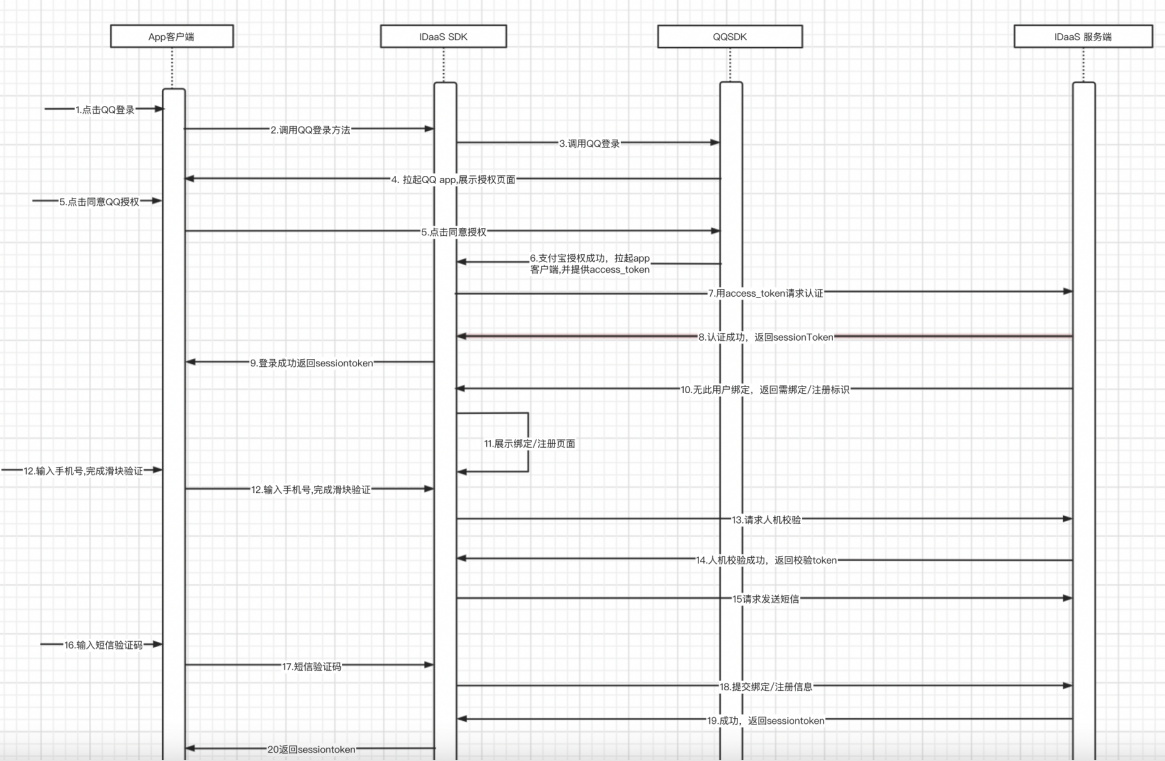
Integration Flow Description
The user clicks the QQ login button on the APP client.
The APP client calls the IDaaS SDK's QQ login method.
The IDaaS SDK calls the QQ SDK's login method.
The QQ SDK launches the QQ APP on the phone and displays the authorization login page.
The user clicks the authorize login button.
QQ authorization is successful, and the client APP is launched, carrying the QQ authorization credential. At this point, the IDaaS SDK automatically obtains the QQ authorization credential during the launch.
IDaaS uses the QQ authorization credential to request authentication from the IDaaS server.
The IDaaS server checks if a phone number is bound. If a phone number is already bound, the IDaaS server authentication succeeds and returns a sessionToken to the IDaaS SDK.
The IDaaS SDK returns the sessionToken to the APP client.
If the IDaaS server finds that no phone number is bound, it returns an identifier indicating that binding or registration is required.
The IDaaS server displays the binding or registration page.
The user enters a phone number, clicks to get a verification code, and completes the slider verification.
The IDaaS SDK sends the slider verification code to the IDaaS server to request slider verification.
The IDaaS server successfully verifies the slider and returns a token to the IDaaS SDK.
The IDaaS SDK uses the token and phone number to request the IDaaS server to send an SMS verification code.
The user receives the SMS verification code, enters it into the verification code input field, and clicks the bind or register button.
The IDaaS SDK submits the binding or registration data to the IDaaS server.
Binding or registration is successful, and the IDaaS server returns a sessionToken to the IDaaS SDK.
The IDaaS SDK returns the sessionToken to the client APP.
# Preparation
# Create an Application on QQ Open Platform
Developers log in to the QQ Open Platform (opens new window), create their own developer account, refer to the official documentation (opens new window) to create a new application, and wait for approval.
For environment setup, please refer to: https://wiki.connect.qq.com/qq%e7%99%bb%e5%bd%95.
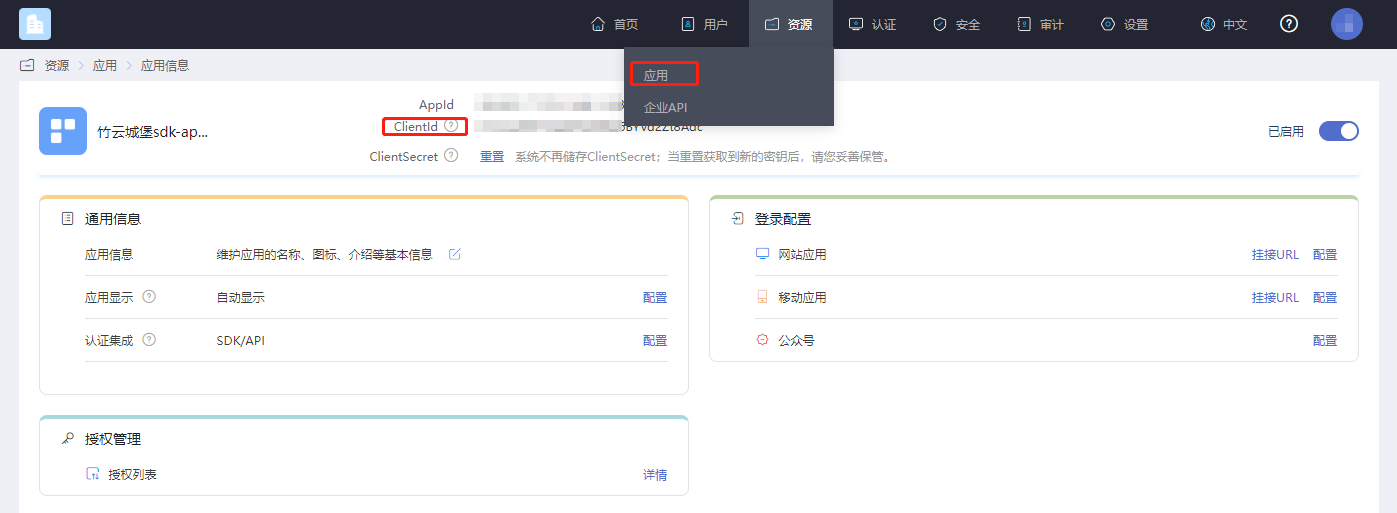
# Obtain the Application clientId
Log in to the IDaaS Enterprise Center platform, click "Resources --> Applications", select the application related to you, and click to view it.
# Configure Authentication Source
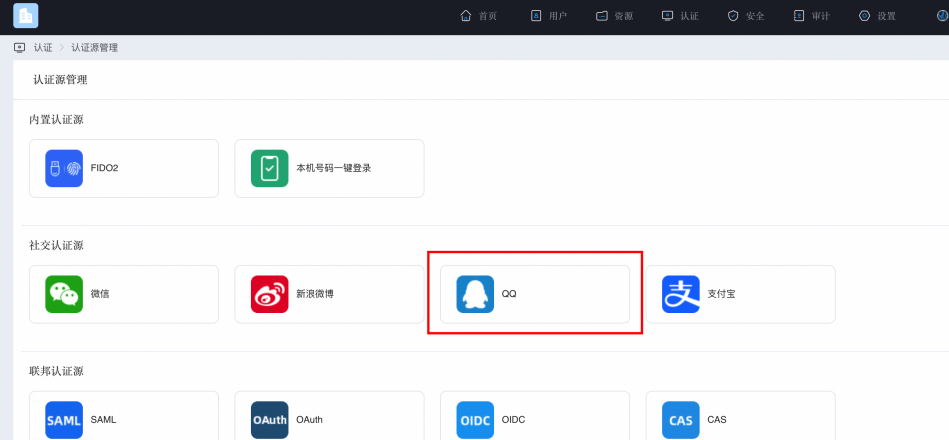
Log in to the IDaaS Enterprise Center platform, click "Authentication --> Authentication Source Management --> QQ".
Click to add an authentication source, fill in the AppKey and AppSecret obtained after registering the application on the QQ Open Platform. Select 'Mobile Application' in the channel selection box. Enter a name in the display name field.
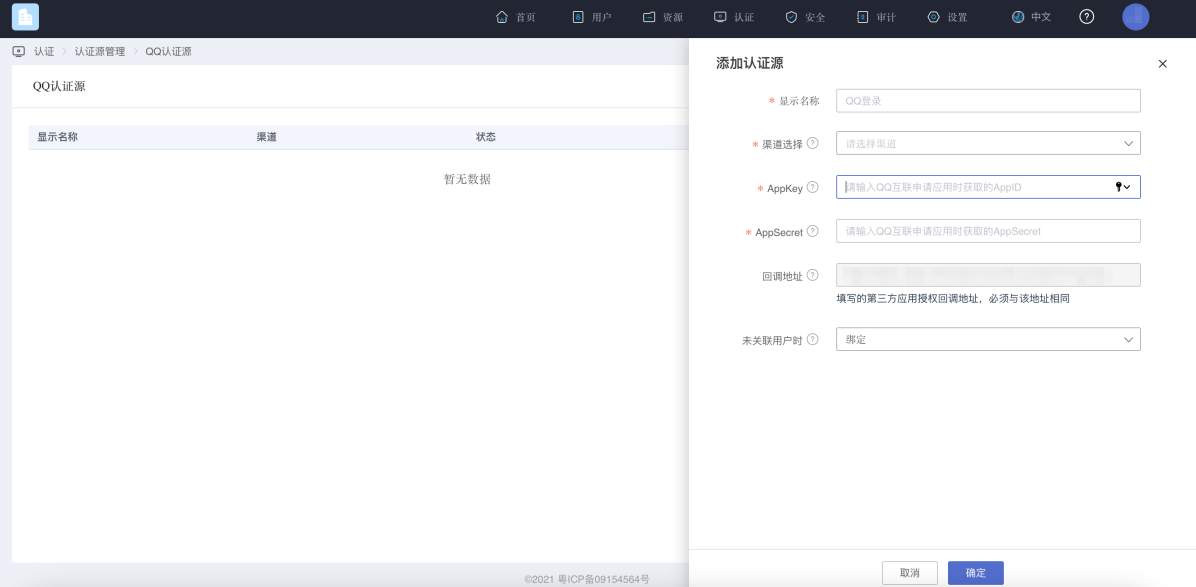
Click OK, and you will get an authentication source as shown in the figure below. Navigate to Resources --> Applications, and click on the newly created App. After the application is created, go to Login Configuration --> Mobile Application --> Configuration.
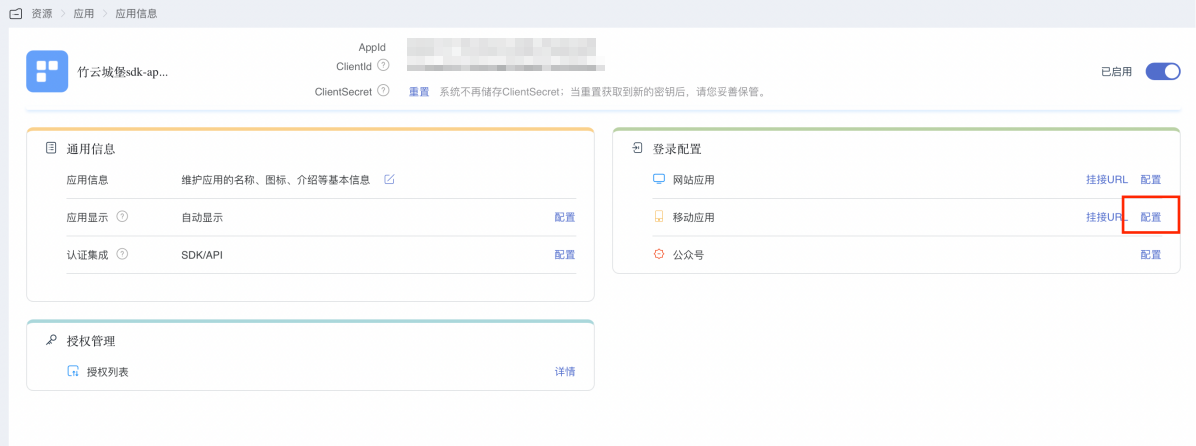
You will reach the window as shown below. Click the enable button next to the QQ entry.
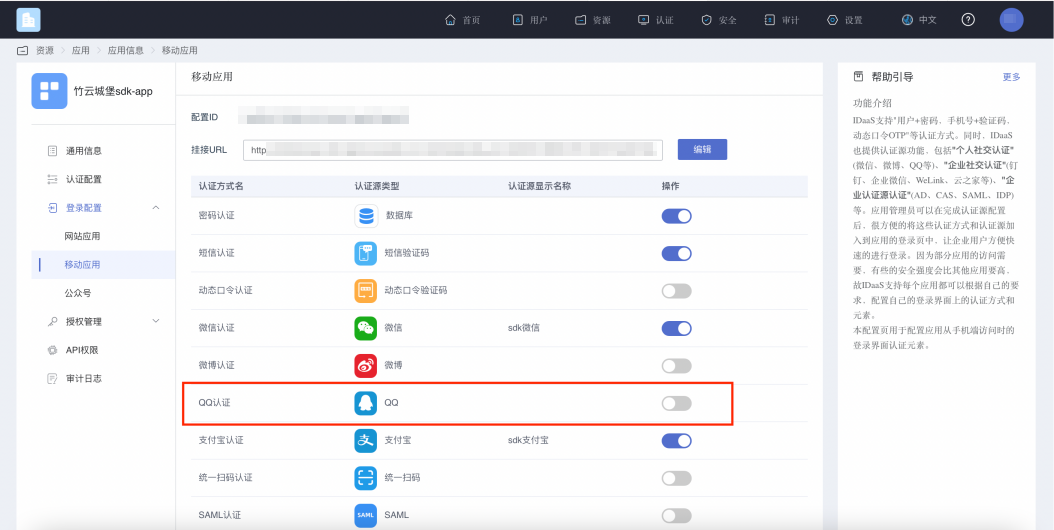
Select the authentication source you just configured and save it.
# Import Dependency Package
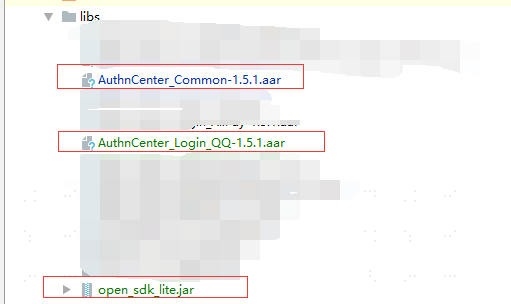
Import the aar package into the lib, as shown below:
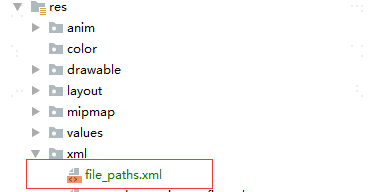
Create a new xml directory under your resource directory, and add a file_path.xml file within that directory (you can directly copy it from the DEMO):
# Configure build.gradle
/*begin*/
/*  rxjava2 +  okhttp + retrofit2  */
api 'io.reactivex.rxjava2:rxjava:2.2.10'
api 'io.reactivex.rxjava2:rxandroid:2.1.1'
api 'com.squareup.retrofit2:retrofit:2.6.0'
api 'com.squareup.retrofit2:adapter-rxjava2:2.6.0'
api 'com.squareup.retrofit2:converter-gson:2.6.0'
api 'com.squareup.okhttp3:okhttp:4.3.1'
api 'com.squareup.okhttp3:logging-interceptor:3.6.0'
api 'com.jakewharton.retrofit:retrofit2-rxjava2-adapter:1.0.0'
api 'com.trello.rxlifecycle2:rxlifecycle-components:2.1.0'
api 'com.alibaba:fastjson:1.2.61'
 /*end*/

//Common library, required
implementation(name: 'AuthnCenter_Common-1.5.3', ext: 'aar')
//QQ Login SDK, required
implementation(name: ''AuthnCenter_LoginQQ-1.5.3', ext: 'aar')
//QQ official dependency library, required
implementation(name: 'open_sdk_lite', ext: 'jar')
2
3
4
5
6
7
8
9
10
11
12
13
14
15
16
17
18
19
20
# Configure AndroidManifest
  <!--Permissions-->
    <uses-permission android:name="android.permission.INTERNET" />
    <uses-permission android:name="android.permission.WRITE_EXTERNAL_STORAGE" />
    <uses-permission android:name="android.permission.READ_EXTERNAL_STORAGE" />
    <uses-permission android:name="android.permission.CAMERA" />
    <uses-permission android:name="android.permission.RECORD_AUDIO" />
    <uses-permission android:name="android.permission.READ_PHONE_STATE" />
    <uses-permission android:name="android.permission.MOUNT_UNMOUNT_FILESYSTEM"/>


        <!-- Country code selection interface, register as needed -->
        <activity
            android:name="com.authncenter.wechat.view.CountryCodeListActivity"
            android:launchMode="singleTask"
            android:screenOrientation="portrait" />
        <!-- SMS verification interface, register as needed -->
        <activity
            android:name="com.authncenter.loginqq.view.MsgActivity"
            android:launchMode="singleTask"
            android:screenOrientation="portrait" />

  <!--QQ login related configuration-->
<activity
    android:name="com.tencent.tauth.AuthActivity"
    android:launchMode="singleTask"
    android:noHistory="true">
    <intent-filter>
        <action android:name="android.intent.action.VIEW" />
        <category android:name="android.intent.category.DEFAULT" />
        <category android:name="android.intent.category.BROWSABLE" />
        <data android:scheme="tencent申请的APPID" />
    </intent-filter>
</activity>

<activity
    android:name="com.tencent.connect.common.AssistActivity"
    android:configChanges="orientation|keyboardHidden"
    android:screenOrientation="behind"
    android:theme="@android:style/Theme.Translucent.NoTitleBar" />

<provider
    android:name="android.support.v4.content.FileProvider"
    android:authorities="com.authncenter.authncentersdk.fileprovider"
    android:exported="false"
    android:grantUriPermissions="true">
    <meta-data
        android:name="android.support.FILE_PROVIDER_PATHS"
        android:resource="@xml/file_paths" />
</provider>
2
3
4
5
6
7
8
9
10
11
12
13
14
15
16
17
18
19
20
21
22
23
24
25
26
27
28
29
30
31
32
33
34
35
36
37
38
39
40
41
42
43
44
45
46
47
48
49
# Development Integration
# Built-in API Introduction
Basic configuration initialization main class AuthnCenterAPI method introduction:
/**
 * SMS verification code -- Send SMS
 */
public void smsSend(Context context, SendSmsReq req, RequestListener listener)

/**
 * Get country code    Note: If country code configuration is enabled, this interface must be called to obtain the country code.
 */
public void getCountryCode(Context context, RequestListener listener)

/**
 * Social account binding interface
 * @param context      Context
 * @param stateToken   Temporary token returned after current login
 * @param otpsmsReq    Binding object information
 * @param listener     Event callback
 */
public void socialBind(Context context, String stateToken, OTPSMSReq otpsmsReq, RequestListener listener)

/**
 *  Register
 * @param context      Context
 * @param stateToken   Temporary token returned after current login
 * @param otpsmsReq    Registration object information
 * @param listener     Event callback
 */
public void register(Context context, String stateToken, OTPSMSReq otpsmsReq, RequestListener listener)
2
3
4
5
6
7
8
9
10
11
12
13
14
15
16
17
18
19
20
21
22
23
24
25
26
27
QQ login initialization main class AuthnCenterLoginWeChat method introduction:
/**
 *   QQ Login
 * @param context  Context
 * @param qqLoginListener Event listener
 * @param loginType       LoginType.DEFAULT (Built-in), LoginType.CUSTOM (Custom)
 */
public void loginByQQ(Context context, QQLoginListener qqLoginListener, LoginType loginType)
2
3
4
5
6
7
8
# Mobile International Area Code Acquisition
If international number support is enabled, please call the international area code acquisition interface first. The international area code acquisition interface returns a configured list of international area codes, along with regular expressions for phone numbers. The image below shows how to configure the international area code list and the preferred area code.
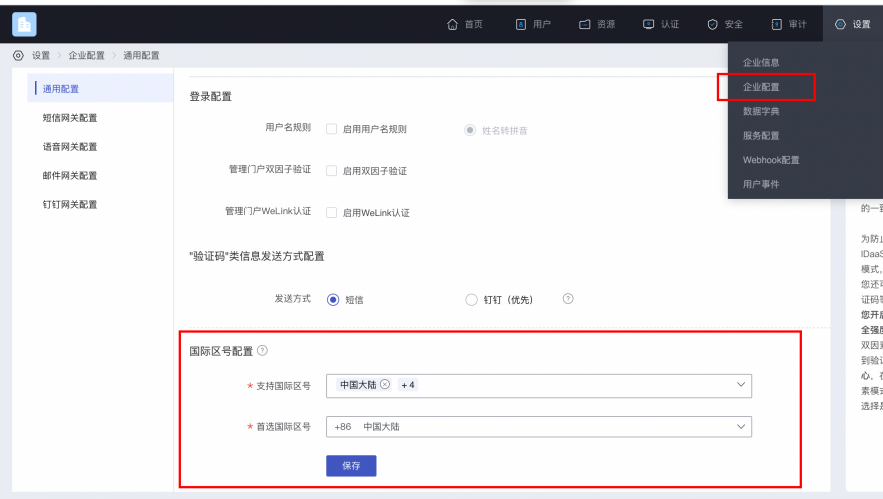
Example code for obtaining the international area code list:
AuthnCenterAPI.Builder().getCountryCode(this, new RequestListener<CountryCodeInfoRsp>() {
    @Override
    public void success(CountryCodeInfoRsp codeInfoRsp) {

    }

    @Override
    public void error(String code, String errorMessage) {
    }
});
2
3
4
5
6
7
8
9
10
Successful example code=0, data value:
{
	"phoneAreaCodeDefinitions": [
		{
			"areaCode": "86",
			"displayMapping": {
				"zh-TW": "中國大陸",
				"en": "China",
				"zh-CN": "中国大陆"
			},
			"countryCode": "CN",
			"mobileRegex": "^(\\+86){0,1}\\-?1\\d{10}$",
			"areaCodeSuffixes": []
		},
		{
			"areaCode": "852",
			"displayMapping": {
				"zh-TW": "中國香港",
				"en": "Hong Kong",
				"zh-CN": "中国香港"
			},
			"countryCode": "HK",
			"mobileRegex": "^(\\+852){1}\\-?0{0,1}[1,4,5,6,7,8,9](?:\\d{7}|\\d{8}|\\d{12})$",
			"areaCodeSuffixes": []
		},
		{
			"areaCode": "886",
			"displayMapping": {
				"zh-TW": "中國臺灣",
				"en": "Taiwan",
				"zh-CN": "中国台湾"
			},
			"countryCode": "TW",
			"mobileRegex": "^(\\+886){1}\\-?[6,7,9](?:\\d{7}|\\d{8})$",
			"areaCodeSuffixes": []
		},
		{
			"areaCode": "853",
			"displayMapping": {
				"zh-TW": "中國澳門",
				"en": "Macau",
				"zh-CN": "中国澳门"
			},
			"countryCode": "MO",
			"mobileRegex": "^(\\+853){1}\\-?0{0,1}[1,4,5,6,7,8,9](?:\\d{7}|\\d{8}|\\d{12})$",
			"areaCodeSuffixes": []
		},
		{
			"areaCode": "93",
			"displayMapping": {
				"zh-TW": "阿富汗",
				"en": "Afghanistan",
				"zh-CN": "阿富汗"
			},
			"countryCode": "AF",
			"mobileRegex": "^(\\+93){1}\\-\\d{6,11}",
			"areaCodeSuffixes": []
		}
	],
	"preferredAreaCode": "CN"
}
2
3
4
5
6
7
8
9
10
11
12
13
14
15
16
17
18
19
20
21
22
23
24
25
26
27
28
29
30
31
32
33
34
35
36
37
38
39
40
41
42
43
44
45
46
47
48
49
50
51
52
53
54
55
56
57
58
59
60
Return Parameters:
| Parameter Name | Chinese Name | Type | Description |
|---|---|---|---|
| preferredAreaCode | Preferred International Area Code | String | The preferred international area code configured for the current enterprise center |
| countryCode | Country/Region Code | String | Country/Region Code |
| areaCode | International Telephone Area Code | String | International Telephone Area Code |
| areaCodeSuffixes | International Telephone Area Code Suffix | String | International Telephone Area Code Suffix |
| mobileRegex | Mobile Number Format Regular Expression | String | Mobile Number Format Regular Expression |
| displayMapping | Multi-language Display Name Mapping | String | Multi-language Display Name Mapping |
# Built-in Sliding Verification
Human-machine interaction verification is required when sending verification codes
BlockPuzzleDialog mBlockPuzzleDialog = new BlockPuzzleDialog(mContext);
mBlockPuzzleDialog.setOnResultsListener(new OnResultsListener() {
        @Override
        public void onResultsClick(String result) {
            LogUtil.getInstance().d("Secondary verification callback result mCaptchaToken:" + result);
            //This callback result is the captchaToken parameter for SMS verification
        }
        @Override
        public void onError(String code, String msg) {
            ToastUtils.ShowToast(mContext, String.format("Error code: %s  Error message: %s", code, msg));
        }
    });
}
2
3
4
5
6
7
8
9
10
11
12
13
14
# Sending Verification Code
The App client needs to have its own UI interface, which includes several essential components: a phone number input field, a verification code input field, a button (or event) to trigger obtaining the verification code, and a login button (or event).
After the user enters a phone number and before clicking (triggering) the send verification code event, the App client should perform a phone number format check.
When clicking (triggering) the send verification code event, the App client calls the IDaaS SDK's method for sending the verification code, as shown in the following example:
//Send verification code
SendSmsReq sendSmsReq = new SendSmsReq();
sendSmsReq.setMobile(getPhoneNum());
sendSmsReq.setType(SendSmsType.login);//Type enumeration
sendSmsReq.setCaptcha_token(“Result returned after successful slide captcha verification”);
AuthnCenterAPI.Builder().smsSend(mContext, sendSmsReq
        , new RequestListener<BaseResponse>() {
            @Override
            public void success(BaseResponse rsp) {
            }
            @Override
            public void error(String code, String errorMessage) {
            }
        });
2
3
4
5
6
7
8
9
10
11
12
13
14
# Built-in UI Development Integration
# Initialization
AuthnCenterSDK.Builder()
                .init(this)
                .setBaseUrl("https://xxx.xxx.com")      //Tenant domain name
                .setClientId("xxxx") //Application client-id from tenant backend
                .isCheckSSL(false) //Whether to check SSL certificate
                .logEnable(false).build(); //Whether to enable HTTP request logs
PlatformConfig.Builder().init(this).setQQAppId("xxx");//Set QQ APPID
PlatformConfig.Builder().init(this).setQQAppAuthorities("xx.xx.xx.fileprovider");  //Set QQ fileprovider
2
3
4
5
6
7
8
9
# UI Customization
The caller can set the text, descriptions, colors, etc., of the binding interface via BindThemeConfig. Specific properties are as follows:
//Customize interface
BindThemeConfig.Builder().setBindTitle("I am the title")
        .setBindDes("I am the description")
        .setBindButtonText("I just want to change the button text")
        .setBindButtonTextDefaultColor("#367517")
        .setBindButtonTextColor("#C8E2B1")
        .setBindButtonTextOnPressColor("#F9F400")
        .setSendMsgColor("#976D00")
        .setSendMsgNoActiviColor("#50A625")
        .setDialogTitle("I just want to customize")
        .setDialogBtnConfirmColor("#FFB6C1");
2
3
4
5
6
7
8
9
10
11
# Property Description
| Parameter | Type | Description | Example |
|---|---|---|---|
| setBackFont | String | Change back text | None |
| setBackFontColor | String | Change back text color | Hexadecimal color, e.g., #FFFFFF |
| setBackImg | int | Set back icon | Resource file R |
| setBackFontSize | int | Set back text size | 14sp |
| setCountryCodeVisibility | boolean | Set whether to display international dialing code | Default is true |
| setBindTitle | String | Binding interface title | None |
| setBindDes | String | Binding interface description | None |
| setBindButtonText | String | Binding button text | None |
| setBindButtonTextDefaultColor | String | Binding button text background default color | Hexadecimal color, e.g., #FFFFFF |
| setBindButtonTextColor | String | Binding button text color | Hexadecimal color, e.g., #FFFFFF |
| setBindButtonTextOnPressColor | String | Binding button text background color after click | Hexadecimal color, e.g., #FFFFFF |
| setSendMsgColor | String | Send SMS button text color | Hexadecimal color, e.g., #FFFFFF |
| setSendMsgNoActiviColor | String | Countdown text color | Hexadecimal color, e.g., #FFFFFF |
| setDialogTitle | String | Unbind popup title | None |
| setDialogBtnConfirmColor | String | Unbind popup confirm button color | Hexadecimal color, e.g., #FFFFFF |
| sendMsgNoActiveBackground | int | Send SMS button background resource | Android color or background resource file (R) |
| setButtonBackground | int | Send SMS button default background resource | Android color or background resource file (R) |
| setSendMsgBackground | int | Binding button background resource | Android color or background resource file (R) |
# QQ Login Built-in Interface
AuthnCenterLoginQQ.Builder().loginByQQ(this, new QQLoginListener() {
    @Override
    public void success(String code, String data) {
  //Success callback
    }
    @Override
    public void error(String code, String errorMessage) {
//Failure callback
    }
}, LoginType.DEFAULT);
2
3
4
5
6
7
8
9
10
# Integration via API Development
If you choose this integration method, after the login returns, you need to handle the binding or registration business and basic operations related to mobile phone verification based on the returned status.
Also, the relevant registration information in the AndroidManifest file can be filled in with your own.
# Call Sequence Instructions
After a successful login, if the returned status is binding, then you need to call:
Get country code (call this based on whether internationalization support is configured) (getCountryCode)
Sliding verification (BlockPuzzleDialog)
Send SMS (smsSend)
Bind or register (socialBind/register)
# Initialization
AuthnCenterSDK.Builder()
                .init(this)
                .setBaseUrl("https://xxx.xxx.com")      //Tenant domain name
                .addGlobalHeader("X-client-id", "xxxx") //Tenant backend application client-id
                .isCheckSSL(false) //Whether to check SSL certificate
                .logEnable(false).build(); //Whether to enable HTTP request log
PlatformConfig.Builder().init(this).setQQAppId("xxx");//Set QQ APPID
PlatformConfig.Builder().init(this).setQQAppAuthorities("xx.xx.xx.fileprovider");  //Set QQ fileprovider
2
3
4
5
6
7
8
# QQ Login (Custom Interface)
AuthnCenterLoginQQ.Builder().loginByQQ(this, new QQLoginListener() {
    @Override
    public void success(String code, String data) {
//Here, based on the `code` return value, navigate to your own interface for binding or registration operations.
        Intent intent = new Intent(MainActivity.this, QQActivity.class);
        intent.putExtra(SocialType.STATETOKEN, data);
        intent.putExtra(SocialType.BINDTYPE, SocialType.WX);
        switch (code) {
   case "10002":   //Login successful
ToastUtils.ShowToast(MainActivity.this, "Login successful : " + data);
                return;
            case "10003":   //Bind user
               intent.putExtra(SocialType.ACTIONTYPE, ActionType.BIND);
                break;
            case "10004": //Register user
                intent.putExtra(SocialType.ACTIONTYPE, ActionType.REGISTER);
                break;
        }
        intent.setFlags(Intent.FLAG_ACTIVITY_NEW_TASK);
        startActivity(intent);
    }

    @Override
    public void error(String code, String errorMessage) {
        ToastUtils.ShowToast(MainActivity.this, "SDK callback  code : " + code + "---- msg " + errorMessage);
    }
}, LoginType.CUSTOM);
2
3
4
5
6
7
8
9
10
11
12
13
14
15
16
17
18
19
20
21
22
23
24
25
26
27
Here, judgment is based on the returned code:
| Code | Description |
|---|---|
| 10001 | AuthCenter server error |
| 10002 | Success |
| 10003 | User binding required |
| 10004 | User registration required |
# Return Codes
| Status Code | Error Code (error_code) | Error Description (error_msg) | Action |
|---|---|---|---|
| 400 | IDAAS.SDK.COMMON.1001 | Parameter {0} cannot be left blank | |
| Parameter {0} cannot be empty | |||
| 400 | IDAAS.SDK.COMMON.1002 | The {0} parameter format is incorrect | |
| Parameter {0} format error | |||
| 400 | IDAAS.SDK.COMMON.1003 | Device information is incomplete | |
| Device information incomplete | |||
| 400 | IDAAS.SDK.COMMON.1004 | Signature decryption error | |
| Signature decryption error | |||
| 400 | IDAAS.SDK.COMMON.1005 | The {0} has failed | |
| {0} has expired | |||
| 400 | IDAAS.SDK.COMMON.1006 | The {0} parameter error | |
| {0} parameter error | |||
| 400 | IDAAS.SDK.COMMON.1007 | The {0} parameter type error | |
| {0} parameter type error | |||
| 500 | IDAAS.SDK.COMMON.1008 | The system is busy. Try again later | |
| System busy. Please try again later | |||
| 400 | IDAAS.SDK.COMMON.1009 | Unknown authentication configuration | |
| Unknown authentication configuration | |||
| 400 | IDAAS.SDK.COMMON.1010 | Failed to obtain the enterprise center global configuration | |
| Failed to obtain enterprise center global configuration | |||
| 400 | IDAAS.SDK.COMMON.1011 | Failed to obtain the international area code configuration | |
| Failed to obtain international area code configuration | |||
| 400 | IDAAS.SDK.COMMON.1012 | The x-client-ID is incorrect and the corresponding application cannot be found | |
| X-client-id error, corresponding application not found | |||
| 400 | IDAAS.SDK.COMMON.1013 | The corresponding user is not found | |
| Corresponding user not found | |||
| 400 | IDAAS.SDK.COMMON.1014 | Application private key not found | |
| Application private key not found | |||
| 400 | IDAAS.SDK.LOGIN.1001 | Error calling interface {0} | |
| Error calling {0} interface | |||
| 400 | IDAAS.SDK.LOGIN.1002 | User not bound | |
| User not bound | |||
| 400 | IDAAS.SDK.LOGIN.1003 | The user has been locked due to too many unsuccessful login attempts. It will be unlocked in {0} minutes and {1} seconds | |
| User locked due to multiple failed login attempts. Will be unlocked in {0} minutes and {1} seconds | |||
| 400 | IDAAS.SDK.LOGIN.1004 | Failed to obtain the password policy | |
| Failed to obtain password policy error | |||
| 400 | IDAAS.SDK.LOGIN.1005 | Invalid username or password. Remaining login attempts: {0} | |
| Invalid username or password. Remaining login attempts:{0} | |||
| 400 | IDAAS.SDK.LOGIN.1006 | Configuration error, unable to find wechat authentication source | |
| Configuration error, WeChat authentication source not found | |||
| 400 | IDAAS.SDK.LOGIN.1007 | Configuration error, unable to find alipay authentication source | |
| Configuration error, Alipay authentication source not found | |||
| 400 | IDAAS.SDK.LOGIN.1008 | The configuration is incorrect. The one-click login authentication source cannot be found | |
| Configuration error, one-click login authentication source not found | |||
| 400 | IDAAS.SDK.SMS.1001 | {0} slide base map is not initialized successfully, please check the path | |
| {0} slide base map initialization failed, please check the path | |||
| 400 | IDAAS.SDK.SMS.1002 | {0} verification code coordinate resolution failed | |
| {0} verification code coordinate resolution failed | |||
| 400 | IDAAS.SDK.SMS.1003 | {0} verification code coordinate verification fails | |
| {0} verification code coordinate verification failed | |||
| 400 | IDAAS.SDK.SMS.1004 | The graphic verification code is incorrect | |
| Graphic verification code verification error | |||
| 400 | IDAAS.SDK.SMS.1005 | SMS verification code verification is incorrect | |
| SMS verification code verification error | |||
| 400 | IDAAS.SDK.SMS.1006 | The email verification code is incorrect | |
| Email verification code verification error | |||
| 400 | IDAAS.SDK.SMS.1007 | Sending scenario does not exist | |
| Sending scenario does not exist | |||
| 400 | IDAAS.SDK.SMS.1008 | Failed to send the verification code | |
| Failed to send verification code | |||
| 400 | IDAAS.SDK.SOCIAL.1001 | The social account is unbound incorrectly | |
| Social account unbinding error | |||
| 400 | IDAAS.SDK.SOCIAL.1002 | The social account has been bound, please unbind it first | |
| Social account already bound, please unbind first | |||
| 400 | IDAAS.SDK.PWD.1001 | The password length is incorrect | |
| Password length error | |||
| 400 | IDAAS.SDK.PWD.1002 | The password cannot be the username | |
| Password cannot be the username | |||
| 400 | IDAAS.SDK.PWD.1003 | Your password complexity is low | |
| Your password complexity is low | |||
| 400 | IDAAS.SDK.PWD.1004 | The password is weak | |
| Password is weak | |||
| 400 | IDAAS.SDK.PWD.1005 | The password is used before, cannot be used again | |
| This password has been used before and cannot be used again | |||
| 400 | IDAAS.SDK.PWD.1006 | Password cannot username in reverse order | |
| Password cannot be the reverse order of the username | |||
| 400 | IDAAS.SDK.PWD.1007 | The number of repeated password characters exceeded the upper limit | |
| Number of repeated password characters exceeds limit | |||
| 400 | IDAAS.SDK.PWD.1008 | Password cannot contain :username, phone number, email prefix, name in PinYing | |
| Password cannot contain: username, phone number, email prefix, name in Pinyin | |||
| 400 | IDAAS.SDK.MFA.1001 | The mobile doesn't match the user | |
| Phone number does not match the user | |||
| 400 | IDAAS.SDK.MFA.1002 | The access control policy is incorrect | |
| Access control policy configuration error | |||
| 400 | IDAAS.SDK.MFA.1003 | Access control authentication source type conversion error | |
| Access control authentication source type conversion error |
I am ready to receive the Markdown content for translation. Please paste the text.