
Xinrenxinshi Single Sign-On
Single Sign-On SSO
# Description
This article describes how to configure Zhuyun IDaaS for Single Sign-On to the Xinrenxinshi platform.
# Prerequisites
- Contact Xinrenxinshi staff to apply for the application and obtain the appKey and appSecret. Access process reference (opens new window)
- Have IDaaS Enterprise Center administrator permissions.
# Authentication Configuration
# IDaaS Configuration
Log in to the Enterprise Center and add the pre-integrated Xinrenxinshi application.

Configure authentication parameters.
Fill in the appKey and appSecret provided by Xinrenxinshi.
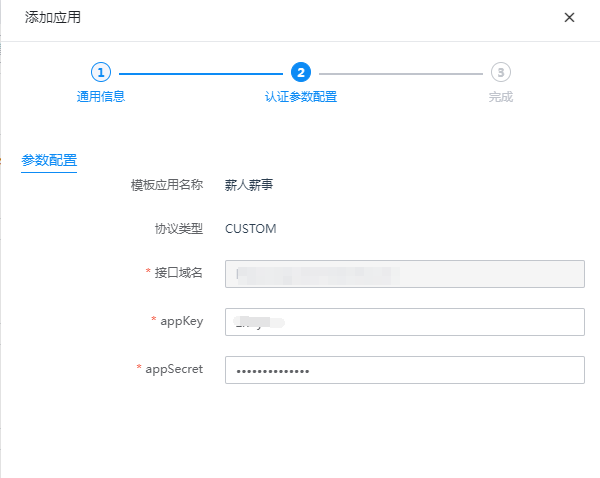
Go to Application Details - Authorization Management - Application Accounts, and add an account.
For the account's employee ID, fill in the employee ID from Xinrenxinshi; for the mobile number, fill in the employee's mobile number from Xinrenxinshi. Either one is required; both cannot be empty.

# Login Verification
Authorized users log in to the IDaaS User Center and click the Xinrenxinshi logo for Single Sign-On.

