
Passive Mode Authentication
When a user accesses an integrated application, the application initiates authentication and login based on the WS-Federation protocol (Passive mode) to the platform. After the user successfully authenticates by entering their username and password, the platform will initiate a POST request through the browser to callback the assertion consumer address.
# Login Flow
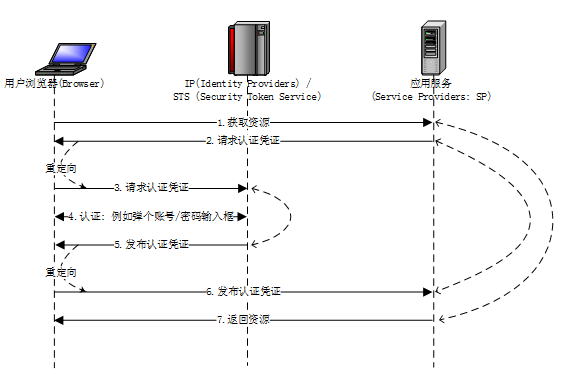
Flow Description:
Browser sends a request to SP to obtain resource A.
SP requests the Browser to provide authentication credentials.
Browser requests credentials from IP.
Browser and IP perform authentication, for example: IP displays a window for entering account/password, the user inputs and submits to IP.
IP verifies the identity and issues authentication credentials (i.e., the response corresponding to step 3).
Browser sends the credentials given by IP to SP (i.e., the response corresponding to step 2).
SP determines the credentials are valid and returns the resource to the Browser (i.e., the response corresponding to step 1).
# Request Specification
GET https://{your_domain}/api/v1/sso/wsfed/{your_app_clientId}/passive
# Request Parameters
| Parameter | Required | Example Value | Description |
|---|---|---|---|
| wa | Yes | wsignin1.0 | Fixed parameter: wsignin1.0 |
| wtrealm | Yes | urn:federation:MicrosoftOnline | Used to identify the accessed application, must match the Wtrealm in the application configuration. |
| wreply | Yes | https://login.microsoftonline.com/login.srf | Validated if the wreply parameter is included in the request. Must match the Wreply in the application configuration. For HTTP protocol, only the domain name needs to match. |
| wctx | No | Context parameter, the interface will return carrying the same parameter. |
# Request Example
https://{your_domain}/api/v1/sso/wsfed/{your_app_clientId}/passive?wa=wsignin1.0&wtrealm=urn:federation:MicrosoftOnline
# Response Example
POST https://{wreply}
| Parameter Name | Required | Example Value | Description |
|---|---|---|---|
| wa | Yes | wsignin1.0 | Fixed parameter: wsignin1.0 |
| wresult | Yes | SAML1.1 Assertion | |
| wctx | No | Context, returned when the request parameter carries the wctx parameter, consistent with the wctx parameter carried in the request |
Error Response Example
{
  "code": "SSO_WSFED_BAD_REQUEST",
  "data": null,
  "message": "Parameter [wtrealm] is incorrect"
}
2
3
4
5
6
# Logout Flow
# Request Description
GET https://{your_domain}/api/v1/sso/wsfed/{your_app_clientId}/logout
# Request Parameters
| Parameter Name | Required | Example Value | Description |
|---|---|---|---|
| wa | Yes | wsignout1.0 | Fixed parameter: wsignin1.0 |
| wreply | No | https://login.microsoftonline.com/login.srf | If empty, the browser redirects to the IDaaS login page after logout. If not empty, the browser redirects to the specified address after logout |
# Request Example
https://{your_domain}/api/v1/sso/wsfed/{your_app_clientId}/logout?wa=wsignout1.0&wreply={your_login_url}