
Client Credentials Grant (M2M)
The Client Credentials grant is primarily used when a backend application calls the API resources of another application system. Before invoking the API resources, the calling party must first perform interface authentication, such as obtaining an Access Token based on the Client ID and Client Secret. The calling party then carries this token to access the API resources.
The Client Credentials grant is well-suited for the Machine-to-Machine (M2M) pattern, such as initiating application authentication through backend services rather than by a user.
In the M2M pattern, there is no user involvement throughout the process; authorization operations occur only between application systems. This pattern is suitable for scenarios requiring automated authentication and authorization between machines, such as backend services, API calls, and data synchronization.
This document describes the overall process of how an API consumer application can securely access API resources after registering the API consumer application and API resources (API providers) on the Bamboo Cloud IDaaS platform and authorizing the API consumer application to access the required API resources.
# Terminology
M2M Pattern: Machine-to-Machine, abbreviated as M2M.
API Consumer Application: Acts as the API consumer (also called an M2M application) and needs to access API resources to obtain relevant business data.
API Resource: Acts as the API provider, exposing API interfaces for API consumers to call.
# Authorization Flow
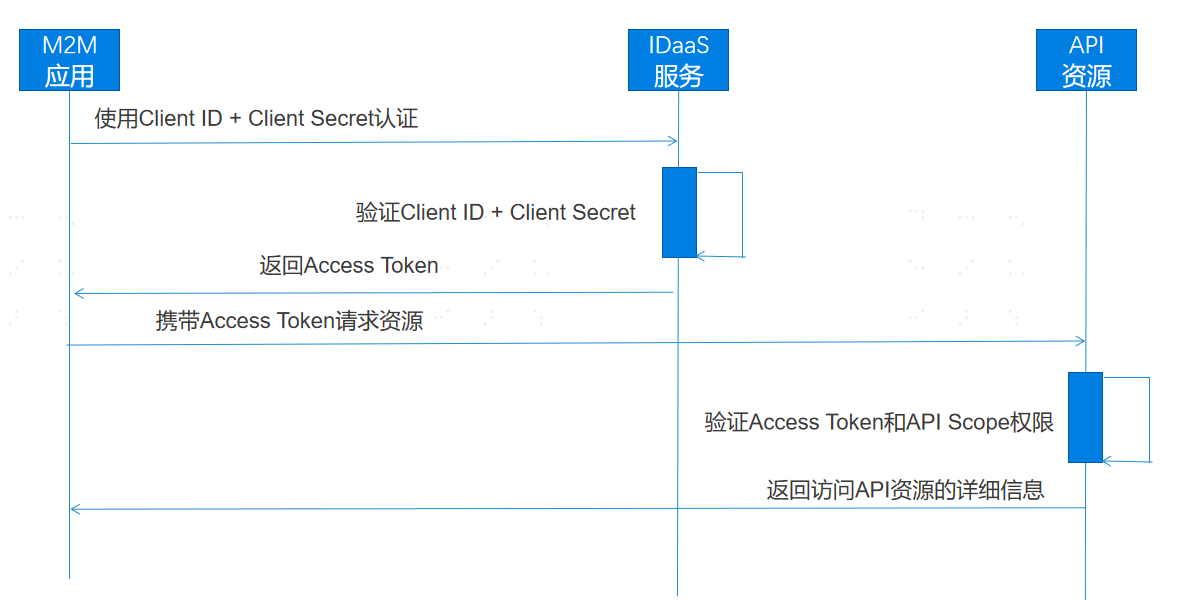
M2M Pattern Flow:
- The API consumer application (M2M application) uses its Client ID and Client Secret to initiate an authorization request to Bamboo Cloud IDaaS. After Bamboo Cloud IDaaS verifies the Client ID and Client Secret, it returns the issued Access Token to the API consumer application.
- The API consumer application carries the Access Token to access the API resource. The API resource server verifies the validity of the Access Token and checks whether the requested permission Scope list is within the authorized range.
- After the resource server successfully verifies the Access Token and permission Scopes, it returns the detailed information of the API resource.
# Development Steps
The development process for integrating with Bamboo Cloud IDaaS platform using the OAuth 2.0 M2M pattern is as follows:
# Register an API Consumer Application
- Log in to the Bamboo Cloud IDaaS Enterprise Center, select the navigation bar
Resources > Applicationsmenu to enter the application list. Click theAdd Self-built Applicationbutton, fill in the application name, then click theSavebutton to create the API consumer application. Click theEnter Application Detailslink to go to the API consumer application details page.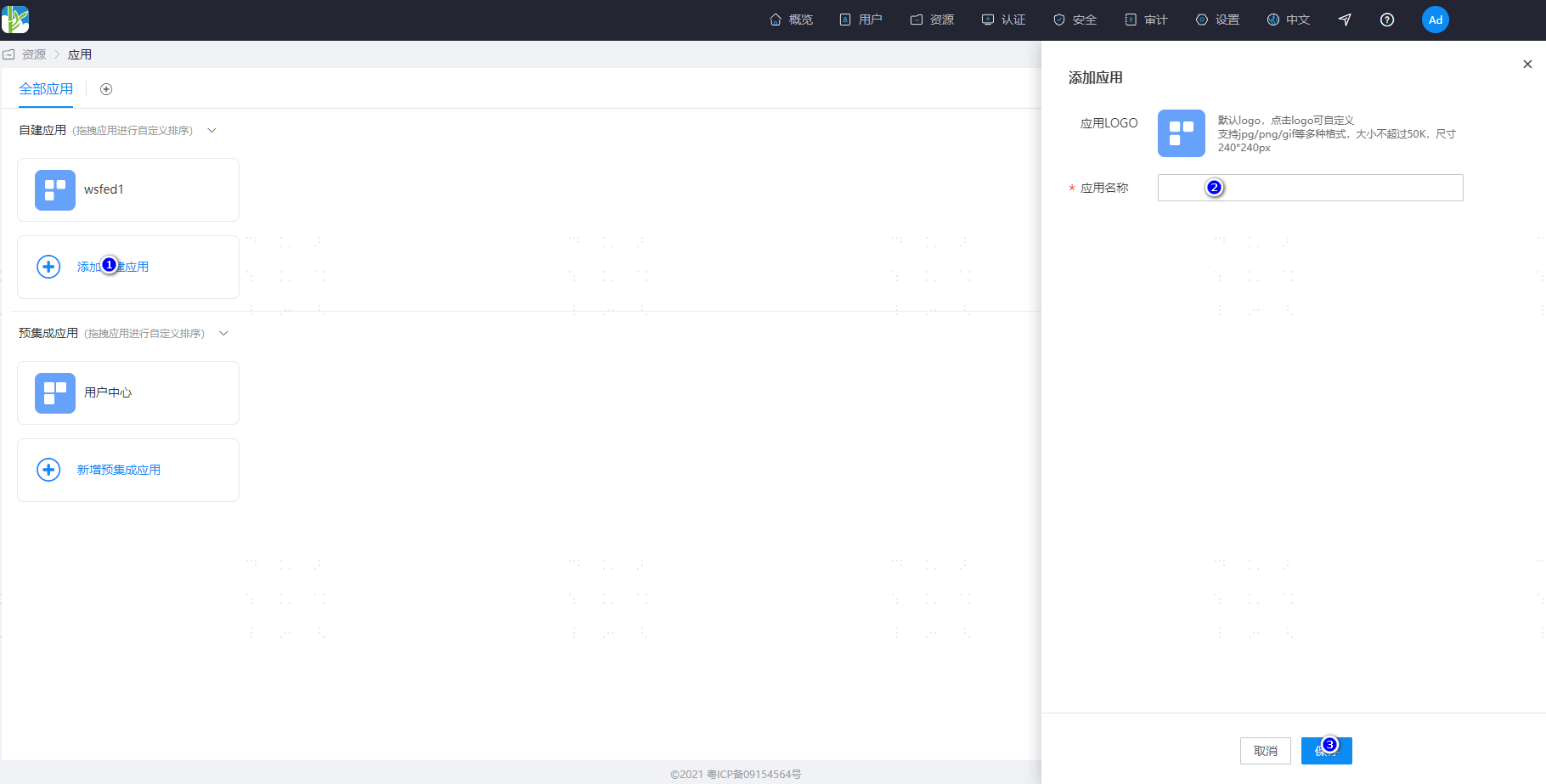
- On the application details page, click the
Enablelink next toClientSecretto obtain the secret. Copy and save the Client ID and Client Secret assigned by the platform.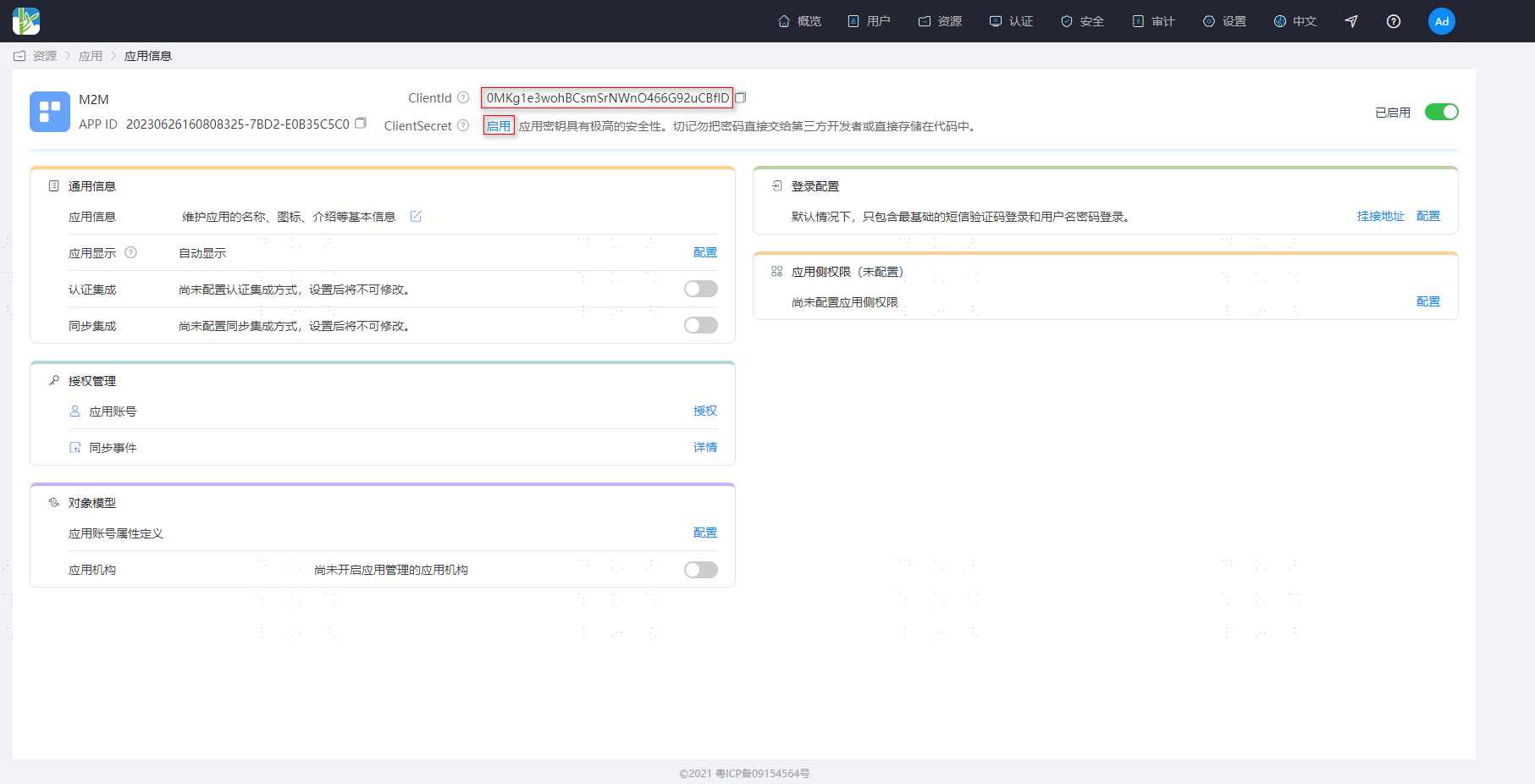 Note: The Bamboo Cloud IDaaS system does not store the ClientSecret; after obtaining the secret, please keep it safe.
# Register API Resources (API Provider) and Add Permissions
Log in to the Bamboo Cloud IDaaS Enterprise Center, select the navigation bar
Resources > Enterprise APIsmenu to enter the API product list. Click theAdd Custom API Productbutton, input the product logo, product name, and product API identifier, then click save.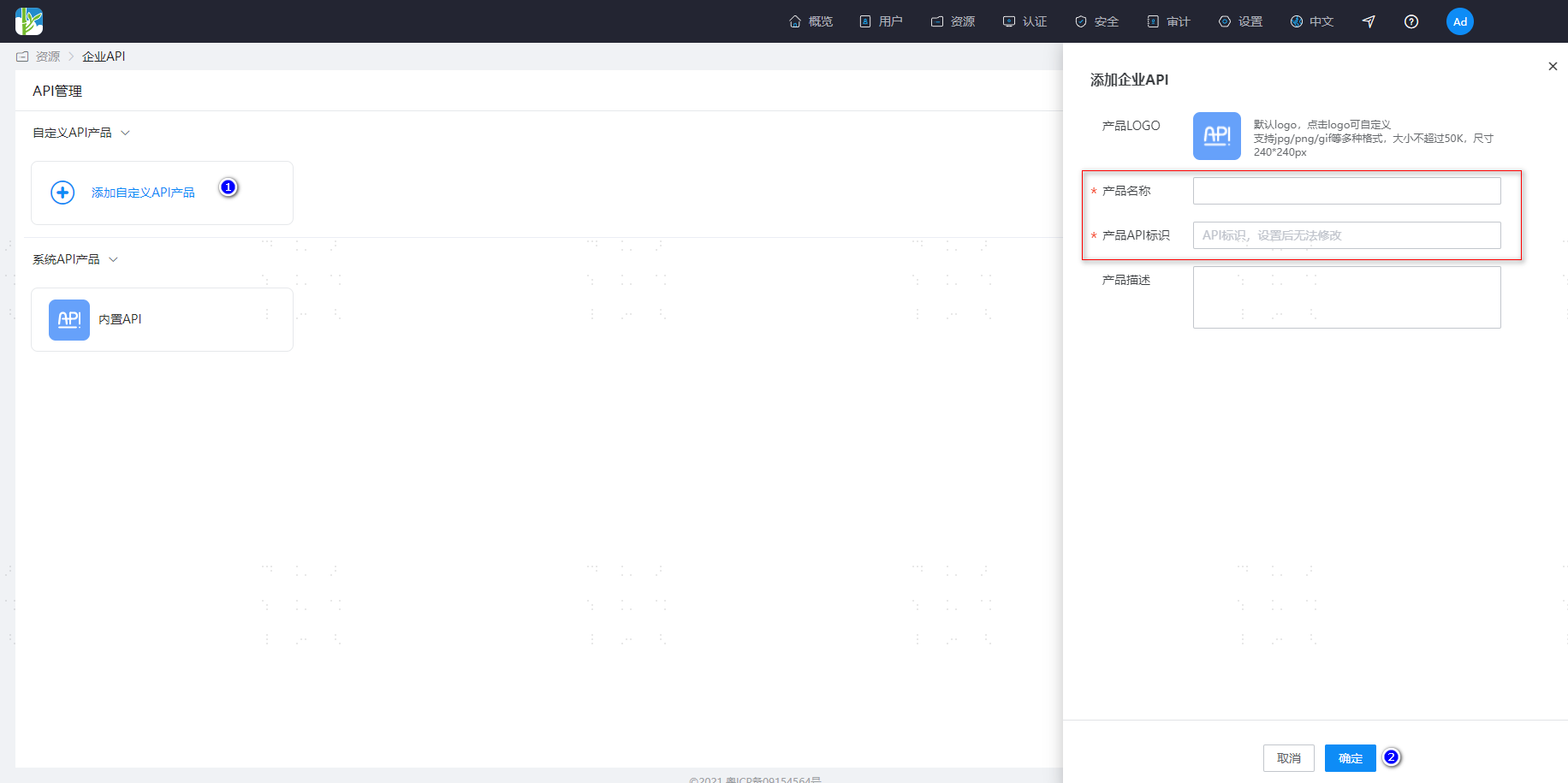 Note: When the API consumer application obtains a token from the IDaaS platform, it needs to pass the parameter of the identifier defined for the API resource. Bamboo Cloud IDaaS locates the corresponding API resource based on the passed product API identifier.
Enter the Enterprise API details page, click
Permission Informationto go to the API permission configuration page. Click theAddbutton on the right to add permissions, input the permission code and permission description, then click save.
# Authorize the API Consumer Application and Assign Permission Scopes
- On the API resource (API provider) details configuration page, click
Application Authorizationto enter the API application authorization page, and authorize the consumer applications that need to access this API resource.
- Select the created "API Consumer Application" and click to enter its configuration page. Click the
API Permissionsmenu to open the permission configuration page, select the authorized API resource, and assign the required permission Scopes.
# API Consumer Application Obtains Token
An API consumer application carries the Client ID and Client Secret parameters to call the Zhuyun IDaaS token acquisition interface. After Zhuyun IDaaS verifies and approves, it returns an Access Token and a list of permission scopes.
# Request Description
POST https://{your_domain}/api/v2/oauth2/token
# Request Headers
| Parameter Name | Chinese Name | Required | Example Value | Description |
|---|---|---|---|---|
| Authorization | Authentication Information | Required | Basic UnFCMkhKdNOWk9xWA== | Use client_id and client_secret for base64 authentication, Format: base64(client_id:client_secret) |
| Content-Type | Data Type | Required | application/x-www-form-urlencoded | Submit parameters using form-urlencoded format |
# Request Example
POST https://{your_domain}/api/v2/oauth2/token
Authorization: Basic UnFCMkhKdGt6bFU...aT0NObkk4NlNOWk9xWA==
Content-Type: application/x-www-form-urlencoded
grant_type=client_credentials&audience=https://apiprovider.com
# Request Parameters
| Request Parameter | Required | Type | Description |
|---|---|---|---|
| grant_type | Yes | String | Fixed value: client_credentials |
| client_id | Yes | String | Client ID assigned to the API consumer application by IDaaS |
| client_secret | Yes | String | Client Secret assigned to the API consumer application by IDaaS |
| audience | Yes | String | The identifier filled in when registering the API resource, URL is recommended |
# Response Example
Correct Response Example
HTTP Status: 200 OK
{
     "access_token": "eyJraWQiOiI3Yzc2ZWYxZTY0OWY0Yjc1OGVkZTczNGQ4ZDY4OWI5OSIsImFsZyI6IlJTMjU2In0.eyJpc3MiOiJodHRwczovL2JhbWJvb2Nsb3VkLmlkYWFzLXRlc3QtYWxwaGEuYmNjYXN0bGUuY29tL2FwaS92MS9vYXV0aDIiLCJhdWQiOiJtMm1hcGkiLCJleHAiOjE2ODc3NzM2OTEsImp0aSI6IlJGa01wWmFWbTQ5R3cyS1hHX2s0cFEiLCJpYXQiOjE2ODc3NzE4OTEsIm5iZiI6MTY4Nzc3MTc3MSwic3ViIjoiME1LZzFlM3dvaEJDc21Tck5Xbk80NjZHOTJ1Q0JmbEQiLCJhenAiOiIwTUtnMWUzd29oQkNzbVNyTlduTzQ2Nkc5MnVDQmZsRCJ9.TIL1WjzqRYdamTgIF591hTq8J08-PrZBRRDvxu9q88wLd5eHjEwfuamGQ2PmdMPXzJy7JCqX8Odr4Kpqlh04jwLYUv1vfIzApM2xjmd8MxU73uG9659PSKyf1yoP9_TLhDd30mgXLN2Fc7IgT1MAnQVTNYmlGU_JrRf-ECE44hMExDcGLScZF7xjJsWjAVX7Wzg4YiVTor3v4oGHdI2-NiEHMdOn2pIvWC_5mxCvIoVRWfYVcrRkpEkyBcWqnhNf422SMDitwkSBkVh73r1-zHOsGLUtci6zbaS2jWjN7OE1tA4iniHsgsx0HyzmfGGo9hLkD6kUpsawzjJH5uqSeg",
    "token_type": "Bearer"
}

Invalid Client Credentials Error Example
HTTP Status: 401
{
    "error": "invalid_client",
    "error_description": "Bad client credentials"
}
2
3
4
5
6
7
8
9
10
11
12
13
For more error codes, please refer to OAuth2.0 Protocol Error Codes (opens new window)
# Response Parameters
| Parameter | Type | Description |
|---|---|---|
| access_token | String | The token issued by IDaaS to the consumer application. |
| token_type | String | Token type, defaults to Bearer Token. |
# API Consumer Application Accessing API Resources
When an API consumer application accesses API resources, the Access Token issued by BambooCloud IDaaS must be carried in the request header. Example request header:
Authorization:Bearer eyJraWQilJTMjU2In0.eyJpiOisRCJ9.TIL1WjwzjJH5uqSeg
Note: The Access Token in the example request header has been formatted for readability.
# API Resource Server (API Provider) Validating Token
When the API resource server receives a resource request, it must validate the Access Token and permission Scope. After successful validation, it returns the relevant resource data to the API consumer application.
# Token Example Explanation
BambooCloud IDaaS uses the standard OAuth2.0 protocol to issue authorized Token tokens. The Token tokens are encapsulated using standard JWT (JSON Web Token). The decoded content of the unpacked Access Token parameters is as follows:
{
	"iss": "https://{yourdomain}/api/v1/oauth2",
	"aud": "https://apiprovider.com",
	"exp": 1687775036,
	"jti": "sFZ-WBf2fj6zHvPxb6k12w",
	"iat": 1687773236,
	"nbf": 1687773116,
	"sub": "0MKg1e3wohBCsmSrNWnO466G92uCBflD",
	"scope": "add read delete",
	"azp": "0MKg1e3wohBCsmSrNWnO466G92uCBflD"
}
2
3
4
5
6
7
8
9
10
11
# Token Parameter Description
| Parameter Name | Type | Description |
|---|---|---|
| iss | String | Token issuer |
| aud | String | Identifier defined by the API resource (API provider) |
| exp | String | Token expiration timestamp |
| jti | String | Unique identifier for the token |
| iat | String | Token issuance timestamp |
| nbf | String | Token activation timestamp |
| sub | String | Client ID assigned by IDaaS to the API consumer application |
| scope | String | API permission Scope list, multiple permissions separated by spaces; this parameter is not returned if there are no permissions. |
| azp | String | Client ID assigned by IDaaS to the API consumer application |
# Verifying Tokens
The API resource server needs to verify the validity and permission scopes of the token. The verification steps include:
- Use the IDaaS public key certificate to verify the signature of the token;
- Verify whether the issuer parameter in the token is valid;
- Verify whether the audience parameter in the token is valid;
- Verify whether the token has expired or is invalid;
- Verify whether the permission scope list is within the authorized range;
- Verify other custom parameters......
The following is example Java code for verifying the id_token using a JWT public key
import java.util.Map;

import org.apache.commons.lang3.StringUtils;
import org.jose4j.jwk.HttpsJwks;
import org.jose4j.jwt.JwtClaims;
import org.jose4j.jwt.consumer.JwtConsumer;
import org.jose4j.jwt.consumer.JwtConsumerBuilder;
import org.jose4j.keys.resolvers.HttpsJwksVerificationKeyResolver;
import org.jose4j.keys.resolvers.VerificationKeyResolver;

public class JwtVerificationExample {

    public static void main(String[] args){

        try {
            //Token issued by Zhuyun IDaaS
            String idToken = "replace your token";
            //Zhuyun IDaaS JWT keys endpoint
            String jwks_uri = "https://{your_domain}/api/v1/oauth2/keys";
            //Token issuance identifier
            String issuer = "https://{your_domain}/api/v1/oauth2";
            //Identifier defined for the API resource
            String audience = "replace your api identifier";
            VerificationKeyResolver verificationKeyResolver = new HttpsJwksVerificationKeyResolver(new HttpsJwks(jwks_uri));
            JwtConsumer consumer = new JwtConsumerBuilder().setVerificationKeyResolver(verificationKeyResolver)
                    .setRequireExpirationTime()
                    .setAllowedClockSkewInSeconds(300)
                    .setRequireSubject()
                    .setExpectedIssuer(issuer)
                    .setExpectedAudience(audience)
                    .build();
            JwtClaims claims = consumer.processToClaims(idToken);
            Map<String, Object> claimsMap = claims.getClaimsMap();
            //Get API permissions
            Object scope = claimsMap.get("scope");
            if (scope != null){
                String[] apiArray = StringUtils.split((String) scope, " ");
                //Check if API permissions are satisfied, omitted......
            }
        } catch (Exception e) {
            //Handle token verification failure
        }
    }
}
2
3
4
5
6
7
8
9
10
11
12
13
14
15
16
17
18
19
20
21
22
23
24
25
26
27
28
29
30
31
32
33
34
35
36
37
38
39
40
41
42
43
44
45
46