
Dynamic Password OTP Authentication
# Documentation Description
This document introduces how to integrate OTP authentication functionality into the iOS client. The OTP function, after activation in the user center, allows users to obtain dynamic passwords on their mobile APP to ensure account security.
In OTP usage scenarios, users log into the user center, go to account settings, account security, dynamic password settings, and activate the dynamic password following the page prompts. For subsequent logins requiring OTP secondary authentication, the OTP-related SDK can be used to quickly generate dynamic passwords.
# Process Description
Integration Process Description
The App client builds a scan page functionality. The string obtained from scanning the QR code is passed to the IDaaS SDK for addition. Upon successful addition, it returns to the OTP list.
The App client builds an OTP password list and uses the IDaaS SDK to retrieve the list of currently added OTP passwords.
In the OTP list, the App client queries the current dynamic password code for a single OTP from the IDaaS SDK every 30 seconds or 1 minute, and then refreshes that single OTP password in the list.
In the OTP list, the App client builds the animation effect for deleting a single OTP password. In the response event, it calls the IDaaS SDK method to delete a single OTP password and refreshes the UI.
# Preparation
- Log in to the IDaaS Enterprise Center platform, click "Settings --> Service Configuration --> Dynamic Password Configuration", and configure the password encryption algorithm, number of digits, and time interval. Currently, the SDK supports the algorithms HMACSHA1, HMACSHA256, and HMACSHA512.

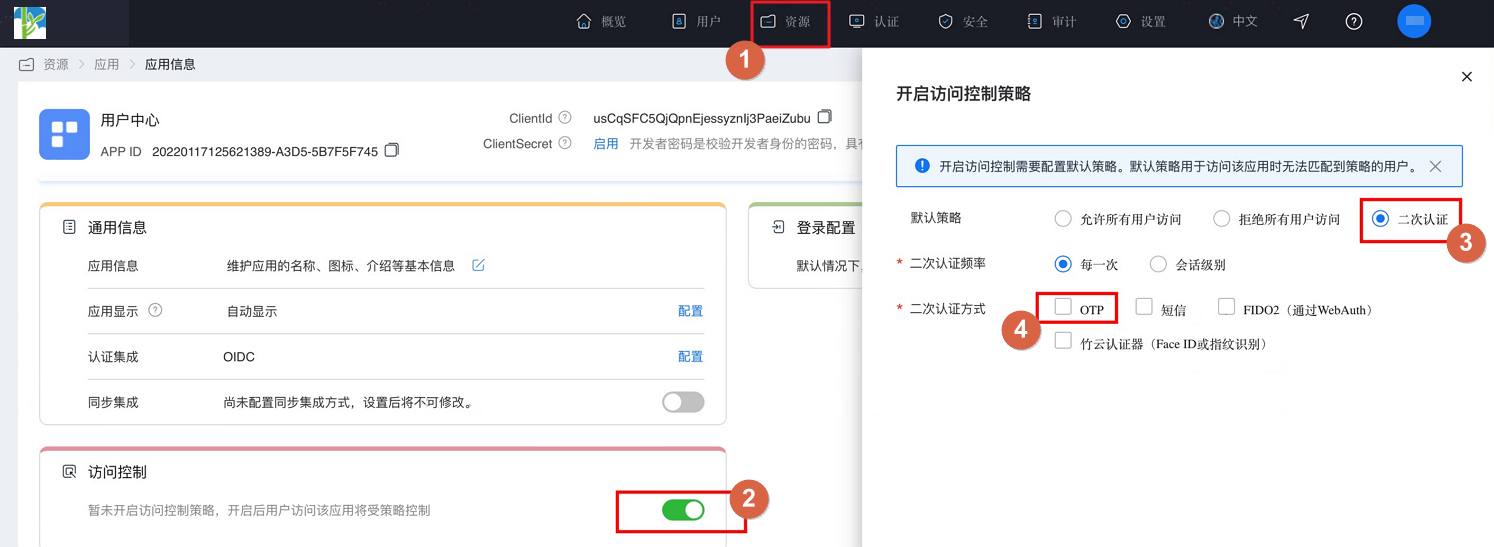
- After configuration, click "Resources --> Applications", find the enterprise application and enter the application panel, turn on the "Access Control" switch. In the pop-up settings page, select secondary authentication and check the secondary authentication method as OTP.
# Introducing Dependencies
Introduce it in Pod.
pod 'SwiftBase32', '~> 0.9.0'
# Adding the Main Library
AuthnCenter_MFA_OTP_2E.framework
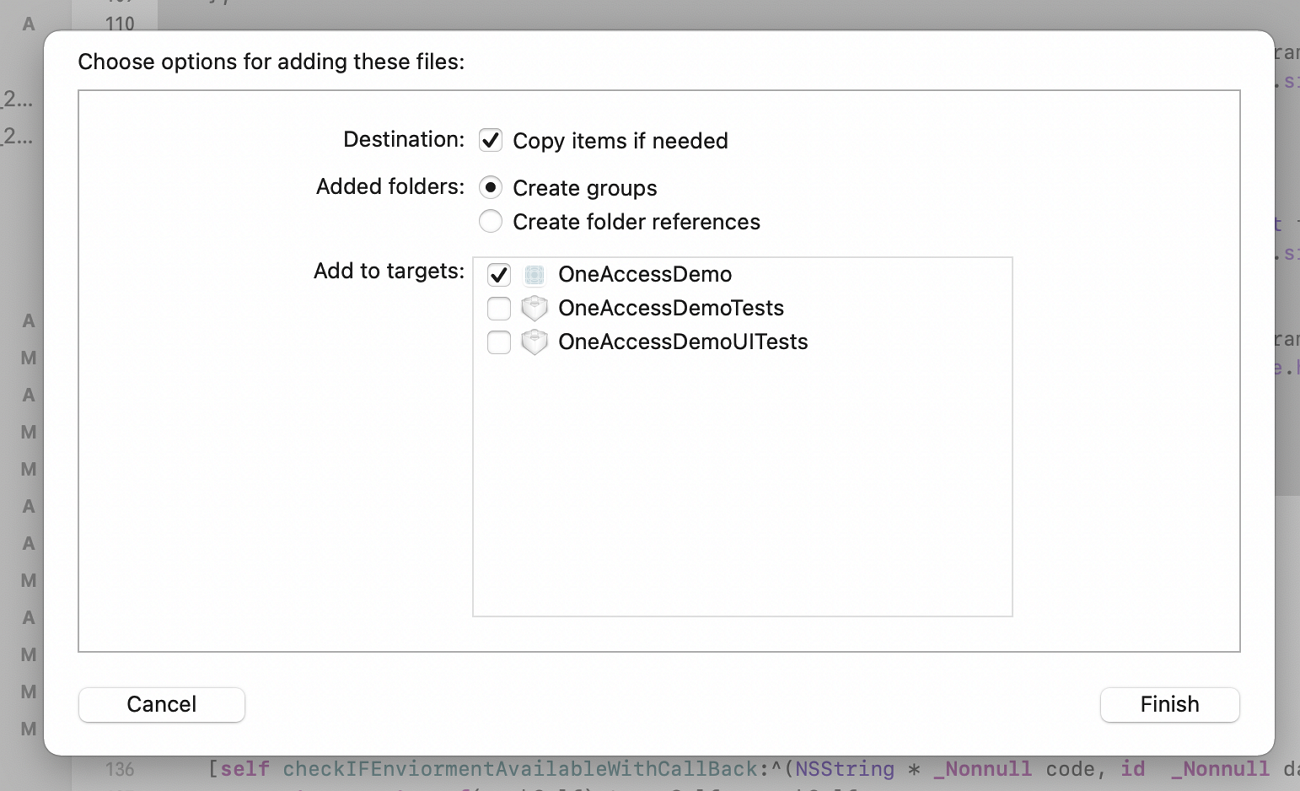
Drag the IDaaS SDK into the project. The introduction method is as follows:
# Targets Settings
The minimum compatible version for the IDaaS SMS login SDK is iOS 10.
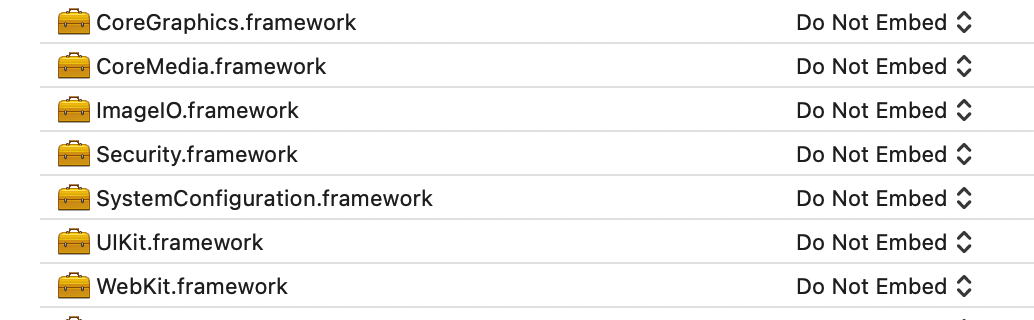
Include the following in the project's Frameworks, Libraries, and Embedded Content.
Security.framework
Foundation.framework
LocalAuthentication.framework
2
3
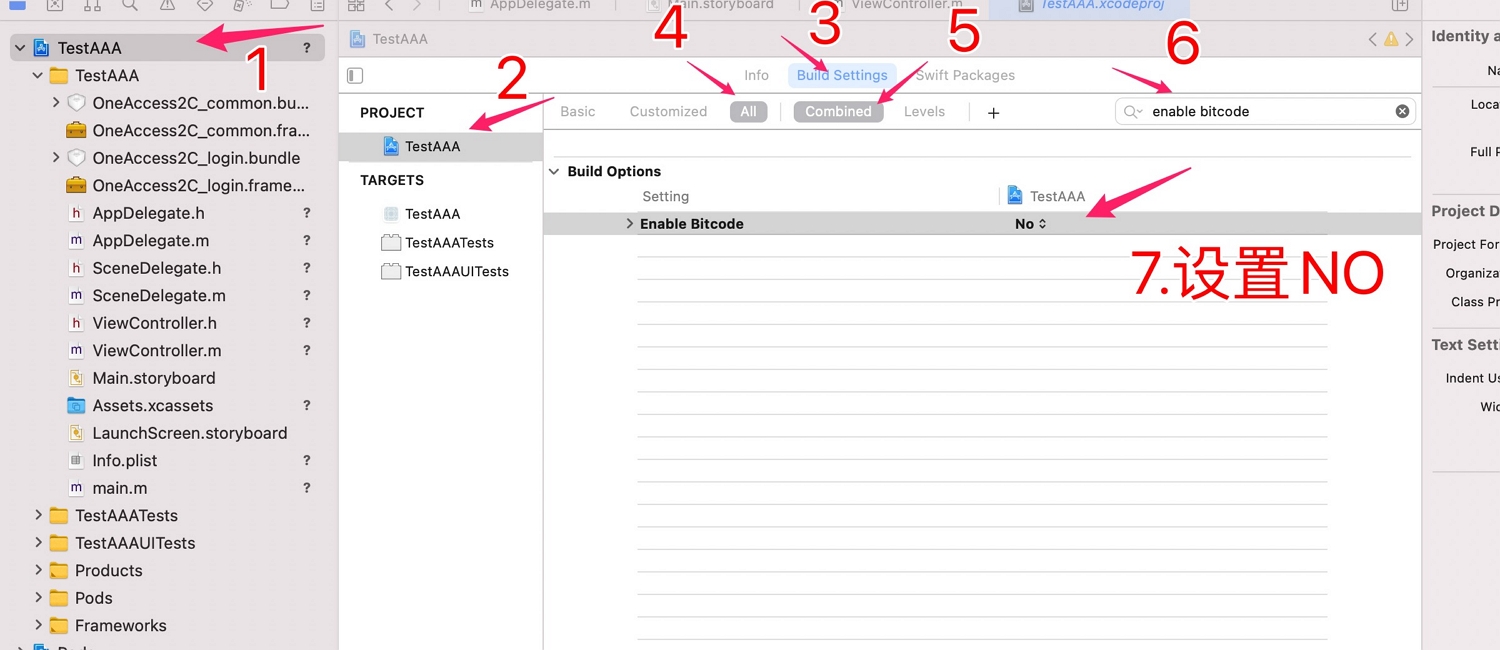
In Build Settings, set Defines Module to YES.
Set bitcode to NO, as shown below.
# Development Integration
# SDK API Introduction
The IDaaS SDK does not provide any UI. The SDK manages the OTP list, which is stored in the keychain by the SDK. Data will not be deleted even if the APP is uninstalled, but you can call the following deletion methods to clear this list one by one. The list can be added to, deleted from, and queried using the following methods:
Add OTP by scanning a QR code.
Add OTP by manually entering parameters.
Query all OTP password lists.
Query a single OTP password.
Delete a single OTP password.
# Adding OTP by Scanning QR Code
The string obtained by the App client scanning the QR code is passed to the add method. A boolean value is returned upon successful addition.
Example call:
 #import <AuthnCenter_MFA_OTP_2E/BCOTPManager.h>


 BOOL flag=  [BCOTPManager addWithUrl:urlStr];
    if(flag){//Addition successful, navigate
        [self.navigationController popViewControllerAnimated:YES];
    }else{//Addition failed
        [self showAlertWithTitle:@"OTP Addition Failed" message:nil sureHandler:nil cancelHandler:nil];

    }
2
3
4
5
6
7
8
9
10
The input parameter urlStr follows the string format:
otpauth://totp/sdk2e:zhangrui1?secret=jw776a3sjogusngvr2u7w57yjoazzo7u6ij2q6uj6r5p3p5anvkdfv2bsvxthncfqjjigedfp35lb6m3trz2zcezlkt736njzxkvy4q%3D&issuer=sdk2e&period=30&digits=6&algorithm=HmacSHA512&logo=null
Note: In the example, `sdk2e` is the application name, and `zhangrui1` is the username.
2
# Manually Input Parameters to Add OTP
When QR code scanning is unavailable, users can also add OTP by manually entering parameters. The user center settings page also provides various parameters that can be manually input to add OTP.
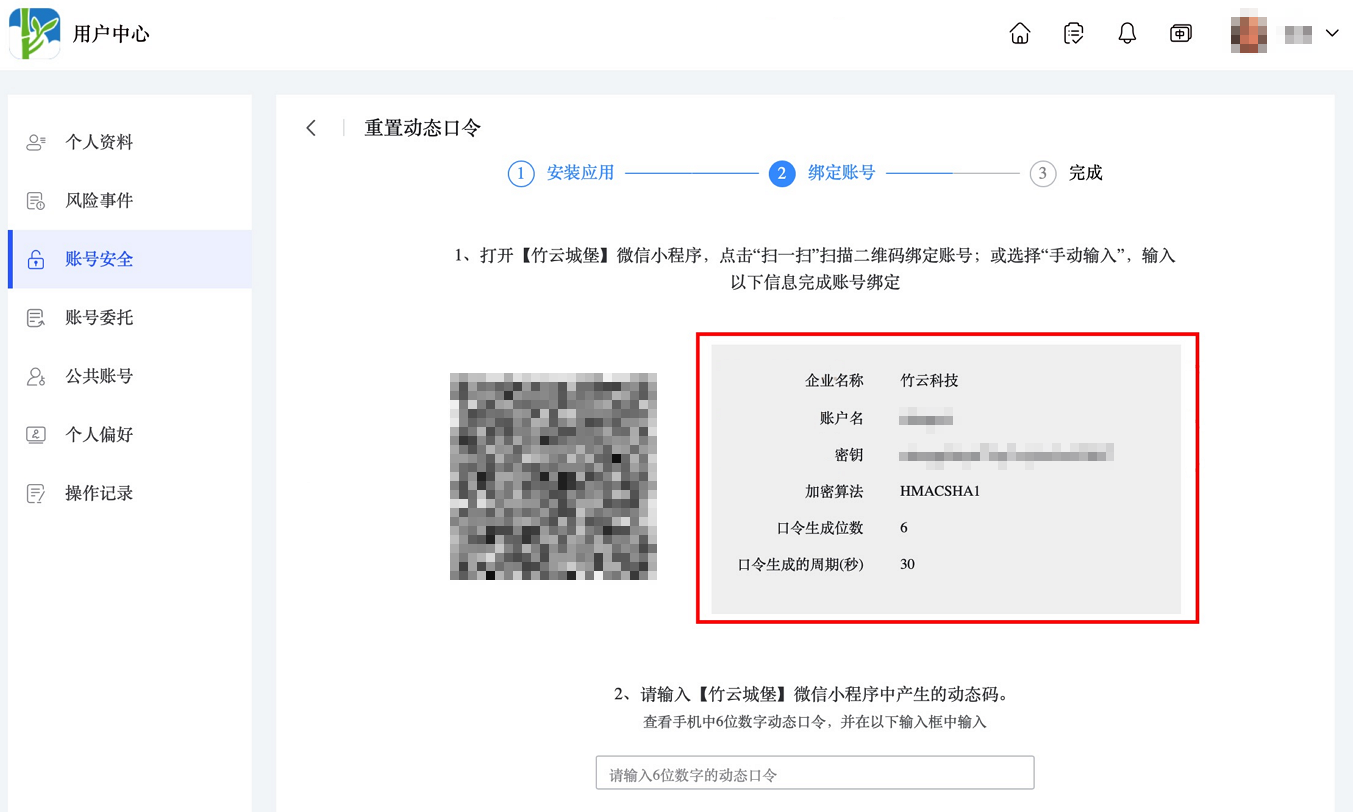
Call example:
 #import <AuthnCenter_MFA_OTP_2E/BCOTPManager.h>

[BCOTPManager addManuallyWithAlgorithm:@"HMACSHA512" andWithSecrete:@"22gua6dxykmffoqw5nhnercsckgg3oqhpge2k74xgujgjvmq7ljymwyoazmy6rvj5j4aor5r37dg7honzkxdzgblcsdtmztgo5qtyva=" andWithDigit:6 andWithPeriod:30 andWithIssuer:@"sdk2e" andWithUserName:@"zhangrui1"];
2
3
Object method introduction:
/**
algorithm:NSString Algorithm, e.g., HMACSHA1, HMACSHA256H, MACSHA512
secrete:  NSString Secret key, e.g., 22gua6dxykmffoqw5nhnercsckgg3oqhpge2k74xgujgjvmq7ljymwyoazmy6rvj5j4aor5r37dg7honzkxdzgblcsdtmztgo5qtyva=
digit:int Number of digits
period:int Refresh duration
issuer:NSString Application name
userName:NSString Username
Returns a boolean value: YES for successful addition / NO for failed addition
**/
+(BOOL)addManuallyWithAlgorithm:(NSString*)algorithm andWithSecrete:(NSString*)secrete andWithDigit:(int)digit andWithPeriod:(int)period andWithIssuer:(NSString*)issuer andWithUserName:(NSString*)userName;
2
3
4
5
6
7
8
9
10
# Query All OTP Token Lists
Calling this method will return all OTP lists.
Example code:
 [BCOTPManager showAllOTPsWithCallBack:^(NSMutableArray* data) {


    }];
2
3
4
5
Object introduction:
/**
BCOTPShowAllSuccessBlock callback function: NSArray

**/
+(void)showAllOTPsWithCallBack:(BCOTPShowAllSuccessBlock)callBack;
2
3
4
5
Callback function format:
NSArray contains:
Each OTP is of type NSArray, and each OTP contains two NSDictionary types, one for the current token and one for the next 30-second token.


(
        ( // First OTP
                { // Current token for the first OTP
            fromDate = "2023-01-09 09:09:30 +0000"; // NSDate type, based on UTC+0. If printed, add 8 hours.
            issuer = "Bamboo Cloud Technology"; // NSString Application name
            toDate = "2023-01-09 09:10:00 +0000"; // NSDate type, based on UTC+0. If printed, add 8 hours.
            userName = zhangrui; // NSString Username
            value = 148910; // NSString Dynamic token code
        },
                { // Next token for the first OTP
            fromDate = "2023-01-09 09:10:00 +0000"; // NSDate type, based on UTC+0. If printed, add 8 hours.
            issuer = "Bamboo Cloud Technology";
            toDate = "2023-01-09 09:10:30 +0000";
            userName = zhangrui;
            value = 743713;
        }
    ),
        ( // Second OTP
                { // Current token for the second OTP
            fromDate = "2023-01-09 09:09:30 +0000";
            issuer = sdk2e;
            toDate = "2023-01-09 09:10:00 +0000";
            userName = zhangrui1;
            value = 662180;
        },
                { // Next token for the second OTP
            fromDate = "2023-01-09 09:10:00 +0000";
            issuer = sdk2e;
            toDate = "2023-01-09 09:10:30 +0000";
            userName = zhangrui1;
            value = 180877;
        }
    )
)
2
3
4
5
6
7
8
9
10
11
12
13
14
15
16
17
18
19
20
21
22
23
24
25
26
27
28
29
30
31
32
33
34
35
36
37
38
# Query a Single OTP Password
By passing an index, you can individually retrieve the dynamic password for an OTP.
Call Example:
#import <AuthnCenter_MFA_OTP_2E/BCOTPManager.h>

[BCOTPManager loadOtpWithIndex:rowIndex andWithCallBack:^(NSArray* data){
                    dispatch_async(dispatch_get_main_queue(), ^{

                        [_codeArrary replaceObjectAtIndex:rowIndex withObject:data];


                        [_tableView reloadData];
                    });
                }];
2
3
4
5
6
7
8
9
10
11
Object Introduction:
/**
Parameter: index, int type, is the index of the OTP in the current list.
The BCOTPLoadSuccessBlock callback function returns an NSArray type.
**/

+(void)loadOtpWithIndex:(int)index andWithCallBack:(BCOTPLoadSuccessBlock)callBack;
2
3
4
5
6
Callback Function Description:
Returns a single OTP, containing an NSArray with two NSDictionary objects: one for the current OTP password and one for the next 30-second OTP password.


        (
                {
            fromDate = "2023-01-09 09:43:30 +0000";//NSDate type, based on UTC+0. Add 8 hours if printing.
            issuer = "Bamboo Cloud Technology";//
            toDate = "2023-01-09 09:44:00 +0000";//NSDate type, based on UTC+0. Add 8 hours if printing.
            userName = zhangrui;//NSString username
            value = 942819;//dynamic password
        },
                {
            fromDate = "2023-01-09 09:44:00 +0000";
            issuer = "Bamboo Cloud Technology";
            toDate = "2023-01-09 09:44:30 +0000";
            userName = zhangrui;
            value = 868491;
        }
    )
2
3
4
5
6
7
8
9
10
11
12
13
14
15
16
17
18
19
# Delete a Single OTP Password
You can delete a single OTP by its index.
Call Example:
 BOOL flag= [BCOTPManager deleteOtpWithIndex:indexPath.row];

//Returns a boolean value, YES for successful deletion / NO for unsuccessful deletion.
2
3