
Secondary Biometric Authentication
# Documentation Description
This document introduces how to integrate biometric authentication functionality into the iOS client. Biometric authentication refers to using the mobile phone's fingerprint/facial recognition function as a multi-factor authentication method when logging in on a PC.
When a user chooses "Use authenticator for secondary authentication" during PC login, they open the APP. Provided the user is logged in and the device is bound, the App will query the backend for any secondary authentication requests. If a request exists, the APP will invoke the phone's biometric recognition to confirm the owner's identity. Simultaneously, the APP will notify the IDaaS server to proceed with the subsequent authentication and authorization process.
# Process Description

Device Binding Integration Process Description
- The App client calls the method to query the device binding status. The IDaaS SDK requests the IDaaS server to check if the device is already bound.
- If the query result indicates the device is not bound, the App client calls the device binding method. The IDaaS SDK initiates the binding process, invoking the phone's fingerprint/facial recognition to confirm the owner's identity. The IDaaS server records the device as bound and returns a binding success/failure result to the App client.
Secondary Authentication Process Description
- The user opens a PC browser to log into the IDaaS system, selects "Use authenticator for secondary authentication," and clicks verify. The App client calls the method to query for secondary authentication requests, and the IDaaS server returns a random string.
- The App client obtains the random string and uses it to call the secondary authentication method. The IDaaS SDK initiates the secondary authentication process, invoking the phone's fingerprint/facial recognition to confirm the owner's identity, and sends the secondary authentication request to the IDaaS server. After the server verifies successfully, the PC web page automatically refreshes its status.
Unbinding Process Description
- The App client calls the method to query the device binding status. The IDaaS SDK requests the IDaaS server to check if the device is already bound.
- If the query result indicates the device is bound, the App client calls the unbinding method. The IDaaS SDK initiates the unbinding process, invoking the phone's fingerprint/facial recognition to confirm the owner's identity. The IDaaS server records the device as unbound and returns an unbinding success/failure result to the App client.
# Preparation
# Obtain clientID
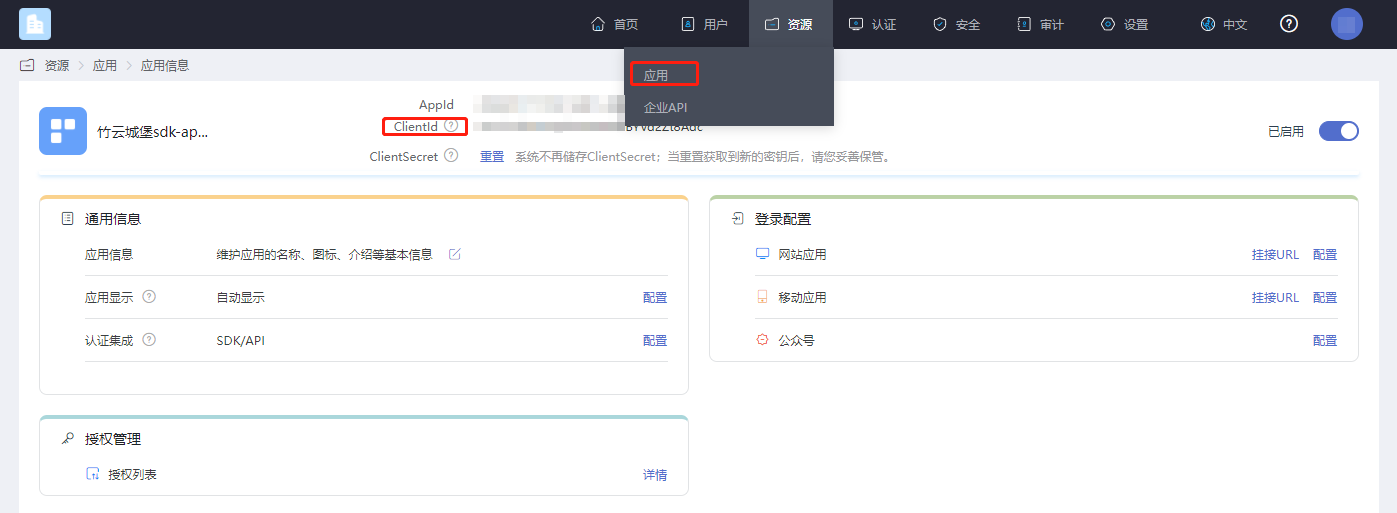
Log in to the IDaaS Enterprise Center platform, click "Resources --> Applications," select the application relevant to you, and click to view it.
# Enable Secondary Authentication
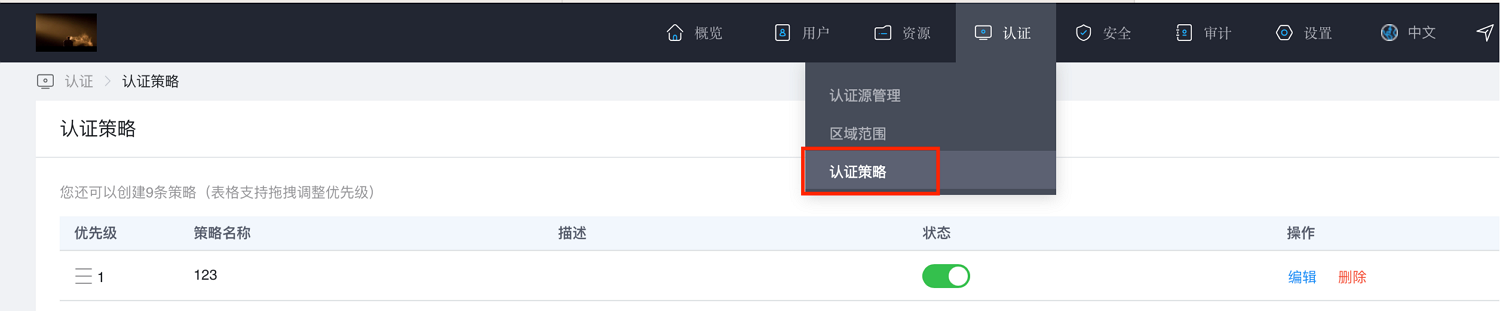
Log in to the IDaaS Enterprise Center platform, click "Authentication --> Authentication Policies."
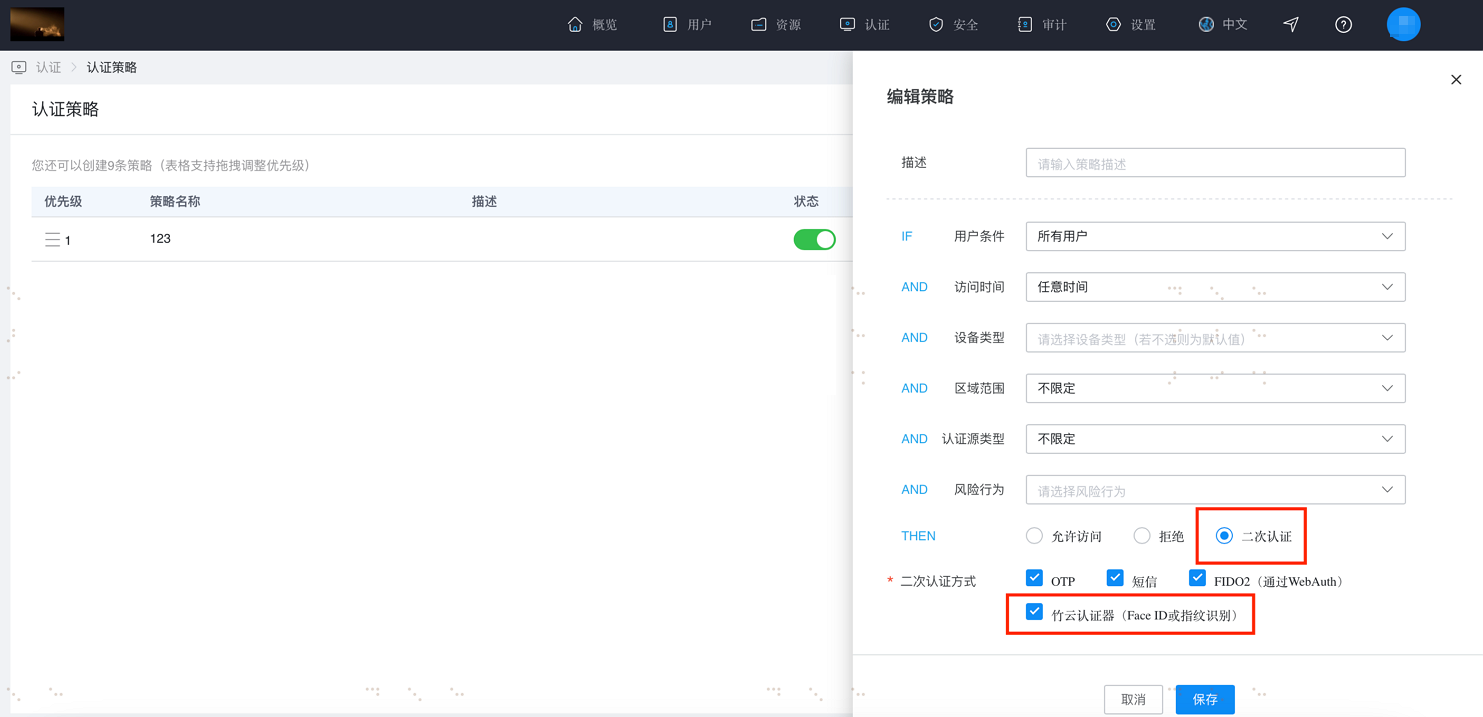
Click "Add Policy." A policy dialog box will appear on the right. Enter a description, check the boxes for "Secondary Authentication" and "Zhuyun Authenticator (FaceID or Fingerprint Recognition)," then click OK.
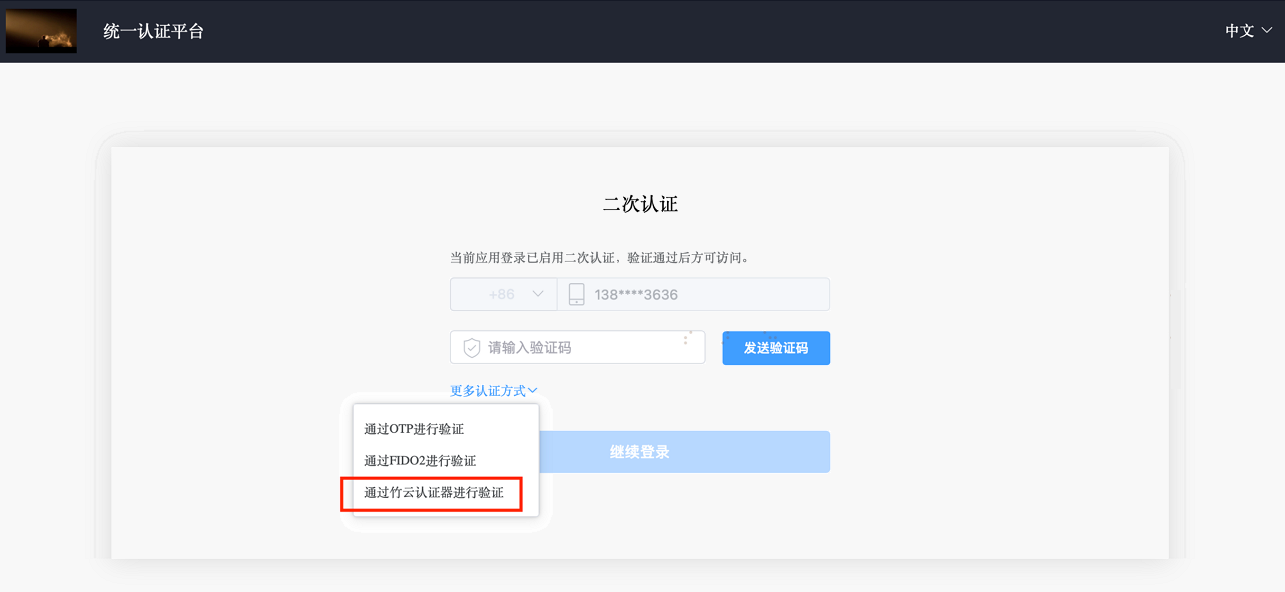
After configuring as described above, when logging into the user center page and after the primary login, where secondary authentication is required, the option "Verify via Zhuyun Authenticator" will appear.
# Import Dependencies
Fingerprint encryption depends on the external library 'EllipticCurveKeyPair'.
# Add Main Libraries
AuthnCenter_common_2E.framework
AuthnCenter_MFA_BioVerify_2E.bundle
AuthnCenter_MFA_BioVerify_2E.framework
2
3
Drag the IDaaSSDK into the project and import it as follows:
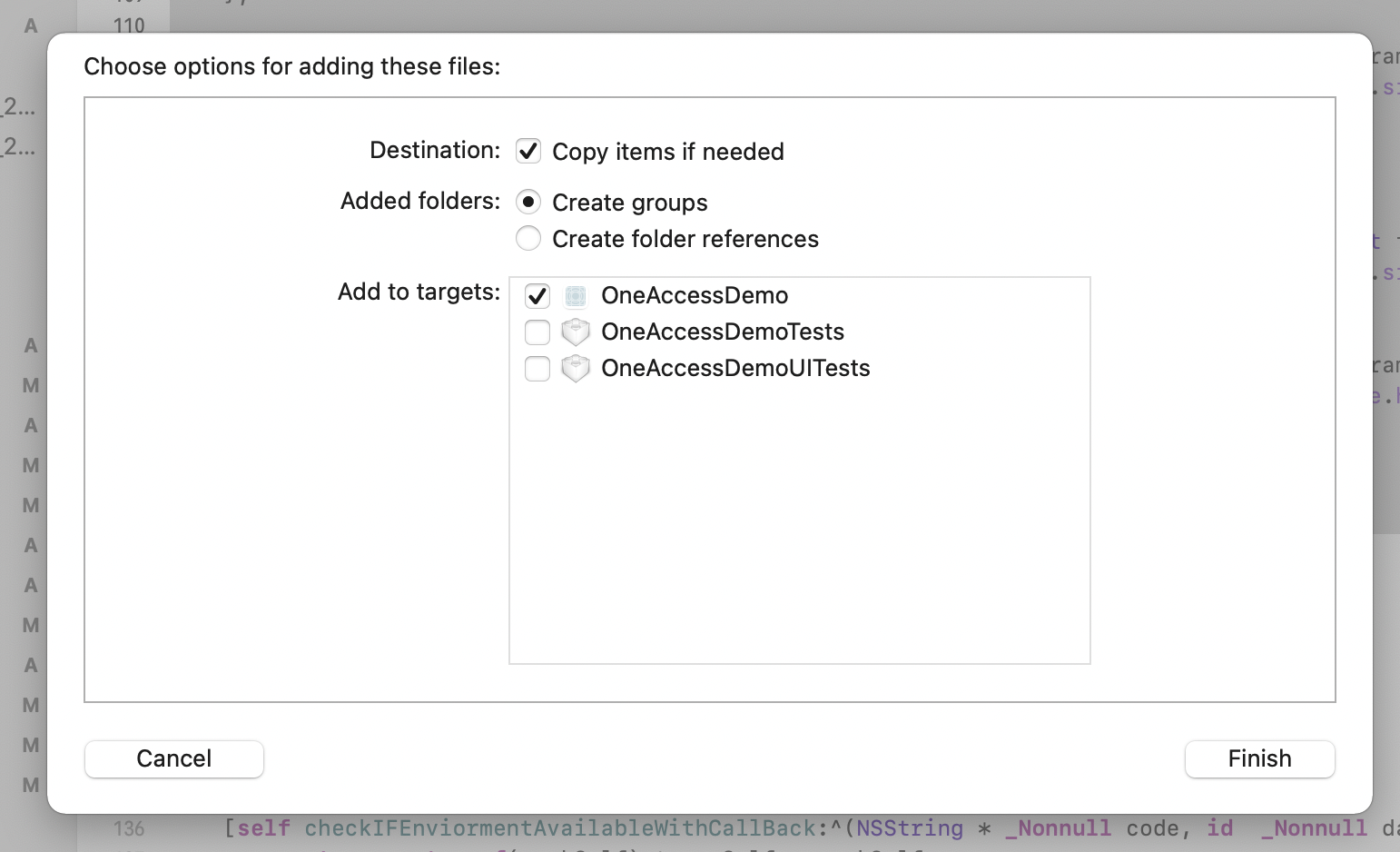
And import the Pod dependencies:
pod 'JWT', '~> 3.0.0-beta.14'
pod 'EllipticCurveKeyPair'
# Targets Settings
The IDaaS Secondary Authentication Biometric Authentication SDK is compatible with a minimum iOS version of 11.
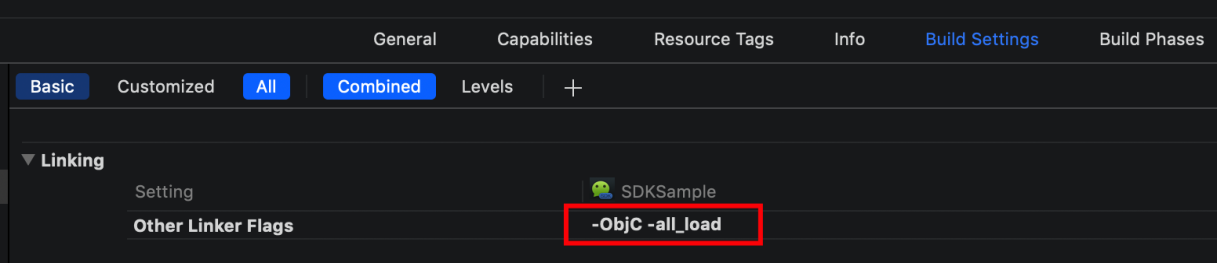
Set Other Linker Flags: In your project file, select Build Setting, and add "-ObjC -all_load" to "Other Linker Flags."
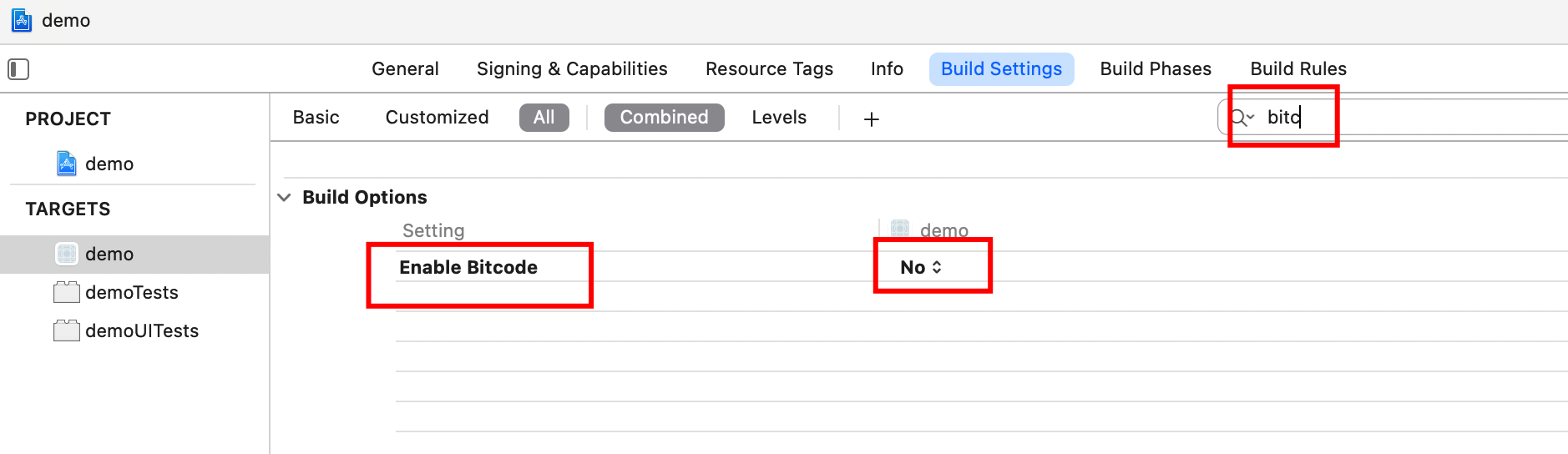
Set bitcode to NO.
# Info.plist Settings
Add biometric authentication permissions in the info.plist file.
Privacy - Face ID Usage Description: Want to use your face/fingerprint for biometric authentication functionality.
# Development Integration
# One-Click Invocation Development Integration Method
This section covers APP client-side operations for one-time binding, unbinding, and secondary authentication. The APP client only needs to integrate with IDaaS, without the need to consider writing fingerprint recognition/face recognition code.
Methods provided:
- SDK initialization
- Query whether the phone uses face recognition or fingerprint recognition type, for determining the text displayed on pop-ups (optional utility method)
- Query device binding status
- Bind device
- Unbind device
- Query whether the PC side has initiated secondary authentication
- Secondary authentication method
# SDK Initialization
The IDaaS SDK provides an initialization method where you can fill in the tenant, clientID, and whether to enable log printing.
Example of the initialization method:
Import the header file in appdelegate as follows
#import <AuthnCenter_common_2E/BCIDACommonManager.h>


// In the didFinishLaunchingWithOptions method of appdelegate
//1. Basic configuration initialization
[[[[[BCIDACommonManager sharedInstance] initWithDomain:@"https://your-backend-tenant.com"] initWithClientID:@"backend-tenant-clientID"] initWithSSLCerVerification:NO] setLogEnabled:YES] ;
2
3
4
5
6
7
Introduction to the main class BCIDACommonManager methods for basic configuration initialization:
/**
  * Function name: sharedInstance
   * @param None
   * @return Singleton object instance class
 */
+ (instancetype )sharedInstance ;

/**
  * Function name: initWithDomain
   * @param domain, starting with https:// and ending with .com.
   * @return Instance class
 */
-(BCIDACommonManager)initWithDomain:(NSString)domain

/**
  * Function name: initWithClientID
   * @param client id.
   * @return Instance class
 */
-(BCIDACommonManager)initWithClientID:(NSString)clientID;

/**
  * Function name: setLogEnabled
   * @param Boolean value indicating whether to enable log.
   * @return Instance class
 */
-(void)setLogEnabled:(BOOL)enable;

/**
  * Function name: initWithSSLCerVerification
   * @param Boolean value to set whether SSL certificate verification is enabled.
   * @return Instance class
 */
-(BCIDACommonManager*)initWithSSLCerVerification:(bool)sslCerVerification;
2
3
4
5
6
7
8
9
10
11
12
13
14
15
16
17
18
19
20
21
22
23
24
25
26
27
28
29
30
31
32
33
34
# Query Whether Phone Uses Face Recognition or Fingerprint Recognition Type
This is an optional method to query whether the phone uses face recognition or fingerprint recognition. It prepares for dynamically loading face recognition icons and fingerprint recognition icons.
Method example:
// Import request header
#import <AuthnCenter_MFA_BioVerify_2E/AuthnCenter_MFA_BioVerify_2E.h>

// Click (trigger) event
[BCIDAFingerPrintManager checkFingerPrintTypeWithCallback:^(NSString *checkFcode, id checkFdata) {
        NSLog(@"checkFinger method returns %@==%@",checkFcode,checkFdata);

        if([checkFcode isEqualToString:@"3"]){
           [BDEFAULTS setObject:@"FaceID" forKey:BC_Phone_FaceID_TouchID_Type];
           [BDEFAULTS synchronize];
        }else if([checkFcode isEqualToString:@"4"]){
            [BDEFAULTS setObject:@"TouchID" forKey:BC_Phone_FaceID_TouchID_Type];
            [BDEFAULTS synchronize];
        }
    }];
2
3
4
5
6
7
8
9
10
11
12
13
14
15
Introduction to BCIDAFingerPrintManager Methods:
/**
The BCIDAFingerCheckTypeBlock callback function includes NSString* checkFcode, id checkFdata
 checkFcode=2, fingerprint verification not supported
 checkFcode=3: Face ID
 checkFcode=4: Touch ID
 checkFcode=5: Biometric recognition supported but not set up
 checkFcode=6: Lock screen password not set, when biometrics are not available
 checkFcode=7: Biometric recognition is locked
 checkFcode=8: User canceled biometric recognition
 checkFcode=9: Other reasons, please refer to the string returned by checkFdata
 */
+(void)checkFingerPrintTypeWithCallback:(BCIDAFingerCheckTypeBlock)callBack;
2
3
4
5
6
7
8
9
10
11
12
# Query Device Binding Status
Call this method anywhere needed (before binding, unbinding, secondary authentication, or before prompting the user on the biometric recognition guide page). Example code is as follows:
// Import the request header
#import <AuthnCenter_MFA_BioVerify_2E/AuthnCenter_MFA_BioVerify_2E.h>


// Click (trigger) event
[[BCIDAMfaBioDeviceBindManager sharedInstance] checkDeviceStatusWithIDToken:_company.user.id_token andWithCallBack:^(NSString * _Nonnull statuscode, id  _Nonnull statusdata) {

        dispatch_async(dispatch_get_main_queue(), ^{
            if([statuscode isEqualToString:@"101"]){// Already bound

            }else if([statuscode isEqualToString:@"102"]){// Not bound


            }else{// Error code

            }
        });

    }];
2
3
4
5
6
7
8
9
10
11
12
13
14
15
16
17
18
19
Introduction to BCIDAMfaBioDeviceBindManager Object Methods:
/**
  * Function name: sharedInstance
   * @param None
   * @return Singleton object instance class
 */
+ (instancetype )sharedInstance ;

/**BCMFABioDeviceStatusCompleteHandler callback function includes NSString * _Nonnull statuscode, id statusdata
  Parameters:
 idToken : The valid idtoken obtained after successful login
**/
-(void)checkDeviceStatusWithIDToken:(NSString*)idToken andWithCallBack:(BCMFABioDeviceStatusCompleteHandler)callBack;
2
3
4
5
6
7
8
9
10
11
12
BCMFABioDeviceStatusCompleteHandler Callback Function Return Codes:
| statuscode | Description |
|---|---|
| statuscode=101 | statusdata=Already bound |
| statuscode=102 | statusdata=Not bound |
| statuscode=Error code (please refer to IDaaS return codes) | statusdata=Error code description |
# Binding Devices
In situations where device binding is required, please first call the method above to query the device binding status, and then call this method.
// Import the header file
#import <AuthnCenter_MFA_BioVerify_2E/AuthnCenter_MFA_BioVerify_2E.h>

// Click (trigger) event
 [[BCIDAMfaBioDeviceBindManager sharedInstance] bindDeviceWithIDToken:_company.user.id_token andWithUserID:_company.user.userid andWithCallBack:^(NSString * _Nonnull bindscode, id  _Nonnull bindsdata) {


            dispatch_async(dispatch_get_main_queue(), ^{


                if([bindscode isEqualToString:@"0"]){// Binding successful

                }else if([bindscode isEqualToString:@"COM.0217"]){// Token invalid

                }else{// Binding unsuccessful

                }
            });
        }];
2
3
4
5
6
7
8
9
10
11
12
13
14
15
16
17
18
19
Introduction to BCIDAMfaBioDeviceBindManager object methods:
/**
  * Function name: sharedInstance
   * @param None
   * @return Singleton object instance class
 */
+ (instancetype )sharedInstance ;

/**BCMFABioDeviceBindCompleteHandler callback function includes: NSString * _Nonnull bindscode,id bindsdata
Parameters:
 idToken : A valid idtoken obtained after successful login
  userID : Used as the unique identifier for this user in this app, for generating public-private key pairs in biometric authentication, ensuring the user's uniqueness within this app.
**/
-(void)bindDeviceWithIDToken:(NSString*)idToken andWithUserID:(NSString*)userID andWithCallBack:(BCMFABioDeviceBindCompleteHandler)callBack;
2
3
4
5
6
7
8
9
10
11
12
13
BCMFABioDeviceBindCompleteHandler callback return values:
| Local Biometric Error Code | Remarks |
|---|---|
| bindscode=2 | Fingerprint verification not supported |
| bindscode=5 | Biometric recognition supported but not set up |
| bindscode=6 | Lock screen password not set, in the absence of biometric recognition |
| bindscode=7 | Biometric recognition is locked |
| bindscode=8 | User canceled biometric recognition |
| bindscode=110 | Biometric recognition failed |
| bindscode=102 | Biometric recognition canceled by pressing the home button |
| Network Request Error Code | |
| bindscode=1 | Missing input parameters |
| bindscode=101 | Error generating RSA public key |
| bindscode=0 | Binding successful |
| bindscode=104 | Binding failed |
| bindscode=Other backend error codes | For details, please refer to the IDaaS error codes on the last page |
# Unbind Device
If you need to unbind a device, please first call the method for querying device binding status mentioned above, and then call this method.
Code Example:
//Import the header
#import <AuthnCenter_MFA_BioVerify_2E/AuthnCenter_MFA_BioVerify_2E.h>

//Trigger the event
[[BCIDAMfaBioDeviceBindManager sharedInstance] unbindDeviceWithIDToken:id_token andWithCallBack:^(NSString * _Nonnull unbincode, id  _Nonnull unbindata) {


        dispatch_async(dispatch_get_main_queue(), ^{
            if([unbincode isEqualToString:@"0"])//Unbind successful
            {


            }else{//Unbind failed

            }


        });
    }];
2
3
4
5
6
7
8
9
10
11
12
13
14
15
16
17
18
19
Introduction to the methods of the BCIDAMfaBioDeviceBindManager object:
/**
  * Function name: sharedInstance
   * @param None
   * @return Singleton object instance class
 */
+ (instancetype )sharedInstance ;

/**BCMFABioDeviceUnbindCompleteHandler callback function includes: NSString * _Nonnull unbincode,id unbindata
Parameters:
 idToken : The valid idtoken obtained after successful login

**/


-(void)unbindDeviceWithIDToken:(NSString*)idToken andWithCallBack:(BCMFABioDeviceUnbindCompleteHandler)callBack;
2
3
4
5
6
7
8
9
10
11
12
13
14
15
BCMFABioDeviceUnbindCompleteHandler Callback Return Values:
| Local Biometric Error Code | Remarks |
|---|---|
| bindscode=2 | Fingerprint verification not supported |
| bindscode=5 | Biometric recognition supported but not configured |
| bindscode=6 | Lock screen password not set (when biometrics are unavailable) |
| bindscode=7 | Biometric recognition is locked |
| bindscode=8 | User canceled biometric recognition |
| bindscode=110 | Biometric recognition failed |
| bindscode=102 | Biometric recognition canceled by pressing the home key |
| Network request and other error codes | |
| bindscode=1 | Missing input parameter |
| code=105 | Unbind failed |
| bindscode=0 | Unbind successful |
| bindscode=Other backend error codes | For details, please see the IDaaS error codes on the last page |
# Check if Secondary Authentication is Currently Initiated on the PC End
When logged in and having a valid idtoken, and under the condition of already being bound, query whether secondary authentication is currently initiated on the PC end.
Code example:
// Import header file
#import <AuthnCenter_MFA_BioVerify_2E/AuthnCenter_MFA_BioVerify_2E.h>

// Trigger method
 [[BCIDAMfaBioVerifyManager sharedInstance] checkIfMFAAvailableWithidToken:_company.user.id_token andWithCallBack:^(NSString * _Nonnull code, id  _Nonnull data) {

        dispatch_async(dispatch_get_main_queue(), ^{

            if([code isEqualToString:@"0"]&&![StringUtil isBlankString:(NSString*)data]){
                    NSString* randomS= (NSString*)data;// The obtained random number, used as an input parameter for the secondary authentication verification method

               [BCAlertPopManager podAlertWithTwoSectionWithTitle:nil andWithMessage:@"You are performing a secondary verification operation" inVC:self andCancelSectionName:@"Cancel" andFirstSelectorName:@"cancelSecondVerifyFingerPrint" andSecondSecName:@"Go to Verify" andSecondSelectorName:@"gotoSecondVerify"];


                }else{// Error codes returned when querying secondary authentication


                }

        });

    }];
2
3
4
5
6
7
8
9
10
11
12
13
14
15
16
17
18
19
20
21
22
Introduction to BCIDAMfaBioVerifyManager object methods:
/**
  * Function name: sharedInstance
   * @param None
   * @return Singleton object instance class
 */
+ (instancetype )sharedInstance;

/**BCMFABioVerifyCheckCompleteHandler callback function includes NSString * _Nonnull code, id data
Parameters:
idToken: The valid idtoken obtained after successful login
**/

-(void)checkIfMFAAvailableWithidToken:(NSString*)idToken andWithCallBack:(BCMFABioVerifyCheckCompleteHandler)callBack;
2
3
4
5
6
7
8
9
10
11
12
13
BCMFABioVerifyCheckCompleteHandler return values:
| Code | Description |
|---|---|
| code=1 | Missing parameters |
| code=0 | There is currently a secondary authentication that needs to be completed. data returns a random number string, which is used as an input parameter for the secondary authentication method below. |
| code=2 | There is currently no secondary authentication that needs to be completed |
# Secondary Authentication Method
When the previous method detects that the PC side has initiated secondary authentication and the random number has been obtained, this method is called to have the SDK launch the secondary authentication process. It completes facial recognition/fingerprint verification, sends the verification result to the backend, and finishes the secondary authentication.
Code Example:
 // Import header file
#import <AuthnCenter_MFA_BioVerify_2E/AuthnCenter_MFA_BioVerify_2E.h>

// Trigger method
 [[BCIDAMfaBioVerifyManager sharedInstance] verifyMFAResponseWithUserID:_company.user.userid andWithIdToken:_company.user.id_token andRandomStr:_randomStr andWithCallBack:^(NSString * _Nonnull code, id  _Nonnull data) {


        dispatch_async(dispatch_get_main_queue(), ^{

            if([code isEqualToString:@"0"]){

                [MBProgressHUD showSuccess:@"Secondary authentication successful"];


            }else{// Secondary authentication failed

            }
        });
    }];
2
3
4
5
6
7
8
9
10
11
12
13
14
15
16
17
18
19
Introduction to BCIDAMfaBioVerifyManager Object Methods:
/**
  * Function name: sharedInstance
   * @param None
   * @return Singleton object instance class
 */
+ (instancetype )sharedInstance;

/**BCMFABioVerifyCompleteHandler callback function includes NSString * _Nonnull code,id data
Parameters:
idToken : The valid idtoken obtained after successful login
userid: The same userid used as a parameter in the binding method
randomStr: The random string obtained from the previous method that checks for secondary authentication
**/
-(void)verifyMFAResponseWithUserID:(NSString*)userid andWithIdToken:(NSString*)idToken andRandomStr:(NSString*)randomStr andWithCallBack:(BCMFABioVerifyCompleteHandler)callBack;
2
3
4
5
6
7
8
9
10
11
12
13
14
BCMFABioVerifyCompleteHandler Return Values:
| Code | Description |
|---|---|
| code=1 | Missing parameters |
| code=101 | Signature method error, please contact administrator |
| code=2 | Secondary authentication failed |
| code=0 | Secondary authentication successful |
| code=Other | Refer to IDaaS backend error codes, at the page bottom |
# API Integration Methods
This section describes how to integrate the biometric secondary authentication SDK in the form of APIs. Developers need to follow the flowchart at the beginning to string together the entire process themselves. This includes writing biometric authentication code to invoke fingerprint or facial authentication, and using it in conjunction with the utility classes provided by the SDK.
# API List
SDK Initialization.
Device Binding Status Query API
Binding API
Unbinding API
Secondary Authentication API
# SDK Initialization
Example of IDaaS SDK initialization method:
Reference the header file in appdelegate as follows
#import <AuthnCenter_common_2C/BCIDACommonManager.h>

// In the didFinishLaunchingWithOptions method in appdelegate
//1. Basic configuration initialization
[[[[[BCIDACommonManager sharedInstance] initWithDomain:@"https://your-backend-tenant.com"] initWithClientID:@"backend tenant clientID"] initWithSSLCerVerification:NO] setLogEnabled:YES] ;
2
3
4
5
6
# Device Binding Status Query API
Call this method anywhere needed (before binding, unbinding, secondary authentication, or prompting the user to enable biometrics on the guide page). Code example:
// Import the request header
#import <AuthnCenter_MFA_BioVerify_2E/AuthnCenter_MFA_BioVerify_2E.h>


// Click (trigger) event
[[BCIDAMfaBioDeviceBindManager sharedInstance] checkDeviceStatusWithIDToken:_company.user.id_token andWithCallBack:^(NSString * _Nonnull statuscode, id  _Nonnull statusdata) {

        dispatch_async(dispatch_get_main_queue(), ^{
            if([statuscode isEqualToString:@"101"]){// Already bound

            }else if([statuscode isEqualToString:@"102"]){// Not bound


            }else{// Error code

            }
        });

    }];
2
3
4
5
6
7
8
9
10
11
12
13
14
15
16
17
18
19
Brief introduction to BCIDAMfaBioDeviceBindManager object methods:
/**
  * Function name: sharedInstance
   * @param None
   * @return Singleton object instance class
 */
+ (instancetype )sharedInstance ;

/**BCMFABioDeviceStatusCompleteHandler callback function includes NSString * _Nonnull statuscode,id statusdata
  Parameters:
 idToken : The valid idtoken obtained after successful login
**/
-(void)checkDeviceStatusWithIDToken:(NSString*)idToken andWithCallBack:(BCMFABioDeviceStatusCompleteHandler)callBack;
2
3
4
5
6
7
8
9
10
11
12
BCMFABioDeviceStatusCompleteHandler callback function return codes:
| statuscode | Description |
|---|---|
| statuscode=101 | statusdata=Already bound |
| statuscode=102 | statusdata=Not bound |
| statuscode=Error code (please refer to IDaaS return codes) | statusdata=Error code description |
# Binding API
Code example, when not bound, call in the following order:
Call fingerprint/face authentication, after successful authentication.
Call the method
getPublicKeywithUseridin the utility classBCIDAFingerPrintVerifyManagerto successfully obtain the public key string.Call the binding method
bindDeviceWithidToken:idtoken andPublicKey:pubKeyofBCIDAMfaBioAPIManager.
//1. Call fingerprint/face authentication, call after successful authentication
  LAContext *context = [[LAContext alloc] init];
  [context evaluatePolicy:LAPolicyDeviceOwnerAuthentication localizedReason:localizedReason reply:^(BOOL success, NSError * _Nullable error) {

      if (success) {//Authentication successful
//2. Call the utility class to generate the encrypted public key. The input parameter userid can be a string that uniquely represents the user and is permanently stored on the phone. If this user id changes, the public key will also change, and the original binding relationship will no longer exist.
// 3. Pass the public key to the binding method
        [[BCIDAFingerPrintVerifyManager sharedInstance] getPublicKeywithUserid:_userID CallBack:^(NSString * _Nonnull gencode, id  _Nonnull gendata) {

            if([gencode isEqualToString:@"0"]){
                NSString* pubKey=(NSString*)gendata;
                [[BCIDAMfaBioAPIManager sharedInstance] bindDeviceWithidToken:idtoken andPublicKey:pubKey andWithCallBack:^(id  _Nonnull bindData) {
                    dispatch_async(dispatch_get_main_queue(), ^{

                        NSDictionary* dic=(NSDictionary*)bindData;
                        NSString* code= [dic objectForKey:@"code"];
                        NSString* message=[dic objectForKey:@"message"];
                        if([code isEqualToString:@"0"]){
                            NSNumber* dataN=(NSNumber*)[dic objectForKey:@"data"];
                            if(dataN!=nil&&dataN!=[NSNull null]){
                                BOOL flag= [dataN boolValue];
                                if(flag){//Success
                                    [self.bindSwitch setOn:YES];
                                    NSString* errstr=[NSString stringWithFormat:@"Binding successful"];

                                    [MBProgressHUD showSuccess:errstr];
                                }else{//Failure

                                    NSString* errstr=[NSString stringWithFormat:@"Binding failed"];
                                    [MBProgressHUD showError:errstr];
                                }
                            }else{
                                NSString* errstr=[NSString stringWithFormat:@"Binding failed"];
                                [MBProgressHUD showError:errstr];
                            }

                        }else{
                            NSString* errstr=[NSString stringWithFormat:@"Binding failed: %@--%@",code,message];
                            [MBProgressHUD showError:errstr];
                        }
                    });


                }];

            }else{

                [MBProgressHUD showError:@"Public key acquisition error, please contact the administrator"];
            }
        }];

            }
  }
2
3
4
5
6
7
8
9
10
11
12
13
14
15
16
17
18
19
20
21
22
23
24
25
26
27
28
29
30
31
32
33
34
35
36
37
38
39
40
41
42
43
44
45
46
47
48
49
50
51
52
53
Introduction to the BCIDAFingerPrintVerifyManager object:
+ (instancetype )sharedInstance ;

/** Get the public key. If it doesn't exist, generate one. If it already exists, retrieve the existing one.
BCIDAFingerPrintKeypairGenerateCompleteHandler returns NSString * _Nonnull gencode, id gendata
gencode=0 gendata=public key
gencode=101 gendata=error description
**/

-(void)getPublicKeywithUserid:(NSString*)userid CallBack (BCIDAFingerPrintKeypairGenerateCompleteHandler)callBack;
2
3
4
5
6
7
8
9
Introduction to the BCIDAMfaBioAPIManager object:
+ (instancetype )sharedInstance ;
/**
Bind, input parameters idtoken
        publicKey (the public key generated by the previous method)
     BCMFABioAPIBindCompleteHandler callback returns an NSDictionary object

**/
-(void)bindDeviceWithidToken:(NSString*)idToken andPublicKey:(NSString*)publicKey andWithCallBack:(BCMFABioAPIBindCompleteHandler)callBack;
2
3
4
5
6
7
8
The callback function returns an NSDictionary object:
| Parameter Name | Chinese Name | Type | Description |
|---|---|---|---|
| code | Return Status Code | String | 0 for success, others for error codes |
| data | Return Content | String | Returns true upon successful binding |
| message | Return Message | String | Returns specific error information when an error occurs |
# Unbind API
Code example, when not bound, call in the following order:
- Call fingerprint/face authentication, and after successful authentication.
- Call the
unbindDeviceAPIWithIDToken:idtoken andWithCallBackmethod of BCIDAMfaBioAPIManager to unbind.
//1. Call fingerprint/face authentication, and upon successful authentication, call
  LAContext *context = [[LAContext alloc] init];
  [context evaluatePolicy:LAPolicyDeviceOwnerAuthentication localizedReason:localizedReason reply:^(BOOL success, NSError * _Nullable error) {

      if (success) {//Authentication successful

        [[BCIDAMfaBioAPIManager sharedInstance] unbindDeviceAPIWithIDToken:idtoken andWithCallBack:^(id  _Nonnull unbindData) {
            dispatch_async(dispatch_get_main_queue(), ^{

                NSDictionary* dic=(NSDictionary*)unbindData;
                NSString* code= [dic objectForKey:@"code"];
                NSString* message=[dic objectForKey:@"message"];
                if([code isEqualToString:@"0"]){
                    NSNumber* dataN=(NSNumber*)[dic objectForKey:@"data"];
                    if(dataN!=nil&&dataN!=[NSNull null]){
                        BOOL flag= [dataN boolValue];
                        if(flag){//Unbind successful
                            [self.bindSwitch setOn:NO];

                            NSString* errstr=[NSString stringWithFormat:@"Unbind successful"];
                            [MBProgressHUD showSuccess:errstr];
                        }else{//Unbind failed

                            NSString* errstr=[NSString stringWithFormat:@"Unbind failed"];
                            [MBProgressHUD showError:errstr];
                        }
                    }else{
                        NSString* errstr=[NSString stringWithFormat:@"Unbind failed"];
                        [MBProgressHUD showError:errstr];
                    }

                }else{
                    NSString* errstr=[NSString stringWithFormat:@"Unbind failed: %@--%@",code,message];
                    [MBProgressHUD showError:errstr];
                }
            });
        }];


      }
2
3
4
5
6
7
8
9
10
11
12
13
14
15
16
17
18
19
20
21
22
23
24
25
26
27
28
29
30
31
32
33
34
35
36
37
38
39
40
Introduction to the BCIDAMfaBioAPIManager object:
+ (instancetype )sharedInstance ;

/** Unbind
Input parameter: idToken
BCMFABioAPIUnBindCompleteHandler callback returns an NSDictionary object
**/
-(void)unbindDeviceAPIWithIDToken:(NSString*)idToken andWithCallBack:(BCMFABioAPIUnBindCompleteHandler)callBack;
2
3
4
5
6
7
The callback function returns an NSDictionary object:
| Parameter | Chinese Name | Type | Description |
|---|---|---|---|
| code | Return Status Code | String | 0 for success, others for error codes |
| data | Return Content | String | On success, returns true |
| message | Return Message | String | When an error occurs, returns specific error information |
# Two-Factor Authentication API
Code example: Query whether two-factor authentication can be used only after confirming it is bound. Developers do not need to write biometric code here; the API will include it during signing. Follow the calling sequence below:
- Query if the PC side has initiated two-factor authentication using
BCIDAMfaBioAPIManager'scheckIFMfaBioRequestAvailableWithIdToken:idToken andWithCallBack. If there is a two-factor authentication request, it returns a random string, which should be saved for the next step's parameter. - If there is a two-factor authentication request, prompt the user with a dialog asking if they want to verify.
- When the user clicks to verify, call the utility class
BCIDAFingerPrintVerifyManager'ssignDataByPrivateKeywithUserid:_userID WithStr:_randomStr andWithCallBack, and pass the random string obtained in step 1 as a parameter. This returns the signed random string; the signing process will trigger fingerprint or facial verification. - Call
BCIDAMfaBioAPIManager'sresponseToMfaBioWithIdToken:idtoken andWithSignedStr:signddata andWithCallBackmethod, using the signed random string from step 3 as thesignddataparameter.
//Check if a two-factor authentication request has been initiated
-(void)mfaCheckWithidToken:(NSString*)idToken{

    [[BCIDAMfaBioAPIManager sharedInstance] checkIFMfaBioRequestAvailableWithIdToken:idToken andWithCallBack:^(id  _Nonnull mfaReData) {
        dispatch_async(dispatch_get_main_queue(), ^{

            NSDictionary* dic=(NSDictionary*)mfaReData;
            NSString* co=[dic objectForKey:@"code"];
            NSDictionary* da=(NSDictionary*)[dic objectForKey:@"data"];
            NSString* mesg=[dic objectForKey:@"message"];

            if([co isEqualToString:@"0"]){
                if(da!=nil){
                    NSString* randomS=  [da objectForKey:@"random"];
                    NSString* clientId=[da objectForKey:@"clientId"];
                    NSString* clientNameS=[da objectForKey:@"clientName"];
                    if(![BCIDACommonStringUtils isEmptyString:randomS]){
                        _randomStr=randomS;
                        [BCAlertPopManager podAlertWithTwoSectionWithTitle:nil andWithMessage:@"There is a pending two-factor authentication to complete" inVC:self andCancelSectionName:@"Close" andFirstSelectorName:nil andSecondSecName:@"Go Verify" andSecondSelectorName:@"goMFaVerify"];

                    }else{
                        [MBProgressHUD showMessage:@"No two-factor authentication requires verification"];
                    }
                }else{
                    [MBProgressHUD showMessage:@"No two-factor authentication requires verification"];
                }


            }


        });
    }];


}

//Proceed with two-factor authentication
-(void)goMFaVerify{
    NSString* idtoken=  [BCIDADEFAULTS objectForKey:idTokenSaveAll];
      if(idtoken==nil||[idtoken isEqualToString:@""]){
          [MBProgressHUD showError:@"Login expired, please log in again"];
          return;
      }
    //1. After the user obtains the random string, they must sign the random string using the following method. The signing result is used as a parameter in the two-factor authentication method.
    [[BCIDAFingerPrintVerifyManager sharedInstance] signDataByPrivateKeywithUserid:_userID WithStr:_randomStr andWithCallBack:^(NSString * _Nonnull signdcode, id  _Nonnull signddata) {
        dispatch_async(dispatch_get_main_queue(), ^{

            if ([signdcode isEqualToString:@"0"]) {
                NSString* signda=(NSString*)signddata;
                [[BCIDAMfaBioAPIManager sharedInstance] responseToMfaBioWithIdToken:idtoken andWithSignedStr:signddata andWithCallBack:^(id  _Nonnull mfaReData) {
                    dispatch_async(dispatch_get_main_queue(), ^{

                        NSDictionary* dic=(NSDictionary*)mfaReData;
                        NSString* code=[dic objectForKey:@"code"];
                        NSNumber* dataflag=(NSNumber*)[dic objectForKey:@"data"];
                        NSString* message=[dic objectForKey:@"message"];
                        if([code isEqualToString:@"0"]){
                            if(dataflag!=nil&&dataflag!=[NSNull null]){
                                BOOL flag= [dataflag boolValue];
                                if(flag){
                                    [MBProgressHUD showSuccess:@"Two-factor authentication successful"];
                                }else{
                                    [MBProgressHUD showError:@"Two-factor authentication failed"];
                                }
                            }else{
                                [MBProgressHUD showError:@"Two-factor authentication failed"];
                            }
                        }else{
                            NSString* errStr=[NSString stringWithFormat:@"Two-factor authentication failed:%@--%@",code,message];
                            [MBProgressHUD showError:errStr];
                        }

                    });

                }];

            }else{
                [MBProgressHUD showError:@"Random string signing error"] ;

            }
        });
    }];


}
2
3
4
5
6
7
8
9
10
11
12
13
14
15
16
17
18
19
20
21
22
23
24
25
26
27
28
29
30
31
32
33
34
35
36
37
38
39
40
41
42
43
44
45
46
47
48
49
50
51
52
53
54
55
56
57
58
59
60
61
62
63
64
65
66
67
68
69
70
71
72
73
74
75
76
77
78
79
80
81
82
83
84
85
86
87
Introduction to BCIDAMfaBioAPIManager Object Methods:
+ (instancetype )sharedInstance ;

/**Check if a secondary authentication has been initiated
   Input parameter: idToken
   Callback returns an NSDictionary object
**/
-(void)checkIFMfaBioRequestAvailableWithIdToken:(NSString*)idToken andWithCallBack:(BCMFABioAPIRequestAvailableCompleteHandler)callBack;

/**Proceed with secondary authentication
  Input parameters: idToken
       signedStr: The random string returned by the previous method after being signed
       Callback returns an NSDictionary object

**/
-(void)responseToMfaBioWithIdToken:(NSString*)idToken andWithSignedStr:(NSString*)signedStr andWithCallBack:(BCMFABioAPIResponseToMfaCompleteHandler)callBack;
2
3
4
5
6
7
8
9
10
11
12
13
14
15
Callback Return Values:
BCMFABioAPIRequestAvailableCompleteHandler success callback returns:
{
    "code": "0",
    "data":
            {
                "random":"231123",//Random string, needs to be signed to be used as input parameter for secondary authentication
               "clientId":"qwwmx651",
               "clientName":"Huawei Cloud"
            }
        ,
    "message": null
}
Error return is code=0, message provides error description.

BCMFABioAPIResponseToMfaCompleteHandler success callback returns:
{
    "code": "0",
    "data":true,//Operation successful, returns YES, failure returns NO
    "message": null
}
2
3
4
5
6
7
8
9
10
11
12
13
14
15
16
17
18
19
20
Introduction to the Signature Tool Class BCIDAFingerPrintVerifyManager:
+ (instancetype )sharedInstance ;

/**
Sign a string
Input parameters: userid represents user uniqueness, same as the one used during binding
    signStr the random string obtained from the interface that checks for secondary authentication
    Callback returns NSString * _Nonnull signdcode, id signddata
    signdcode=0, data returns the signed random string
    signdcode=error code, data returns error information
**/
-(void)signDataByPrivateKeywithUserid:(NSString*)userid WithStr:(NSString*)signStr andWithCallBack:(BCIDAFingerPrintSignDataCompleteHandler)callBack;
2
3
4
5
6
7
8
9
10
11
# Return Codes
| Status Code | Error Code (error_code) | Error Description (error_msg) | Action |
|---|---|---|---|
| 400 | IDAAS.SDK.COMMON.1001 | Parameter {0} cannot be left blank | |
| Parameter {0} cannot be left blank | |||
| 400 | IDAAS.SDK.COMMON.1002 | The {0} parameter format is incorrect | |
| Parameter {0} format error | |||
| 400 | IDAAS.SDK.COMMON.1003 | Device information is incomplete | |
| Device information incomplete | |||
| 400 | IDAAS.SDK.COMMON.1004 | Signature decryption error | |
| Signature decryption error | |||
| 400 | IDAAS.SDK.COMMON.1005 | The {0} has failed | |
| {0} has expired | |||
| 400 | IDAAS.SDK.COMMON.1006 | The {0} parameter error | |
| {0} parameter error | |||
| 400 | IDAAS.SDK.COMMON.1007 | The {0} parameter type error | |
| {0} parameter type error | |||
| 500 | IDAAS.SDK.COMMON.1008 | The system is busy. Try again later | |
| System busy. Please try again later | |||
| 400 | IDAAS.SDK.COMMON.1009 | Unknown authentication configuration | |
| Unknown authentication configuration | |||
| 400 | IDAAS.SDK.COMMON.1010 | Failed to obtain the enterprise center global configuration | |
| Failed to obtain enterprise center global configuration | |||
| 400 | IDAAS.SDK.COMMON.1011 | Failed to obtain the international area code configuration | |
| Failed to obtain international area code configuration | |||
| 400 | IDAAS.SDK.COMMON.1012 | The x-client-ID is incorrect and the corresponding application cannot be found | |
| X-client-id error, cannot find the corresponding application | |||
| 400 | IDAAS.SDK.COMMON.1013 | The corresponding user is not found | |
| Corresponding user not found | |||
| 400 | IDAAS.SDK.COMMON.1014 | Application private key not found | |
| Application private key not found | |||
| 400 | IDAAS.SDK.LOGIN.1001 | Error calling interface {0} | |
| Error calling interface {0} | |||
| 400 | IDAAS.SDK.LOGIN.1002 | User not bound | |
| User not bound | |||
| 400 | IDAAS.SDK.LOGIN.1003 | The user has been locked due to too many unsuccessful login attempts. It will be unlocked in {0} minutes and {1} seconds | |
| Due to multiple failed login attempts, the user has been locked. It will be unlocked in {0} minutes and {1} seconds | |||
| 400 | IDAAS.SDK.LOGIN.1004 | Failed to obtain the password policy | |
| Failed to obtain password policy | |||
| 400 | IDAAS.SDK.LOGIN.1005 | Invalid username or password. Remaining login attempts: {0} | |
| Invalid username or password. Remaining login attempts: {0} | |||
| 400 | IDAAS.SDK.LOGIN.1006 | Configuration error, unable to find wechat authentication source | |
| Configuration error, cannot find WeChat authentication source | |||
| 400 | IDAAS.SDK.LOGIN.1007 | Configuration error, unable to find alipay authentication source | |
| Configuration error, cannot find Alipay authentication source | |||
| 400 | IDAAS.SDK.LOGIN.1008 | The configuration is incorrect. The one-click login authentication source cannot be found | |
| Configuration error, cannot find one-click login authentication source | |||
| 400 | IDAAS.SDK.SMS.1001 | {0} slide base map is not initialized successfully, please check the path | |
| {0} slide base map not initialized successfully, please check the path | |||
| 400 | IDAAS.SDK.SMS.1002 | {0} verification code coordinate resolution failed | |
| {0} verification code coordinate resolution failed | |||
| 400 | IDAAS.SDK.SMS.1003 | {0} verification code coordinate verification fails | |
| {0} verification code coordinate verification fails | |||
| 400 | IDAAS.SDK.SMS.1004 | The graphic verification code is incorrect | |
| Graphic verification code verification error | |||
| 400 | IDAAS.SDK.SMS.1005 | SMS verification code verification is incorrect | |
| SMS verification code verification error | |||
| 400 | IDAAS.SDK.SMS.1006 | The email verification code is incorrect | |
| Email verification code verification error | |||
| 400 | IDAAS.SDK.SMS.1007 | Sending scenario does not exist | |
| Sending scenario does not exist | |||
| 400 | IDAAS.SDK.SMS.1008 | Failed to send the verification code | |
| Failed to send verification code | |||
| 400 | IDAAS.SDK.SOCIAL.1001 | The social account is unbound incorrectly | |
| Social account unbinding error | |||
| 400 | IDAAS.SDK.SOCIAL.1002 | The social account has been bound, please unbind it first | |
| Social account already bound, please unbind first | |||
| 400 | IDAAS.SDK.PWD.1001 | The password length is incorrect | |
| Password length error | |||
| 400 | IDAAS.SDK.PWD.1002 | The password cannot be the username | |
| Password cannot be the username | |||
| 400 | IDAAS.SDK.PWD.1003 | Your password complexity is low | |
| Your password complexity is low | |||
| 400 | IDAAS.SDK.PWD.1004 | The password is weak | |
| Password is weak | |||
| 400 | IDAAS.SDK.PWD.1005 | The password is used before, cannot be used again | |
| This password has been used before and cannot be used again | |||
| 400 | IDAAS.SDK.PWD.1006 | Password cannot username in reverse order | |
| Password cannot be the username in reverse order | |||
| 400 | IDAAS.SDK.PWD.1007 | The number of repeated password characters exceeded the upper limit | |
| Number of repeated password characters exceeds limit | |||
| 400 | IDAAS.SDK.PWD.1008 | Password cannot contain :username, phone number, email prefix, name in PinYing | |
| Password cannot contain: username, phone number, email prefix, name in Pinyin | |||
| 400 | IDAAS.SDK.MFA.1001 | The mobile doesn't match the user | |
| Mobile number does not match the user | |||
| 400 | IDAAS.SDK.MFA.1002 | The access control policy is incorrect | |
| Access control policy configuration error | |||
| 400 | IDAAS.SDK.MFA.1003 | Access control authentication source type conversion error | |
| Access control authentication source type conversion error |
I am ready. Please provide the Markdown content you need translated.