
Employee Identity (EIAM)
Interface Call Instructions
Identity Synchronization
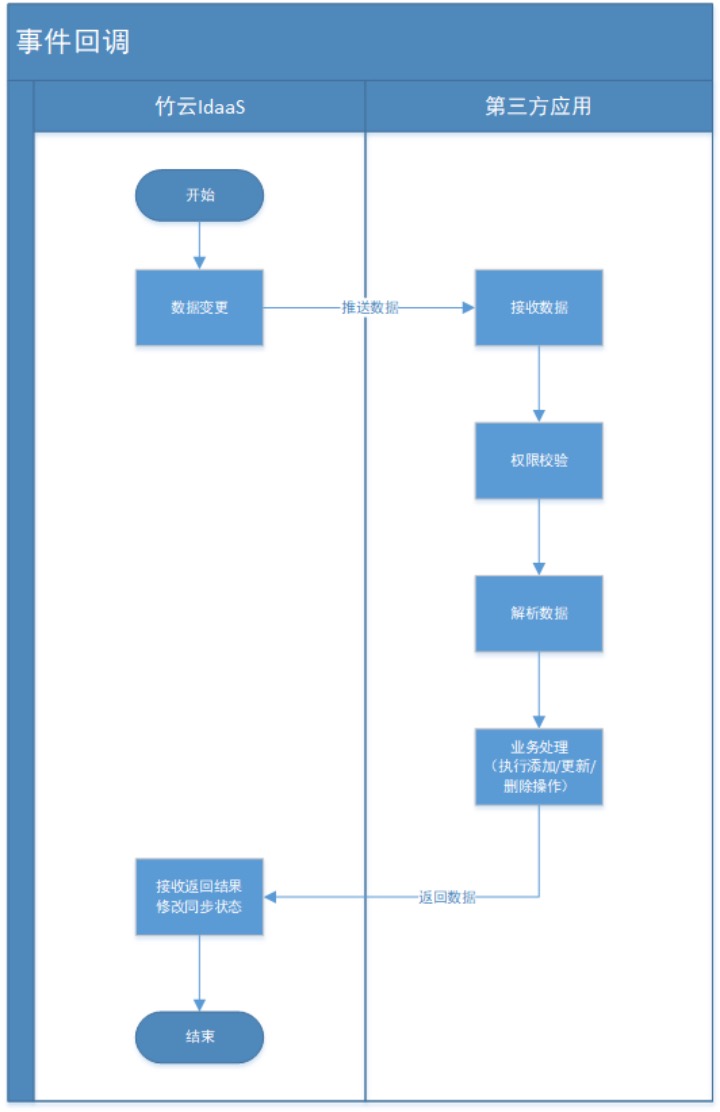
# Event Callback Process
# Interface Format
The request method for the synchronous event callback interface is POST, with data encoded in UTF-8 and formatted as JSON. If the URL for your application system to receive event callbacks is https://{app_domain}/callback, IDaaS will push the changed business data to this callback address when organizational or user changes occur in your enterprise.
| Parameter | Description |
|---|---|
| Request URL | https://{app_domain}/callback |
| Request Method | POST |
| Request Header | Authorization: Bearer {access_token} |
# Request Parameters
| Parameter Name | Type | Description |
|---|---|---|
| nonce | String | Random number, used in conjunction with timestamp to prevent replay attacks. |
| timestamp | Integer | Timestamp, used in conjunction with nonce to prevent replay attacks. |
| eventType | String | Event type, refer to the event type list later. |
| data | String | Message body. When encryption is not enabled, the plaintext message body is sent. When encryption is enabled, the encrypted message body is sent, which needs to be decrypted to obtain the message content. After decryption, there are two fields: random and msg, where msg is the plaintext message content. |
| signature | String | Message signature. When signature is not enabled, the signature information is an empty string. When signature is enabled, signature information is generated. The signature calculation combines the signature salt value (signatureSaltValue) configured for the enterprise application, the timestamp, nonce, and the encrypted message body from the request. |
# Response Parameters
| Parameter Name | Type | Description |
|---|---|---|
| code | String | Return code, 200 indicates success. For failure error codes, refer to the common return code description. |
| message | String | Description of the error cause when processing fails. |
| data | String | The returned message body. Different business callbacks require returning different content, such as an empty string or the required business data. - When encryption is not enabled, the plaintext message body is returned. - When encryption is enabled, the encrypted message body is returned, which needs to be decrypted to obtain the message content. After decryption, there are two fields: random and msg, where msg is the plaintext message content. |
# Request Example
- Request example without message signature and encryption enabled
{
	"nonce": "123456",
	"timestamp": 1783610513,
	"eventType": "eventType",
	"data": "Plain text message",
	"signature": ""
}
1
2
3
4
5
6
7
2
3
4
5
6
7
- Request example with message signature and encryption enabled
{
	"nonce": "123456",
	"timestamp": 1783610513,
	"eventType": "eventType",
	"data": "1ojvw2WPvW7LijxS8UvISr8pdDP+rXpPbcLGOmIBNbWetRg7IP0vdhkl",
	"signature": "111108bb8e6dbce3c9671d6fdb69d15066227608"
}
1
2
3
4
5
6
7
2
3
4
5
6
7
# Response Example
Status Code: 200 Request successful
- Response body without message signature and encryption enabled
{
	"code": "200",
	"message": "success",
	"data": "Plain text message"
}
1
2
3
4
5
2
3
4
5
- Response body with message signature and encryption enabled
{
	"code": "200",
	"message": "success",
	"data": "P+rXpWetRg7IP0vdhVgkVwSoZBJeQwY2zhROsJq/HJ+q6tp1qhl9L1+c"
}
1
2
3
4
5
2
3
4
5