
Overview
WeChat Mini Program is a brand new way to connect users and services. It can be easily accessed and shared within WeChat, offering an excellent user experience.
Does your enterprise currently own or plan to apply for an enterprise WeChat Mini Program?
Bamboo Cloud IDaaS provides corresponding openAPIs. You can call various interfaces to implement functions such as registering and logging into enterprise application systems via the Mini Program.
# Preparations
Before formally calling various interfaces, please ensure that the enterprise administrator has completed the following operations:
- Already registered a Mini Program on the WeChat Official Platform and obtained the AppID and AppSecret parameters. For detailed information, please refer to the content about registering a Mini Program in Configure WeChat Authentication Source.
- Already created a custom enterprise application in the IDaaS Enterprise Center platform and configured a WeChat authentication source with the login scenario set to Mini Program authorization login for this application. For detailed information, please refer to the content about configuring the authentication source in Configure WeChat Authentication Source.
- Already configured the authentication method for WeChat Mini Program authorization login for the custom enterprise application in the IDaaS Enterprise Center platform. For detailed information, please refer to Configure WeChat Mini Program Authorization Login.
# Login Scenarios
# Mini Program Login
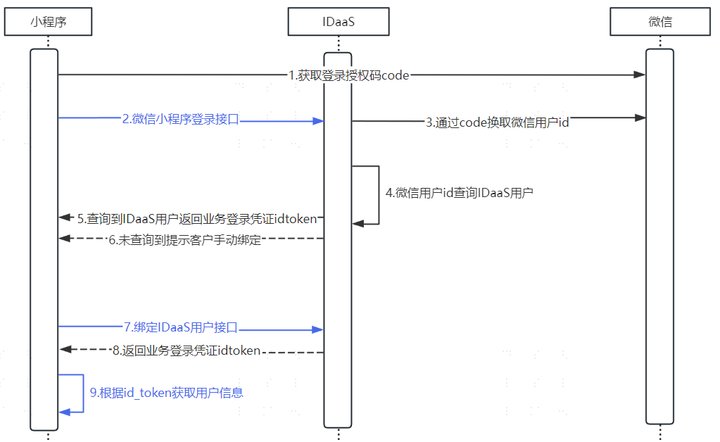
- When a user opens the Mini Program, the Mini Program displays a login button. After the user clicks the login button, the Mini Program sends a login request (wx.login()) to the WeChat server. Upon receiving the login request, the WeChat server verifies the Mini Program's identity and legitimacy. If the verification passes, the WeChat server generates a temporary login credential (code).
The code is valid for only 5 minutes. If the Mini Program's backend does not use this temporary credential to exchange for the WeChat user ID at the WeChat backend server within 5 minutes, this credential will be invalidated, and wx.login needs to be called again to generate a new login credential.
Obtain the WeChat login credential in the success callback of wx.login, then immediately send the code to IDaaS via wx.request by calling the interface WeChat Mini Program Login, in order to exchange for the WeChat user identity ID later.
IDaaS uses the temporary login credential (code) to send a request to the WeChat server to obtain the user's unique identifier (openid) and session key (session_key).
At this point, IDaaS uses the code to retrieve the WeChat-side user identity openid from the WeChat server and queries the IDaaS user repository.
If there is a corresponding relationship between a user in the IDaaS user repository and the WeChat-side user identity openid, then IDaaS generates the business login credentials id_token and session_token.
If there is no corresponding relationship between a user in the IDaaS user repository and the WeChat-side user identity openid, then IDaaS returns a status code: status, prompting the Mini Program that user binding is required.
With this binding information, the next time the Mini Program needs the user to log in, after obtaining the code via wx.login(), it can get the user's WeChat identity openid. Through the binding information, the IDaaS-side user ID can be looked up. This silent authorization login method is very convenient.
- IDaaS calls the bind user interface based on the Status being SOCIAL_BIND (bind existing user on IDaaS side) and USER_REGISTER (bind existing user or non-existing user on IDaaS side).
When Status is SOCIAL_BIND: Binding process. Choose one of the following methods to bind:
Bind User via WeChat Authorized Mobile;
Bind User via Mobile Number or Email;
Bind User via Username and Password
When Status is USER_REGISTER: Binding or registration process. Choose one of the following methods to bind:
Bind or Register User via WeChat Authorized Mobile;
Bind or Register User via Mobile Number or Email
Upon successful binding, IDaaS generates the business login credentials
id_tokenandsession_token.After IDaaS generates the business login credential
id_token, the mini-program uses Get User Information from id_token to parse the idtoken and obtain user information.
The mini-program should maintain the user identity information corresponding to the id_token and use the Refresh session_token API to refresh the validity period of the id_token to maintain the login session. This way, we don't need to obtain a new code every time, saving a lot of communication overhead.
# Mini-Program Phone Number Login
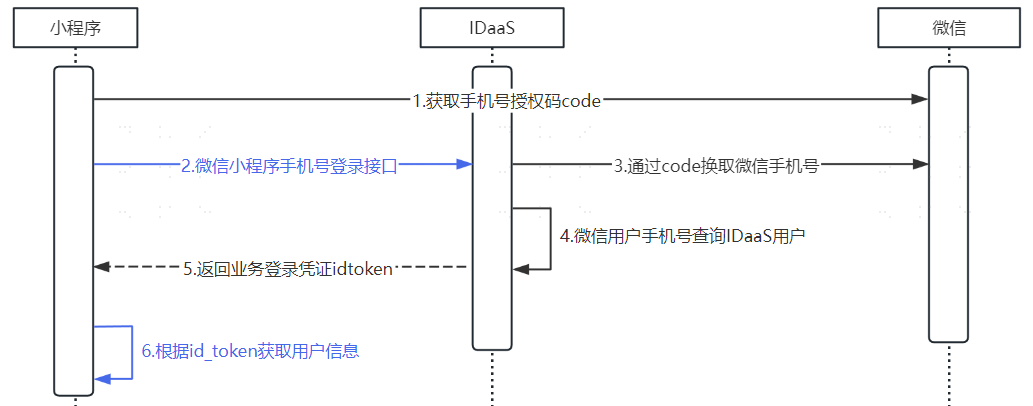
- When the user opens the mini-program, the mini-program displays a phone number login button. After the user clicks the phone number login button, the mini-program sends a request for phone number quick verification (
wx.getPhoneNumber()) or phone number real-time verification (wx.getRealtimePhoneNumber()) to the WeChat server. Upon receiving the request, the WeChat server verifies the mini-program's identity and legitimacy. If the mini-program passes verification, the WeChat server generates a temporary credential (code).
The code is only valid for 5 minutes. If the mini-program's backend does not use this temporary credential to exchange for the WeChat phone number at the WeChat backend server within 5 minutes, the credential will be invalidated, and a new login credential needs to be generated.
The difference between the Phone Number Quick Verification Component (opens new window) and the Phone Number Real-time Verification Component (opens new window) is:
The Phone Number Real-time Verification Component performs real-time verification on the phone number selected by the user for each request.
The Phone Number Quick Verification Component verifies the number, but does not guarantee real-time verification.
After obtaining the temporary credential
codefrom the WeChat mini-program, it is immediately sent viawx.requestto IDaaS by calling the API WeChat Mini-Program Phone Number Login, in order to later exchange it for the WeChat user identity ID.IDaaS uses the temporary credential (
code) to send a request to the WeChat server to obtain the user's phone number.At this point, IDaaS uses the code to obtain the user's phone number from the WeChat server and queries the IDaaS user database.
If the IDaaS user database contains a user with the same phone number as the one obtained from the WeChat server, then IDaaS generates the business login credentials
id_tokenandsession_token.After IDaaS generates the business login credential
id_token, the mini-program uses Get User Information from id_token to parse the idtoken and obtain user information.
The mini-program should maintain the user identity information corresponding to the id_token and use the Refresh session_token API to refresh the validity period of the id_token to maintain the login session. This way, we don't need to obtain a new code every time, saving a lot of communication overhead.