
QQ Login
# Documentation Description
This document explains how to integrate QQ authorization login functionality into an iOS client application. When a user clicks the QQ login button in the client APP, the IDaaS SDK invokes the QQ APP's authorization page. After the user clicks the "Authorize Login" button and authorization is successful, the QQ APP redirects back to the client APP. At this point, the IDaaS SDK automatically receives a temporary authorization code and uses it to request authentication from the IDaaS server. The final authentication result is then returned to the client APP.
# Process Description
# Login Process
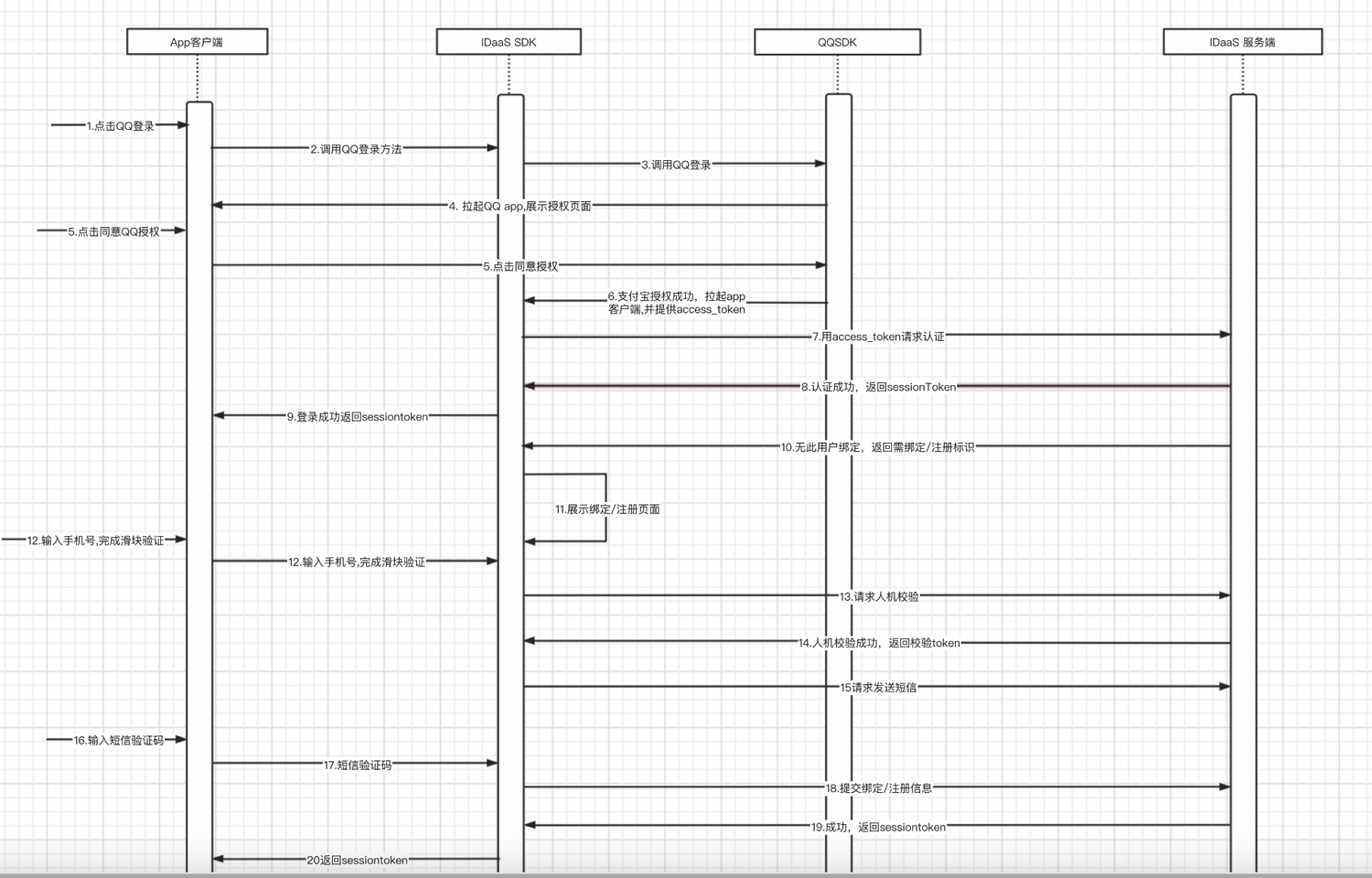
Integration Process Description
- The user clicks the QQ login button in the client APP.
- The client APP calls the IDaaS SDK's QQ login method.
- The IDaaS SDK calls the QQ SDK's login method.
- The QQ SDK launches the QQ APP on the mobile device and displays the authorization login page.
- The user clicks the "Authorize Login" button.
- QQ authorization is successful. The client APP is launched, carrying the QQ authorization code. At this point, the IDaaS SDK automatically obtains the QQ authorization code during the launch process.
- IDaaS uses the QQ authorization code to request authentication from the IDaaS server.
- The IDaaS server checks if a mobile phone number is bound. If a mobile number is already bound, the IDaaS server authentication is successful, and it returns a sessionToken and id_token to the IDaaS SDK.
- The IDaaS SDK returns the sessionToken and id_token to the client APP.
- If the IDaaS server finds no bound mobile number, it returns an identifier indicating that binding or registration is required.
- The IDaaS server displays the binding or registration page.
- The user enters a mobile phone number, clicks "Get Verification Code," and completes the CAPTCHA verification.
- The IDaaS SDK sends the CAPTCHA verification code to the IDaaS server to request CAPTCHA verification.
- The IDaaS server successfully verifies the CAPTCHA and returns a token to the IDaaS SDK.
- The IDaaS SDK uses the token and mobile number to request the IDaaS server to send an SMS verification code.
- The user receives the SMS verification code, enters it into the input field, and clicks the "Bind" or "Register" button.
- The IDaaS SDK submits the binding or registration data to the IDaaS server.
- Binding or registration is successful. The IDaaS server returns a sessionToken and id_token to the IDaaS SDK.
- The IDaaS SDK returns the sessionToken and id_token to the client APP.
- The client can use the id_token to verify login validity and obtain basic user information.
- The client can use the session_token to refresh the id_token.
# Preparation
# Create an Application on QQ Open Platform
Developers log in to the QQ Open Platform (opens new window), create a developer account, refer to the official documentation (opens new window) to create a new application, and wait for it to be approved.
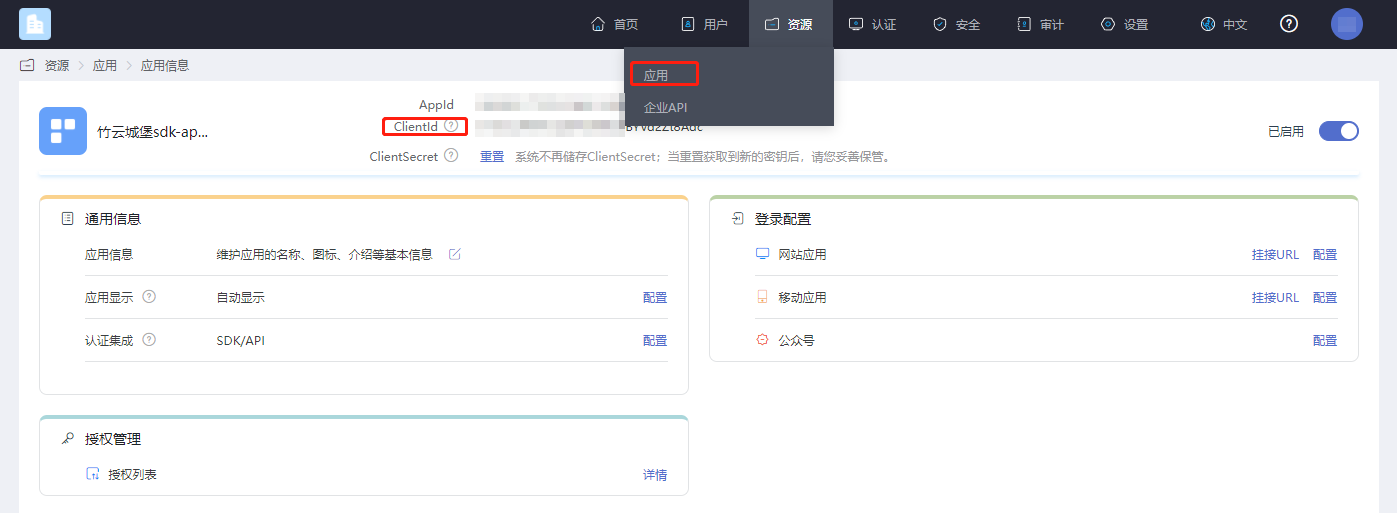
# Obtain the Application clientID
Log in to the IDaaS Enterprise Center platform, click "Resources -> Applications," select the relevant application, and click to view it.
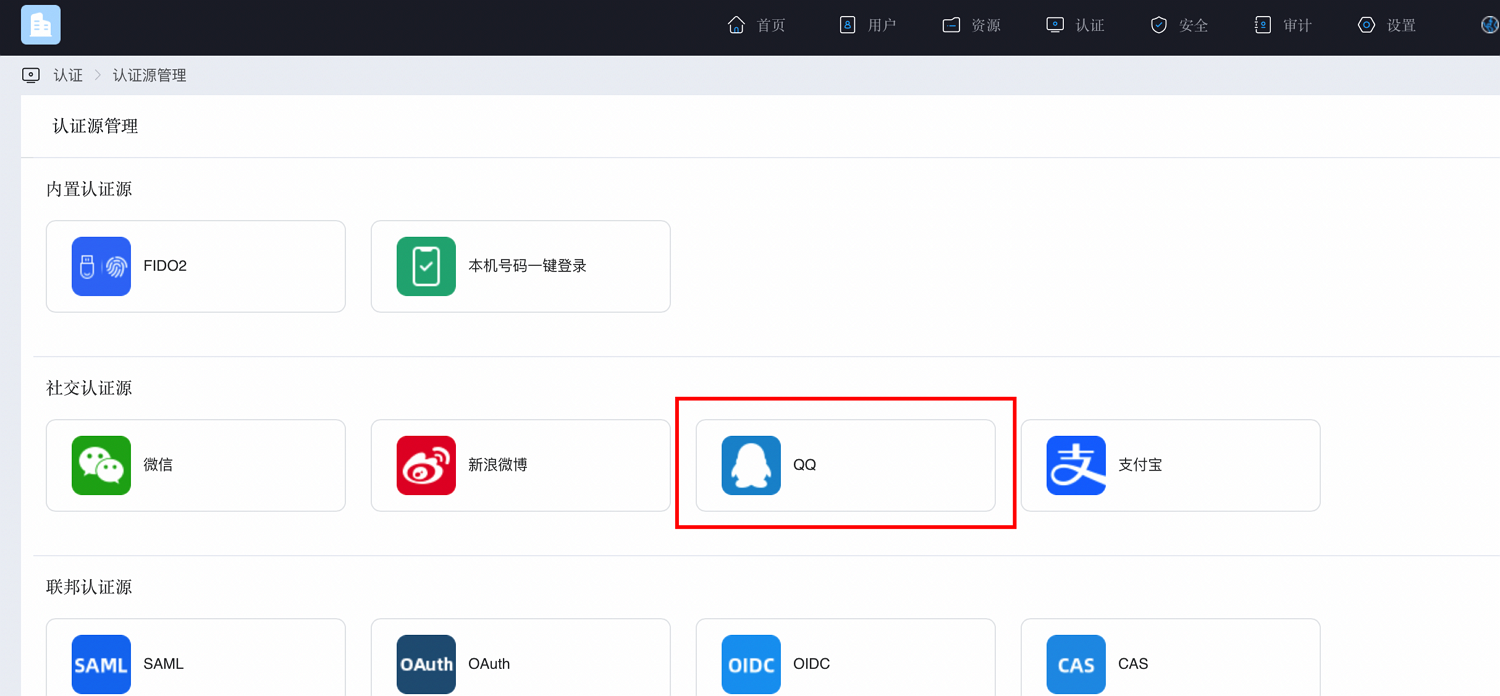
# Configure Authentication Source
Log in to the IDaaS Enterprise Center platform, click "Authentication -> Authentication Source Management -> QQ."
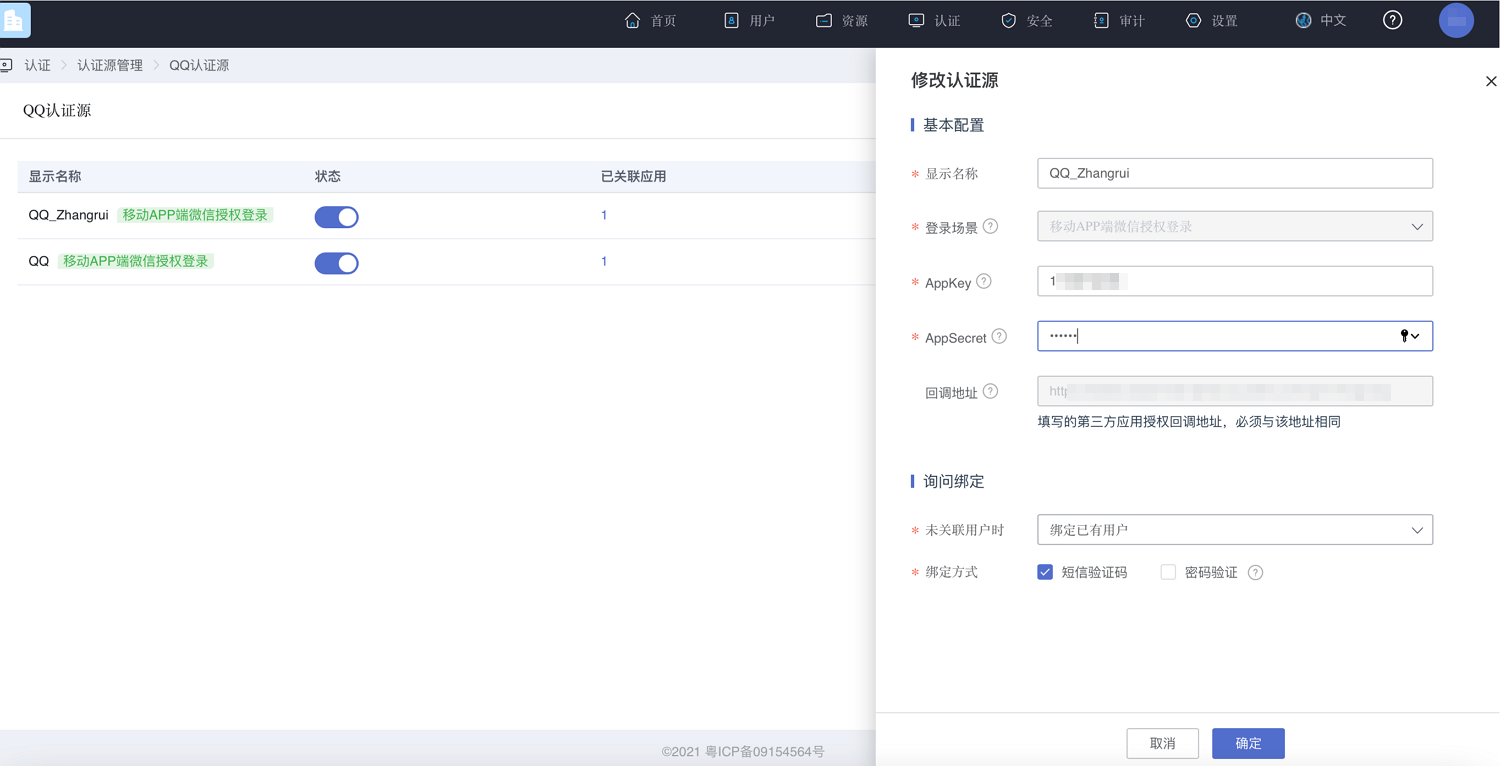
Click "Add Authentication Source," fill in the AppKey and AppSecret obtained after registering the application on the QQ Open Platform. Select 'Mobile Application' in the channel selection box. Enter a name in the display name field.
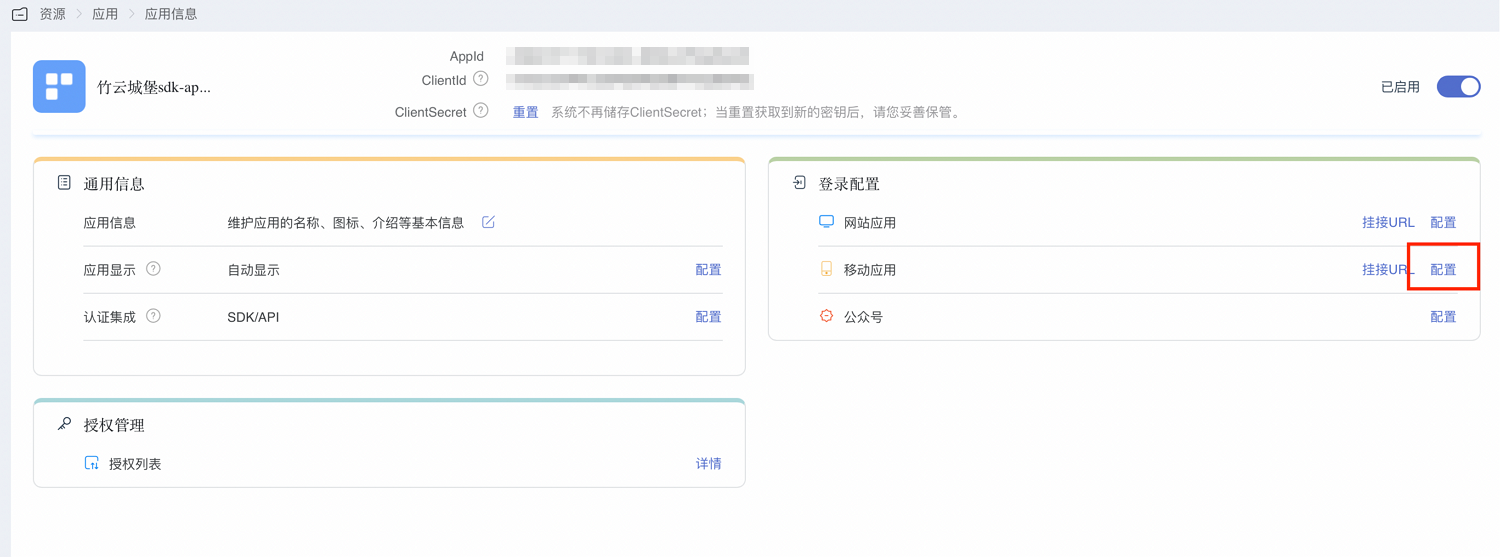
Switch to "Resources -> Applications," find the newly created application, and enter "Login Configuration -> Mobile Application -> Configuration."
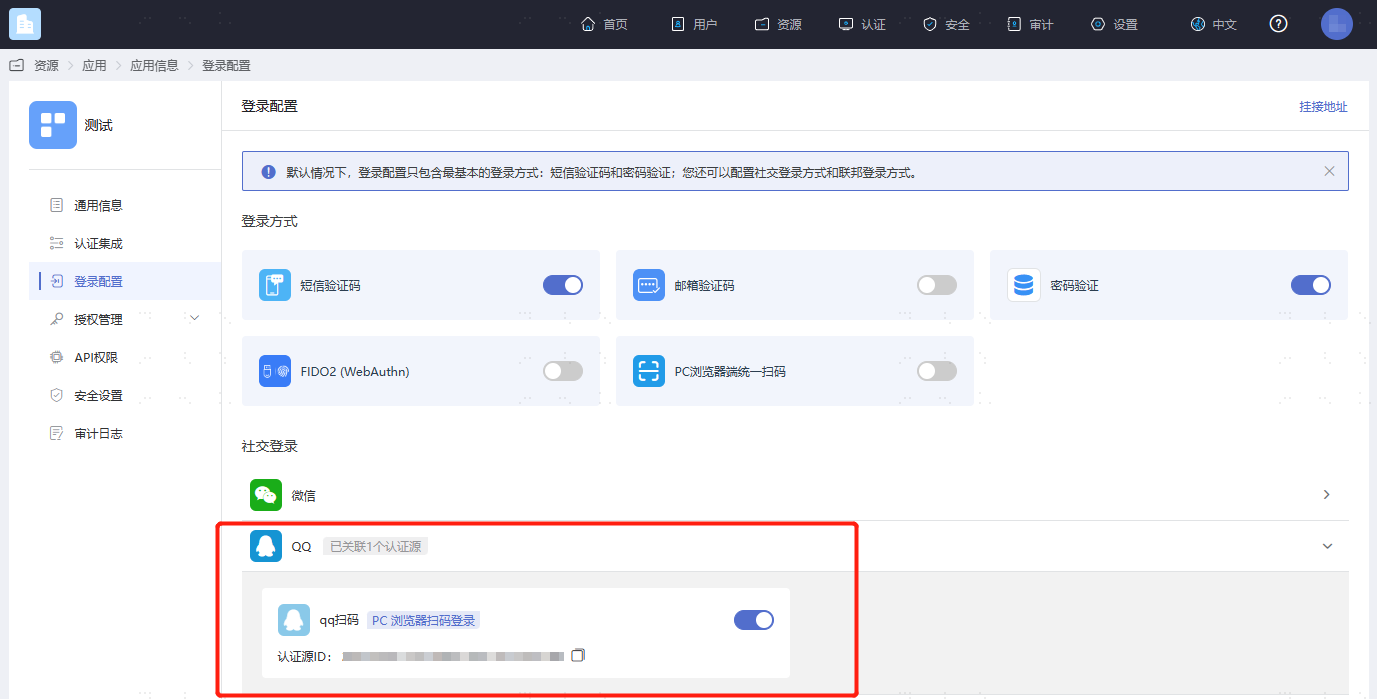
Find the QQ configuration, click to enable it, and complete the authentication source configuration.
# Import Dependencies
Import Tencent's packages into the project.
TencentOpenAPI.framework //QQ SDK package
TencentOpenApi_IOS_Bundle.bundle
2
Note that TencentOpenAPI.framework and TencentOpenApi_IOS_Bundle.bundle must be placed at the root of the application's resources; otherwise, resource loading issues may occur.
# Adding the Main Libraries
AuthnCenter_common_2C.framework
AuthnCenter_QQ_2C.framework
AuthnCenter_QQ_2C.bundle // Resource bundle
2
3
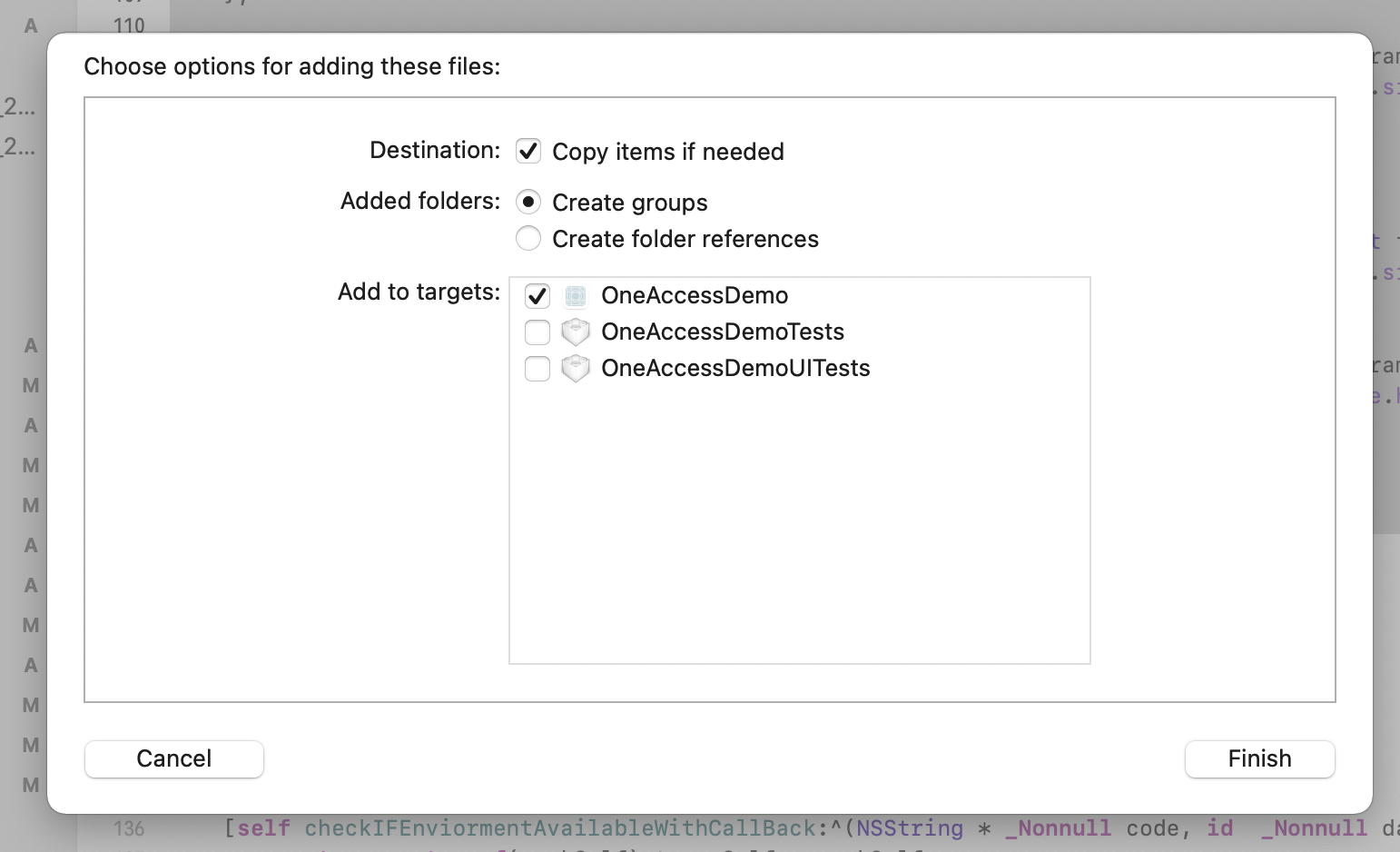
Drag the IDaaS SDK into the project and import it as follows:
Also, add the Pod dependency.
pod 'JWT', '~> 3.0.0-beta.14'
# Target Settings
- Add the system library files that the QQ SDK depends on, as listed below.
AuthnCenter_common_2C.framework // IDaaS SDK, current version is 1.5.0
AuthnCenter_QQ_2C.framework // IDaaS SDK, current version is 1.5.0
AuthnCenter_QQ_2C.bundle // Resource bundle, current version is 1.5.0
2
3
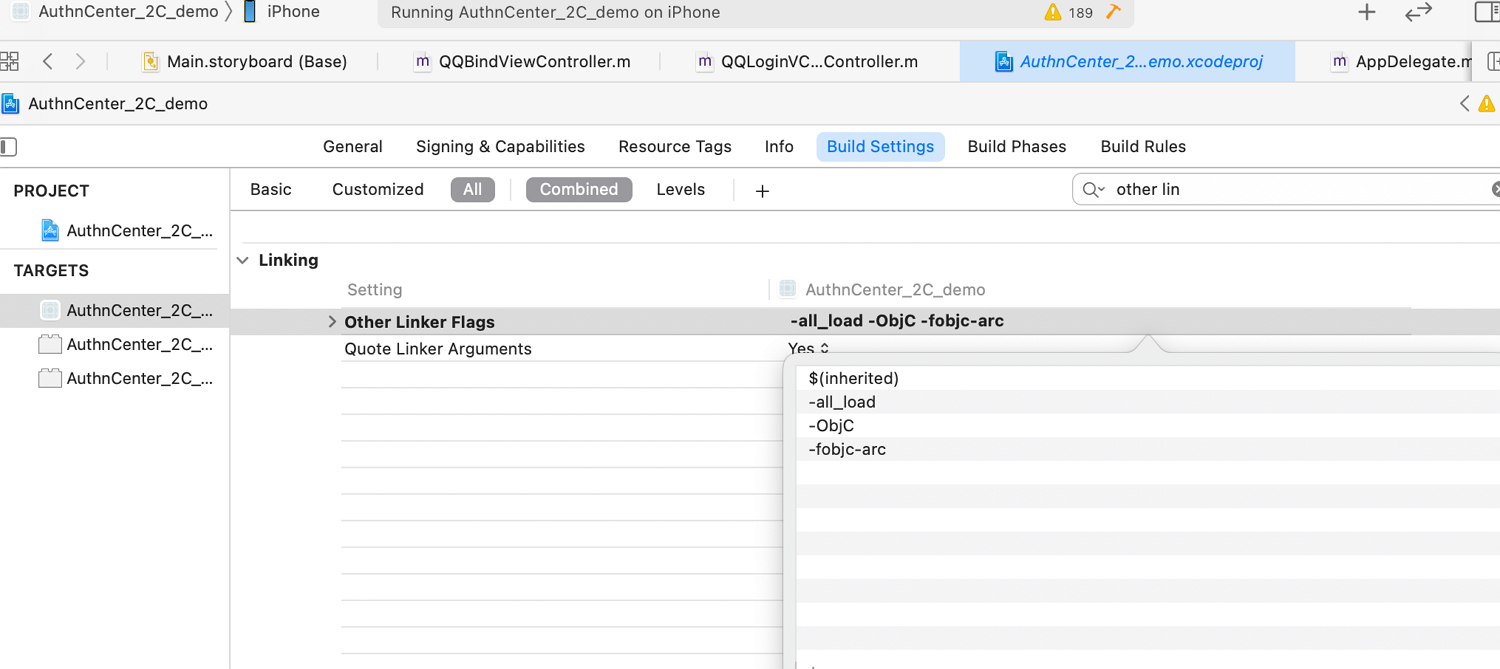
Set Other Linker Flags. In your project file, select Build Setting, and add "-ObjC -all_load -fobjc-arc" to "Other Linker Flags".
Set the URL scheme. In Xcode, select your project settings, go to the "TARGETS" section, and under the "info" tab, add a "URL scheme" to "URL Types" with your registered application id (as shown in the figure below). The URL Schemes should be
tencent+ the Tencent application appid.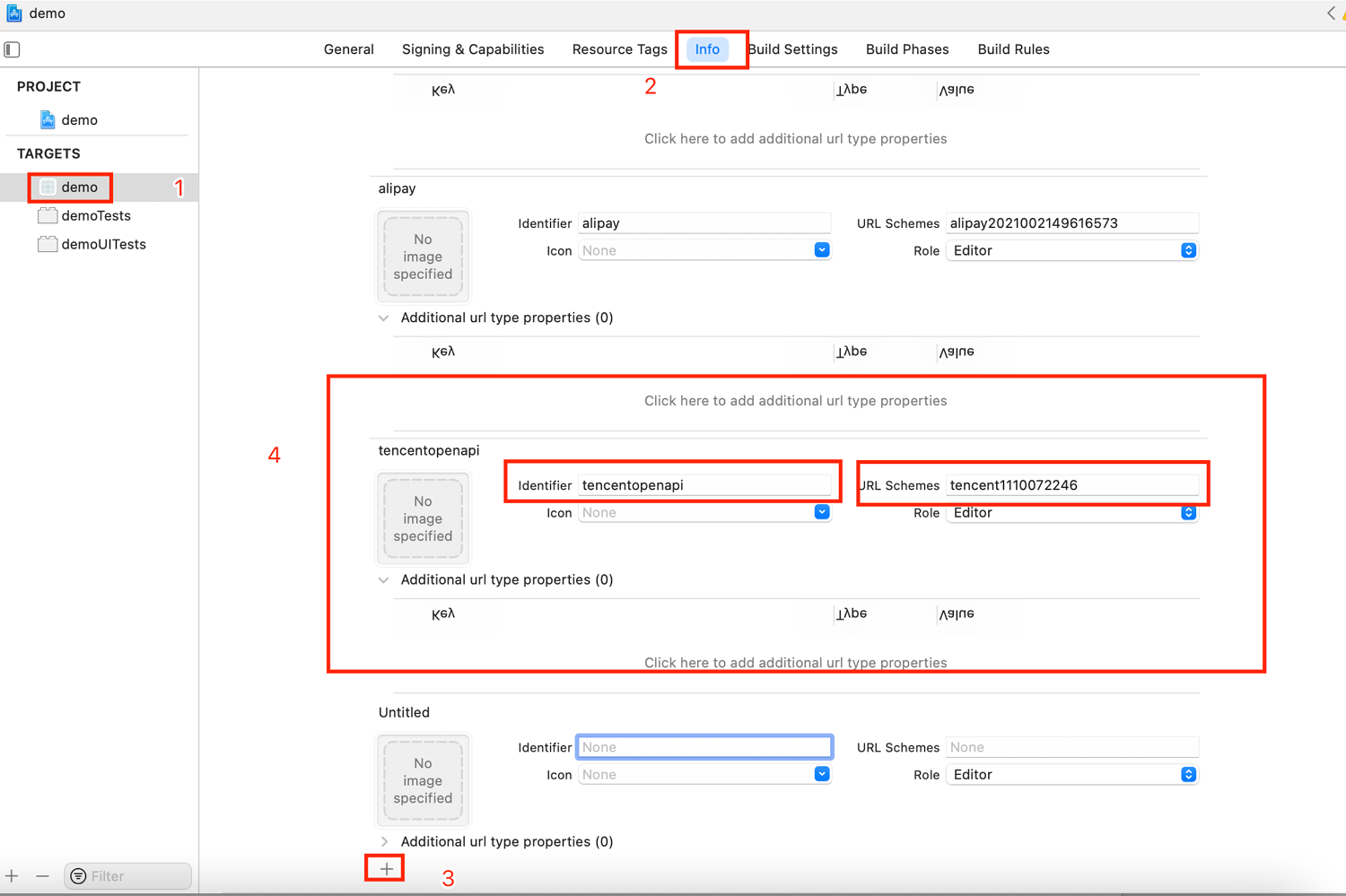
In Xcode, select your project settings, go to the "TARGETS" section, and under the "info" tab, add
mqqopensdkapiV2andmqqto "LSApplicationQueriesSchemes" (as shown in the figure below).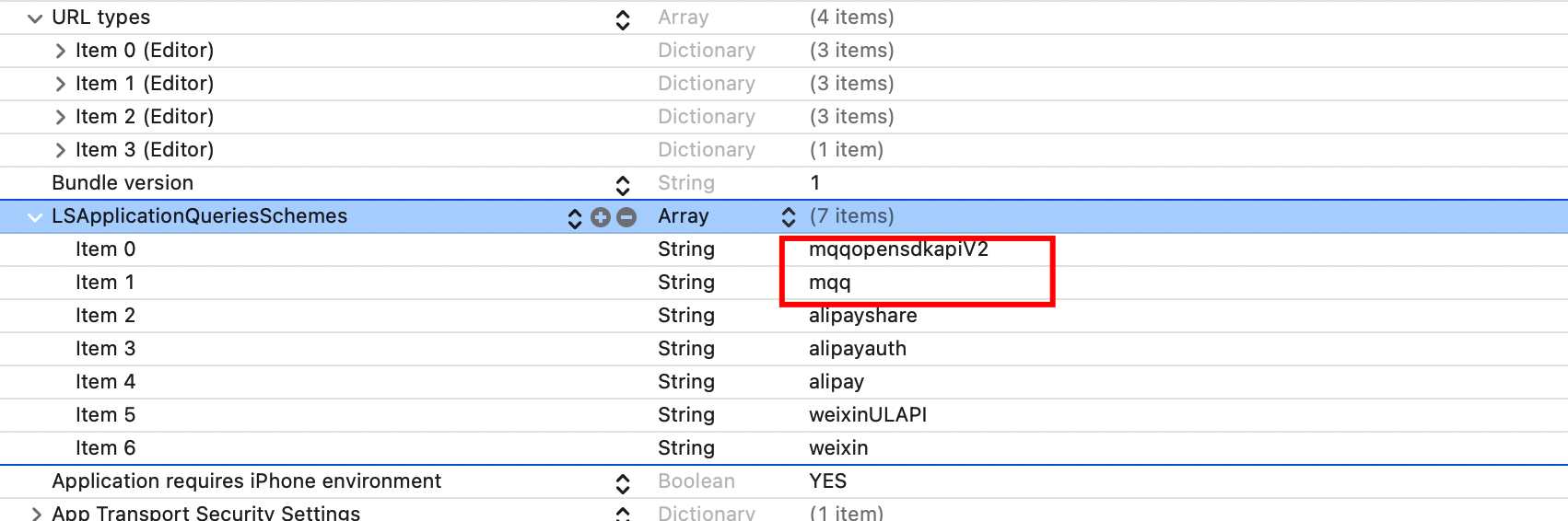
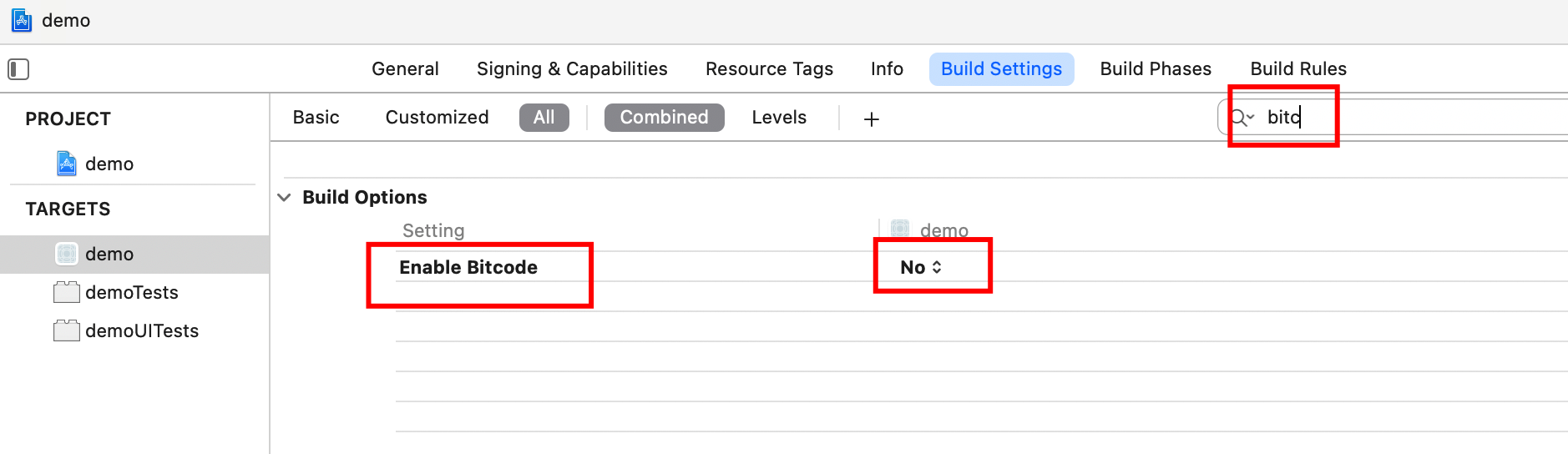
Set bitcode to NO.
# Universal Link Settings
To launch the App client after successful authorization, you need to configure a Universal Link. Please refer to online tutorials for configuring Universal Links.
For the Universal Link configuration method in the QQ application, please refer to https://wiki.connect.qq.com/填写及校验universallinks.
After successfully configuring the Universal Link, you need to enter it in the App client. Follow the steps below to add Associated Domains and enter the Universal Link in the format shown in the figure.
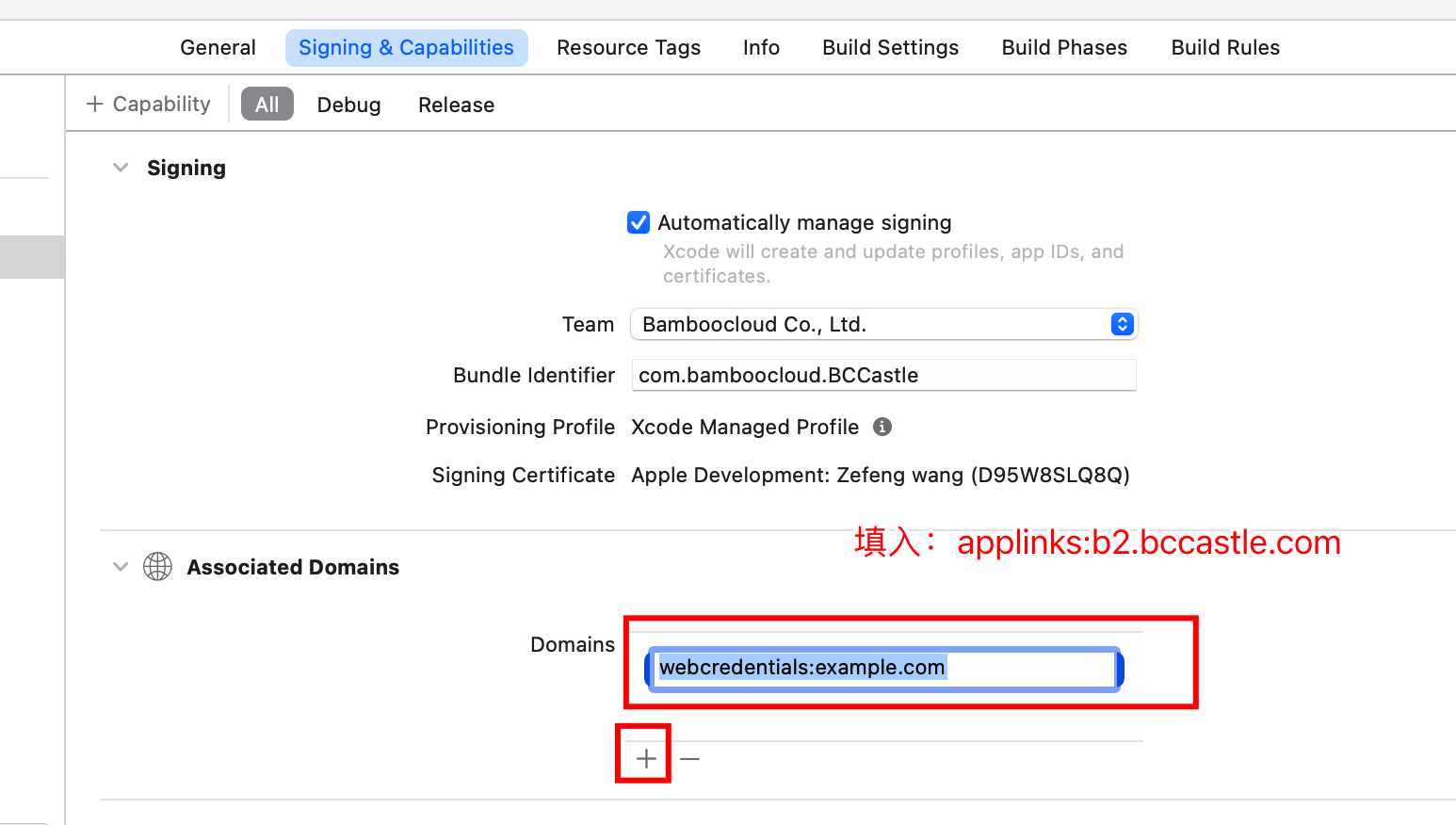
The format of the Universal Link is: applinks:your_universallink
Set "Allow Non-modular Includes In Framework Modules" to Yes.

# Development Integration
# Development Integration Method with Built-in UI Pages
This section describes how to launch QQ login once from the App client. The App client only needs to integrate the IDaaS SDK initialization method and the QQ registration method, and call the IDaaS SDK QQ login method where QQ login needs to be launched. All other authentication, registration, and binding UI flows are fully provided by the IDaaS SDK. After successful login, the sessionToken and IDToken are returned in the callback function.
Before proceeding with this section, please complete all Xcode configurations and QQ Open Platform configurations from the previous chapter.
# SDK Initialization
The IDaaS SDK provides an initialization method where you can fill in the tenant, clientID, and whether to enable log printing.
Example of Initialization Method:
In the appdelegate, reference the header files as follows
#import <AuthnCenter_common_2C/BCIDACommonManager.h>
#import <AuthnCenter_QQ_2C/BCQQLoginManager.h>
#import <TencentOpenAPI/TencentOpenApiUmbrellaHeader.h>


// Initialize in the didFinishLaunchingWithOptions method
[[[[[BCIDACommonManager sharedInstance] initWithDomain:@"https://your-backend-tenant.com"] initWithClientID:@"backend-tenant-clientID"] initWithSSLCerVerification:NO] setLogEnabled:YES] ;

[[BCQQLoginManager sharedInstance] registQQAppid:@"1110072246" andUniversalLink:@"https://b2.bccastle.com/qq_conn/1110072246"];
2
3
4
5
6
7
8
9
10
In the appdelegate, the following methods receive scheme callbacks from QQ.
- (BOOL)application:(UIApplication *)application handleOpenURL:(NSURL *)url {

    [[BCQQLoginManager sharedInstance] handleOpenUrl:url];


    return YES;
}

- (BOOL)application:(UIApplication *)app openURL:(NSURL *)url options:(NSDictionary<UIApplicationOpenURLOptionsKey,id> *)options{

    [[BCQQLoginManager sharedInstance] handleOpenUrl:url];

    return YES;
}


- (BOOL)application:(UIApplication *)application openURL:(NSURL *)url sourceApplication:(NSString *)sourceApplication annotation:(id)annotation{

    [[BCQQLoginManager sharedInstance] handleOpenUrl:url];
    return YES;
}

-(BOOL)application:(UIApplication *)application continueUserActivity:(NSUserActivity *)userActivity restorationHandler:(void (^)(NSArray<id<UIUserActivityRestoring>> * _Nullable))restorationHandler{

   [[BCQQLoginManager sharedInstance] handleUniversalLink:userActivity];

    return YES;
}
2
3
4
5
6
7
8
9
10
11
12
13
14
15
16
17
18
19
20
21
22
23
24
25
26
27
28
29
30
31
Introduction to the basic configuration initialization of the main class BCIDACommonManager methods:
/**
  * Function name: sharedInstance
   * @param none
   * @return Singleton object instance class
 */
+ (instancetype )sharedInstance ;

/**
  * Function name: initWithDomain
   * @param domain, starting with https:// and ending with .com.
   * @return Instance class
 */
-(BCIDACommonManager)initWithDomain:(NSString)domain

/**
  * Function name: initWithClientID
   * @param client id.
   * @return Instance class
 */
-(BCIDACommonManager)initWithClientID:(NSString)clientID;

/**
  * Function name: setLogEnabled
   * @param Boolean value indicating whether to enable log.
   * @return Instance class
 */
-(void)setLogEnabled:(BOOL)enable;

/**
  * Function name: initWithSSLCerVerification
   * @param Boolean value setting whether to enable SSL certificate verification.
   * @return Instance class
 */
-(BCIDACommonManager*)initWithSSLCerVerification:(bool)sslCerVerification;
2
3
4
5
6
7
8
9
10
11
12
13
14
15
16
17
18
19
20
21
22
23
24
25
26
27
28
29
30
31
32
33
34
Introduction to BCQQLoginManager Class Methods:
/**
  * Function name: sharedInstance
   * @param None
   * @return Singleton object instance class
 */
+ (instancetype )sharedInstance ;

/**
  * Function name: registQQAppid
   * @param QQAppid Appid from QQ Open Platform
   * @param universalLink UniversalLink filled in on the QQ Open Platform
   *@return Singleton object instance class
 */

-(BCQQLoginManager*)registQQAppid:(NSString*)QQAppid andUniversalLink:(NSString*)universalLink;


/**
   * Function name: handleOpenUrl
* @param Call this method when the QQ app returns to the client app (call within the openUrl method)
   * @param None
 * @return YES/NO
 */
-(BOOL)handleOpenUrl:(NSURL*)url;


/**
   * Function name: handleUniversalLink
* @param Call this method when the QQ app returns to the client app (call within the universal link receiving method)
   * @param None
 * @return YES/NO
 */
-(BOOL)handleUniversalLink:(NSUserActivity *)userActivity;
2
3
4
5
6
7
8
9
10
11
12
13
14
15
16
17
18
19
20
21
22
23
24
25
26
27
28
29
30
31
32
33
# Initiate QQ Login
When the user clicks the QQ login button, the APP client calls the IDaaS SDK's QQ login method. The code example is as follows:
// Import header files
#import <AuthnCenter_Alipay_2C/BCQQLoginManager.h>
#import <TencentOpenAPI/TencentOpenApiUmbrellaHeader.h>

// Click (trigger) event
[[BCQQLoginManager sharedInstance] loginQQWithCallBack:^(NSString * _Nonnull code, id  _Nonnull data) {
        dispatch_async(dispatch_get_main_queue(), ^{

        });
    }];
2
3
4
5
6
7
8
9
10
Introduction to BCQQLoginManager Login Object Methods:
/**
   * Function name: loginQQWithCallBack
* @param Trigger QQ login
   * @param
   * @return BCQQLoginCompletionHandler callback function.
1.code=0 indicates success, data returns sessionToken and IDToken
              2.code=other indicates failure, data returns the reason description.
 */
-(void)loginQQWithCallBack:(BCQQLoginCompletionHandler)callBack;
2
3
4
5
6
7
8
9
BCQQLoginCompletionHandler Callback Function Return Codes:
| Code | Description |
|---|---|
| code=0 | Login successful. At this time, data returns an NSDictionary containing: data=@{@"session_token": session_token content,@"id_token":idToken content}; |
| code=1 | Login failed. data returns a string describing the error, usually errors unrelated to interface requests such as missing parameters. |
| code= 102 | Authorization failure from the QQ app |
| code=103 | Canceled login was clicked on the QQ app authorization page |
| code=104 | After QQ authorization succeeded, the user clicked the back button on the bind/register phone number page, user returned and canceled |
| code=Error code (please refer to IDaaS return codes) | Login unsuccessful. data returns error description, interface returns error code |
# UI Customization
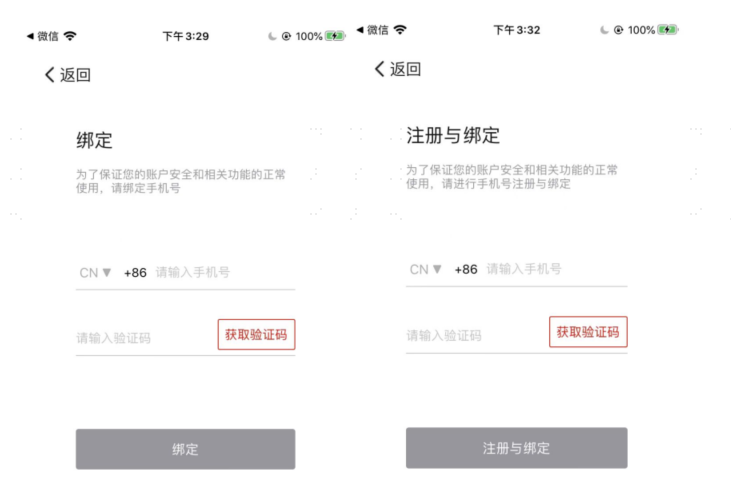
After QQ authorization is successful, depending on whether a user is matched, the binding or quick registration process will be initiated. If "New QQ user login triggers registration" is configured in the IDaaS Enterprise Center authentication source settings, then quick registration will proceed. (Whether the binding page or the quick registration page is displayed depends on the backend authentication source configuration).
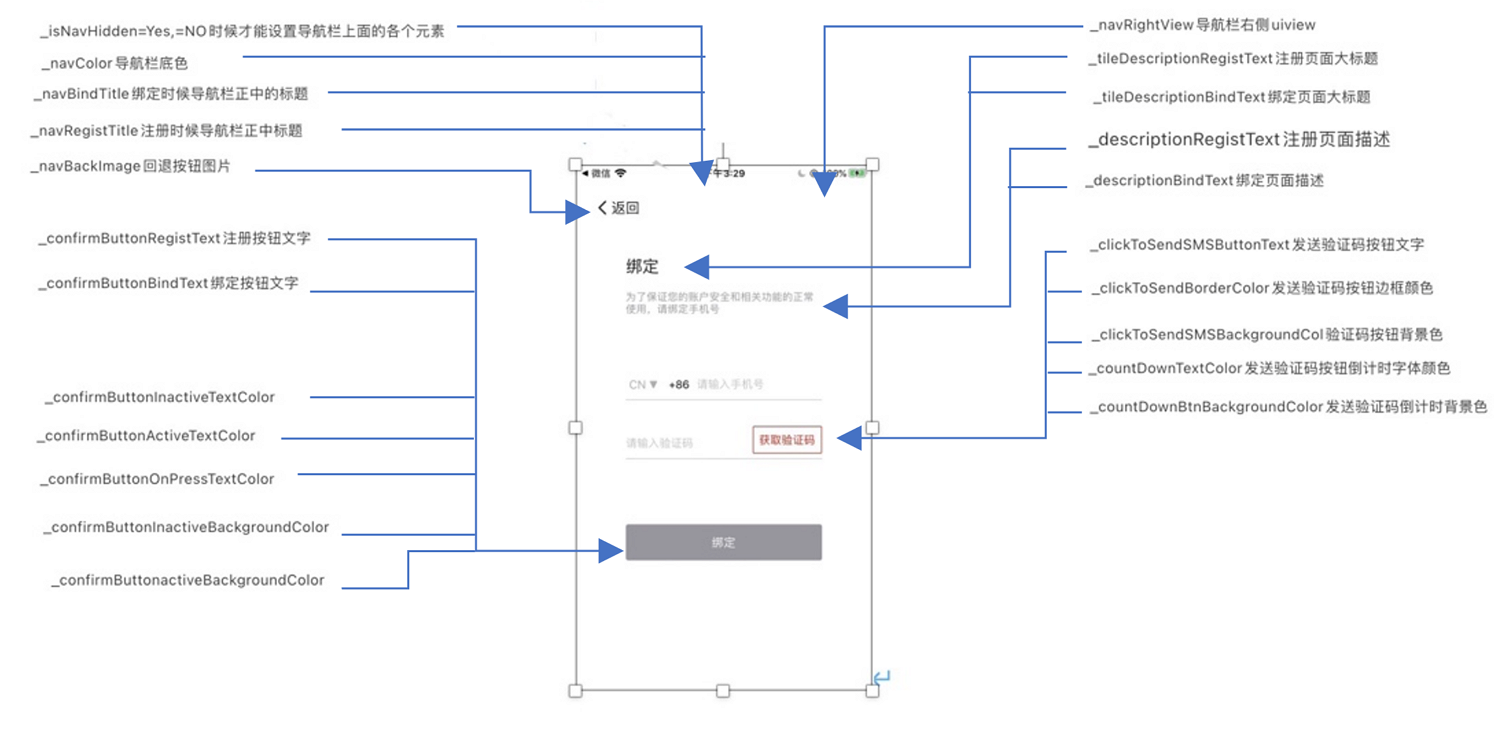
The image above shows the default UI page.
In the didFinishLaunchingWithOptions method within AppDelegate, set the theme object, the theme object.
Code example:
// Create a new style object and set the style for each element. If an individual element is not set, the default style shown in the image above will be used.
BCQQBindPhoneViewCustomSetting* settings=[[BCQQBindPhoneViewCustomSetting alloc] init];
    settings.isNavHidden=NO;
//  settings.hideInternationalPhoneCodeArea=YES;
   settings.navHiddenBackButtonFrameBlock = ^CGRect(CGRect frame) {// When isNavHidden=YES, you can set the frame for the back button
            CGRect rec=CGRectMake(5, 150, 70, 40);
            return rec;
        };

    settings.navBindTitle=[[NSAttributedString alloc] initWithString:@"Bind xx" attributes:@{NSForegroundColorAttributeName : UIColor.orangeColor,NSFontAttributeName : [UIFont systemFontOfSize:18.0]}];

    settings.navRegistTitle=[[NSAttributedString alloc] initWithString:@"Register xx" attributes:@{NSForegroundColorAttributeName : UIColor.greenColor,NSFontAttributeName : [UIFont systemFontOfSize:18.0]}];

    settings.navBackImage=[UIImage imageNamed:@"fanhuianniu-2"];
    settings.navColor=@"99FFCC";
    UIButton* bttn=[UIButton buttonWithType:UIButtonTypeSystem];
    [bttn setTitle:@"More" forState:UIControlStateNormal];
    [bttn setTintColor:[UIColor blackColor]];

    [bttn addTarget:self action:@selector(clickMore) forControlEvents:UIControlEventTouchUpInside];
    settings.navRightView=bttn;

    settings.tileDescriptionRegistText=[[NSAttributedString alloc] initWithString:@"Register xx My Phone Number" attributes:@{NSForegroundColorAttributeName : UIColor.orangeColor,NSFontAttributeName : [UIFont systemFontOfSize:25.0]}];
    settings.tileDescriptionBindText=[[NSAttributedString alloc] initWithString:@"Bind My Phone Number" attributes:@{NSForegroundColorAttributeName : UIColor.greenColor,NSFontAttributeName : [UIFont systemFontOfSize:25.0]}];
    settings.descriptionRegistText=[[NSAttributedString alloc] initWithString:@"Enter the phone number for registration... Christmas Aksu phone card playoffs punch card machine Hang Seng Technology Ha is" attributes:@{NSForegroundColorAttributeName : UIColor.grayColor,NSFontAttributeName : [UIFont systemFontOfSize:16.0]}];

    settings.descriptionBindText=[[NSAttributedString alloc] initWithString:@"Enter the phone number for binding... Christmas Aksu phone card playoffs punch card machine Hang Seng Technology Ha is" attributes:@{NSForegroundColorAttributeName : UIColor.redColor,NSFontAttributeName : [UIFont systemFontOfSize:16.0]}];
    settings.clickToSendSMSButtonText=[[NSAttributedString alloc] initWithString:@"Get Verification Code" attributes:@{NSForegroundColorAttributeName : UIColor.greenColor,NSFontAttributeName : [UIFont systemFontOfSize:10.0]}];
//    settings.clickToSendBorderColor=@"CCFF33";
    settings.clickToSendSMSBackgroundImage=[UIImage imageNamed:@"wangluo"];
//    settings.countDownTextColor=@"330000";
    settings.countDownBtnBackgroundColor=@"CCCCFF";
    settings.countDownBtnBackgroundImage=[UIImage imageNamed:@"lvhang"];
    settings.confirmButtonRegistText=@"Register Me";
    settings.confirmButtonBindText=@"Bind";
    settings.confirmButtonInactiveTextColor=@"FF99FF";
    settings.confirmButtonActiveTextColor=@"FF9966";
    settings.confirmButtonOnPressTextColor=@"FF66FF";

    settings.confirmButtonInactiveBackgroundColor=@"999999";
    settings.confirmButtonactiveBackgroundColor=@"CC00FF";
//    settings.confirmButtonInactiveBackgroundImage=[UIImage imageNamed:@"24gf-stopCircle"];
//    settings.confirmButtonActiveBackgroundImage=[UIImage imageNamed:@"24gf-stopCircle-2"];

// After setting these values, use the class below to save them into memory.
[[BCAlipayBindPhoneThemeManager sharedInstance] setBindPhoneTheme:settings];
2
3
4
5
6
7
8
9
10
11
12
13
14
15
16
17
18
19
20
21
22
23
24
25
26
27
28
29
30
31
32
33
34
35
36
37
38
39
40
41
42
43
44
45
46
Property List:
| Property | Description |
|---|---|
| isNavHidden | YES: Hides the navigation bar, the back button is a UIButton, button image can be passed in. NO: Does not hide the navigation bar, a back button image must be passed in. |
| navColor | // Navigation bar theme color NSString, hexadecimal, no ox, no #, e.g.: FF4F4A |
| navHiddenBackButtonFrameBlock | When isNavHidden=YES, you can set the frame of the back button |
| navBindTitle | Binds the navigation bar title |
| navRegistTitle | Registers the navigation bar title |
| navBackImage | The image for navigating back. If isNavHidden=NO (navigation bar hidden), then it's a simple back button on the interface. On navigation bar (50x30), without navigation bar (70x40) |
| navRightView | Custom UIView for the right side of the navigation bar, can pass in a UIButton with events |
| tileDescriptionRegistText | First title (title for the quick registration page), NSString |
| tileDescriptionBindText | First title (title for the social login bind phone number page) |
| descriptionBindText | Description field below the title (title for the social login bind phone number page), NSString |
| descriptionRegistText | Description field below the title (title for the registration page) |
| clickToSendSMSButtonText | Send SMS button text |
| clickToSendBorderColor | Send SMS button border color NSString, hexadecimal, no ox, no #, e.g.: FF4F4A |
| clickToSendSMSBackgroundColor | Send SMS button background color, NSString, hexadecimal, no ox, no #, e.g.: FF4F4A |
| clickToSendSMSBackgroundImage | Sets the background image for the click-to-send SMS button. Background image takes priority; if no image is set, use the background color above. |
| countDownTextColor | Text color for the SMS countdown, NSString, hexadecimal, no ox, no #, e.g.: FF4F4A |
| countDownBtnBackgroundColor | Background color for the SMS countdown button. NSString, hexadecimal, no ox, no #, e.g.: FF4F4A |
| countDownBtnBackgroundImage | Background image for the SMS countdown button. Background image takes priority; if no image is set, use the background color above. |
| confirmButtonRegistText | Register, confirm button text |
| confirmButtonBindText | Bind, confirm button text |
| confirmButtonInactiveTextColor | Confirm button text color when not clickable, NSString, hexadecimal, no ox, no #, e.g.: FF4F4A |
| confirmButtonActiveTextColor | Confirm button text color when clickable, NSString, hexadecimal, no ox, no #, e.g.: FF4F4A |
| confirmButtonOnPressTextColor | Bind, confirm button text color when just pressed, NSString, hexadecimal, no ox, no #, e.g.: FF4F4A |
| confirmButtonInactiveBackgroundColor | Bind, confirm button background color when not clickable, NSString, hexadecimal, no ox, no #, e.g.: FF4F4A |
| confirmButtonactiveBackgroundColor | Bind, confirm button background color when clickable, NSString, hexadecimal, no ox, no #, e.g.: FF4F4A |
Each time it is called, the theme will be overwritten. If no theme is set, the page will adopt the default style. If only a part of the theme is set, the set part will be saved, and properties that are not set will use the default color styles.
# Integration Method via API Calls
This section introduces how to integrate QQ login in the form of an API. The client APP needs to build its own binding/registration interface.
# Call Sequence Description
Project configuration.
Initialize in the Appdelegate.
Integrate the QQ login SDK.
Obtain the callback QQ authorization token access token and openid.
Call the IDaaS SDK QQ login method.
Navigate to the binding or registration page to complete binding or registration.
# SDK Initialization
Example of the IDaaS SDK initialization method:
Include the header file in the appdelegate as follows
#import <AuthnCenter_common_2C/BCIDACommonManager.h>

// Initialize in the didFinishLaunchingWithOptions method
[[[[[BCIDACommonManager sharedInstance] initWithDomain:@"https://your-backend-tenant.com"] initWithClientID:@"backend-tenant-clientID"] initWithSSLCerVerification:NO] setLogEnabled:YES] ;
2
3
4
5
# QQ Login Method
Example of the IDaaS SDK login method using QQ authorization token:
// Call after obtaining the QQ authorization login token code
[[BCQQAPILoginManager sharedInstance] loginQQByAccessToken:accessToken andOpenID:openID andWithCallBack:^(NSString * _Nonnull code, id  _Nonnull data) {

}];
2
3
4
BCQQAPILoginManager:
/**
   * Function name: sharedInstance
   * @param No parameters
   * @return Returns the singleton instance of the object
 */
+ (instancetype )sharedInstance ;

/**
   * Function name: loginQQByAccessToken
   * @param accessToken: The accessToken obtained from QQ authorization login 【Non-null】.
* @param openid: The openID obtained from QQ authorization login 【Non-null】.
   * @return BCQQAPILoginCallBackHandler callback function NSString* code ,id data.

 */

-(void)loginQQByAccessToken:(NSString*)accessToken andOpenID:(NSString*)openid andWithCallBack: (BCQQAPILoginCallBackHandler)callBack;
2
3
4
5
6
7
8
9
10
11
12
13
14
15
16
Summary of BCQQAPILoginCallBackHandler callback function:
Success Example 1 (Successfully matched user, returns session_token):
code=0
data=
{
    "session_token": "btsiBjx85prcZu6I6Ki057Tmw3nSF2VO",
    "id_token":content
    "expire": 432000,//NSNumber type
    "status": "SUCCESS"
}

Success Example 2 (Returns auto-registration and binding flow):
code=101
data=
{
    "state_token": "eyJhbGciOiJIUzI1NiIsInR5cCI6IkpXVCJ9.eyJzdWIiOiJ7XCJzb2NpYWxVaWRcIjpcIm8zRHVFNVNySXVodTlIZHFucHd0c3Y5a2dkSFFcIixcInN0YXR1c1wiOlwiVVNFUl9SRUdJU1RFUlwifSIsImV4cCI6MTY0NjcwNTcwNCwiaWF0IjoxNjQ2NzAzOTA0LCJqdGkiOiIxNjQ2NzAzOTA0NTEwMCJ9.tLEpS-9jrXwiJI3GlZw4RGg_z0zMDzKMMZtPBv2VPS8",
    "data": "{\"socialBindOrRegisterFlow\":[\"VERIFY_PHONE\",\"VERIFY_EMAIL\"]}",
    "status": "USER_REGISTER"
}

Success Example 3 (Returns binding flow):
code=101
data=
{
    "state_token": "eyJhbGciOiJIUzI1NiIsInR5cCI6IkpXVCJ9.eyJzdWIiOiJ7XCJzb2NpYWxVaWRcIjpcIm8zRHVFNVNySXVodTlIZHFucHd0c3Y5a2dkSFFcIixcInN0YXR1c1wiOlwiVVNFUl9SRUdJU1RFUlwifSIsImV4cCI6MTY0NjcwNTcwNCwiaWF0IjoxNjQ2NzAzOTA0LCJqdGkiOiIxNjQ2NzAzOTA0NTEwMCJ9.tLEpS-9jrXwiJI3GlZw4RGg_z0zMDzKMMZtPBv2VPS8",
    "data": "{\"socialBindOrRegisterFlow\":[\"VERIFY_PHONE\",\"VERIFY_EMAIL\"]}",
    "status": " SOCIAL_BIND"
}

Error Example:
code=1
data=
{
    "error_code": "IDAAS.SDK.COMMON.1001",
    "error_msg": "Parameter X-client-id cannot be left blank."
}
2
3
4
5
6
7
8
9
10
11
12
13
14
15
16
17
18
19
20
21
22
23
24
25
26
27
28
29
30
31
32
33
34
35
# Login-as-Registration Process Method
Phone Number Regular Expression Validation for Obtaining International Area Code
If international phone number support is enabled, you must first call the international area code acquisition interface. This interface returns a configured list of international area codes, along with regular expressions for phone numbers. The image below shows how to configure the international area code list.
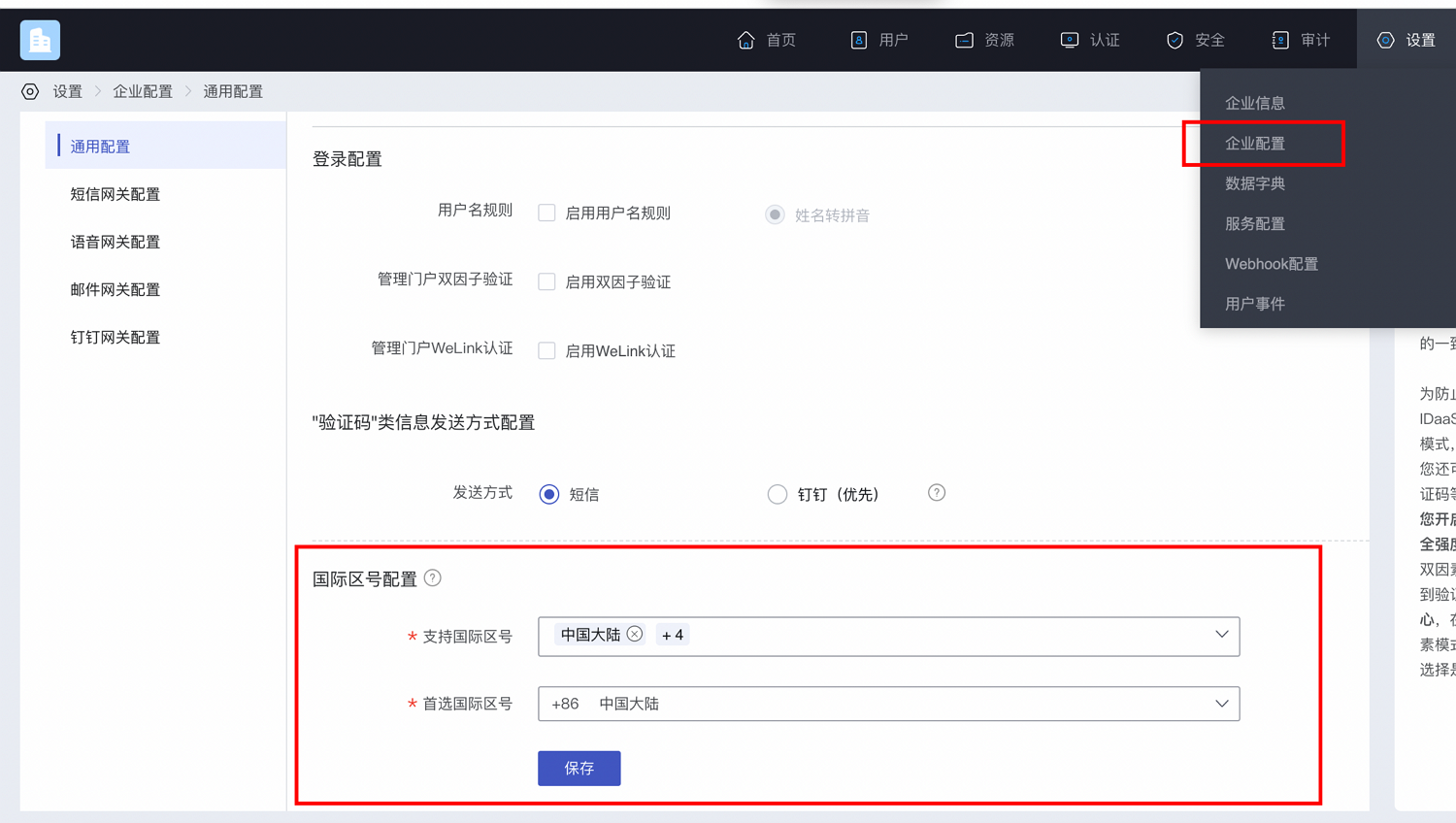
Example code for obtaining the international area code list:
#import <AuthnCenter_common_2C/BCIDAInternationalPhoneCodeManager.h>


[BCIDAInternationalPhoneCodeManager getInternaltionalAreaCodeWithCompletionHandler:^(NSString * _Nonnull code, id  _Nonnull data) {
        __strong __typeof(weakSelf)strongSelf = weakSelf;
        dispatch_async(dispatch_get_main_queue(), ^{
            NSDictionary* dic=(NSDictionary*)data;
        //Check if the phone number matches the regular expression
 BOOL flag=  [strongSelf parseDictionary:dic andWithMoile:mobile];

        });
    }];
2
3
4
5
6
7
8
9
10
11
12
Introduction to the main class method:
/**
* Function name: getInternaltionalAreaCodeWithCompletionHandler
* @brief: Method to obtain international area codes
* @param
*@param
* @param BCSMSGetInternationalAreaCodeHandlerBlock () Result callback function, code=0, data returns an NSDictionary result
**/
+(void)getInternaltionalAreaCodeWithCompletionHandler:(BCSMSGetInternationalAreaCodeHandlerBlock)resultHander;
2
3
4
5
6
7
8
Successful example with code=0, value of data:
{
	"phoneAreaCodeDefinitions": [
		{
			"areaCode": "86",
			"displayMapping": {
				"zh-TW": "中國大陸",
				"en": "China",
				"zh-CN": "中国大陆"
			},
			"countryCode": "CN",
			"mobileRegex": "^(\\+86){0,1}\\-?1\\d{10}$",
			"areaCodeSuffixes": []
		},
		{
			"areaCode": "852",
			"displayMapping": {
				"zh-TW": "中國香港",
				"en": "Hong Kong",
				"zh-CN": "中国香港"
			},
			"countryCode": "HK",
			"mobileRegex": "^(\\+852){1}\\-?0{0,1}[1,4,5,6,7,8,9](?:\\d{7}|\\d{8}|\\d{12})$",
			"areaCodeSuffixes": []
		},
		{
			"areaCode": "886",
			"displayMapping": {
				"zh-TW": "中國臺灣",
				"en": "Taiwan",
				"zh-CN": "中国台湾"
			},
			"countryCode": "TW",
			"mobileRegex": "^(\\+886){1}\\-?[6,7,9](?:\\d{7}|\\d{8})$",
			"areaCodeSuffixes": []
		},
		{
			"areaCode": "853",
			"displayMapping": {
				"zh-TW": "中國澳門",
				"en": "Macau",
				"zh-CN": "中国澳门"
			},
			"countryCode": "MO",
			"mobileRegex": "^(\\+853){1}\\-?0{0,1}[1,4,5,6,7,8,9](?:\\d{7}|\\d{8}|\\d{12})$",
			"areaCodeSuffixes": []
		},
		{
			"areaCode": "93",
			"displayMapping": {
				"zh-TW": "阿富汗",
				"en": "Afghanistan",
				"zh-CN": "阿富汗"
			},
			"countryCode": "AF",
			"mobileRegex": "^(\\+93){1}\\-\\d{6,11}",
			"areaCodeSuffixes": []
		}
	],
	"preferredAreaCode": "CN"
}
2
3
4
5
6
7
8
9
10
11
12
13
14
15
16
17
18
19
20
21
22
23
24
25
26
27
28
29
30
31
32
33
34
35
36
37
38
39
40
41
42
43
44
45
46
47
48
49
50
51
52
53
54
55
56
57
58
59
60
Return Parameters:
| Parameter Name | Chinese Name | Type | Description |
|---|---|---|---|
| preferredAreaCode | Preferred International Dialing Code | String | The preferred international dialing code configured for the current enterprise center. |
| countryCode | Country/Region Code | String | Country/Region Code |
| areaCode | International Telephone Dialing Code | String | International Telephone Dialing Code |
| areaCodeSuffixes | International Telephone Dialing Code Suffix | String | International Telephone Dialing Code Suffix |
| mobileRegex | Mobile Number Format Regular Expression | String | Mobile Number Format Regular Expression |
| displayMapping | Multi-language Display Name Mapping | String | Multi-language Display Name Mapping |
Slider Verification
Please perform mobile number format validation before calling this method.
Click (trigger) the send verification code event, and the App client calls the slider verification method of the IDaaS SDK. Example as follows:
// Import header file
#import <AuthnCenter_QQ_2C/BCQQSlideVerifyCodeManager.h>

// Click (trigger) the send verification code event
 [BCQQSlideVerifyCodeManager startSlidingVerifyCodePageWithMobileNumber:mobile andWithResultHandler:^(NSString * _Nonnull code, id  _Nonnull data){
            dispatch_async(dispatch_get_main_queue(), ^{
            NSLog(@"Slider verification result==%@==%@",code,data);

            });
        }];
2
3
4
5
6
7
8
9
10
Introduction to BCQQSlideVerifyCodeManager Object Methods:
/**
* Function Name: startSlidingVerifyCodePageWithMobileNumber
* @brief: Click to initiate the slider verification
* @param mobile phone number: Either with country code "+86-13800000000" or without country code "13800000000" is acceptable.
* @param BCQQSlideCodeHandlerBlock: Asynchronous result callback:
1. When slider verification is successful, returns code=0 data=slider token
2. code=other indicates slider verification failure (refer to error codes)
3. code=105, data="User closed" indicates the close button of the slider popup was clicked
**/

+(void)startSlidingVerifyCodePageWithMobileNumber:(NSString*)mobile andWithResultHandler:(BCQQSlideCodeHandlerBlock)resultHandler;
2
3
4
5
6
7
8
9
10
11
Example code for sending SMS when slider verification code=0 is successful:
QQSlideSMSSendType type=0;

    if([_status isEqualToString:@"USER_REGISTER"]){
        type=qqSlideSMSRegist;
    }else if([_status isEqualToString:@"SOCIAL_BIND"]){

        type=qqSlideSMSBind;

    }


[BCQQSlideVerifyCodeManager sendSMSWithSlideResultWithToken:token andMobile:mobile andWithType:type andWithCallBack:^(NSString * _Nonnull code, id  _Nonnull data) {
if ([code isEqualToString:@"0"]) {
            NSLog(@"SMS sent successfully--code=%@ data=%@",code,data);
        }else{
            NSLog(@"SMS sending failed--code=%@ data=%@",code,data);

        }

    }];
2
3
4
5
6
7
8
9
10
11
12
13
14
15
16
17
18
19
20
21
Introduction to the BCQQSlideVerifyCodeManager method for sending SMS:
/**
* Function Name: sendSMSWithSlideResultWithToken
* @brief: Call this method to send SMS,
* @param token the token obtained after successful slider verification from the previous method
* @param mobile phone number
* @param (qqSlideSMSSendType enum) type, obtained from the login method's status field,
status= SOCIAL_BIND is for binding, here the input parameter type=qqSlideSMSBind
status= USER_REGISTER is for registration, here the input parameter type=qqSlideSMSRegist
* @param complete: Asynchronous result callback, returns code=0 when SMS is sent successfully, code=other indicates SMS sending failure, please refer to IDaaS error codes and the returned data (string error description)
**/
+(void)sendSMSWithSlideResultWithToken:(NSString*)token andMobile:(NSString*)mobile andWithType:(QQSlideSMSSendType)type andWithCallBack:(BCQQSendSMSHandlerBlock)callBack;
2
3
4
5
6
7
8
9
10
11
Binding Method
When the QQ login method returns:
Successful example (returns binding flow):
code=101
data=
{
    "state_token": "eyJhbGciEwMCJ9.tLEpS-9jrXwiJI3GlZw4RGPBv2VPS8",
    "data": "{\"socialBindOrRegisterFlow\":[\"VERIFY_PHONE\",\"VERIFY_EMAIL\"]}",
    "status": " SOCIAL_BIND"
}
2
3
4
5
6
7
8
The user receives the SMS verification code, enters it into the verification code box, clicks the bind button (or triggers the event), and the APP client calls the binding method as follows:
Example code:
[[BCQQBindOrRegistManager sharedInstance] qqBindWithMobile:mobile andWithVerifyCode:verifyCode andWithStateToken:_state_token andWithCompletionHandler:^(NSString * _Nonnull code, id  _Nonnull data) {

  }];
2
3
Introduction to the main class BCQQBindOrRegistManager methods:
/**
   * Function name: sharedInstance
   * @param No input parameters
   * @return Returns the singleton instance of the object
 */
+ (instancetype )sharedInstance ;

/**
* Function name: qqBindWithMobile
* @brief: QQ login binding method
* @param mobile Phone number
*@param StateToken The state_token field obtained from the login method
*@param verifyCode SMS verification code
* @param BCQQBindCompleteHandler Callback function
**/
-(void)qqBindWithMobile:(NSString*)mobile andWithVerifyCode:(NSString*)verifyCode andWithStateToken: (NSString*)StateToken andWithCompletionHandler:(BCQQBindCompleteHandler)completeHandler;
2
3
4
5
6
7
8
9
10
11
12
13
14
15
16
BCQQBindCompleteHandler callback function return codes:
| Code | Description |
|---|---|
| code=0 | Login successful, data= { "session_token": "btsiBjx85prcZu6I6Ki057Tmw3nSF2VO", "id_token": content, "expire": 432000, // NSNumber type "status": "SUCCESS" } |
| code=1 | Login failed, data returns a string describing the error |
| code=Error code (please refer to IDaaS return codes) | Login unsuccessful, data returns error description |
Registration Method
When the QQ login method returns:
Successful example (returns automatic registration and binding flow):
code=101
data=
{
    "state_token": "eyJhbGciOiJIUzI1N_z0zMDzKMMZtPBv2VPS8",
    "data": "{\"socialBindOrRegisterFlow\":[\"VERIFY_PHONE\",\"VERIFY_EMAIL\"]}",
    "status": "USER_REGISTER"
}
2
3
4
5
6
7
8
After the user receives the SMS verification code, enters it into the verification code field, and clicks the register button (or triggers the event), the APP client calls the registration and binding method as follows:
Example code:
[[BCQQBindOrRegistManager sharedInstance] qqRegistWithMobile:mobile andWithVerifyCode:verifyCode andWithStateToken:_state_token andWithCompletionHandler:^(NSString * _Nonnull code, id  _Nonnull data) {


  }];
2
3
4
Introduction to the main class BCQQBindOrRegistManager methods:
/**
   * Function name: sharedInstance
   * @param No input parameters
   * @return Returns the singleton instance of the object
 */
+ (instancetype )sharedInstance ;

/**
* Function name: qqRegistWithMobile
* @brief: QQ login automatic registration method
* @param mobile Phone number
*@param StateToken The state_token field obtained from the QQ login method
*@param verifyCode SMS verification code
* @param BCQQRegistCompleteHandler Callback function
**/
-(void)qqRegistWithMobile:(NSString*)mobile andWithVerifyCode:(NSString*)verifyCode andWithStateToken: (NSString*)StateToken andWithCompletionHandler:(BCQQRegistCompleteHandler)completeHandler;
2
3
4
5
6
7
8
9
10
11
12
13
14
15
16
BCQQBindOrRegistManager callback function return codes:
| Code | Description |
|---|---|
| code=0 | Login successful, login successful, data= { "session_token": "btsiBjx85prcZu6I6Ki057Tmw3nSF2VO", "id_token": content, "expire": 432000,//NSNumber type "status": "SUCCESS" } |
| code=1 | Login failed, data returns a string describing the error |
| code=Error code (please refer to IDaaS return codes) | Login unsuccessful, data returns error description |
# IDToken Verification and User Information Retrieval
After a successful login, a session_token and an id_token are returned. The id_token can be used to retrieve user information and verify the login validity period.
Process:
- Verify the idToken
- Retrieve user information from the idtoken (this method can be called directly without verification)
# Verify id_token
Call example:
  [[BCIDAIDTokenManager sharedInstance] verifySignWithIdToken:idToken andWithCallBack:^(NSString * _Nonnull code, id  _Nonnull data) {
          }];
2
Introduction to the main class BCIDAIDTokenManager:
/**
   * Function name: sharedInstance
   * @param No input parameters
   * @return Returns the singleton instance of the object
*/
+ (instancetype )sharedInstance;

/**
* Function name: verifySignWithIdToken
* @brief: Method to verify if the idtoken is within the login validity period and consistent with the application
* @param idToken returned during login
* @param BCIDAIdTokenVerifyHandlerBlock Callback function:
NSString code
id       data
**/
-(void)verifySignWithIdToken:(NSString*)idToken andWithCallBack:(BCIDAIdTokenVerifyHandlerBlock)callback;
2
3
4
5
6
7
8
9
10
11
12
13
14
15
16
Return Value:
| code(NSString) | data | Data Type and Description |
|---|---|---|
| 0 | success | [NSString] Signature verification successful |
| 1 | Error description | [NSString] Input parameter is empty; SDK initialization parameters domain and clientID are not set |
| 106 | Time expired | [NSString] Expired idtoken |
| 107 | clientID mismatch | [NSString] Possibly used another application's clientID |
| 103 | Signature verification failed | [NSString] Signature verification process failed |
| 102 | Retrieved public key is empty | [NSString] Error during signature verification process |
| See error code collection at the end of the document | See error code collection at the end of the document | May also return error codes listed at the end of the document |
# Parse User Information from idToken
Call Example:
[[BCIDAIDTokenManager sharedInstance] getUserInfoFromIdTokenWithIdToken:idToken andWithCallBack:^(NSString * _Nonnull code, id  _Nonnull data) {

}];
2
3
Introduction to Main Class BCIDAIDTokenManager:
/**
   * Function name: sharedInstance
   * @param No input parameters
   * @return Returns the singleton instance of the object
*/
+ (instancetype )sharedInstance;

/**
* Function name: getUserInfoFromIdTokenWithIdToken
* @brief: Parse user information from idToken
* @param idToken returned from login
* @param BCIDAIdTokenGetInfoHandlerBlock callback function:
NSString code
id       data

**/
-(void)getUserInfoFromIdTokenWithIdToken:(NSString*)idToken andWithCallBack:(BCIDAIdTokenGetInfoHandlerBlock)callback;
2
3
4
5
6
7
8
9
10
11
12
13
14
15
16
17
User Information Parameter Description:
| Parameter Name | Description |
|---|---|
| iss | Token Issuer |
| aud | Token Audience, the application's clientId |
| exp | Token Expiration Time |
| jti | Token ID |
| iat | Token Issuance Time |
| sub | Fixed as subject |
| name | User's Full Name |
| mobile | User's Mobile Number |
| id | User ID |
| userName | Username |
| User Email |
Callback Function Return Value:
Success Example:
code=0
data=
{
	"id": "20220729174957176-2C7F-A2C54C293",
	"exp": 1659407592,
	"nbf": 1659407172,
	"mobile": "+86-13808603636",
	"jti": "7iwCYPo8EYcmLAD18x-CAw",
	"iss": "https:\/\/sdk2c.idaas-test-alpha.bccastle.com\/api\/v1\/oauth2",
	"userName": "zhangrui1",
	"sub": "20220729174957176-2C7F-A2C54C293",
	"aud": "S1ScicdIVR1QUbNs8TBz6BYVd2Zt8Adc",
	"iat": 1659407292,
	"email": "",
	"name": "zhangrui1"
}
2
3
4
5
6
7
8
9
10
11
12
13
14
15
16
17
# Refreshing IDToken
Call Example:
[[BCIDAIDTokenRefreshManager sharedInstance] refreshIdTokenWithSessionToken:sessionToken andWithCallBack:^(NSString * _Nonnull code, id  _Nonnull data) {
            NSString* jsonS=(NSString*)data;
         NSDictionary* dict=  [self dictionaryWithJsonString:jsonS];//Parse jsonStr to NSDictionary
          NSString* idTok= [dict objectForKey:@"id_token"];
            NSString* session_tok=[dict objectForKey:@"session_token"];
            NSString* expr=[dict objectForKey:@"expire"];
                  }];
2
3
4
5
6
7
Introduction to the main class BCIDAIDTokenManager:
/**
   * Function name: sharedInstance
   * @param No input parameters
   * @return Returns the singleton instance of the object
*/
+ (instancetype )sharedInstance;

/**
* Function name: refreshIdTokenWithSessionToken
* @brief: Refresh idToken
* @param sessionToken returned from login
* @param BCIDAIdTokenRefreshIDTokenHandlerBlock callback function:
NSString code
id       data

**/
-(void)refreshIdTokenWithSessionToken:(NSString*)sessionToken andWithCallBack:(BCIDAIdTokenRefreshIDTokenHandlerBlock)callBack;
2
3
4
5
6
7
8
9
10
11
12
13
14
15
16
17
Callback function return values:
Success example:
code=0
data=
{
  "id_token" : "eyJraWQiOiJhODJkzJjLmlkYWFzLXRllKp6w",
  "session_token" : "apcOKuyry7kASh9h6mtf2G2GbettkyiU",
  "expire" : 7200
}

Failure example (unable to retrieve data)
code=1
2
3
4
5
6
7
8
9
10
11
# Return Codes
| Status Code | Error Code (error_code) | Error Description (error_msg) | Handling Measures |
|---|---|---|---|
| 400 | IDAAS.SDK.COMMON.1001 | Parameter {0} cannot be left blank | |
| Parameter {0} cannot be empty | |||
| 400 | IDAAS.SDK.COMMON.1002 | The {0} parameter format is incorrect | |
| Parameter {0} format error | |||
| 400 | IDAAS.SDK.COMMON.1003 | Device information is incomplete | |
| Device information incomplete | |||
| 400 | IDAAS.SDK.COMMON.1004 | Signature decryption error | |
| Signature decryption error | |||
| 400 | IDAAS.SDK.COMMON.1005 | The {0} has failed | |
| {0} has expired | |||
| 400 | IDAAS.SDK.COMMON.1006 | The {0} parameter error | |
| {0} parameter error | |||
| 400 | IDAAS.SDK.COMMON.1007 | The {0} parameter type error | |
| {0} parameter type error | |||
| 500 | IDAAS.SDK.COMMON.1008 | The system is busy. Try again later | |
| System busy. Please try again later | |||
| 400 | IDAAS.SDK.COMMON.1009 | Unknown authentication configuration | |
| Unknown authentication configuration | |||
| 400 | IDAAS.SDK.COMMON.1010 | Failed to obtain the enterprise center global configuration | |
| Failed to obtain enterprise center global configuration | |||
| 400 | IDAAS.SDK.COMMON.1011 | Failed to obtain the international area code configuration | |
| Failed to obtain international area code configuration | |||
| 400 | IDAAS.SDK.COMMON.1012 | The x-client-ID is incorrect and the corresponding application cannot be found | |
| X-client-id error, cannot find the corresponding application | |||
| 400 | IDAAS.SDK.COMMON.1013 | The corresponding user is not found | |
| Corresponding user not found | |||
| 400 | IDAAS.SDK.COMMON.1014 | Application private key not found | |
| Application private key not found | |||
| 400 | IDAAS.SDK.LOGIN.1001 | Error calling interface {0} | |
| Error calling interface {0} | |||
| 400 | IDAAS.SDK.LOGIN.1002 | User not bound | |
| User not bound | |||
| 400 | IDAAS.SDK.LOGIN.1003 | The user has been locked due to too many unsuccessful login attempts. It will be unlocked in {0} minutes and {1} seconds | |
| User has been locked due to multiple failed login attempts. It will be unlocked in {0} minutes and {1} seconds | |||
| 400 | IDAAS.SDK.LOGIN.1004 | Failed to obtain the password policy | |
| Error obtaining password policy | |||
| 400 | IDAAS.SDK.LOGIN.1005 | Invalid username or password. Remaining login attempts: {0} | |
| Invalid username or password. Remaining login attempts: {0} | |||
| 400 | IDAAS.SDK.LOGIN.1006 | Configuration error, unable to find wechat authentication source | |
| Configuration error, unable to find QQ authentication source | |||
| 400 | IDAAS.SDK.LOGIN.1007 | Configuration error, unable to find alipay authentication source | |
| Configuration error, unable to find QQ authentication source | |||
| 400 | IDAAS.SDK.LOGIN.1008 | The configuration is incorrect. The one-click login authentication source cannot be found | |
| Configuration error, unable to find one-click login authentication source | |||
| 400 | IDAAS.SDK.SMS.1001 | {0} slide base map is not initialized successfully, please check the path | |
| {0} slide base map not initialized successfully, please check the path | |||
| 400 | IDAAS.SDK.SMS.1002 | {0} verification code coordinate resolution failed | |
| {0} verification code coordinate resolution failed | |||
| 400 | IDAAS.SDK.SMS.1003 | {0} verification code coordinate verification fails | |
| {0} verification code coordinate verification fails | |||
| 400 | IDAAS.SDK.SMS.1004 | The graphic verification code is incorrect | |
| Graphic verification code verification error | |||
| 400 | IDAAS.SDK.SMS.1005 | SMS verification code verification is incorrect | |
| SMS verification code verification error | |||
| 400 | IDAAS.SDK.SMS.1006 | The email verification code is incorrect | |
| Email verification code verification error | |||
| 400 | IDAAS.SDK.SMS.1007 | Sending scenario does not exist | |
| Sending scenario does not exist | |||
| 400 | IDAAS.SDK.SMS.1008 | Failed to send the verification code | |
| Failed to send verification code | |||
| 400 | IDAAS.SDK.SOCIAL.1001 | The social account is unbound incorrectly | |
| Social account unbinding error | |||
| 400 | IDAAS.SDK.SOCIAL.1002 | The social account has been bound, please unbind it first | |
| Social account is already bound, please unbind first | |||
| 400 | IDAAS.SDK.PWD.1001 | The password length is incorrect | |
| Password length error | |||
| 400 | IDAAS.SDK.PWD.1002 | The password cannot be the username | |
| Password cannot be the username | |||
| 400 | IDAAS.SDK.PWD.1003 | Your password complexity is low | |
| Your password complexity is too low | |||
| 400 | IDAAS.SDK.PWD.1004 | The password is weak | |
| Password is weak | |||
| 400 | IDAAS.SDK.PWD.1005 | The password is used before, cannot be used again | |
| This password has been used before and cannot be used again | |||
| 400 | IDAAS.SDK.PWD.1006 | Password cannot username in reverse order | |
| Password cannot be the reverse order of the username | |||
| 400 | IDAAS.SDK.PWD.1007 | The number of repeated password characters exceeded the upper limit | |
| Number of repeated password characters exceeds the limit | |||
| 400 | IDAAS.SDK.PWD.1008 | Password cannot contain :username, phone number, email prefix, name in PinYing | |
| Password cannot contain: username, phone number, email prefix, name in Pinyin | |||
| 400 | IDAAS.SDK.MFA.1001 | The mobile doesn't match the user | |
| Phone number does not match the user | |||
| 400 | IDAAS.SDK.MFA.1002 | The access control policy is incorrect | |
| Access control policy configuration error | |||
| 400 | IDAAS.SDK.MFA.1003 | Access control authentication source type conversion error | |
| Access control authentication source type conversion error |
I understand the rules. Please paste the Markdown content you want me to translate.