
One-Click Mobile Number Login
# Documentation Description
This document explains how to integrate the one-click login functionality in iOS client applications. The one-click login feature, also known as number verification, integrates the unique data gateway authentication capabilities of the three major telecom operators, upgrading the SMS verification code method, and is applicable for user registration, login, and other scenarios.
Usage scenario for one-click login: The user does not need to input a mobile number. The SDK will present an authorization page. After the user confirms authorization, the SDK obtains a token. The server then uses this token to query the operator's gateway to get the mobile number currently used by the user for internet access. The final authentication result is returned to the App's backend server.
The Zhuyun IDaaS One-Click Login SDK is a wrapper based on Alibaba Cloud's "Mobile Number Verification" SDK. Users can integrate this SDK by following Alibaba Cloud's integration specifications.
# Process Description
# One-Click Login Process
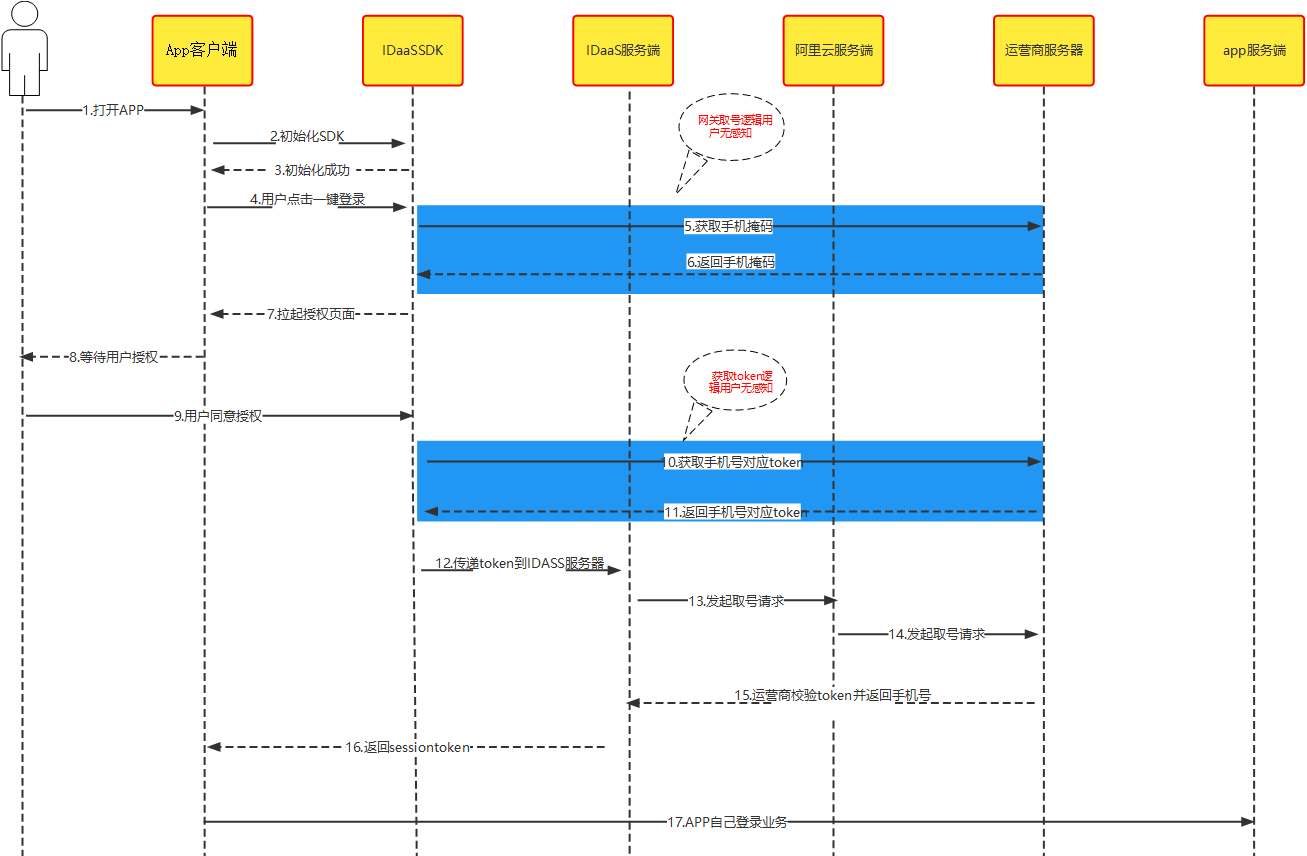
Integration Process Description
Register Alibaba Cloud's private key and IDaaS backend configuration parameters with the IDaaS SDK.
Terminal network detection: Check if the network environment is viable through the Alibaba Cloud server. If the user has 4G data enabled and the network is unobstructed, successfully call the IDaaS SDK and present the authorization page.
The user confirms the content of the authorization page and agrees to the relevant agreements. The IDaaS SDK obtains an authorization TOKEN and passes it to the IDaaS backend server.
The IDaaS backend server uses the TOKEN to retrieve the user's mobile number from the Alibaba Cloud server, then initiates authentication. If authentication is successful, it returns a session_token and an id_token, which can be saved on the App client or used for other purposes. If authentication fails, it returns an error code and reason, and proceeds to the next step.
The client can use the id_token to verify login validity and obtain basic user information.
The client can use the session_token to refresh the id_token.
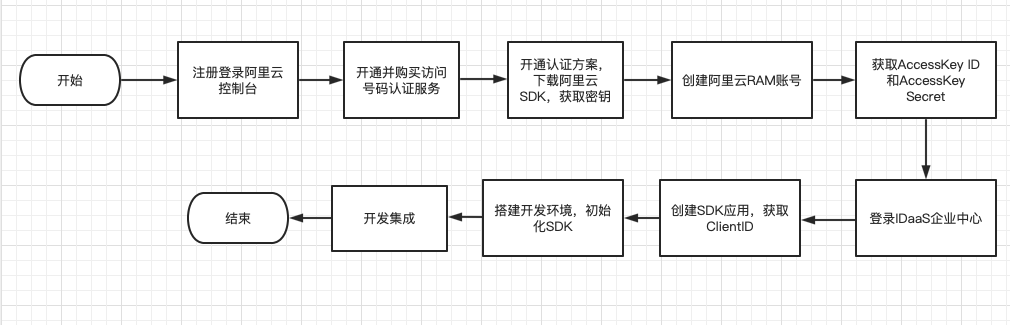
# Integration Flow
# Preparation
# Register an Alibaba Cloud Account
Refer to the Alibaba Cloud official website for the Account Opening Process (opens new window) and Authentication Scheme Management (opens new window).
# Activate Mobile Number Verification Service
Visit the Mobile Number Verification Service product detail page and purchase/activate it as an enterprise user.
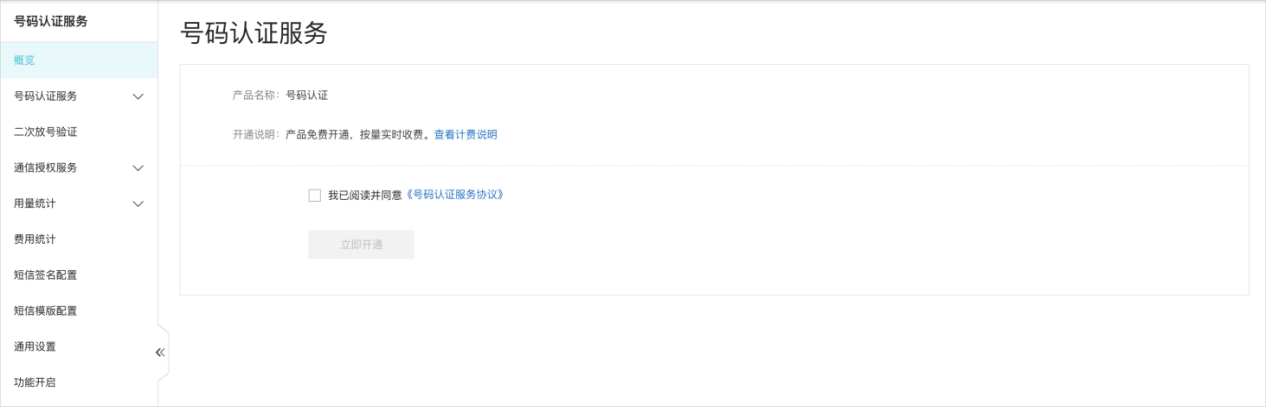
Click "Activate Now" or visit the product console.
Enter the console homepage, check the box for "I have read and agree to the Mobile Number Verification Service Agreement".
Click "Activate Now" to complete product activation.
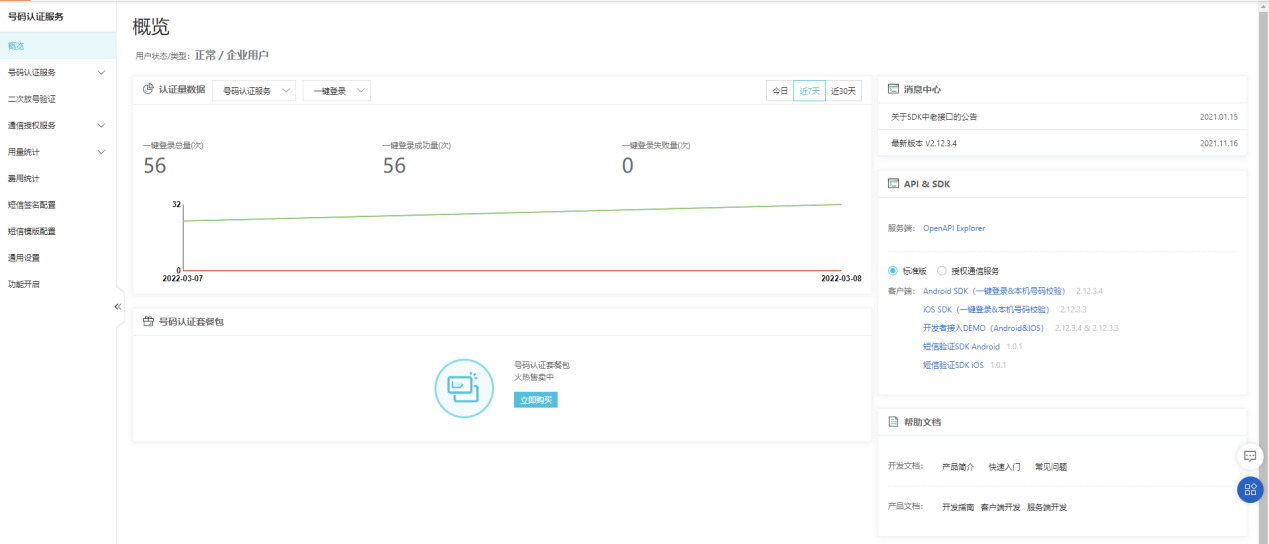
Log in to the Mobile Number Verification Service Console (opens new window), under the Standard Edition tab, download and extract the iOS SDK.
# Add Authentication Scheme
- For the iOS app integration scheme, you need to use the Bundle ID of the iOS app intended for the App Store. Fill it in as shown below.
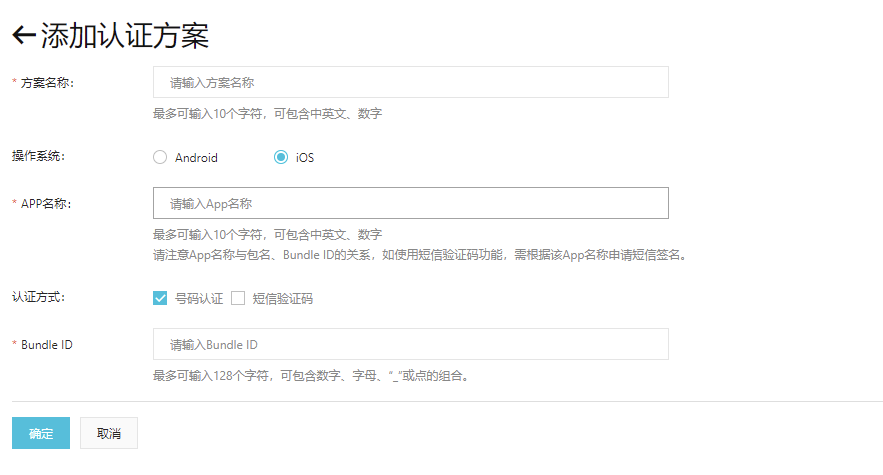
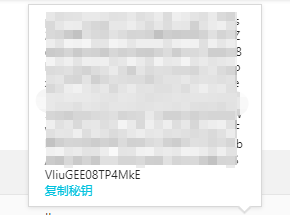
- After filling in, click "OK" to save the configuration. Obtain the secret key and save it locally in the app. When using the IDaaS SDK, pass it into the SDK's initialization method (used during initialization in AppDelegate). Refer to the SDK initialization steps.
# Configure IDaaS Backend Authentication Source
- Log in to the IDaaS Enterprise Center, select "Authentication -> Authentication Source Management -> Built-in Authentication Sources", and click "One-Click Login with Device Number".
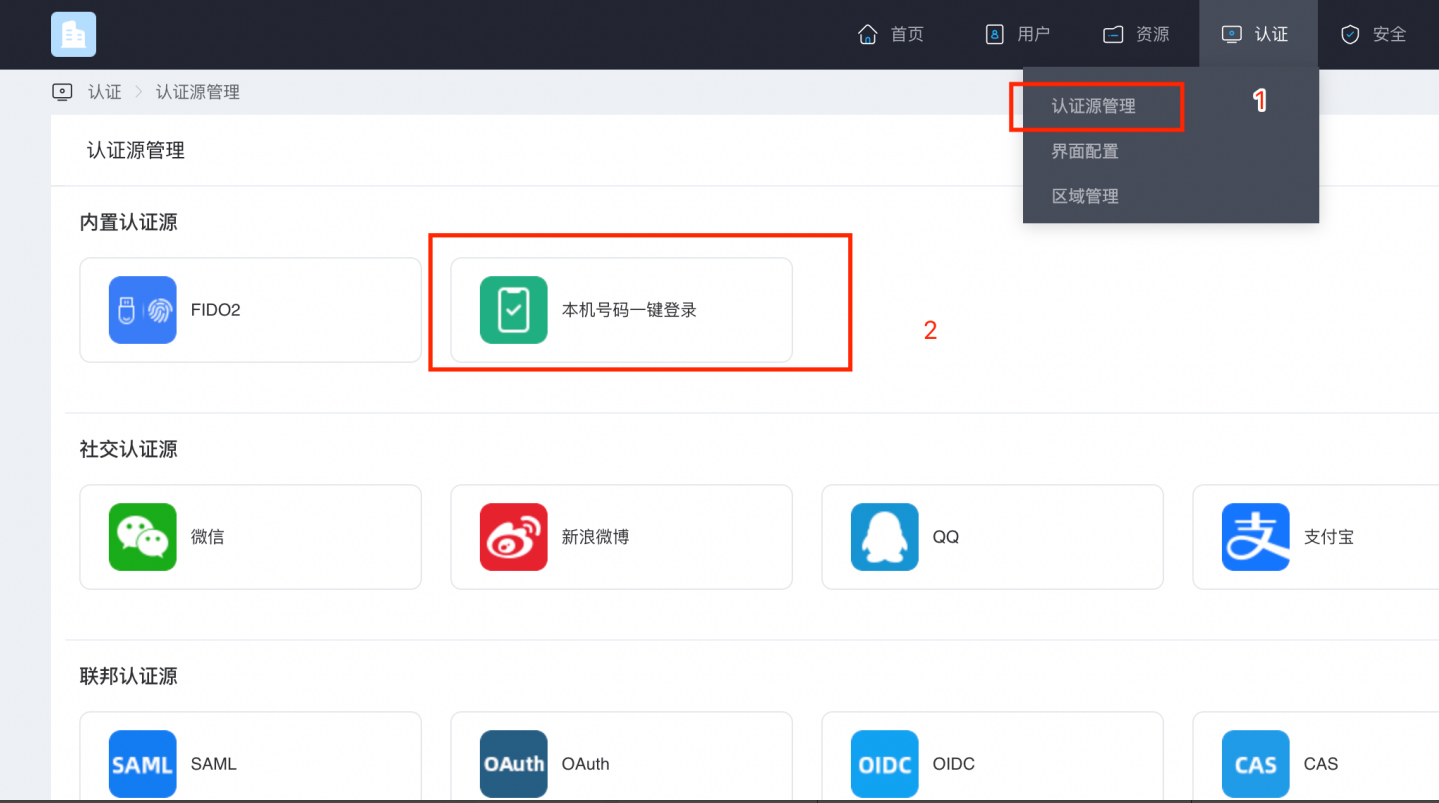
- The "One-Click Login with Device Number" configuration page will pop up. Configure the parameters required for one-click login with the device number.

| Parameter | Description |
|---|---|
| Mobile Number Authentication Provider | Alibaba Cloud by default |
| Access Key ID | Enter the AccessKey generated when creating the user on Alibaba Cloud |
| AccessKey Secret | Enter the AccessKey Secret generated when creating the user on Alibaba Cloud |
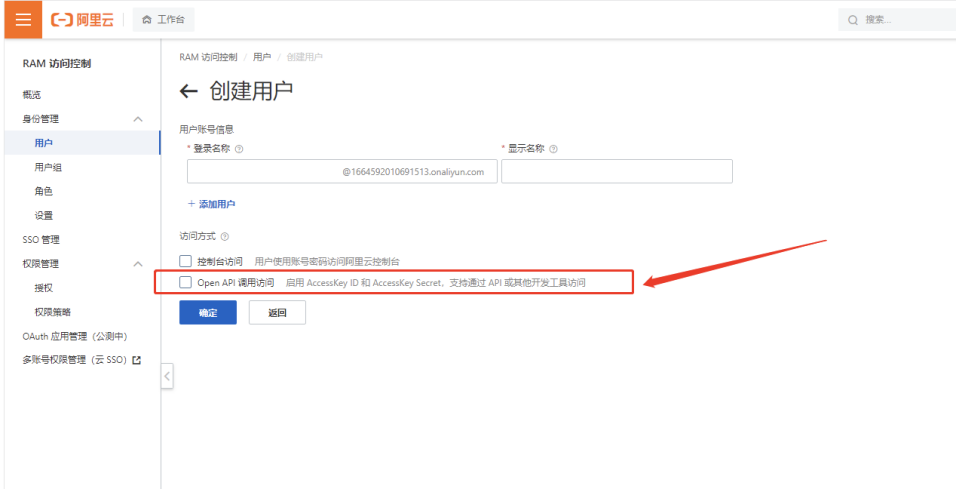
Create a user in the Alibaba Cloud console. Check the box below to obtain the AccessKey and AccessKey Secret parameters. Configure the obtained parameters in the page from the previous step.
Log in to the IDaaS backend. Click Resources -> Applications -> Select the application related to you and click to view.
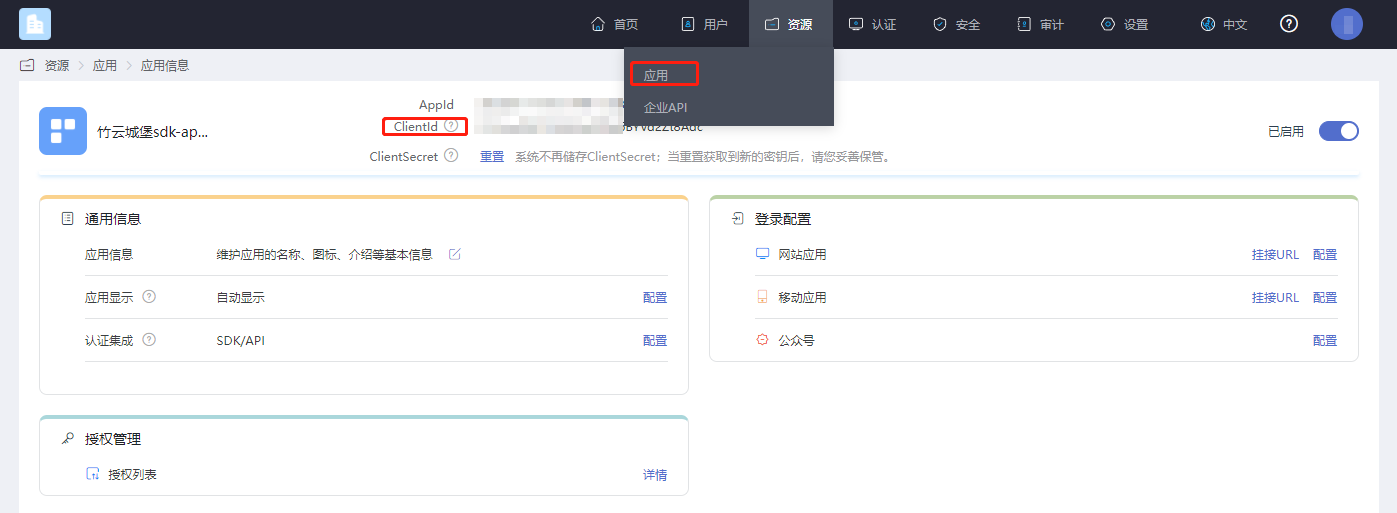
# Environment Setup
# Import Dependencies
Log in to the Mobile Number Authentication Service Console (opens new window). In the Standard Edition tab, download and extract the iOS SDK.
ATAuthSDK.framework  // Alibaba Cloud SDK, current version is 2.13.2
YTXMonitor.framework 	// Alibaba Cloud SDK, current version is 2.3.2
YTXOperators.framework 	// Alibaba Cloud SDK, current version is 1.3.2
2
3
# Add Main Libraries
AuthnCenter_common_2C.framework
AuthnCenter_mobileNumberAuth_AliYun_2C.framework
AuthnCenter_mobileNumberAuth_AliYun_2C.bundle // Resource file
2
3
Drag the dependency libraries and IDaaSSDK into the project, and import them as follows:
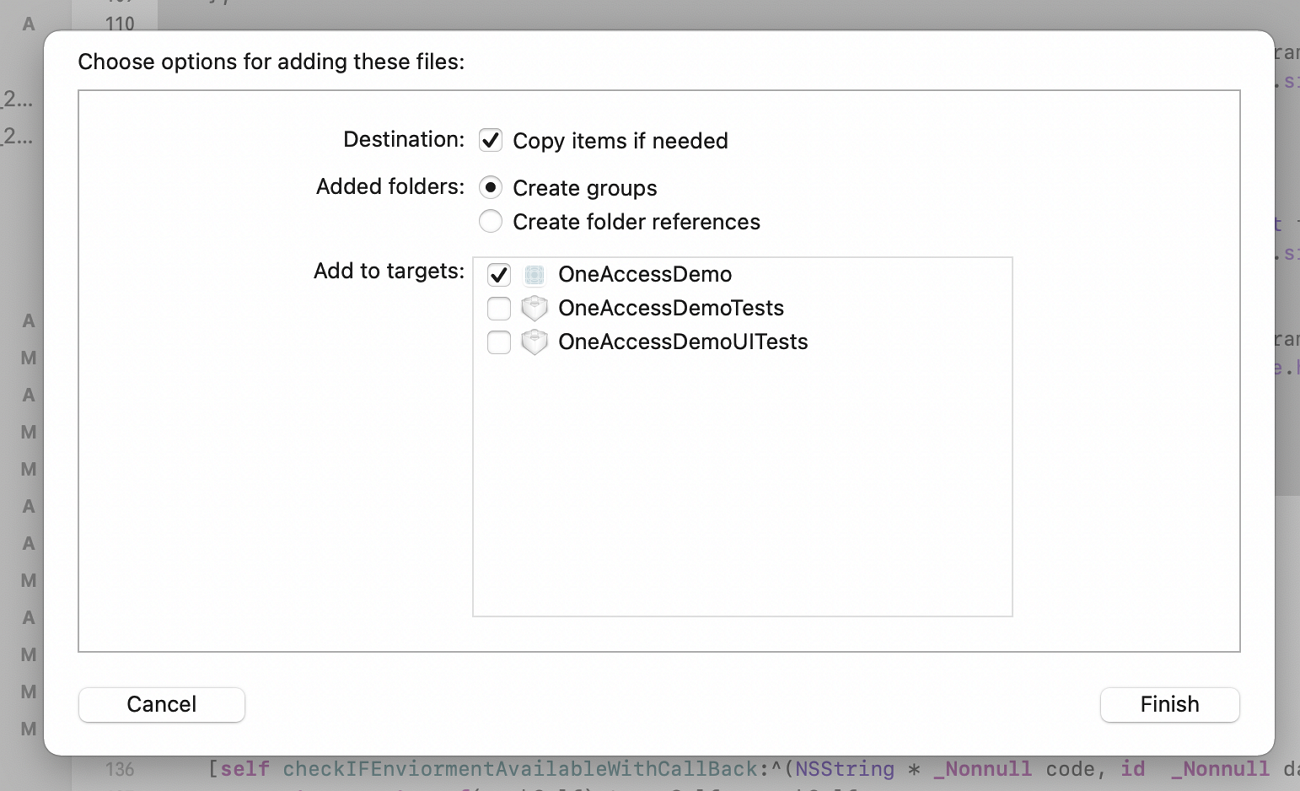
And introduce the Pod dependency package.
pod 'JWT', '~> 3.0.0-beta.14'
# Targets Settings
The IDaaS One-Click Login SDK has a minimum compatible version of iOS 11.
In "Frameworks, Libraries, and Embedded Content", import the following packages.
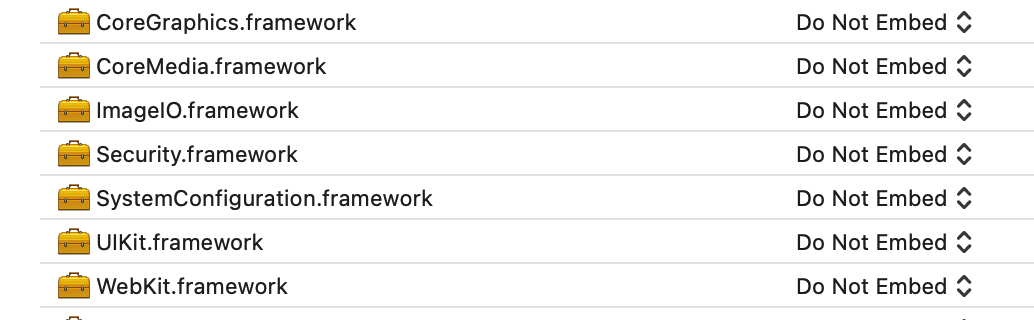
Add the main libraries and dependency packages in "Frameworks, Libraries, and Embedded Content", and add
-ObjCin "Other Linker Flags".
If your terminal device uses China Unicom SIM card's 5G mobile data, it may cause failure to obtain the local phone number using the one-click login function. You can resolve this issue by selecting TARGETS > Info > Custom iOS Target Properties > App Transport Security Settings > Allow Arbitrary Loads in the menu bar and setting its value to YES.
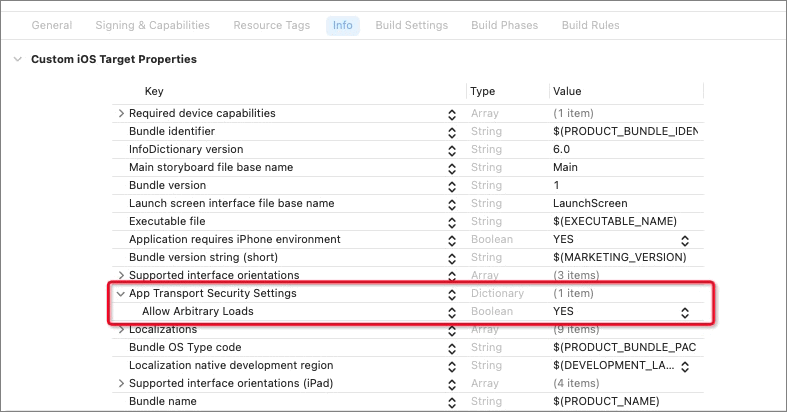
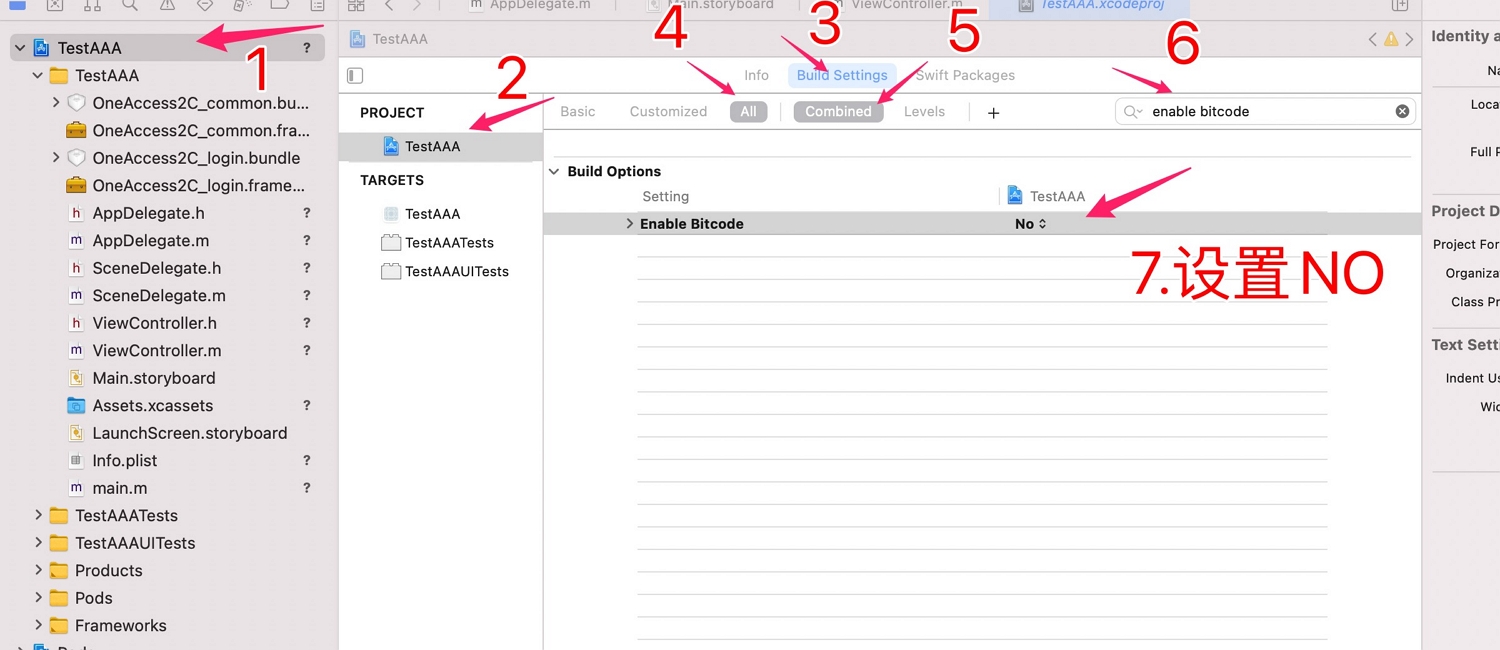
Configure bitcode, as shown in the figure below, set bitcode to NO.
# Development Integration
Include the header files:
Reference the following in appdelegate
#import < AuthnCenter_common_2C /BCIDACommonManager.h>
#import <AuthnCenter_mobileNumberAuth_AliYun_2C/BCMobileNumberAuthManager.h>
2
3
# SDK Initialization
Save the secret key obtained from adding the authentication scheme on the app side. Register the secret key to the IDaaS SDK at the app's entry point. The IDaaS SDK provides two initialization methods. You can call the startMobileAuthWithWindowsMode method to launch the window where one-click login is needed, after calling the initialization methods.
Example of initializing one-click login with the device's phone number. Initialize the two methods in the didFinishLaunchingWithOptions method in appdelegate.
//1. Basic configuration initialization
[[[[[BCIDACommonManager sharedInstance] initWithDomain:@"https://your-backend-tenant.com"] initWithClientID:@"backend-tenant-clientID"] initWithSSLCerVerification:NO] setLogEnabled:YES] ;

//2. One-click login initialization method
[[BCMobileNumberAuthManager sharedInstance] registAliYunSecreteKey:aliYunSecKey andWithCompletionHandler:^(NSDictionary * _Nonnull resultDic) {
        //On success, resultDic=@{resuFltCode:600000,msg:...}
}];
2
3
4
5
6
7
Introduction to the main class BCIDACommonManager methods for basic configuration initialization:
/**
  * Function name: sharedInstance
   * @param None
   * @return Singleton object instance class
 */
+ (instancetype )sharedInstance ;

/**
  * Function name: initWithDomain
   * @param domain, ending with .com.
   * @return Instance class
 */
-(BCIDACommonManager)initWithDomain:(NSString)domain

/**
  * Function name: initWithClientID
   * @param client id.
   * @return Instance class
 */
-(BCIDACommonManager)initWithClientID:(NSString)clientID;

/**
  * Function name: setLogEnabled
   * @param Boolean value to enable log.
   * @return Instance class
 */
-(void)setLogEnabled:(BOOL)enable;

/**
  * Function name: initWithSSLCerVerification
   * @param Boolean value to set whether SSL certificate verification is enabled.
   * @return Instance class
 */
-(BCIDACommonManager*)initWithSSLCerVerification:(bool)sslCerVerification;
2
3
4
5
6
7
8
9
10
11
12
13
14
15
16
17
18
19
20
21
22
23
24
25
26
27
28
29
30
31
32
33
34
Introduction to the main class BCMobileNumberAuthManager methods for one-click login initialization:
/**
  * Function name: sharedInstance
   * @param None
   * @return Singleton object instance class
 */
+ (instancetype )sharedInstance ;

/**
  * Function name: registAliYunSecreteKey
   * @param aliYunSecreteKey Pass in Alibaba Cloud's private key.
   * @return BCMobileNumberAuthRegistCompletionHandler callback function, containing NSDictionary * resultDic. On success, resultDic=@{resuFltCode:600000,msg:...}. For other cases, the "resultCode" value please refer to PNSReturnCode
 */
-(void)registAliYunSecreteKey:(NSString*)aliYunSecreteKey andWithCompletionHandler:(BCMobileNumberAuthRegistCompletionHandler)completionCallBack;
2
3
4
5
6
7
8
9
10
11
12
13
# Environment Detection
The App client needs to use Alibaba Cloud's detection method to check if the environment is suitable before using the one-click login feature. The terminal mobile phone must be in a 4G environment to be successfully invoked. The environment needs to be re-detected after initial setup or switching mobile data networks. Generally, it is sufficient to call it once before starting a login authentication process.
Introduction to TXCommonHandler object methods:
/**
* Function name: checkEnvAvailableWithComplete
* @brief: Checks and prepares the calling environment. Only when resultDic returns PNSCodeSuccess can the following functional interfaces be called. It needs to be called again after initial setup or switching mobile data networks. Generally, it is sufficient to call it once before starting a login authentication process.
*@param complete: Asynchronous result callback. On success, resultDic=@{resultCode:600000, msg:...}. For other cases, refer to PNSReturnCode for the "resultCode" value. Only a successful callback guarantees subsequent interface calls.
*/
[TXCommonHandler sharedInstance]; // Get the Alibaba Cloud singleton
-(void)checkEnvAvailableWithComplete:(void(^_Nullable)(NSDictionary* Nullable resultDic))complete;
2
3
4
5
6
7
After successful detection, you can call an acceleration method to speed up the pop-up of the one-click login authorization page, preventing excessive waiting time when calling one-click login to bring up the authorization page. (Using the acceleration method is not mandatory depending on the actual situation.)
/**
* Function name: accelerateLoginPageWithTimeout
* @brief: Accelerates the pop-up of the one-click login authorization page, preventing excessive waiting time when calling getLoginTokenWithTimeout:controller:model:complete: to bring up the authorization page.
* @param timeout: Interface timeout (unit: s), default is 3.0s. When the value is 0.0, the default timeout is used.
* @param complete: Asynchronous result callback. On success, resultDic=@{resultCode:600000,msg:...}. For other cases, refer to PNSReturnCode for the "resultCode" value.
*/
-(void)accelerateLoginPageWithTimeout:(NSTimeInterval)timeout complete:(void (^_Nullable)(NSDictionary * Nonnull resultDic))complete;
2
3
4
5
6
7
# Invoke Authorization Page
After successful environment detection and calling the acceleration method, invoke the IDaaS SDK's one-click login method.
Example code:
[[BCMobileNumberAuthManager sharedInstance] startMobileAuthWithWindowsMode:nil andWithViewController:self andWithCompletionCallBack:^(NSString * _Nonnull code, id  _Nonnull data) {
        // When code=@"0", login is successful, data returns session_token and id_token. When code is other values, login fails.
    }];
The callback function returns the result, and the authorization page closes automatically.
2
3
4
Introduction to the main class BCMobileNumberAuthManager method:
/**
* Function name: startMobileAuthWithWindowsMode
* @brief: One-click login page invocation process
* @param (TXCustomModel*)customMode Page customization class. Page styles can be customized through this class. Please refer to later chapters.
*@param (UIViewController*)fromVC Presents the one-click login page from the current viewcontroller.
* @param BCMobileNumberAuthProcessCompletionHandler() callback function, see the following table.
*/
-(void)startMobileAuthWithWindowsMode:(TXCustomModel*)customMode andWithViewController:(UIViewController*)fromVC andWithCompletionCallBack:(BCMobileNumberAuthProcessCompletionHandler)completionCallBack;
2
3
4
5
6
7
8
BCMobileNumberAuthProcessCompletionHandler callback function return codes:
| Code | Description |
|---|---|
| code=0 | Login successful. At this time, data returns an NSDictionary: data=@{@"session_token": sessionToken content, @"id_token": idToken content}; |
| code=1 | Login failed. data returns a string describing the error. |
| code=Error Code (Alibaba Cloud error code and event code). Please refer to the Alibaba Cloud error code table (Error Codes and Event Response Codes). | Login unsuccessful. data returns an NSDictionary from which the current operation result values can be obtained. |
| code=Error Code (SDK backend error code) | Login unsuccessful. data returns a string error description information. |
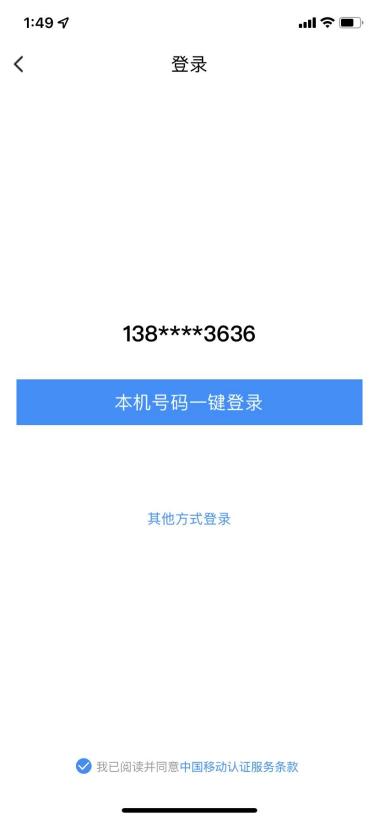
The default one-click login page of the IDaaS SDK includes a desensitized phone number display, a back button, a checkbox for agreement signing, and a button for other login methods. The style and text description of the above components can be customized.
Among them, after clicking the one-click login with local number, back, and other login method buttons, the IDaaS SDK will initiate a callback to the App client, returning content as Response Code and related data, and close the window, meaning the operation is complete; after operating the checkbox agreement signing, the callback function provides related data, and the window will not be closed.
# Authorization Page Design
Ensure users' right to know that their phone number information is authorized for developer use during the login process. One-click login requires developers to provide an authorization page login screen for user confirmation. Before calling the authorization login method, developers must display the authorization page, clearly informing users that the current operation will pass their local phone number information to the application.
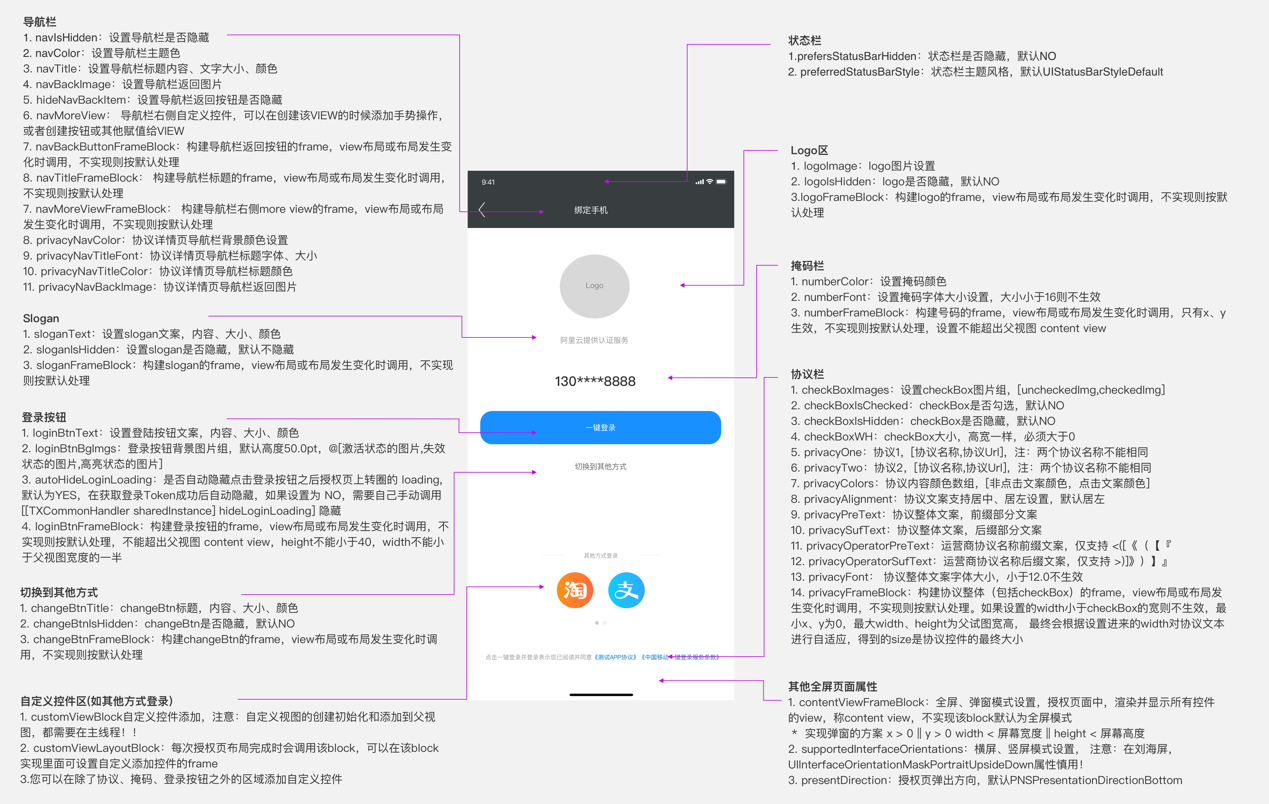
TXCustomModel *model = [[TXCustomModel alloc] init];
This is the class Alibaba Cloud uses for page style customization. You can instantiate the class, set the page styles, and then pass this instance into the SDK's launch method.
2
Example Code:
-(TXCustomModel*)AddThemeExample{
    TXCustomModel *model = [[TXCustomModel alloc] init];

        model.supportedInterfaceOrientations = UIInterfaceOrientationMaskPortrait;
         model.navIsHidden = NO;
         model.logoIsHidden = NO;
    model.navColor=[UIColor clearColor];
        NSDictionary *attributes = @{
            NSForegroundColorAttributeName : [UIColor whiteColor],
            NSFontAttributeName : [UIFont systemFontOfSize:20.0]
        };
        NSDictionary *attributesNavTex = @{
            NSForegroundColorAttributeName : [UIColor blackColor],
            NSFontAttributeName : [UIFont systemFontOfSize:20.0]
        };
        NSDictionary *attributesslogenTex = @{
            NSForegroundColorAttributeName : [UIColor grayColor],
            NSFontAttributeName : [UIFont systemFontOfSize:20.0]
        };
        UIColor* UIBlue=[UIColor colorWithRed:255.0/255.0 green:99.0/255.0 blue:71.0/255.0 alpha:1.0];
        NSDictionary *attributeschangeTex = @{
            NSForegroundColorAttributeName : UIBlue,
            NSFontAttributeName : [UIFont systemFontOfSize:15.0]
        };

        model.navTitle = [[NSAttributedString alloc] initWithString:@"Login" attributes:attributesNavTex];
        model.loginBtnText=[[NSAttributedString alloc] initWithString:@"One-Click Login with Local Number" attributes:attributes];

        UIImage* backImage=  [UIImage imageNamed:@"fanhuianniu-2"];
        UIImage* uncheckImage=[UIImage imageNamed:@"gou-2"];
        UIImage* checkImage=[UIImage imageNamed:@"gou"];

        model.navBackImage=backImage;
        model.checkBoxImages=@[uncheckImage,checkImage];
        model.changeBtnTitle=[[NSAttributedString alloc] initWithString:@"Other Login Methods" attributes:attributeschangeTex];
        model.privacyFrameBlock = ^CGRect(CGSize screenSize, CGSize superViewSize, CGRect frame) {

            float startx= (BCIDAScreenWidth-frame.size.width)*0.5;
            frame.origin.x=startx;

            return frame;
        };
        model.logoImage = [UIImage imageNamed:@"wangluo"];

    model.logoFrameBlock = ^CGRect(CGSize screenSize, CGSize superViewSize, CGRect frame) {
        frame=CGRectMake(frame.origin.x, (frame.origin.y+100), frame.size.width, frame.size.height);
        return frame;
    };

       model.numberFrameBlock = ^CGRect(CGSize screenSize, CGSize superViewSize, CGRect frame) {
            frame=CGRectMake(frame.origin.x, (frame.origin.y+40), frame.size.width, frame.size.height);
            return frame;
        };
        model.privacyNavBackImage=backImage;
        model.sloganIsHidden=YES;
        model.loginBtnFrameBlock = ^CGRect(CGSize screenSize, CGSize superViewSize, CGRect frame) {
            frame=CGRectMake(frame.origin.x, (frame.origin.y+40), frame.size.width, frame.size.height);
            return frame;
        };
    model.changeBtnFrameBlock = ^CGRect(CGSize screenSize, CGSize superViewSize, CGRect frame) {
        frame=CGRectMake(frame.origin.x, (frame.origin.y+40), frame.size.width, frame.size.height);
        return frame;
    };
    return model;

}
2
3
4
5
6
7
8
9
10
11
12
13
14
15
16
17
18
19
20
21
22
23
24
25
26
27
28
29
30
31
32
33
34
35
36
37
38
39
40
41
42
43
44
45
46
47
48
49
50
51
52
53
54
55
56
57
58
59
60
61
62
63
64
65
66
# ID Token Verification and User Information Retrieval
After a successful login, a session_token and an id_token are returned. The id_token can be used to retrieve user information and verify the validity of the login session.
Verify the idToken
Retrieve user information from the idtoken (This method can be called directly without prior verification)
# Verify id_token
Call example:
  [[BCIDAIDTokenManager sharedInstance] verifySignWithIdToken:idToken andWithCallBack:^(NSString * _Nonnull code, id  _Nonnull data) {
          }];
2
Introduction to the main class BCIDAIDTokenManager:
/**
   * Function name: sharedInstance
   * @param No parameters
   * @return Returns the singleton instance of the object
*/
+ (instancetype )sharedInstance;

/**
* Function name: verifySignWithIdToken
* @brief: Method to verify if the idtoken is within the login validity period and matches the application
* @param idToken returned during login
* @param BCIDAIdTokenVerifyHandlerBlock callback function:
NSString code
id       data
**/
-(void)verifySignWithIdToken:(NSString*)idToken andWithCallBack:(BCIDAIdTokenVerifyHandlerBlock)callback;
2
3
4
5
6
7
8
9
10
11
12
13
14
15
16
Return values:
| code(NSString) | data | Data type and description of data |
|---|---|---|
| 0 | success | [NSString] Signature verification successful |
| 1 | Error description | [NSString] Input parameter is empty, or SDK initialization parameters domain and clientID are not set |
| 106 | Time expired | [NSString] Expired idtoken |
| 107 | clientID mismatch | [NSString] Possibly used a clientID from another application |
| 103 | Signature verification failed | [NSString] Signature verification process failed |
| 102 | Public key retrieval failed (empty) | [NSString] Error during the signature verification process |
| Refer to the error code collection at the end of the document | Refer to the error code collection at the end of the document | Other error codes listed at the end of the document may also be returned |
# Parse User Information from idToken
Call example:
[[BCIDAIDTokenManager sharedInstance] getUserInfoFromIdTokenWithIdToken:idToken andWithCallBack:^(NSString * _Nonnull code, id  _Nonnull data) {

}];
2
3
Introduction to the main class BCIDAIDTokenManager:
/**
   * Function name: sharedInstance
   * @param No input parameters
   * @return Returns the singleton instance of the object
*/
+ (instancetype )sharedInstance;

/**
* Function name: getUserInfoFromIdTokenWithIdToken
* @brief: Parse user information from idToken
* @param idToken returned by login
* @param BCIDAIdTokenGetInfoHandlerBlock callback function:
NSString code
id       data

**/
-(void)getUserInfoFromIdTokenWithIdToken:(NSString*)idToken andWithCallBack:(BCIDAIdTokenGetInfoHandlerBlock)callback;
2
3
4
5
6
7
8
9
10
11
12
13
14
15
16
17
User information parameter description:
| Parameter Name | Description |
|---|---|
| iss | Token issuer |
| aud | Token recipient, the clientId of the application |
| exp | Token expiration time |
| jti | Token id |
| iat | Token issuance time |
| sub | Fixed as subject |
| name | User's name |
| mobile | User's mobile phone number |
| id | User's id |
| userName | Username |
| User's email |
Callback Function Return Values:
Success Example:
code=0
data=
{
	"id": "20220729174957176-2C7F-A2C54C293",
	"exp": 1659407592,
	"nbf": 1659407172,
	"mobile": "+86-13808603636",
	"jti": "7iwCYPo8EYcmLAD18x-CAw",
	"iss": "https:\/\/sdk2c.idaas-test-alpha.bccastle.com\/api\/v1\/oauth2",
	"userName": "zhangrui1",
	"sub": "20220729174957176-2C7F-A2C54C293",
	"aud": "S1ScicdIVR1QUbNs8TBz6BYVd2Zt8Adc",
	"iat": 1659407292,
	"email": "",
	"name": "zhangrui1"
}

Failure Example
code=102
2
3
4
5
6
7
8
9
10
11
12
13
14
15
16
17
18
19
20
# Refresh IDToken {/refresh-idtoken/}
Call Example:
[[BCIDAIDTokenRefreshManager sharedInstance] refreshIdTokenWithSessionToken:sessionToken andWithCallBack:^(NSString * _Nonnull code, id  _Nonnull data) {
            NSString* jsonS=(NSString*)data;
         NSDictionary* dict=  [self dictionaryWithJsonString:jsonS];//Parse jsonStr to NSDictionary
          NSString* idTok= [dict objectForKey:@"id_token"];
            NSString* session_tok=[dict objectForKey:@"session_token"];
            NSString* expr=[dict objectForKey:@"expire"];
                  }];
2
3
4
5
6
7
Introduction to Main Class BCIDAIDTokenManager:
/**
   * Function Name: sharedInstance
   * @param No input parameters
   * @return Returns the singleton instance of the object
*/
+ (instancetype )sharedInstance;

/**
* Function Name: refreshIdTokenWithSessionToken
* @brief: Refresh idToken
* @param sessionToken returned from login
* @param BCIDAIdTokenRefreshIDTokenHandlerBlock callback function:
NSString code
id       data

**/
-(void)refreshIdTokenWithSessionToken:(NSString*)sessionToken andWithCallBack:(BCIDAIdTokenRefreshIDTokenHandlerBlock)callBack;
2
3
4
5
6
7
8
9
10
11
12
13
14
15
16
17
Callback Function Return Values:
Success Example:
code=0
data=
{
  "id_token" : "eyJraWQiOiJhODJkzJjLmlkYWFzLXRllKp6w",
  "session_token" : "apcOKuyry7kASh9h6mtf2G2GbettkyiU",
  "expire" : 7200
}

Failure Example (Failed to retrieve data)
code=1
2
3
4
5
6
7
8
9
10
11
# Alibaba Cloud Return Codes
| Return Code | Return Code Description | Suggestion |
|---|---|---|
| 600000 | Token retrieval successful | None. |
| 600001 | Authorization page successfully invoked | None. |
| 600002 | Failed to invoke authorization page | Suggest switching to other login methods. |
| 600004 | Failed to retrieve carrier configuration information | Create a ticket to contact an engineer. |
| 600005 | Mobile terminal insecure | Switch to other login methods. |
| 600007 | No SIM card detected | Prompt the user to check the SIM card and retry. |
| 600008 | Mobile data network not enabled | Prompt the user to enable mobile data network and retry. |
| 600009 | Unable to determine carrier | Create a ticket to contact an engineer. |
| 600010 | Unknown exception | Create a ticket to contact an engineer. |
| 600011 | Failed to retrieve Token | Switch to other login methods. |
| 600012 | Pre-login failed | None. |
| 600013 | Carrier maintenance upgrade, this function is unavailable | Create a ticket to contact an engineer. |
| 600014 | Carrier maintenance upgrade, this function has reached the maximum call frequency | Create a ticket to contact an engineer. |
| 600015 | Interface timeout | Switch to other login methods. |
| 600017 | App ID, App Key parsing failed | Key not set or set incorrectly, please check key information first. If the key is correct, create a ticket to contact an engineer. |
| 600021 | Carrier switch detected when clicking login | Switch to other login methods. |
| 600023 | Loading custom control exception | Check if the custom control is added correctly. |
| 600024 | Terminal environment check supports authentication | None. |
| 600025 | Terminal detection parameter error | Check if the passed parameter types and ranges are correct. |
| 600026 | Calling acceleration or pre-login interfaces is not allowed when the authorization page is already loaded | Check for any behavior where the preLogin or accelerateAuthPage interface is called after the authorization page is launched, which is not allowed. |
Authorization Page Click Event Response Codes:
| Response Code | Response Code Description |
|---|---|
| 700000 | Clicked back, user canceled password-free login. |
| 700001 | Clicked switch button, user canceled password-free login. |
| 700002 | Clicked login button event. |
| 700003 | Clicked check box event. |
| 700004 | Clicked agreement rich text link event. |
# Operator Error Codes
# China Mobile
| Return Code | Return Code Description |
|---|---|
| 103000 | Success. |
| 102507 | Login timeout (when clicking the login button on the authorization page). |
| 103101 | Request signature error. |
| 103102 | Package signature or Bundle ID error. |
| 103111 | Gateway IP error or incorrect operator request. |
| 103119 | AppID does not exist. |
| 103211 | Other errors, please submit a work order to contact an engineer. |
| 103412 | Invalid request includes encryption method error, non-JSON format, empty request, etc. |
| 103414 | Parameter validation exception. |
| 103511 | Server IP whitelist validation failed. |
| 103811 | Token is empty. |
| 103902 | Repeated login within a short time, causing the script to become invalid. |
| 103911 | Token requests are too frequent, no more than 30 Tokens obtained and unused within 10 minutes. |
| 104201 | Token repeated validation failed, expired, or does not exist. |
| 105018 | Used a Token obtained for local number verification to fetch a number, resulting in insufficient Token permissions. |
| 105019 | Application is not authorized. |
| 105021 | Daily number fetching limit reached. |
| 105302 | AppID is not in the whitelist. |
| 105313 | Illegal request. |
| 200005 | User did not grant permission (READ_PHONE_STATE). |
| 200010 | Unable to recognize SIM card or no SIM card (Android). |
| 200020 | User canceled login. |
| 200021 | Data parsing exception. |
| 200022 | No network. |
| 200023 | Request timeout. |
| 200024 | Data network switch failed. |
| 200025 | Location error (usually due to thread caught exception, socket, system not granting mobile data network permission, etc., please submit a work order to contact an engineer). |
| 200026 | Input parameter error. |
| 200027 | Mobile data network not enabled or network unstable. |
| 200028 | Network request error. |
| 200038 | Cross-network number fetching request failed. |
| 200039 | Cross-network number fetching gateway failed to retrieve number. |
| 200048 | User did not install a SIM card. |
| 200050 | EOF exception. |
| 200061 | Authorization page exception. |
| 200064 | Server returned data exception. |
| 200072 | CA root certificate validation failed. |
| 200082 | Server busy. |
| 200086 | ppLocation is empty. |
| 200087 | Used only for monitoring the successful launch of the authorization page. |
| 200096 | Current network does not support number fetching. |
# China Unicom
| Return Code | Return Code Description |
|---|---|
| 0 | Indicates the request was successful. |
| -10008 | JSON conversion failed. |
| 1, Request timeout | Request timed out. |
| 1, Private network IP address lookup failed | Failed to look up the number using private network IP. |
| 1, Private network IP verification error | Private network IP verification error. |
| 1, Source IP authentication failed | Source IP authentication failed. |
| 1, Failed to obtain authentication information | Failed to obtain authentication information. |
| 1, Failed to obtain mobile authorization code | Usually caused by a timeout when requesting the SDK. |
| 1, Gateway number retrieval failed | Gateway number retrieval failed. |
| 1, Network request failed | Network request failed. |
| 1, Signature verification failed | Signature verification failed. |
| 1, The provided code and AppID do not match | The provided code and AppID do not match. |
| 1, Appears to be disconnected from the Internet | Unstable network connection caused a disconnect. |
| 1, The certificate for this server is invalid | Connected to an insecure server, submit a work order to contact an engineer. |
| 1, PIP verification failed | Submit a work order to contact an engineer. |
| 1, Gateway concurrent connections limit reached | Submit a work order to contact an engineer. |
| 1, Data connection is currently not allowed | Submit a work order to contact an engineer. |
| 1, Unable to connect to the server | Submit a work order to contact an engineer. |
| 1, System internal error | Submit a work order to contact an engineer. |
| 1, Number retrieval gateway internal error | Internal error in the number retrieval gateway, submit a work order to contact an engineer. |
| 1, connect address error | Connection address error, usually caused by a timeout failure. |
| 1, select socket error | Select socket error. |
| 1, handshake failed | Handshake failed. |
| 1, decode ret_url fail | URL decoding failed. |
| 1, connect error | Connection error. |
| 1, read failed | Submit a work order to contact an engineer. |
| 1, response null | No response, submit a work order to contact an engineer. |
| 1, Unknown error | Submit a work order to contact an engineer. |
| 2, Request timeout | Interface request duration exceeded the value set by timeout. |
# China Telecom
| Return Code | Return Code Description |
|---|---|
| -64 | Permission-denied (No permission to access). |
| -65 | API-request-rates-Exceed-Limitations (API call rate limit exceeded). |
| -10001 | Number retrieval failed, mdn is empty. |
| -10002 | Parameter error. |
| -10003 | Decryption failed. |
| -10004 | IP restricted. |
| -10005 | Cross-network number retrieval callback parameter abnormal. |
| -10006 | mdn retrieval failed, and belongs to China Telecom network. |
| -10007 | Redirected to cross-network number retrieval. |
| -10008 | Exceeded the preset number retrieval threshold. |
| -10009 | Timestamp expired. |
| -10013 | Perator_unsupported, submit a ticket to contact an engineer. |
| -20005 | Sign-invalid (Signature error). |
| -8001 | Network exception, request failed. |
| -8002 | Request parameter error. |
| -8003 | Request timeout. |
| -8004 | Mobile data network not enabled. |
| -8010 | No network connection (Network error). |
| -720001 | Wi-Fi to 4G switch request exception. |
| -720002 | Wi-Fi to 4G switch timeout. |
| 80000 | Request timeout. |
| 80001 | Network connection failed, network link interrupted, Invalid argument, Data connection currently not allowed. |
| 80002 | Response code error 404. |
| 80003 | No network connection. |
| 80005 | Socket timeout exception. |
| 80007 | IO exception. |
| 80008 | No route to host. |
| 80009 | Nodename nor servname provided, or not known. |
| 80010 | Socket closed by remote peer. |
| 80800 | Wi-Fi switch timeout. |
| 80801 | Wi-Fi switch exception. |
# IDaaS Return Codes
| Status Code | Error Code (error_code) | Error Description (error_msg) | Action |
|---|---|---|---|
| 400 | IDAAS.SDK.COMMON.1001 | Parameter {0} cannot be left blank | |
| Parameter {0} cannot be empty | |||
| 400 | IDAAS.SDK.COMMON.1002 | The {0} parameter format is incorrect | |
| Parameter {0} format error | |||
| 400 | IDAAS.SDK.COMMON.1003 | Device information is incomplete | |
| Device information is incomplete | |||
| 400 | IDAAS.SDK.COMMON.1004 | Signature decryption error | |
| Signature decryption error | |||
| 400 | IDAAS.SDK.COMMON.1005 | The {0} has failed | |
| {0} has expired | |||
| 400 | IDAAS.SDK.COMMON.1006 | The {0} parameter error | |
| {0} parameter error | |||
| 400 | IDAAS.SDK.COMMON.1007 | The {0} parameter type error | |
| {0} parameter type error | |||
| 500 | IDAAS.SDK.COMMON.1008 | The system is busy. Try again later | |
| The system is busy. Please try again later | |||
| 400 | IDAAS.SDK.COMMON.1009 | Unknown authentication configuration | |
| Unknown authentication configuration | |||
| 400 | IDAAS.SDK.COMMON.1010 | Failed to obtain the enterprise center global configuration | |
| Failed to obtain enterprise center global configuration | |||
| 400 | IDAAS.SDK.COMMON.1011 | Failed to obtain the international area code configuration | |
| Failed to obtain international area code configuration | |||
| 400 | IDAAS.SDK.COMMON.1012 | The x-client-ID is incorrect and the corresponding application cannot be found | |
| X-client-id is incorrect, cannot find the corresponding application | |||
| 400 | IDAAS.SDK.COMMON.1013 | The corresponding user is not found | |
| Corresponding user not found | |||
| 400 | IDAAS.SDK.COMMON.1014 | Application private key not found | |
| Application private key not found | |||
| 400 | IDAAS.SDK.LOGIN.1001 | Error calling interface {0} | |
| Error calling interface {0} | |||
| 400 | IDAAS.SDK.LOGIN.1002 | User not bound | |
| User not bound | |||
| 400 | IDAAS.SDK.LOGIN.1003 | The user has been locked due to too many unsuccessful login attempts. It will be unlocked in {0} minutes and {1} seconds | |
| The user has been locked due to multiple failed login attempts. It will be unlocked in {0} minutes and {1} seconds | |||
| 400 | IDAAS.SDK.LOGIN.1004 | Failed to obtain the password policy | |
| Error obtaining password policy | |||
| 400 | IDAAS.SDK.LOGIN.1005 | Invalid username or password. Remaining login attempts: {0} | |
| Invalid username or password. Remaining login attempts: {0} | |||
| 400 | IDAAS.SDK.LOGIN.1006 | Configuration error, unable to find wechat authentication source | |
| Configuration error, unable to find WeChat authentication source | |||
| 400 | IDAAS.SDK.LOGIN.1007 | Configuration error, unable to find alipay authentication source | |
| Configuration error, unable to find Alipay authentication source | |||
| 400 | IDAAS.SDK.LOGIN.1008 | The configuration is incorrect. The one-click login authentication source cannot be found | |
| Configuration error, one-click login authentication source not found | |||
| 400 | IDAAS.SDK.SMS.1001 | {0} slide base map is not initialized successfully, please check the path | |
| {0} slide base map initialization failed, please check the path | |||
| 400 | IDAAS.SDK.SMS.1002 | {0} verification code coordinate resolution failed | |
| {0} verification code coordinate parsing failed | |||
| 400 | IDAAS.SDK.SMS.1003 | {0} verification code coordinate verification fails | |
| {0} verification code coordinate verification failed | |||
| 400 | IDAAS.SDK.SMS.1004 | The graphic verification code is incorrect | |
| Graphic verification code verification error | |||
| 400 | IDAAS.SDK.SMS.1005 | SMS verification code verification is incorrect | |
| SMS verification code verification error | |||
| 400 | IDAAS.SDK.SMS.1006 | The email verification code is incorrect | |
| Email verification code verification error | |||
| 400 | IDAAS.SDK.SMS.1007 | Sending scenario does not exist | |
| Sending scenario does not exist | |||
| 400 | IDAAS.SDK.SMS.1008 | Failed to send the verification code | |
| Failed to send verification code | |||
| 400 | IDAAS.SDK.SOCIAL.1001 | The social account is unbound incorrectly | |
| Social account unbinding error | |||
| 400 | IDAAS.SDK.SOCIAL.1002 | The social account has been bound, please unbind it first | |
| Social account already bound, please unbind first | |||
| 400 | IDAAS.SDK.PWD.1001 | The password length is incorrect | |
| Password length error | |||
| 400 | IDAAS.SDK.PWD.1002 | The password cannot be the username | |
| Password cannot be the username | |||
| 400 | IDAAS.SDK.PWD.1003 | Your password complexity is low | |
| Your password complexity is too low | |||
| 400 | IDAAS.SDK.PWD.1004 | The password is weak | |
| Password is weak | |||
| 400 | IDAAS.SDK.PWD.1005 | The password is used before, cannot be used again | |
| This password has been used before and cannot be used again | |||
| 400 | IDAAS.SDK.PWD.1006 | Password cannot username in reverse order | |
| Password cannot be the username in reverse order | |||
| 400 | IDAAS.SDK.PWD.1007 | The number of repeated password characters exceeded the upper limit | |
| Number of repeated password characters exceeds limit | |||
| 400 | IDAAS.SDK.PWD.1008 | Password cannot contain :username, phone number, email prefix, name in PinYing | |
| Password cannot contain: username, phone number, email prefix, name in Pinyin | |||
| 400 | IDAAS.SDK.MFA.1001 | The mobile doesn't match the user | |
| Mobile number does not match the user | |||
| 400 | IDAAS.SDK.MFA.1002 | The access control policy is incorrect | |
| Access control policy configuration error | |||
| 400 | IDAAS.SDK.MFA.1003 | Access control authentication source type conversion error | |
| Access control authentication source type conversion error |
Please provide the Markdown content you wish to have translated.